
Close Menu
onyxguides.comonyxguides.com

    Subscribe to Updates

    Get the latest creative news from FooBar about art, design and business.

    What's Hot

    How To Connect Hp Deskjet Printer To Wi-Fi

    March 27, 2026

    GENEINNO GTP-EXCAM1 T1 Pro External Camera User Manual

    March 27, 2026

    How Does A Projector Work

    March 26, 2026
    Facebook X (Twitter) Instagram
    onyxguides.comonyxguides.com
    Facebook X (Twitter) Instagram Pinterest
    • Home
    • About us
    • Terms & Conditions
    • Privacy Policy
    • FAQs
    • Contact us
    onyxguides.comonyxguides.com
    Home » POWERTEC SL4120 100W LED Flood Light Instruction Manual
    POWERTEC

    POWERTEC SL4120 100W LED Flood Light Instruction Manual

    By Gabriel SmithNovember 10, 2025Updated:November 12, 2025No Comments2 Mins Read
    Facebook Twitter Pinterest LinkedIn Tumblr WhatsApp Telegram Email
    POWERTEC-SL4120-100W-LED Flood-Light-FEATURED
    Share
    Facebook Twitter LinkedIn Pinterest Email

    powertech-logo

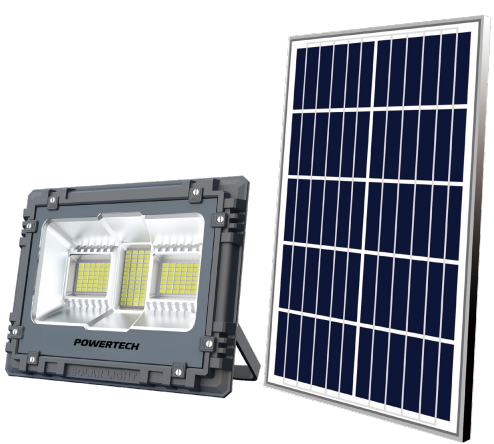
    POWERTEC SL4120 100W LED Flood Light

    POWERTEC-SL4120-100W-LED Flood-Light-PRODUCT

    Box Content

    • Lamp
    • Solar Panel
    • Remote Controller
    • Support Bracket
    • Wall Bolts
    • Operating Manual

    Installation

    POWERTEC-SL4120-100W-LED Flood-Light-FIG-1

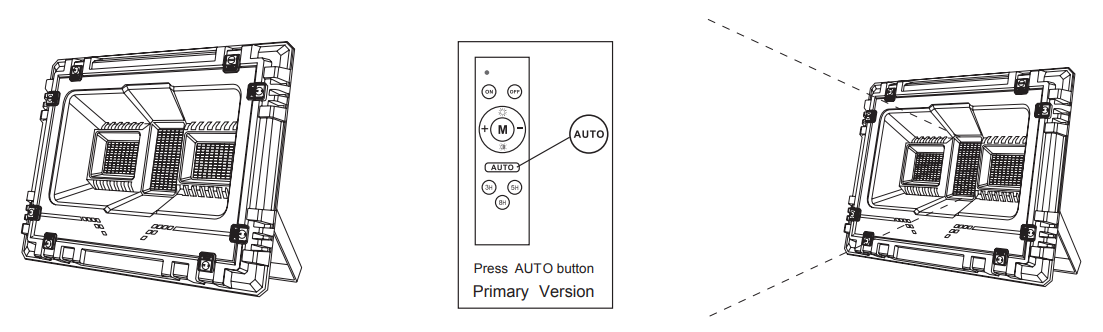
    1. Take out the lamp from the packaging
    2. Press the button above
    3. The light should turn on automatically

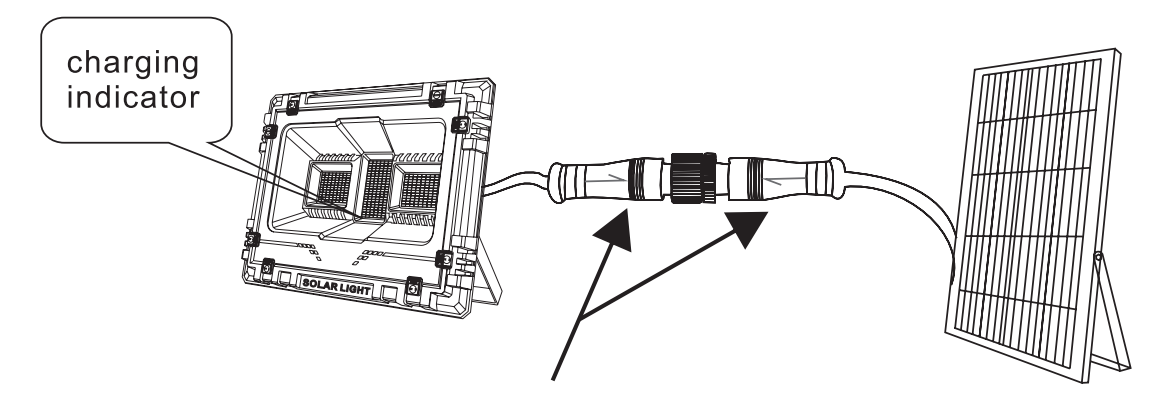
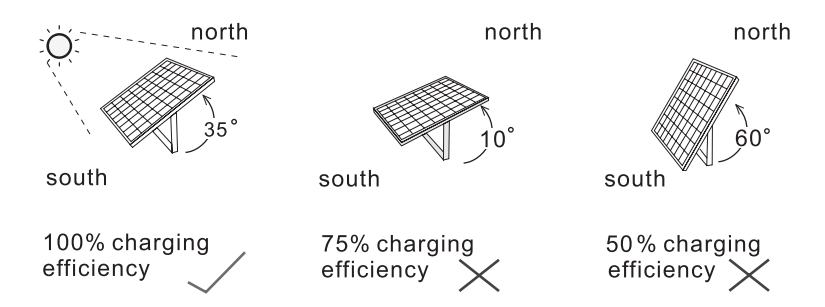
    Once the Waterproof connector is connected correctly, place the Solar Panel towards the Sunlight. The light should automatically turn off, and the Charging indicator (See positive or low) will flash regularly. This means the Solar panels are charging the batteries correctly.
    Fix the product on the wall with the supplied wall bolts. The installation height is suggested to be between 3-6 meters.
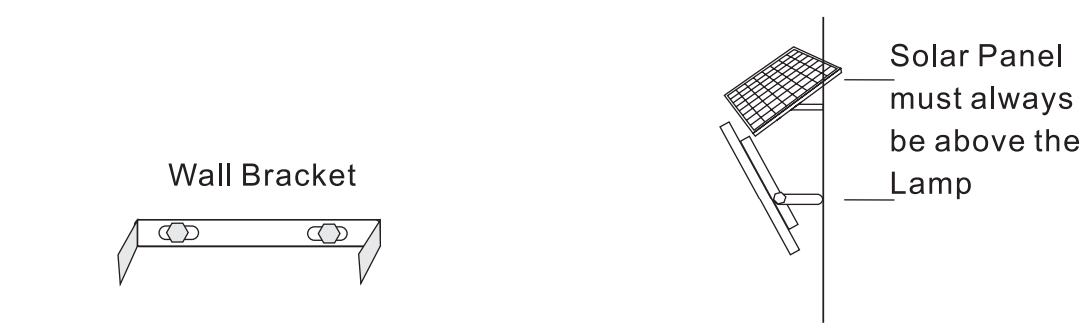
    The panel needs unobstructed sunlight to charge correctly.
     

    Remote Control Instruction

    Light-operated Mode.

    Once the waterproof wiring connector is connected and tightened, the POWERTEC SL4120 100W LED Flood Light will operate automatically. By pressing the [AUTO] key, the POWERTEC SL4120 100W LED Flood Light will turn on at dusk and turn off to charge when the sun rises, ensuring efficient and hassle-free illumination.

    Remote Controller Functions

    Customer Service

    • Distributed by: Electus Distribution Pty Ltd 46 Eastern Creek Dr, Eastern Creek NSW 2766 Australia
    • Ph: 1300 738 555
    • Website: www.electusdistribution.com.au

    FAQs

    Q: What is the brightness output of this floodlight?

    It provides between 8,000 and 9,000 lumens, making it appropriate for sporting grounds, huge yards, and building exteriors.

    Q: Is the floodlight waterproof?

    Indeed. Because of its IP65 rating, it is water-resistant and dust-tight, making it appropriate for outdoor use even in the event of rain or snow.

    Q: What voltage does the SL4120 operate on?

    The majority of residential, commercial, and industrial power sources can power the light, which runs on AC 100–277V.

    Q: Can the beam angle be adjusted?

    Indeed. For the best illumination, you can tilt and angle the light to target particular regions using the mounting bracket.

    Q: Does the SL4120 produce heat?

    Compared to conventional flood lights, LED technology produces less heat. To guarantee longevity and safety, the heat sink and aluminium casing effectively dissipate heat.

    how to use POWERTEC SL4120 flood light OnyxGuides Manual POWERTEC LED flood light user manual POWERTEC SL4120 guide SL4120 LED flood light setup guide User Manual
    Share. Facebook Twitter Pinterest LinkedIn Tumblr Email
    Gabriel Smith

      Related Posts

      Sony ILCE-6700 Interchangeable Lens Digital Camera User Guide

      December 7, 2025

      Bose MA12 Panaray Modular Line Array Loudspeaker User Manual

      December 4, 2025

      Bowers & Wilkins Px8 Wireless Headphones User Manual

      December 4, 2025

      Sonos Arc Black Voice Control Ultra Soundbar User Manual

      December 4, 2025

      JANAM GT1 Self Mobile Entry Head Unit Instruction Manual

      December 4, 2025

      Ronix 1250 Carpet Vacuum Cleaner Instruction Manual

      December 4, 2025
      Add A Comment

      Comments are closed.

      Don't Miss
      Other

      How To Connect Hp Deskjet Printer To Wi-Fi

      March 27, 2026

      Introduction The printer is a very useful device. The people in offices or at home…

      GENEINNO GTP-EXCAM1 T1 Pro External Camera User Manual

      March 27, 2026

      How Does A Projector Work

      March 26, 2026

      Swellpro GC3-S Waterproof 4K 3 Axis Gimbal Camera User Guide

      March 26, 2026
      Stay In Touch
      • Facebook
      • Twitter
      • Pinterest
      • Instagram
      • YouTube
      • Vimeo

      Subscribe to Updates

      Subscribe to Updates

      Follow us

      Facebook X-twitter Instagram Pinterest

      © 2025 All rights reserved Onyx Guide.