

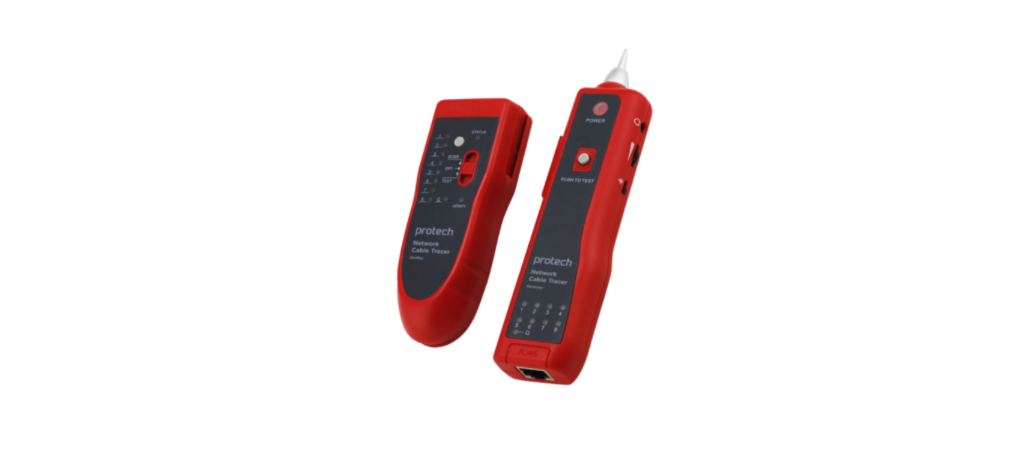

PROTECH XC5090 Network Cable Tracer

The PROTECH XC5090 Network Cable Tracer is a versatile tool designed for tracing and testing telephone, network, and electric wires with accuracy and ease.
Overview

Included Accessories

Telephone Wire Search Function

- Using the PROTECH XC5090 Network Cable Tracer, directly insert the telephone wire with an RJ11 plug into the RJ11 socket of the wire tracker’s emitter.
- Push DIP swithe tch of emitthe ter to the position of “SCAthe N” then wire finding indicator “STATUS”, flashes meaning normal the work of emitter;
- Press downward the inching button, use the probe of the receiver to find the target wire at the other end;
- During testing, the function switch-over button can be pressed for the switch-over of the dual-tone.

Compare the volume of the “tout” sound and the brightness of the signal indicator. Then you can find the target that has the highest volume and brightest indicator.
Network Wire Search Function

- Using the PROTECH XC5090 Network Cable Tracer, directly insert the network wire with an RJ45 plug into the RJ45 socket of the wire tracker’s transmitter.
- Push DIP swithe tch of emitthe ter to the position of “SCAthe N” then wire finding indicator “STATUS”, flashes meaning normal the work of emitter;
- Press downward the inching button, use the probe of the receiver tthe o find the target wire at the other end;
- During testing, the function switch-over button compressed the switch for the switchover of dual-tone.

Compare the volume of the “tout” sound and the brightness of the signal indicator. Then you can find the target that has the highest volume and brightest indicator.
Electric Wire Search Function

- Using the PROTECH XC5090 Network Cable Tracer, directly insert the electric wire with a crocodile clip and RJ11 plug into the RJ11 socket of the wire tracker’s emitter.
- Push DIP swithe tch of emitthe ter to the position of” SCAthe N” then wire finding indicator “STATUS”, flashes meaning normal the work of .mitter;
- Press downward the inching button, use the probe of the receiver tthe o find the target wire at the other end;
- During testing, the function switch-over button can be pressed for the switch-over of the dual-tone.

Compare the volume of the “tout” sound and the brightness of the signal indicator. Then you can find the target that has the highest volume and brightest indicator.
Wire Collation Function
- Insert RJ45 plugs at both ends of the network wire into the corresponding socket, transmitter, and receiver.r
- Push the function switch v verify, but the ton on emitter to the position of TEST, testing indicator ” VERIFY”, flashes meaning normal work of emitter.
- According to 16 wire sequences, judge the characteristics of short-circuit, breaking ccircuitci circuitand crossing.
- During the sting, the function switch-over button can be pressed for the switchover between fast and slow levels.

Wire Sequence Tester
Support direct wire connection of the operating switch.

It’s so simple that there is no cable tester required for the string wire now.
It can take the place of a cable tester.
It can rapidly test open circuit/short circuit and crossing through the 16 status indicators. The test result is accurate, and the result is displayed clearly and directly.
Automatic scan mode, rapidly testing, it can test corresponding double-twisted cables 1,2,3,4, 5,6,7,8, meanwhile, it can judge wrong connection, short, open circuit.
Other Functions
Open circuit or short circuit testing function the DIP switch on the emitter to the position of “TEST”, and llonlong-press function switch-over button on the emitter for 2 seconds. The “VERIFY” indicator will change “flash” to “lighting”.

earphones function on
In noia, the environment can be used to prevent interference from the outside.
The volume adjusting function finds the wire; the volume knob can be rotated to a moderate level of sound.
Spotlight function
You can easily work as usual, turning on the light switch at night and in the dark.
For users who need to inspect wires or hard-to-reach areas in addition to tracing, the PROTECH QC8716 Video Inspection Camera is a perfect companion. Check out the PROTECH QC8716 Video Inspection Camera Instruction Manual for detailed setup and usage instructions.
An inching switch can automatically delay the power-off. The continuous lifespan of the battery is over 50 hours.
Specifications
PROTECH XC5090 Network Cable Tracer specifications at a glance.

Customer Support
- Email: support@whynter.com
- Website: WWW.WHYNTER.COM
- Tel: 800-443-6153
Product contents and specifications may change without notice. Copyright © 2024
1 Comment
Pingback: PROTECH QM1549 RMS IP67 Digital Multimeter | Full User Guide