



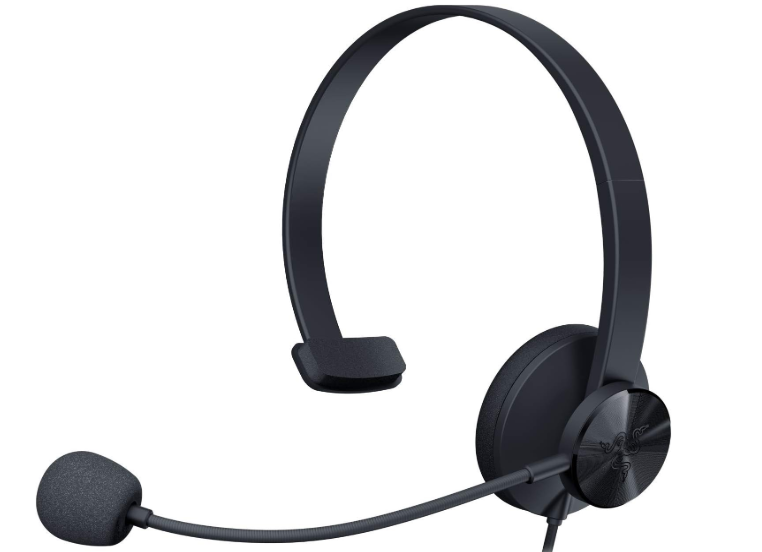
RAZER TETRA Wired Streaming Headset
Safety Instructions
- To achieve maximum safety while using your Razer Kraken X USB, we suggest that you adopt the following guidelines:
- Do not take apart the device (doing so will void your warranty), and do not attempt to operate it under abnormal current loads.
- Keep the device away from liquid, humidity, or moisture.
- Operate the device only within the specific temperature range of 0°C (32° F) to 40°C (104 ° F).
- Should the temperature exceed this range, unplug and/or switch off the device in order to let the temperature stabilize to an optimal level.
- The device isolates external ambient sounds even at low volumes, resulting in lowered awareness of your external surroundings.
- Please remove the device when engaging in any activity that requires active awareness of your surroundings.
- Listening to excessively loud music over an extended period of time can damage your hearing.
- Furthermore, legislation of certain countries permits only a maximum sound level of 86dB for 8 hours a day.
- We therefore recommend that you reduce the volume to a comfortable level when listening for prolonged periods of time. Please, take good care of your hearing.
Description
Razer Tetra gaming chat headset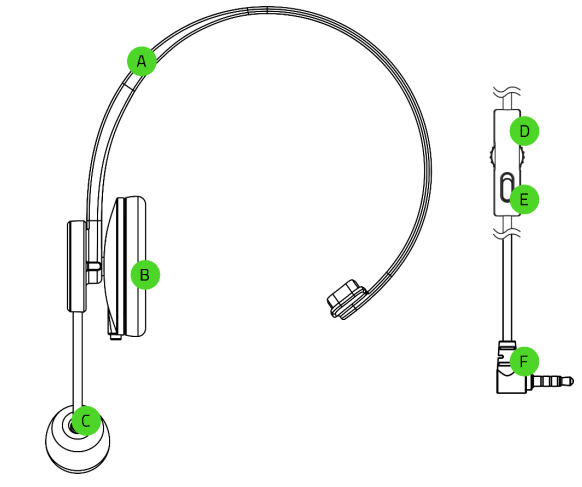
- Adjustable headband
- Leatherette ear cushion
- Foldable unidirectional microphone with mic foam
- Volume control wheel
- Microphone mute toggle umo
- 3.5 mm audio + mic connector
WHAT’S NEEDED
- Audio + microphone usage
- Devices with 3.5 mm audio + mic combined jack*
Getting Started
Bend the mic until it is parallel to your mouth. Make sure the mic diaphragm is in front and the air vent is facing away from your mouth.
Use
Volume Wheel
- Rotate the volume wheel as shown to increase or decrease the volume.
Mic Mute Button
- Press the mic mute button to mute or unmute the microphone.
Headset Lifespan
- We recommend stretching the headset gently apart before placing it over your head to minimize headband stress. However, please avoid overstretching the headset beyond its technical limits.
Surround Sound
- Experience accurate positional audio that’s specifically designed for games, movies, and music on
PC. Be sure to use the activation code included in the packaging or visit razer.com/7.1-surround– sound to learn more.
Specifications
- Frequency response: 20 Hz – 20 kHz
- Impedance: 329 @ 1 kHz
- Sensitivity (@1 kHz): 113 dB
- Drivers: 40 mm, with Neodymium magnets
- Inner ear cup diameter: 65 x 44 mm
- Connection type: USB Digital
- Cable length: 1.3 m / 4.27 ft.
- Approx. Weight: 275 g / 0.60 lbs
- Frequency response: 100 Hz – 10 kHz
- Signal-to-noise ratio: > 55 dB
- Sensitivity (@1 kHz): -42 $ 3 dB
- Pick-up pattern: Unidirectional ECM boom
- Volume up and down
- Microphone quick mute toggle
Maintainance
- The Razer Kraken X USB requires minimal maintenance to keep it in optimum condition.
- Once a month, we recommend you unplug the device and clean it using a soft cloth or cotton swab to prevent dirt buildup.
- Do not use soap or harsh cleaning agents.
Warranty
You’ve got a great device in your hands, complete with a 2-year limited warranty coverage.
©2019 Razer Inc. All rights reserved. Razer, the triple-headed snake logo, Razer logo, “For Gamers. By Gamers.”, and “Powered by Razer Chroma” logo are trademarks or registered trademarks of Razer Inc. and/or affiliated companies in the United States or other countries.
All other trademarks and trade names are the RAZER TETRA Wired Streaming Headset property of their respective owners, and other company and product names mentioned herein may be trademarks of their respective companies.
Razer Inc. (“Razer”) may have copyright, RAZER TETRA Wired Streaming Headset trademarks, trade secrets, patents, patent applications, or other intellectual property rights (whether registered or unregistered) concerning the product in this guide. Furnishing of this guide does not give you a license to any such copyright, trademark, patent, or other intellectual property right.
The Razer Kraken X USB (the “Product”) may differ from pictures, whether on packaging or otherwise. Razer assumes no responsibility for such differences or for any errors that may appear. Information contained herein is subject to change without notice.
Limited Product Warranty
- For the latest and current terms of the Limited Product Warranty, please visit razer.com/warrant.,
Limitation of Liability
Razer shall in no event be liable for any lost profits, loss of information or data, special, incidental, indirect, punitive or consequential or incidental damages, arising in any way out of distribution of, sale of, resale of, use of, or inability to use the Product. In no event shall Razer’s liability exceed the retail purchase price of the Product.
General
These terms shall be governed by and construed under the laws of the jurisdiction in which the Product was purchased. If any term herein is held to be invalid or unenforceable, then such term (in so far as it is invalid or unenforceable) shall be given no effect and deemed to be excluded without invalidating any of the remaining terms. Razer reserves the right to amend any term at any time without notice
Customer Support
- Website: razerid.razer.com
- For Help: support.razer.com
- Ph: 1-855-872-5233
FAQs
What platforms is the Razer Tetra headset compatible with?
Designed primarily for console use, particularly with the PlayStation 4 and 5, the Razer Tetra may also be used with any device that has a 3.5mm audio port, including the Xbox One/Series X|S, Nintendo Switch, and PC.
Is the Razer Tetra a stereo or mono headset?
For gamers and streamers who want to listen to game audio through external speakers while still having crystal-clear voice chat through the headset, the Tetra is a mono headset with a single on-ear speaker.
What makes the Razer Tetra ideal for streamers?
It is ideal for clear communication during live streaming or multiplayer gaming because of its cardioid microphone, which concentrates on your speech while reducing background noise. It is also pleasant for long sessions due to its lightweight and unobtrusive design.
Can I wear the headset on either ear?
Indeed! Depending on your taste, you can wear the speaker and microphone on the left or right side of the Tetra because it is reversible.
Does it require any software or drivers to work?
Drivers and software are not required. It will function immediately if you just insert the 3.5mm jack into the audio port on your device.
Does the Razer Tetra support in-line controls?
Indeed, the headset has a mic mute button and in-line volume control, allowing you to rapidly change settings without interfering with gaming.
Can I use the Razer Tetra for both voice chat and game audio?
The main purpose of the headset is voice chat, not full-range gaming audio. Use it in conjunction with external speakers or a specialised sound system for full game sound.
How do I ensure the best mic quality?
Make sure the cardioid side, which is typically marked, is facing your lips when you place the boom mic near your mouth. Use a slightly off-center microphone to prevent popping noises.