

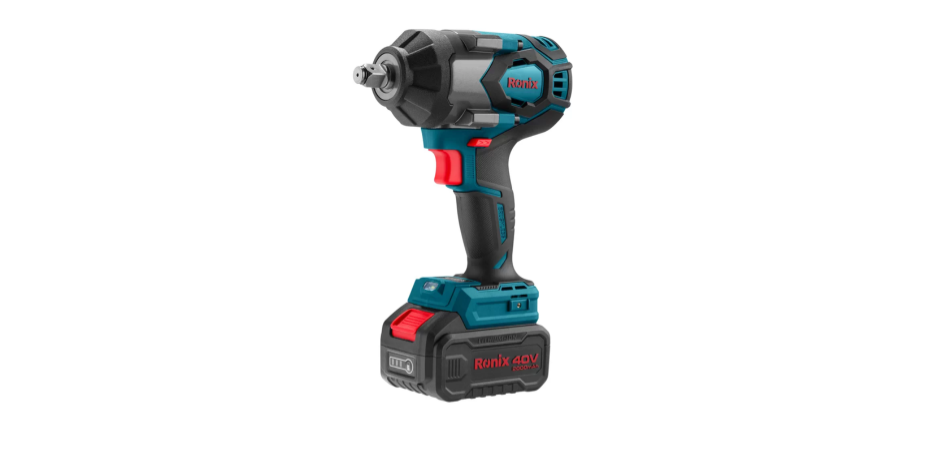

Ronix 8907 40V Brushless Impact Wrench
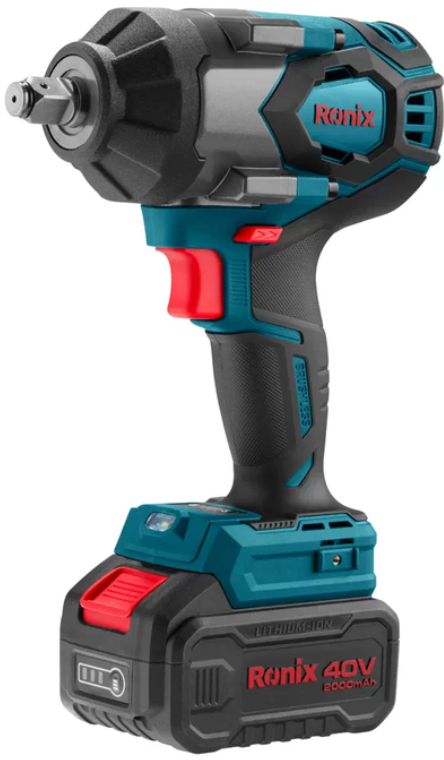
Safety Instructions
- Keep the work area clean and well-lit. Cluttered or dark areas invite accidents.
- Power tools create sparks, which may ignite the dust or fumes.
- Keep children and bystanders away while operating a power tool.
- Distractions can cause you to lose control.
- Power tool plugs must match the outlet. Never modify the plug in any way.
- Don’t use any adaptor plugs with earthed (grounded) power tools.
- Unmodified plugs and matching outlets will reduce the risk of electric shock.
- Don’t expose power tools to rain or wet conditions.
- Water entering a power tool will increase the risk of electric shock.
- Don’t abuse the cord. Never use the cord for carrying, pulling, or unplugging the power tool.
- Keep the cord away from heat, oil, sharp edges, or moving parts.
- Damaged or entangled cords increased the risk of electric shock.
- When operating a power tool outdoors, use an extension cord suitable for outdoor use.
- Using a cord suitable for outdoor use will reduce the risk of electric shock.
- The use of an RCD reduces the risk of electric shock.
- Stay alert, watch what you are doing, and use common sense when operating a power tool.
- A moment of inattention while operating power tools may result in serious personal injury.
- Remove any adjusting key or wrench before turning the power tool on.
- Don’t overreach. Keep proper footing and balance at all times.
- This enables better control of the power tool in unexpected situations.
- Dress properly. Don’t wear loose clothing or jewelry.
- Keep your hair, clothing, and gloves away from moving parts.
Specifications
| Model | 8907-40V |
| Battery Voltage | 40V |
| Battery Type | Lithium-ion |
| Driving Shank | 1/2″ Square |
| No-load Speed | 0-1200RPM 0-1800RPM 0-2400RPM |
| Impact Rate | 0-1600BPM 0-2400BPM 0-3200BPM |
| Max Torque | 800N·m |
| Standard Bolt | M12-M24 |
| High Tensile Bolt | M10-M16 |
| Body Material | Nylon(PA6+GF30) |
| Weight | 2.61Kg (with 1pc Battery) |
| Packaging | BMC |
| Accessories | 2pcs Battery Packs 1pc Charger |
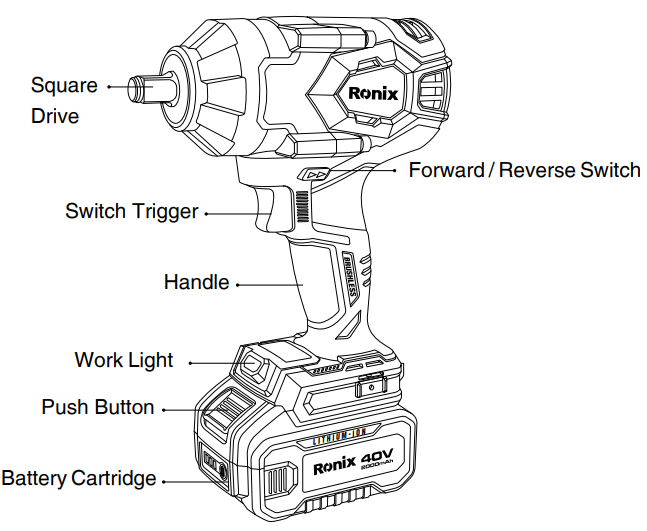
Part List
Use & Care
Ensure the switch is in the off position before inserting the battery pack. Insert the battery pack into power tools that have the switch on invites accidents. Recharge only with the charger specified by the manufacturer. A charger that is suitable for one type of battery pack may create a risk of fire when used with another battery pack. Use power tools only with specifically designated battery packs. Use of any other battery packs may create a risk of injury and fire.
When the battery pack is not in use, keep it away from other metal objects, like paper clips, coins, keys, nails, screws, or other small metal objects that can make a connection from one terminal to another. Shorting the battery terminals together may cause burns or a fire. Under abusive conditions, liquid may be ejected from the battery; avoid contact. If contact accidentally occurs, flush with water. If liquid contacts the eyes, additionally seek medical help. Liquid ejected from the battery may cause irritation or burns.
Do not expose a battery pack or tool to fire or excessive temperature. Exposure to fire or temperature above 265 °F (130 °C ) may cause an explosion. Follow all instructions and do not charge the battery pack or tool outside the temperature range specified in the instructions. Charging improperly or at temperatures outside the specified range may damage the battery and increase the risk of fire.
Service
Have your power tool serviced by a qualified repair person using only identical replacement parts. This will ensure that the safety of the power tool is maintained. Never service damaged battery packs. Service of battery packs should only be performed by the manufacturer or authorized service providers.
Assembly
- To remove the battery, push in the release buttons and pull the battery pack away from the tool.
- Always remove the battery pack before changing or removing accessories.
- To insert the battery, slide the pack into the body of the tool. Make sure it latches securely into place.
Operation
Switch Control
The control switch may be set to three positions: forward, reverse, and lock. Due to a lockout mechanism, the control switch can only be adjusted when the ON/OFF switch is not pressed. 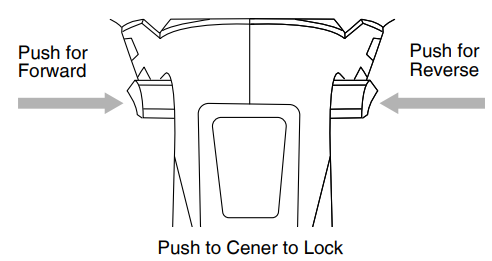
- For reverse (counterclockwise) rotation, push the Ronix 8907 40V Brushless Impact Wrench control switch in the direction shown.
- For forward (clockwise) rotation, push the control switch in the direction shown.
- Check the direction of rotation before use.
- Check the direction of rotation before use.
- To lock the trigger, push the control switch to the center position.
- The trigger will not work when the control switch is in the locked position.
- Always remove the battery pack before performing maintenance or changing accessories.
- Always lock the trigger or remove the battery pack before storing the tool and any time the tool is not in use.
Using the Drive Control
The button is used to adjust the torque, rotation speed (RPM), and impact speed (BPM) for the application. To select the drive control mode:
- Push the control switch for forward(clockwise) rotation.
- Pull and release the trigger to turn on the tool. The current mode indicator is lit.
- Press the button to cycle through the 3 modes (speeds).
- When the desired mode indicator is lit, begin work.
- Press the reverse button to cycle between two modes (reverse auto stop/reverse).
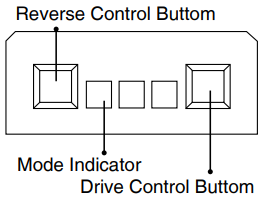
In mode (red light is on), when run in reverse, the tool will spin at the above RPM and BPM until the nut breaks free from the joint. Then, the tool stopped working. If you want to keep removing the nut from the bolt, press the button. The red light is off, the tool will Ronix 8907 40V Brushless Impact Wrench continue spinning at the above RPM and BPM until you release the trigger.
Speed Controls
These tools may be operated at any speed from 0 to full speed.
- To vary the driving speed, increase or decrease the Ronix 8907 40V Brushless Impact Wrench pressure on the trigger.
- To start the tool, pull the trigger.
- The further the trigger is pulled, the greater the speed.
- To stop the tool, release the trigger.
Impacting Techniques
The longer a bolt, screw, or nut is impacted, the tighter it will become. To help prevent damaging the fasteners or workpieces, avoid excessive impact. Be particularly careful when impacting smaller fasteners because they require less impact to reach optimum torque.
Practice with various fasteners, noting the length of time required to reach the desired torque. Check the tightness with a hand-torque wrench. If the fasteners are too tight, reduce the impact time. If they are not tight enough, increase the impact time.
Cleaning & Maintainance
Clean dust and debris from vents. Keep handles clean, dry, and free of oil or grease. Use only mild soap and a damp cloth to clean, since certain cleaning agents and solvents are harmful to plastics and other insulated parts. Some of these include gasoline, turpentine, lacquer thinner, paint thinner, chlorinated cleaning solvents, ammonia, and household detergents containing ammonia. Never use flammable or combustible solvents around tools.
Charging A Battery
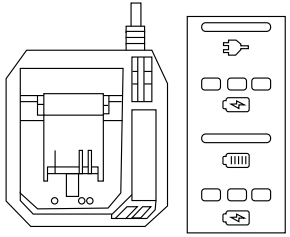
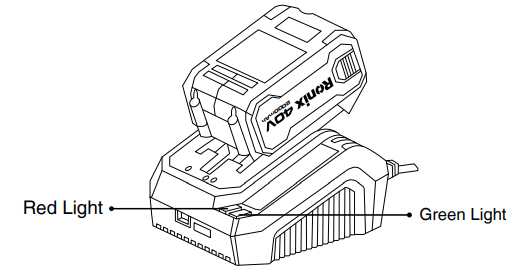
- Insert the plug into the charging unit into a power socket and turn the power on if required.
- Hee charging output interface inserts the battery into the charging port.
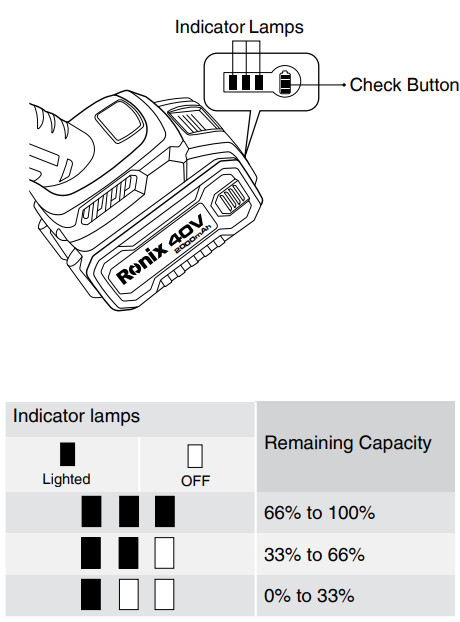
Charger Operating Mode Red Light Green Light Standby Mode ON OFF Charging Mode OFF Flashing 1Hz Charging Ending Mode OFF ON Preparatory Charging Mode OFF Flashing 1Hz Battery Failure Flashing 2Hz OFF Over Temperature Fault Flashing 1Hz OFF - Press the check button on the battery cartridge to indicate the remaining battery capacity. The indicator lamps light up for a few seconds.
Customer Support
- Address: Lyoner Str. 36 60528 Frankfurt am Main
- Tel:+49 69 310 900 66
- Website: www.ronixtools.com
FAQs
What are the key benefits of the brushless motor in the Ronix 8907 impact wrench?
In comparison to conventional brushed motors, the brushless motor offers increased power output, longer runtime, lower maintenance costs, and more efficiency.
What type of battery does the Ronix 8907 use, and how long does it last?
Its 40V lithium-ion battery provides a long runtime that is ideal for demanding jobs; depending on workload, it may often operate for up to 45 minutes on a full charge.
What torque settings are available on this impact wrench?
For optimal control, users can choose between light and heavy tightening or loosening tasks using the Ronix 8907’s numerous torque settings.
Is the Ronix 8907 suitable for professional automotive or construction use?
Yes, it is ideal for professional use in heavy equipment maintenance, construction, and vehicle repairs due to its long-lasting brushless motor and strong torque output.
How do I change the socket on the impact wrench?
To quickly attach or remove sockets, use the anvil’s quick-release button.
Does the impact wrench have a forward and reverse function?
Yes, you may quickly move between tightening and releasing fasteners thanks to the directional switch.
What maintenance does the Ronix 8907 require?
Clean the instrument frequently to get rid of dust and debris, check the battery and charger for damage, lubricate moving parts according to the instructions, and keep it somewhere cool and dry.