



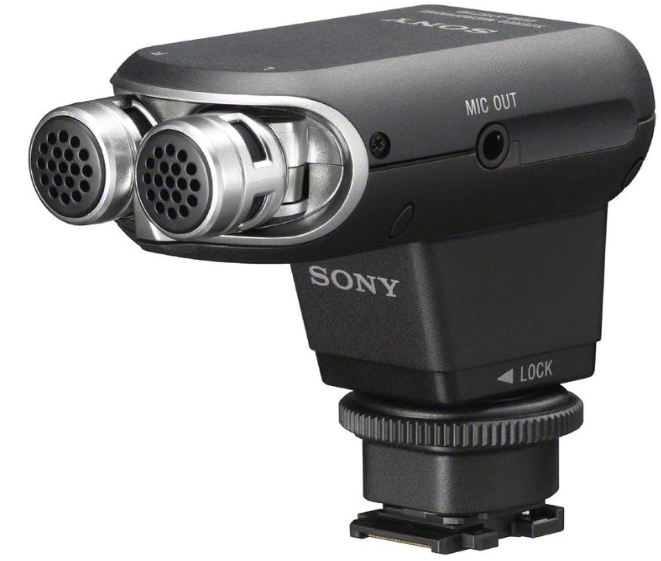
Sony ECM-XYST1M Stereo Microphone
Safety Instructions
- Do not touch the connector.
- This unit is a precision instrument. Do not drop, handle it, or apply excessive shock to it.
- Keep this unit away from high temperatures and humidity.
- When using this unit outside, be careful not to get it wet with rain or seawater.
- During movie recording, operational noises or beeps from the camera or lens may be recorded.
- If you touch this unit during recording, noise will be recorded.
- Be careful not to touch this unit, especially with your hair, head attire, etc.
- If you change the pickup pattern switch setting of this unit during recording, noise occurs.
- Do not hold the camera only by this unit. This unit may be damaged, or the camera may fall.
Features
The Stereo Microphone ECM-XYST1M (referred to below as “this unit”) is compatible with a camera that has a Multi Interface Shoe, such as a Sony Video Camera or Interchangeable Lens Digital Camera (referred to below as “camera”). Using a camera in combination with this unit enables effective recording to suit your purpose. Refer to the instruction manual of your camera and check that your camera is compatible with the Multi Interface Shoe.
- The stereo system enables natural sound pick-up, delivering a stereo sound image with superb clarity.
- The pickup pattern (affecting the soundstage width) can be set to 0° or 120° according to the sound source.
Identifying the Parts
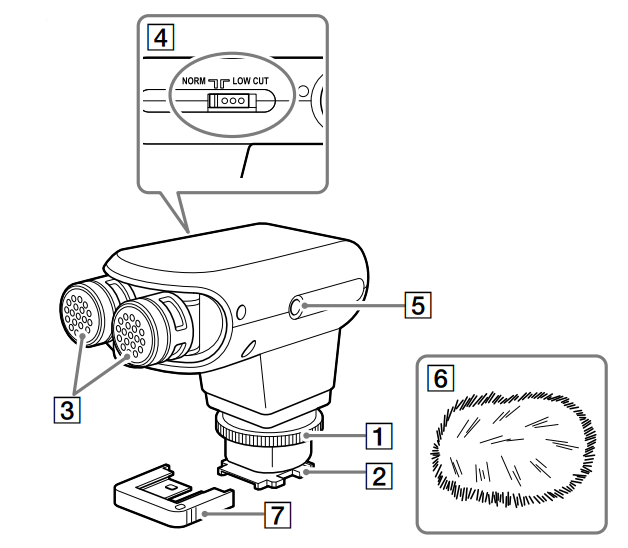
- Lock knob
- Multi-Interface foot Notes: Do not touch the connector.
- Microphone: Adjust the directional angle of the microphone by hand according to the sound source.
- 0° When picking up a sound with a narrow soundstage, or a distant sound (conversation, solo instruments, etc).
- 120° When picking up a sound with a wide soundstage, or a nearby sound (concert, theatrical performance, et).) Refer to the above table as a rough standard.
- Choose the pickup pattern depending on your preference. Slide switch (NORM (Normal)/LOW CUT (Low-cut)). Set the switch according to the sound source. NORM To pick up sound naturally from low to high tones.
- LOW-CUT To cut the low-tone range effectively to reduce noise from wind, vibration, or air conditioning.
- Microphone out. You can record sound by connecting this unit to a camera with the supplied connecting cable.
- When using a video camera that can be used to adjust the microphone level, connect one end of the supplied connecting cable to the MIC OUT jack of this unit and the other end to the external microphone input jack of the video camera.
- This unit acts as a plug-in power microphone, and the microphone level can be adjusted with the video camera. When using an interchangeable lens digital camera with an Auto-lock Accessory Shoe (compatible with movie recording), attach an ADP-MAC shoe adaptor (sold separately) to the camera.
- Then connect one end of the supplied connecting cable to the MIC OUT jack of this unit and the other end to the external microphone input jack of the camera. This unit acts as a plug-in power microphone.
- Wind screen: Place on this unit to reduce the popping noise caused by wind or breathing.
Using this Appliance
When this unit is attached to the camera, the camera automatically switches from the built-in microphone to the external microphone. After attaching this unit, adjust the microphone by hand to the angle you want.
To attach this unit 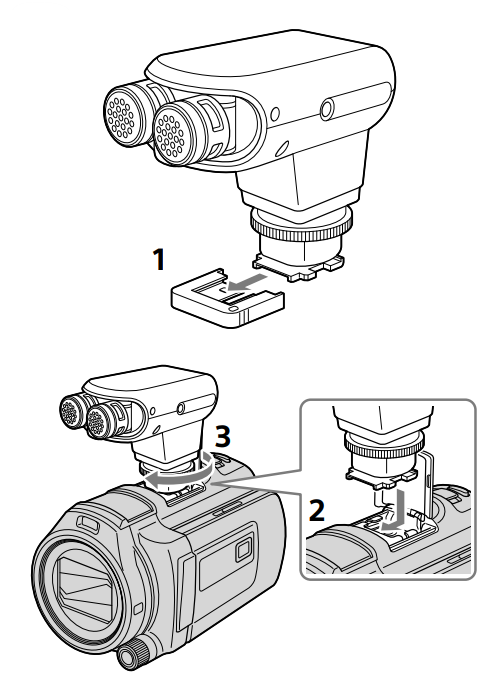
- Remove the connecting protective cap from this unit.
- Turn off the power to the camera.
- Align the Multi Interface foot of this unit with the Multi Interface Shoe on the camera and attach this unit. Rotate the lock knob of this unit to the LOCK direction.
To detach this unit
Turn off the power of the camera and then detach this unit by following the attaching procedure in reverse.
Specifications
- Type: Electret condenser type
- Frequency response: 70 Hz to 20,000 Hz
- Pickup pattern: 0° / 120° pickup pattern switching (See illustration
- Operating temperature: 0 °C to 40 °C (32 °F to 104 °F)
- Storage temperature: –20 °C to +60 °C (-4 °F to +140 °F)
- Dimensions (Approx.): 74.2 mm × 62.3 mm × 37 mm (3 in. × 2 1/2 in. × 1 1/2 in.)
- Mass: Approx. 100 g (3.6 oz)
- Included items: Stereo microphone (1), Wind screen (1), Connecting cable (1), Connector protect cap (1), Spacer (1), Carrying pouch (1), Set of printed documentation
Disposal
For the Customers in Europe
Disposal of Old Electrical & Electronic Equipment (Applicable in the European Union and other European countries with separate collection systems)This symbol on the product or on its packaging indicates that this product shall not be treated as household waste. Instead, it shall be handed over to the applicable collection point for the recycling of electrical and electronic equipment. By ensuring this product is disposed of correctly, you will help prevent potential negative consequences for the environment and human health, which could otherwise be caused by inappropriate waste handling of this product. The recycling of materials will help to conserve natural resources. For more detailed information about the recycling of this product, please contact your local Civic Office, your household waste disposal service, or the shop where you purchased the product.
Notice for the customers in the countries applying EU Directives > Manufacturer: Sony Corporation, 1-7-1 Konan Minato-ku, Tokyo, 108-0075 Japan. For EU product compliance: Sony Belgium, bijkantoor van Sony Europe Limited, Da Vincilaan 7-D1, 1935
For the Customers ithe n the Republic of India
Reduction in the Use of Hazardous Substances in Electrical & Electronic Equipment. This product and its components, consumables, parts, or spares comply with the hazardous substances restriction of India’s E-Waste (Management) Rules. The maximum allowable concentrations of the restricted substances are 0.1% by weight in homogenous materials for Lead, Mercury, Hexavalent Chromium, Polybrominated Biphenyls (PBB) and Polybrominated Diphenyl Ethers (PBDE), and 0.01% by weight in homogenous materials for Cadmium, except for the exemptions specified in Schedule II of the aforesaid Rules.
Customer Service
- Website: https://www.sony.com/
- Ph: 800-326-9551
FAQs
Q: What kind of microphone is the ECM‑XYST1M?
It works well with cameras that have a “multi interface shoe” (or with a 3.5 mm cable for other cameras).
Q: What kind of use cases is it designed for?
When you want better sound than a built-in camera microphone, it works well for video recording, vlogging, interviews, trip videos, ambient sound capture, and general filmmaking. It is helpful for locations, events, or ambient sounds and can record stereo sound.
Q: What audio quality and frequency range does the mic deliver?
With a frequency response of 70 Hz to 20 kHz, it records in stereo and covers a wide audio spectrum that is appropriate for full-range audio, voices, instruments, and background noise.
Q: Can I adjust how wide or narrow the stereo pickup is?
Yes, one of the main features is an adjustable pickup angle. Depending on whether you want a wide ambient sound or a focused subject, you can choose between a wide stereo 120° angle (more ambient/stereo field) or a narrower 0° angle (more focused).
Q: How well does it work outdoors or in windy/ambient environments?
It has a windscreen that reduces wind noise, which is helpful for events, street recording, and outdoor photography.
2 Comments
Pingback: Sony ILCE-6700 Interchangeable Lens Digital Camera Manual
Can you be more specific about the content of your article? After reading it, I still have some doubts. Hope you can help me. https://www.binance.com/ph/register?ref=IU36GZC4