



Sony INZONE M10S 27” OLED 1440p Gaming Monitor
Safety Instructions
- Never cover the ventilation holes or insert anything into the cabinet.
- Do not use the supplied AC power cord (mains lead) on any other equipment.
- Do not pinch, bend, or twist the AC power cord (mains lead) excessively.
- Core conductors may be exposed or broken.
- Do not modify the AC power cord (mains lead).
- Do not put anything heavy on the AC power cord (mains lead).
- Do not pull on the AC power cord itself when disconnecting the AC power cord (mains lead).
- Do not connect too many appliances to the same AC power outlet (mains socket).
- Do not use a poor-fitting AC power outlet (mains socket).
- Leave space around the OLED Monitor as shown below.
Installation On A Wall/Stand
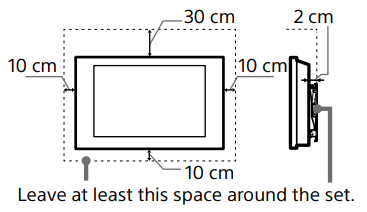
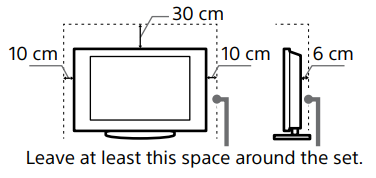
To ensure proper ventilation and prevent the collection of dirt or dust.
- Do not lay the OLED Monitor flat; install it upside down, backwards, or sideways.
- Do not place the OLED Monitor on a shelf, rug, bed or in a closet.
- Do not cover the OLED Monitor with a cloth, such as curtains, or items such as newspapers, etc.
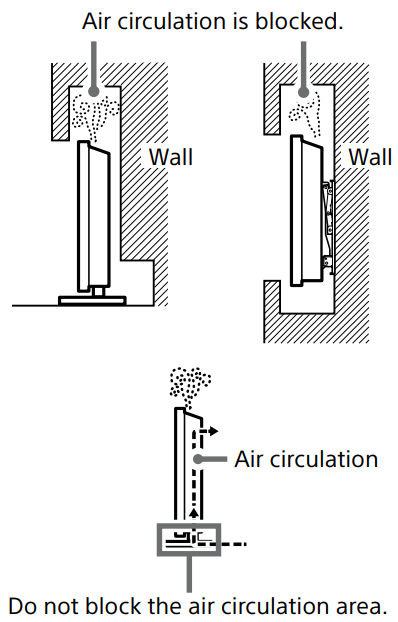
- Do not install the OLED Monitor as shown below.
Power Cord (mains lead)
Handle the AC power cord (mains lead) and outlet (mains socket) as follows to avoid any risk of fire, electric shock or damage and/ or injuries.
- The shape of the AC power plug (mains plug), which is supplied with the OLED Monitor, varies depending on the region. Be sure to connect the appropriate supplied AC power cord (mains lead) with the plug that fits into the AC power outlet (mains socket).
- Use only SSony-suppliedAC AC AC power cords (mains lead), not those of other brands.
- Insert the plug fully into the AC power outlet (mains socket).
- Operate the OLED Monitor on a 100 V – 240 V AC supply only.
- When wiring cables, be sure to unplug the AC power cord (mains lead) for your safety and take care not to catch your feet on the cables. Disconnect the AC power cord (mains lead) from the AC power outlet (mains socket) before working on or moving the OLED Monitor.
- Keep the AC power cord (mains lead) away from heat sources.
- Unplug the AC power plug (mains plug) and clean it regularly. If the plug is covered with dust and it picks up moisture, its insulation may deteriorate, which could result in a fire.
Adapter
To reduce the risk of fire or electric shock, do not expose this apparatus to rain or moisture. To prevent fire or shock hazard, do not place objects filled with liquids, such as vases, on the apparatus. Do not install this equipment in a confined space, such as a bookshelf or similar unit.
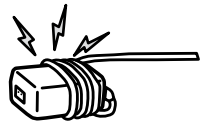
- Be sure to use the supplied AC adapter and AC power cord (mains lead).
- Otherwise, it may cause a malfunction.
- Connect the AC adapter to an easily accessible AC power outlet (mains socket).
- Do not coil the AC power cord (mains lead) around the AC adapter.
- The core wire may be cut/or it may cause a malfunction of the OLED Monitor.
- Do not touch the AC adapter with wet hands.
- The set is not disconnected from the AC source as long as it is connected to the AC power outlet (mains socket), even if the set itself has been turned off.
- As the AC adapter will become warm when it is used for a long time, it may feel hot when touching it with your hand.
Installation
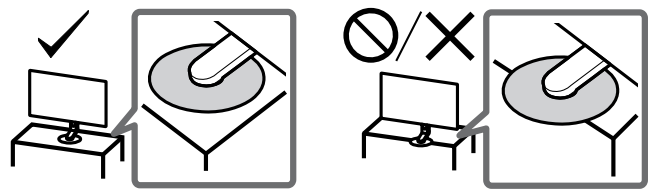
- The OLED Monitor should be installed near an easily accessible AC power outlet (mains socket).
- Place the OLED Monitor on a stable, level surface to prevent it from falling over and causing personal injury or property damage.
- Install the OLED Monitor where it cannot be pulled, pushed, or knocked over.
- Install the OLED Monitor so that the OLED Monitor’s Table-Top Stand does not protrude out from the OLED Monitor stand (not supplied).
- If the TableTop Stand protrudes out from the OLED Monitor stand, it may cause the OLED Monitor to topple over, fall down, and cause personal injury or damage to the OLED Monitor.
Transporting
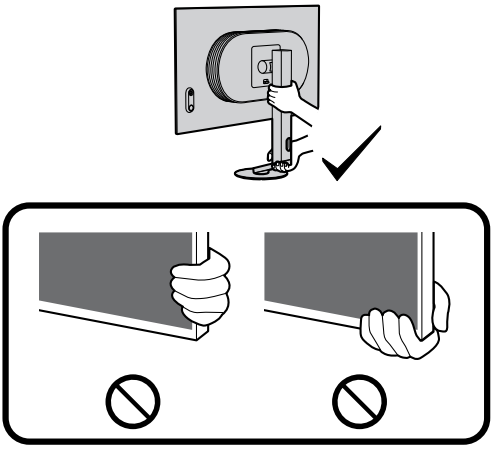
- Before transporting the OLED Monitor, disconnect all cables.
- When transporting the OLED Monitor by hand, hold it as shown below.
- Do not put stress on the OLED panel and the frame around the screen.
- When lifting or moving the OLED Monitor, hold it firmly from the bottom.
- When transporting the OLED Monitor, do not subject it to jolts or excessive vibration.
- When transporting the OLED Monitor for repairs or when moving, pack it using the original carton and packing material.
Installing a Monitor on the Wall
This OLED Monitor’s instruction manual only provides the steps to prepare the OLED Monitor for Wall-Mount installation before it is installed on the wall. Your OLED Monitor can be mounted to a wall using a suitable Wall-Mount Bracket (not supplied). If the Table-Top Stand is attached to the OLED Monitor, the OLED Monitor may require detaching the Table-Top Stand. Prepare the OLED Monitor for the Wall-Mount Bracket before making cable connections.
For product protection and safety reasons, Sony strongly recommends that the installation of your OLED Monitor on the wall be performed by qualified professionals. Do not attempt to install it yourself.
- Follow the instruction guide provided with the Wall-Mount Bracket for your model. Sufficient expertise is required in installing this OLED Monitor, especially to determine the strength of the wall for withstanding the OLED Monitor’s weight.
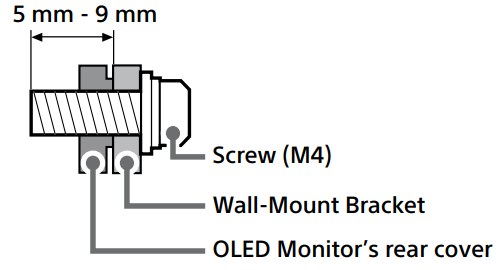
- The screws for installing the Wall-Mount Bracket to the OLED Monitor are not supplied.
- The length of the screw for the Wall-Mount Bracket differs depending on the Wall-Mount Bracket thickness. Please refer to the illustration below.

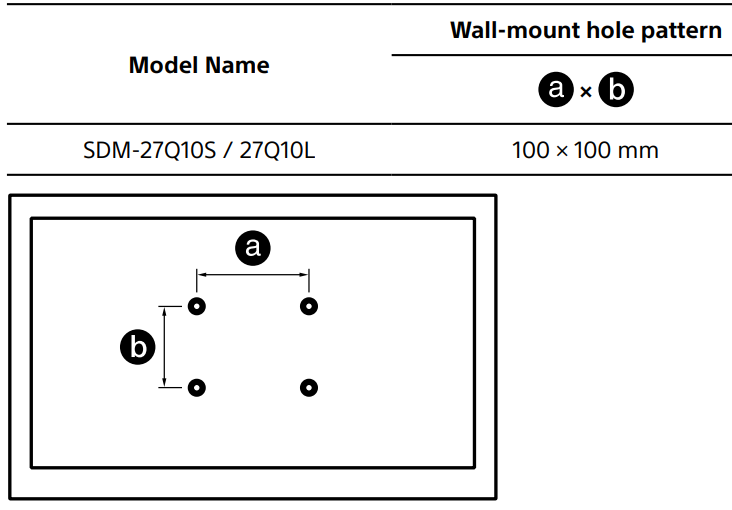
- Refer to the following table for the wall-mount hole pattern.
Prohibited Usage
Do not install/use the OLED Monitor in locations, environments or situations such as those listed below, or the OLED Monitor may malfunction and cause a fire, electric shock, damage and/or injuries.
Locations
Outdoors (in direct sunlight), at the seashore, on a ship or other vessel, inside a vehicle, unstable locations, near water, rain, moisture or smoke.
Environments
Places that are hot, humid, or excessively dusty; where insects may enter; where it might be exposed to mechanical vibration, near the source of naked flame, such as a lighted candle, which is placed on the OLED Monitor. The OLED Monitor shall not be exposed to dripping or splashing, and no objects filled with liquids, such as vases, shall be placed on the OLED Monitor.
Situations
Use when your hands are wet, with the cabinet removed, or with attachments not recommended by the manufacturer. Disconnect the OLED Monitor from the AC power outlet (mains socket) during lightning storms.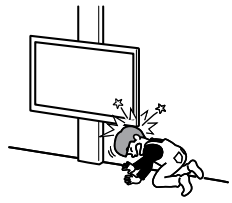
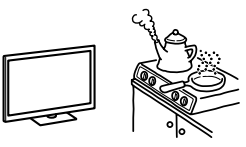
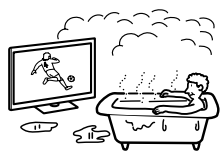
- Place the OLED Monitor in a humid or dusty space, or in a room with oily smoke or steam (near cooking tables or humidifiers). Fire, electric shock, or warping may result.
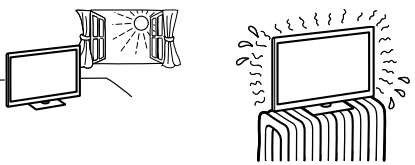
- Install the OLED Monitor in places subject to extreme temperature, such as in direct sunlight, near a radiator or a heating vent.
- If the OLED Monitor is placed in the changing room of a public bath or hot spring, the OLED Monitor may be damaged by airborne sulfur, etc.
- For the best picture quality, do not expose the screen to direct illumination or sunlight.
- Avoid moving the OLED Monitor from a cold area to a warm area.
- Sudden room temperature changes may cause moisture condensation.
Broken pieces
- Do not throw anything at the OLED Monitor.
- The screen glass may break due to the impact and cause serious injury.
- If the surface of the OLED Monitor cracks, do not touch it until you have unplugged the AC power cord (mains lead). Otherwise, this may cause an electric shock.
Conditions
- This product is suitable for use in tropical and/or moderate climate conditions.
When not in use
- If you will not be using the OLED Monitor for several days, the OLED Monitor should be disconnected from the AC power (mains) for environmental and safety reasons.
- As the OLED Monitor is not disconnected from the AC power (mains) when it is just turned off, pull the plug from the AC power outlet (mains socket) to disconnect the OLED Monitor completely.
- ALWAYS keep small accessories out of the reach of children, so that they are not mistakenly swallowed. Turn off the OLED Monitor and unplug the AC power cord (mains lead) immediately if any of the following problems occur.
- Ask your dealer or Sony service centre to have it checked by qualified service personnel.
- The AC power cord (mains lead) is damaged.
- Poor fitting of the AC power outlet (mains socket).
- OLED Monitor is damaged by being dropped, hit or having something thrown at it.
- Any liquid or solid object falls through openings in the cabinet.
Temperature
When the OLED Monitor is used for an extended period, the panel surrounds become warm. It may feel hot when touching it with your hand.
Medical Institutions
- This product cannot be used as a medical device. It may cause a medical equipment malfunction.
- Do not place this product close to medical devices
- This product (including accessories) has magnet(s) which may interfere with pacemakers, programmable shunt valves for hydrocephalus treatment, or other medical devices.
- Do not place this product close to persons who use such medical devices.
- Consult your doctor before using this product if you use any such medical device.
- Keep out of the reach of children or supervised individuals
- This product (including accessories) has magnet(s). Swallowing magnet(s) could cause serious harm, such as a choking hazard or intestinal injuries. If magnets (or a magnet) were swallowed, consult a doctor immediately.
- This product (including accessories such as covers) uses magnets. Do not place magnetically sensitive objects (cash cards, credit cards with magnetic coding, etc.) near this product.
LED Screen
Viewing the OLED Monitor
- View the OLED Monitor in moderate light, as viewing the OLED Monitor in poor light or for long periods of time strains your eyes.
- When using headphones, adjust the volume so as to avoid excessive levels, as hearing damage may result.
- Although the OLED screen is made with high-precision technology and 99.99 % or more of the pixels are effective, black dots may appear or bright points of light (white, red, blue, or green) may appear constantly on the OLED screen. This is a structural property of the OLED screen and is not a malfunction.
- To avoid damaging the OLED screen, do not expose the OLED screen to direct sunlight.
- Do not push or scratch the OLED screen of this monitor. The image may be uneven, or the OLED screen may be damaged.
- The screen and cabinet get warm when this monitor is in use. This is not a malfunction.
- Avoid spraying insect repellent with volatile material on the OLED screen.
- Avoid prolonged contact with rubber or plastic materials on the OLED screen.
- When disposing of your monitor, be sure to follow your local laws and regulations.
Protecting the Screen
Image retention
OLEDMonitors are susceptible to image retention (burn-in) due to the characteristics of the materials used. Image retention may occur if images are displayed in the same location on the screen repeatedly or over extended periods of time.
- This is not a malfunction of the monitor.
- Avoid displaying images that may cause image retention.
- The following are examples of images and displays that may cause image retention:
- Content with black bars either on the top and bottom and/or the left and right sides of the screen.
- Static images, such as photos. Static content from applications.
- Displays of [Frame rate counter], [Crosshair] or [Timer] in [Gaming assist].
- Sony recommends that you turn off the monitor normally by pressing the power button on the monitor.
- Fill the screen by changing [Aspect ratio] to eliminate the black bars.
- Turn off displays of [Frame rate counter], [Crosshair] and [Timer] in [Gaming assist].
- The monitor has the following features to help reduce/prevent image retention.
Panel refresh
A panel refresh will adjust the panel uniformity. Panel refresh can be performed and should only be used when image retention is very noticeable.
- The Panel refresh function may affect the panel.
- Do not perform Panel refresh more than once a year, as it may affect the usable life of the panel.
- The effectiveness of a panel refresh may vary depending on the image retention condition.
- Panel refresh takes up to 10 minutes to complete.
- The following also applies to some models, as indicated before executing a Panel refresh.
- A white, red, green, or blue line may be displayed on the screen during the Panel refresh; this is not a malfunction of the monitor. Panel refresh will only work when the room temperature is between 10 ºC and 40 ºC.
- Pixel shift: Automatically moves the image on the screen to prevent image retention.
- Other feature: The screen brightness is automatically reduced when displaying still images, clocks, bright colours or logos, etc.
Handling and Cleaning
- Avoid touching the screen. To remove dust from the screen surface/cabinet, wipe gently with a microfiber cloth. Never spray water or detergent directly on the OLED Monitor.
- It may drip to the bottom of the screen or exterior parts, and enter the OLED Monitor, and may cause damage to the OLED Monitor.
- Keep optional components or any equipment emitting electromagnetic radiation away from the OLED Monitor. Otherwise, picture distortion and/ or noisy sound may occur.
- This equipment has been tested and found to comply with the limits set out in the EMC Standards using a connection signal cable shorter than 3 meters.
- Install and use the OLED Monitor in accordance with the instructions below in order to avoid any risk of fire, electric shock or damage and/ or injuries.
Disposal
For the Customers in Europe
The recycling of materials will help to conserve natural resources. For more detailed information about the recycling of this product, please contact your local Civic Office, your household waste disposal service, or the shop where you purchased the product.
Notice for the customers in the countries applying EU Directives > Manufacturer: Sony Corporation, 1-7-1 Konan Minato-ku, Tokyo, 108-0075 Japan. For EU product compliance: Sony Belgium, bijkantoor van Sony Europe Limited, Da Vincilaan 7-D1, 1935
For the Customers ithe n the Republic of India
Reduction in the Use of Hazardous Substances in Electrical & Electronic Equipment. This product and its components, consumables, parts, or spares comply with the hazardous substances restriction of India’s E-Waste (Management) Rules.
Customer Service
- Website: https://www.sony.com/
- Ph: 800-326-9551
FAQs
Q: What type of display panel does the INZONE M10S use?
With its 27-inch OLED panel, the INZONE M10S offers great colour accuracy, wide contrast, and deep blacks, making it perfect for both gaming and content creation.
Q: What is the monitor’s resolution?
For contemporary gaming systems, the monitor’s 2560 × 1440 (1440p QHD) resolution offers a striking mix between clarity and performance.
Q: What is the refresh rate of the INZONE M10S?
Ultra-smooth action during fast-paced games is ensured by the M10S’s capability for high-refresh-rate gaming, usually up to 240Hz (model-dependent).
Q: Does the M10S support NVIDIA G-SYNC or AMD FreeSync?
Indeed. The monitor offers smoother, more reliable PC gaming performance by reducing screen tearing and stutter thanks to adaptive sync algorithms.
Q: Does the monitor include HDR support?
Indeed. Games and movies with a high dynamic range can look brighter, richer, and more realistic thanks to the INZONE M10S’s support for HDR10.
Q: How does the monitor handle screen burn-in?
In order to lessen the possibility of picture retention or burn-in during extended gaming sessions, Sony incorporates OLED care functions like pixel shift, screen refresh, and brightness stabilisation.
Q: Does the monitor include built-in speakers?
Although customers frequently prefer dedicated audio or INZONE gaming headsets for better sound quality, some M10S variants may include basic integrated speakers.
Q: Is the monitor height- or tilt-adjustable?
Indeed. An ergonomic stand with height, tilt, and occasionally swivel adjustments is usually included with the INZONE M10S. Additionally, it is compatible with VESA installation for wall mounting or monitor arms.