



Soundcore C40i Open-Ear Earbuds
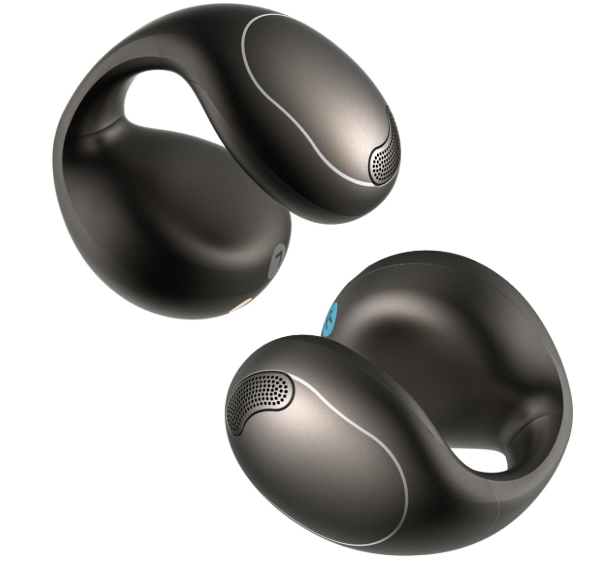
OVERVIEW
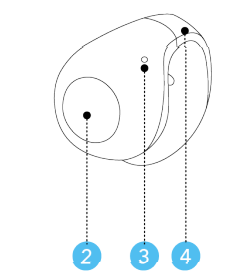
Front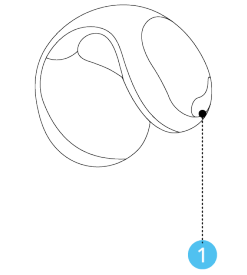
- Sound Outlet
- Intuitive Button
- Microphone
- C-Bridge

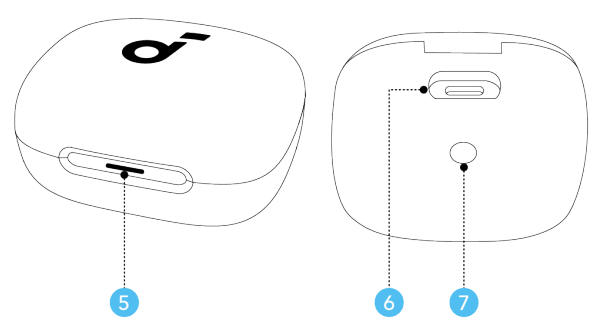
- LED Indicator
- USB-C Charging Port
- Charging Case Button

WEARING
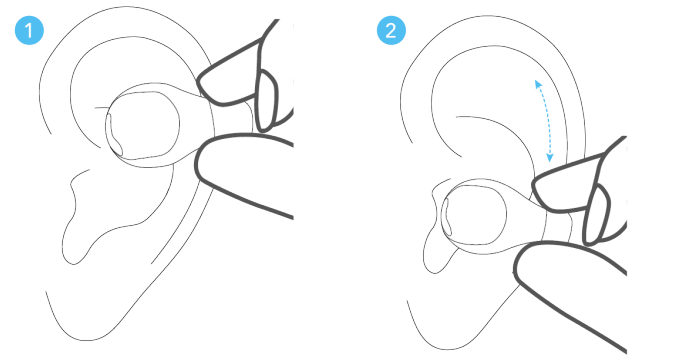
- Hold your ears with one hand, and gently clamp the earbuds onto the upper part of your auricles. Make sure the front side faces your ear canal, and the back side with the intuitive button rests behind your ear.
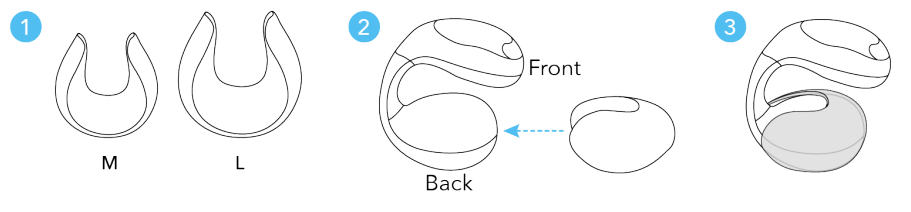
- Move the earbuds upwards or downwards until they fit securely, and you can hear the sound well. If the fit feels loose, you can choose between M and L size ear grips to enhance stability.
POWERING ON & PAIRING 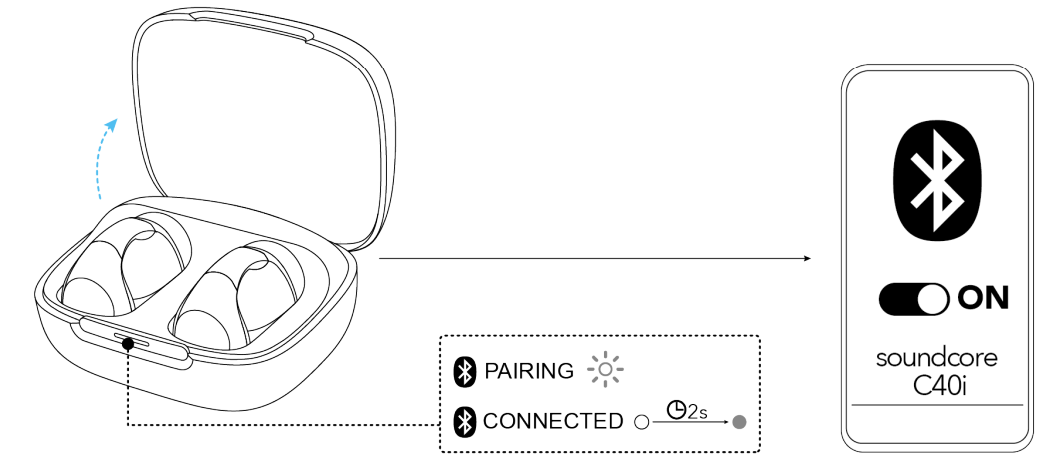
Open the case to power on the earbuds and enter pairing mode. Select Soundcore C40i” from your device’s Bluetooth list.
- When pairing, the LED indicator will start flashing white. After the pairing is successful, the LED indicator will stay on for 2 seconds and then go off.
MANUAL PAIRING
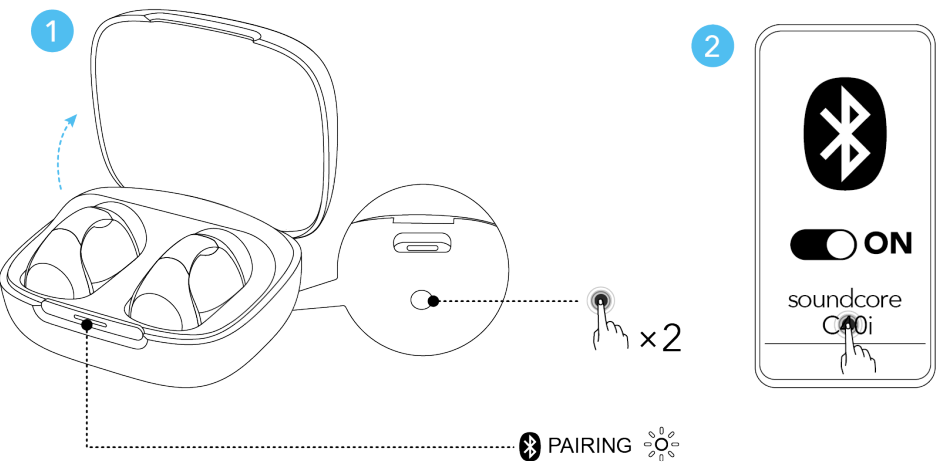
To manually enter Bluetooth pairing mode:
- Place the earbuds in the charging case and leave the case open. Double-press the charging case button until the LED indicator starts flashing white.
- Proceed to pair with your device.
CHARGING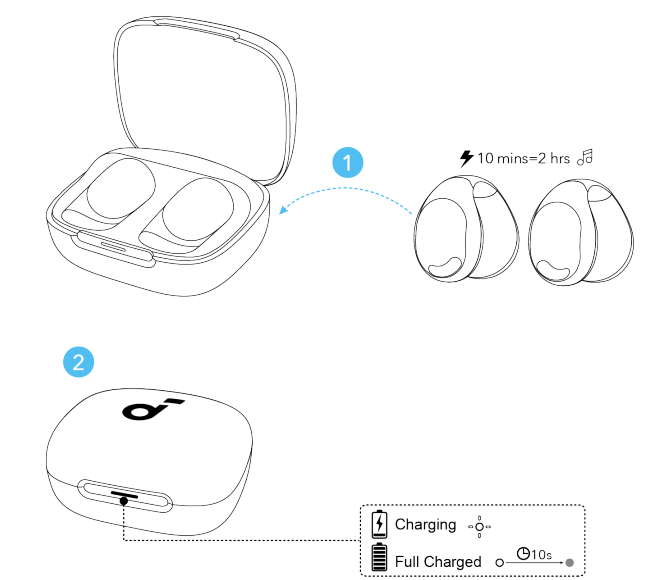
- Place the earbuds in the charging case and close it.
- Fully dry off the earbuds and the USB-C charging port before charging.
- Connect the charging case to a power supply by using the provided USB-C charging cable.
- 10 minutes of charging with the case offers 2 hours of playtime.
- Low Battery Indication: When the battery of the earbuds falls below 20%, the LED indicator will flash for 3 seconds once the earbuds are back in the case.
DUAL CONNECTIONS
To connect the earbuds with two Bluetooth devices at the same time, there are two methods:
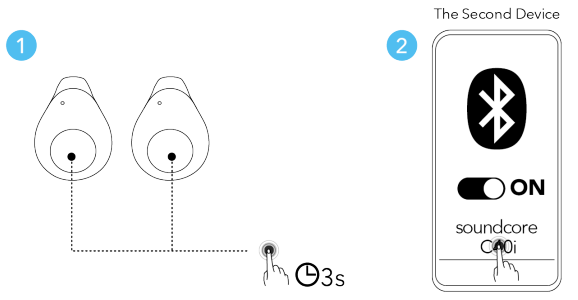
Method 1: Manual Pairing with the Second Device
While wearing the earbuds, press and hold the intuitive button on both earbuds for 3 seconds until you hear a voice prompt to enter pairing mode. Then you can proceed to pair with the second device. Please note that if you attempt to connect a third device, the earbuds will automatically disconnect from the first device, as the earbuds can only connect to a maximum of two devices simultaneously.
Method 2: Using the Soundcore App
In the Soundcore app, tap Dual Connections on the main interface, then proceed to Connect New Device.
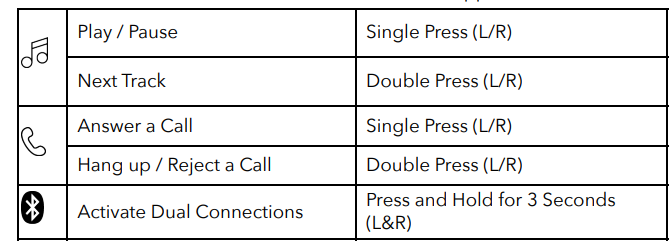
CONTROLS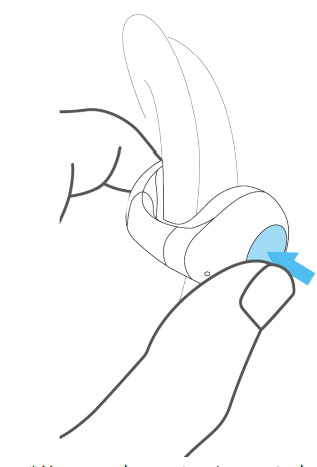
- You can also customise controls in the Soundcore app.
POWERING OFF 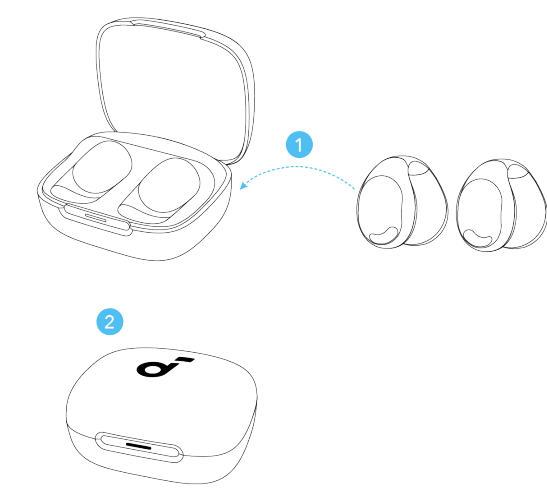
To power off, return the earbuds to the charging case and close the case.
RESET
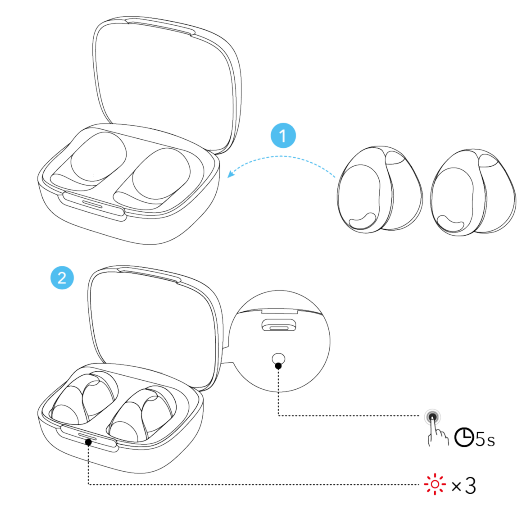
Place the earbuds in the charging case and leave the case open. Press and hold the charging case button for 5 seconds until the LED indicator flashes red slowly three times
FIRMWARE UPDATE
You will be informed once a new firmware version is detected when you connect the earbuds to the app. Ensure the earbuds are placed in the charging case, and the case remains open until the firmware update is complete. During the update, ensure the earbuds are being charged and avoid any usage.
SPECS
Specifications
are subject to change without notice.
| Input | 5V 0.5A |
| 0.28A (0.14A per port) | |
| Battery capacity | Earbud: 70mAh
Charging Case: 460mAh |
| Impedance | 22Ω± 15% at 1KHz, Input:0.148 V |
| Waterproof rating (earbuds) | IPX4 |
| Bluetooth version | 5.4 |
CUSTOMER SERVICE
- Call +1 (800) 988 7973 (US/Canada)
- Call +44 (0) 1604 936200 (UK)
| Variable ‘x’ | Range ofvariablese | Content |
| Eighth | 8,9, A, B, C… | Denotes the year, 8 means 2018, 9 means 2019, A means 2020, B means 2021, C means 2022, and so on. |
| Ninth and tenth | 01,02,03… | Denotes weeks, 01 means the first week in this year, 02 means the second week in this year, and so on. |
| Eleventh | 1-7 | Denotes date, 1 means Monday, 2 means Tuesday…, 7 means Sunday and so on. |
| The last five | 00001-99999 | Denotes serial No. |
Hereby, Anker Innovations Limited declares that this device complies with the Product Security and Telecommunications Infrastructure (Security Requirements for Relevant Connectable
FAQs
What kind of earbuds are the C40i?
The C40i are clip-on, open-ear earbuds that do not fit into your ear canal. Rather, they rest on the outer ear, allowing you to stay conscious of your surroundings and enjoy a breathable, “ear open” listening experience.
How’s the comfort and fit — will they stay secure during active use?
The C40i offers a stable yet comfortable fit with to its flexible memory titanium clip on frame and soft joint, which adjust to various ear shapes.
How is the sound quality — clarity, bass, music experience?
Surprisingly good for open ear earbuds: despite the earbuds’ inability to seal inside the ear, critics point out clear highs, wide mids, and solid bass.
Can I make calls and use them for meetings, outdoor errands, or commuting?
Indeed. Even in somewhat busy settings, the C40i’s dual microphones with AI-enhanced call clarity boost voice pickup.
What controls do they have — is it as convenient as touch earbuds?
For power, play/pause, track skip, volume up/down, and call management, they employ physical button controls (one per earbud) rather than touch.
How is the sound quality?
For open-ear designs, the earbuds provide good bass along with crisp mids and highs. They may not have the isolation and deep bass of in-ear earbuds, but the sound is well-balanced and enjoyable for calls, music, and podcasts. The listening experience can be improved by utilising the EQ and 3D sound features of the Soundcore app.
Can I use them for calls and meetings?
Indeed. The C40i’s twin microphones with AI-enhanced call clarity make them appropriate for online classrooms, video conferences, and phone conversations. Because of the open-ear design, background noise could still be audible.
How do they stay in place?
They employ a flexible memory-wire clip made of titanium that encircles the ear. They can be tailored to fit most ear shapes comfortably and securely thanks to adjustable ear grips.
6 Comments
I don’t think the title of your article matches the content lol. Just kidding, mainly because I had some doubts after reading the article.
Your point of view caught my eye and was very interesting. Thanks. I have a question for you.
Thank you for your sharing. I am worried that I lack creative ideas. It is your article that makes me full of hope. Thank you. But, I have a question, can you help me?
Your article helped me a lot, is there any more related content? Thanks! https://www.binance.com/register?ref=IXBIAFVY
Can you be more specific about the content of your article? After reading it, I still have some doubts. Hope you can help me. https://www.binance.com/en/register?ref=JHQQKNKN
I don’t think the title of your article matches the content lol. Just kidding, mainly because I had some doubts after reading the article.