

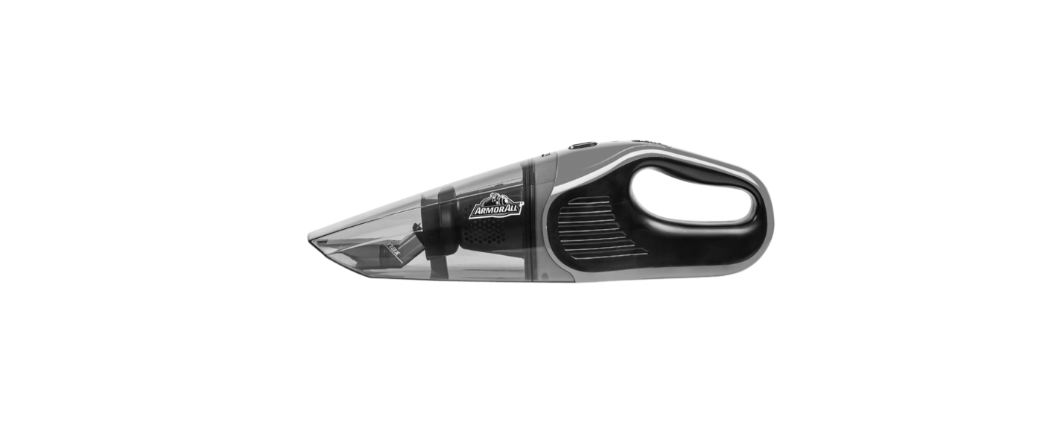

VacMaster AA07V1 7.4V Car Vacuum
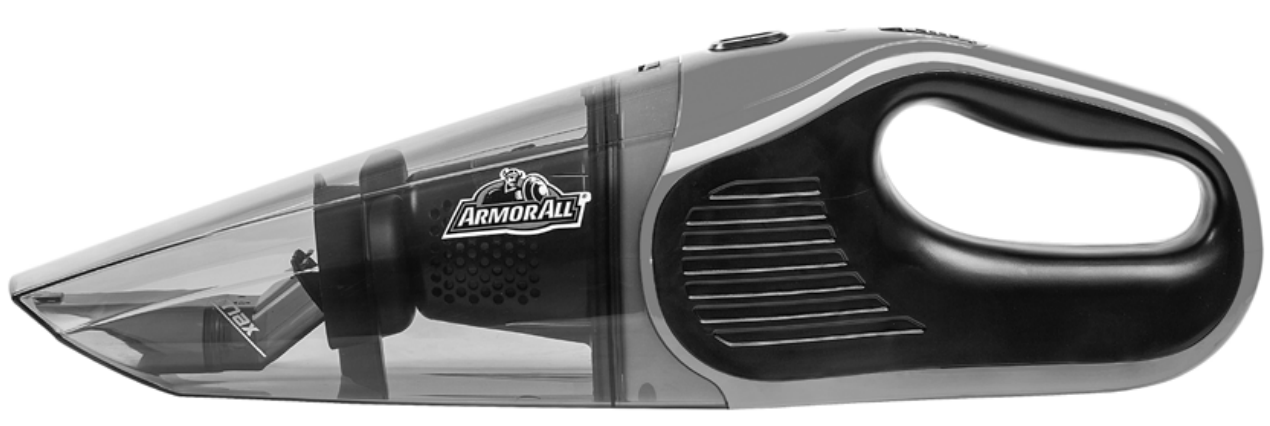
Safety Instructions
- Do not run the vacuum unattended.
- Do not use outdoors or on wet surfaces.
- To reduce the risk of health hazards from vapors or dust, do not vacuum toxic materials.
- Do not use or store near hazardous materials.
- Do not pick up anything that is burning or smoking, such as cigarettes, matches, or hot ashes.
- Do not pick up hard or sharp objects such as glass, nails, screws, coins, etc.
- Use only on dry, indoor surfaces.
- Do not expose to rain. Store indoors.
- Do not allow it to be used as a toy.
- Close attention is necessary when used by or near children.
- Do not put any object into openings.
- Keep hair, loose clothing, fingers, and all parts of the body away from openings and moving parts.
- Do not unplug by pulling on the cord. To unplug, grasp the plug, not the cord.
- Do not handle the vacuum, charger, charger plug, or charger terminal with wet hands.
- Do not expose a vacuum to fire or excessive temperature.
- Exposure to fire or temperature above 265°F (130°C) may cause an explosion.
- Have servicing performed by a qualified repair person using only identical replacement parts.
- This will ensure that the safety of the product is maintained.
- Do not modify or attempt to repair the vacuum except as indicated in the instructions for use and care.
- Use only as described in this manual. Use only the manufacturer’s recommended attachments.
- Use only with Listed/Certified ITE equipment/power supply or Class II power unit.
Unpacking & Content
Carton Contents List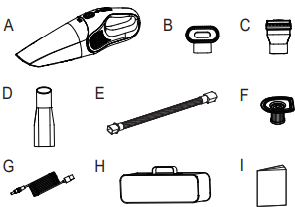
- Car Vacuum Assembly ……..….……..1
- Detail Brush ………….…..………………1
- Pet Hair Rake ….…………..…………..1
- Crevice Tool…..………………………….. 1
- Hose ………………………………………….1
- Reusable Washable Filter…..…………1
- Charging Cord ……………………………..1
- Storage Bag ………………………………..1
- Operator’s Manual ………………………..1
Components
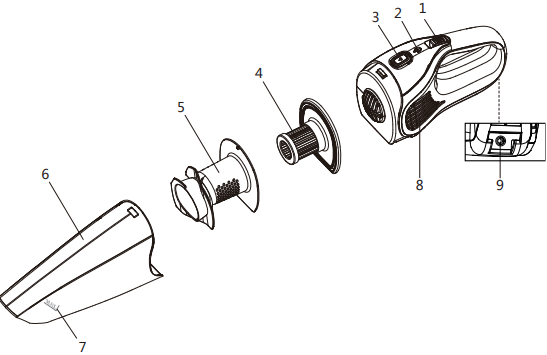
- On/Off Switch
- Charging Indicator
- Dust Cup Release Button
- Reusable Washable Filter
- Filter Holder
- Dust Cup
- Max Fill Line
- Vents
- Charging Port
Operation
CHARGING THE VACUUM 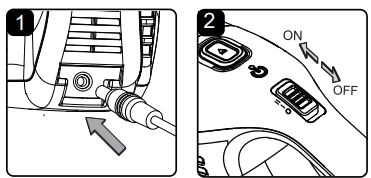
- Insert the charging cord into the charging port on the back of the vacuum
- Connect the USB adapter to a wall outlet.
- The charging indicator on the vacuum flashes red when charging.
- Remove the charging cord from the vacuum. Remove the charging adapter from the outlet.
Using the Vacuum
- Your vacuum comes ready for dry or wet vacuum cleaning.
- To power on the vacuum, slide the On/Off switch forward to the ‘I’ or ‘II’ position.
- Once turned on, the charging indicator lights up green.
- The vacuum has two-speed controls, ‘I’ and ‘II’.
- Change speed by sliding the On/Off switch between ‘I’andr ‘positions.
- To power off the vacuum, slide the On/Off switch back to the’ OFF position.
- The charging indicator goes out.
Dry Vacuuming
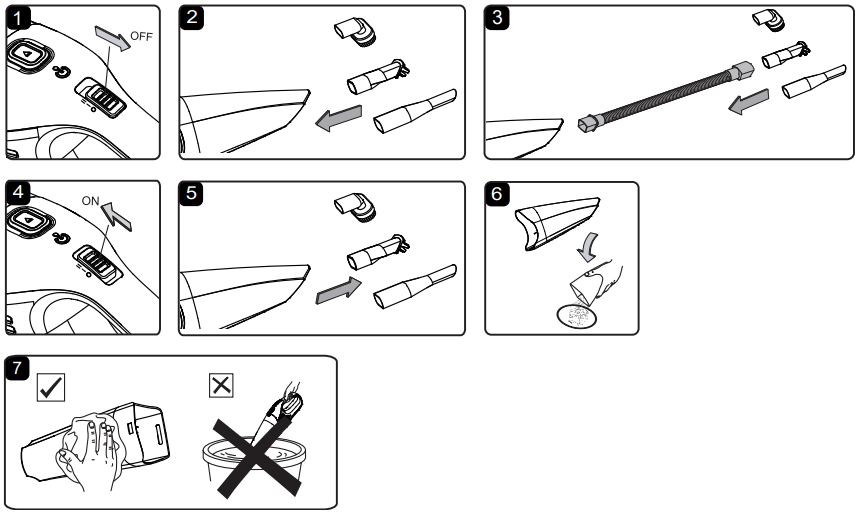
- Verify that the switch is in the ‘O’ OFF position.
- Insert the desired nozzle into the end of the dust cup until secured in place.
- Optional: For further vacuuming, attach the hose to the end of the dust cup.
- Then insert the nozzle into the end of the hose until secured in place.
- Turn the vacuum on by sliding the switch forward to the ‘I’ or ‘II’ position and begin vacuuming.
- After use, turn the vacuum off. Remove the accessory from the dust cup by pulling it out.
- Remove the dust cup by pressing down on the dust cup release button and pulling the dust cup away from the vacuum. Remove the reusable washable filter and the filter holder. Refer to pages 10-11 for removal instructions.
- Empty the dust cup, clean and dry the inside and outside before storage.
Wet Vacuuming
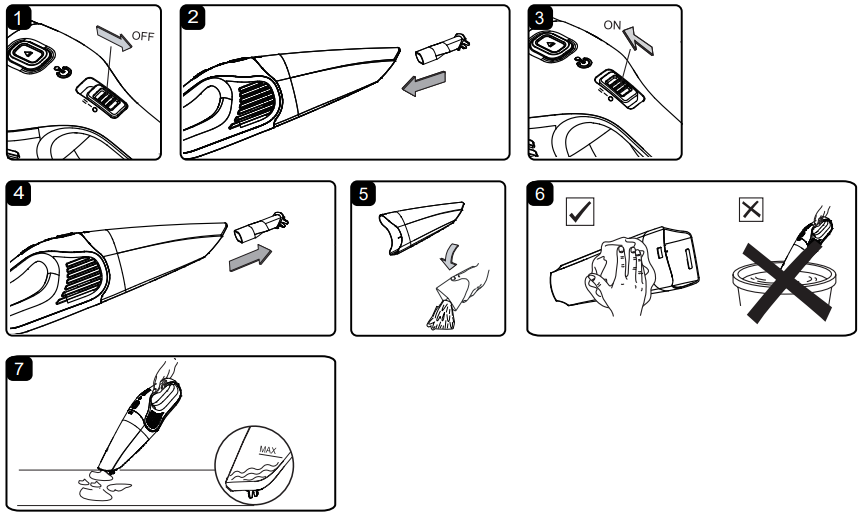
- Verify that the switch is in the ‘O’ OFF position.
- Insert the pet hair rake into the end of the dust VacMaster AA07V1 7.4V Car Vacuum cup until secured in place.
- Turn the vacuum on by sliding the switch forward to the ‘I’ or ‘II’ position and begin vacuuming.
- After use, turn the vacuum off. Remove the accessory from the dust cup by pulling it out.
- Remove the dust cup by pressing down on the dust cup release button and pulling the dust cup away from the vacuum.
- Remove the reusable washable filter and the filter holder.
- Refer to pages 10-11 for removal instructions.
- Empty the dust cup, clean and dry the inside and outside before storage.
Maintainance
CLEANING & REPLACING FILTER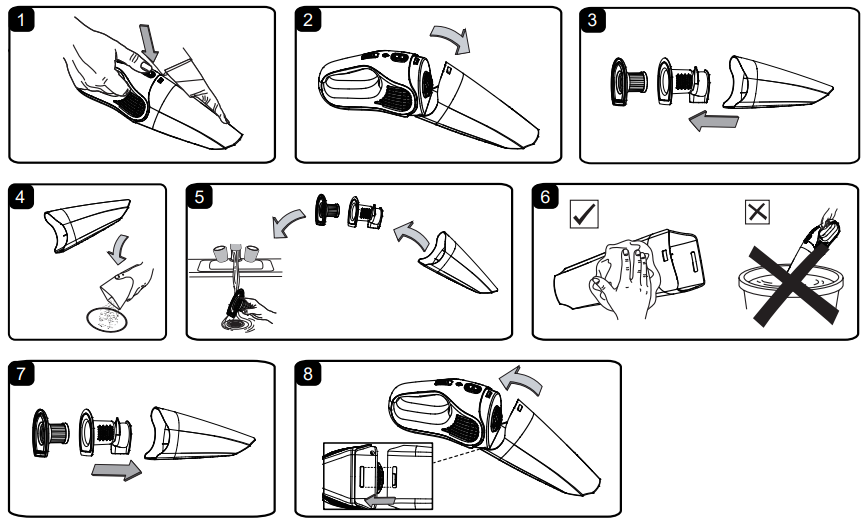
- Verify that the switch is in the ‘O’ OFF position.
- Press the dust cup release button and remove the dust cup.
- Remove the reusable washable filter and the VacMaster AA07V1 7.4V Car Vacuum filter holder from the dust cup, and then clean any loose dust off the filter with a soft-bristle brush.
- Empty all debris and any dust from the dust cup.
- Use a mild soap and water solution to wash the filter and rinse with clean water, air dry, and reinsert the filter once completely dry.
- Allow the wet filter to air dry for 24 hours before fitting it into the dust cup.
- Make sure the dust cup, the filter holder, and the reusable washable filter are clean and dry before using them again. DO NOT immerse the vacuum in water.
- Cleaning the vacuum housing using a damp cloth. Make sure no fluid enters the housing.
- Refit the filter holder and reusable washable filter into the dust cup. If required, replace with a new filter. Fit the new reusable washable filter into the dust cup.
- Refit the dust cup onto the vacuum. Make sure the dust cup clicks into place.
STORAGE
Before storage, empty the dust cup. Clean and dry the inside and outside of the dust cup. Place the vacuum in the storage bag. Store the vacuum indoors.
REPAIRS
Repairs for this car vacuum should be performed only by a qualified service person using only identical replacement parts.
Troubleshooting
| PROBLEM | POSSIBLE CAUSE | SOLUTION |
| The vacuum will not operate. | The battery pack is discharged. | Charge the vacuum. |
| The hand vacuum or battery is damaged. | Call customer service at 1-866-3848432 for assistance. | |
| Dust is being released through the vents. | The filter is missing or damaged. | Attach or replace the filter. |
| Reduced efficiency and motor/speed vibration. | There are blockages in the nozzle or the vacuum inlets. | Turn off the vacuum and check the nozzle and inlets for blockages. |
| The filter is clogged by fine dust. | Take off the filter and clean it, or install a new filter. | |
| The dust cup is full. | Empty the dust cup and clean the filter. | |
| The vacuum will not charge. | ||
| The charging cord is damaged. | Replace the charging cord. Call customer service at 1-866-384-8432 for assistance. | |
| Dust accumulated on the charging port of the vacuum. | Clean off any dust accumulated on the charging port of the vacuum. | |
| The charging indicator is damaged. | Call customer service at 1-866-3848432 for assistance. | |
| No power at the electrical outlet. | Check circuit breakers. Replace the charging adapter. | |
| The battery is damaged. | Call customer service at 1-866-3848432 for assistance. |
Customer Support
- Website: www.vacmasterfresh.com/product-registration/
- Visit: vacmasterfresh.com/contact-us/
- Tel: 1-866-384-8432.
FAQs
What is the VacMaster AA07V1 designed for?
A small, cordless handheld vacuum made especially for cleaning automobile interiors is the AA07V1. It’s perfect for quickly clearing small debris, pet hair, dust, and crumbs from confined areas.
Is the AA07V1 battery-powered or plug-in?
It runs on a 7.4V rechargeable lithium-ion battery, which provides cordless convenience for light cleaning jobs without sacrificing suction.
How long does the battery last on a full charge?
On a full charge, the Hoover may operate continuously for up to 15 to 20 minutes, depending on the surface type and cleaning mode.
How long does it take to fully charge the battery?
Usually, charging with the provided USB charging cord or converter takes three to four hours.
Is the filter reusable?
The HEPA-type filter is indeed reusable and washable. When clean, rinse with water only (no detergents), allow it to air dry completely, and then reinstall.
How do I know when it needs charging?
When it’s time to recharge, a low-battery indicator light may flicker or change colour. To extend the vacuum’s lifespan, always store it with the battery partially charged.