



VacMaster CC0101 Bagless Canister Vacuum Cleaner
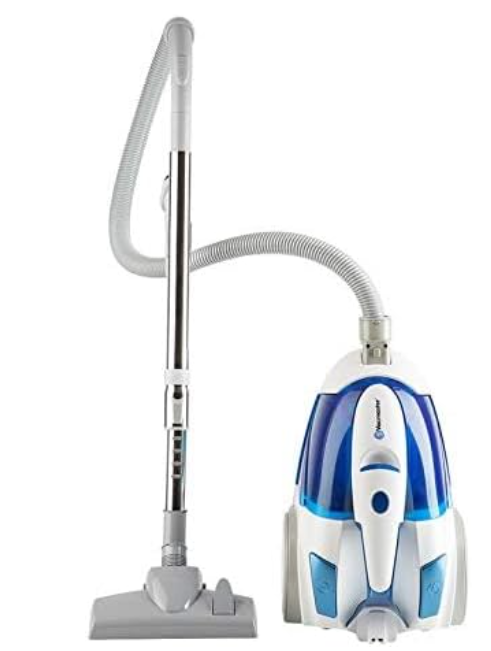
Safety Instructions
- Do not use outdoors or on wet surfaces.
- Do not allow it to be used as a toy.
- Close attention is necessary when used by or near children.
- Use only as described in this manual.
- Use only the manufacturer’s recommended attachments.
- Do not use with a damaged cord or plug.
- Do not run the appliance over the cord.
- Keep the cord away from heated surfaces.
- Do not unplug by pulling on the cord.
- To unplug, grasp the plug, not the cord.
- Do not handle the plug or the appliance with wet hands.
- Do not put any object into openings.
- Keep hair, loose clothing, fingers, and all parts of the body away from openings and moving parts.
- Turn off all controls before unplugging.
- Use extra care when cleaning on stairs.
- Do not pick up anything that is burning or smoking, such as cigarettes, matches, or hot ashes.
- Do not use without filters in place.
- Hold the plug when rewinding onto the cord reel. Do not allow the plug to whip when rewinding.
Technical Data
Bagless Canister Vacuum Cleaner
- Model: CC0101
- Rated Voltage: 120V AC
- Rated Frequency: 60Hz
- Nominal Current: 8.5A
Know Your Product
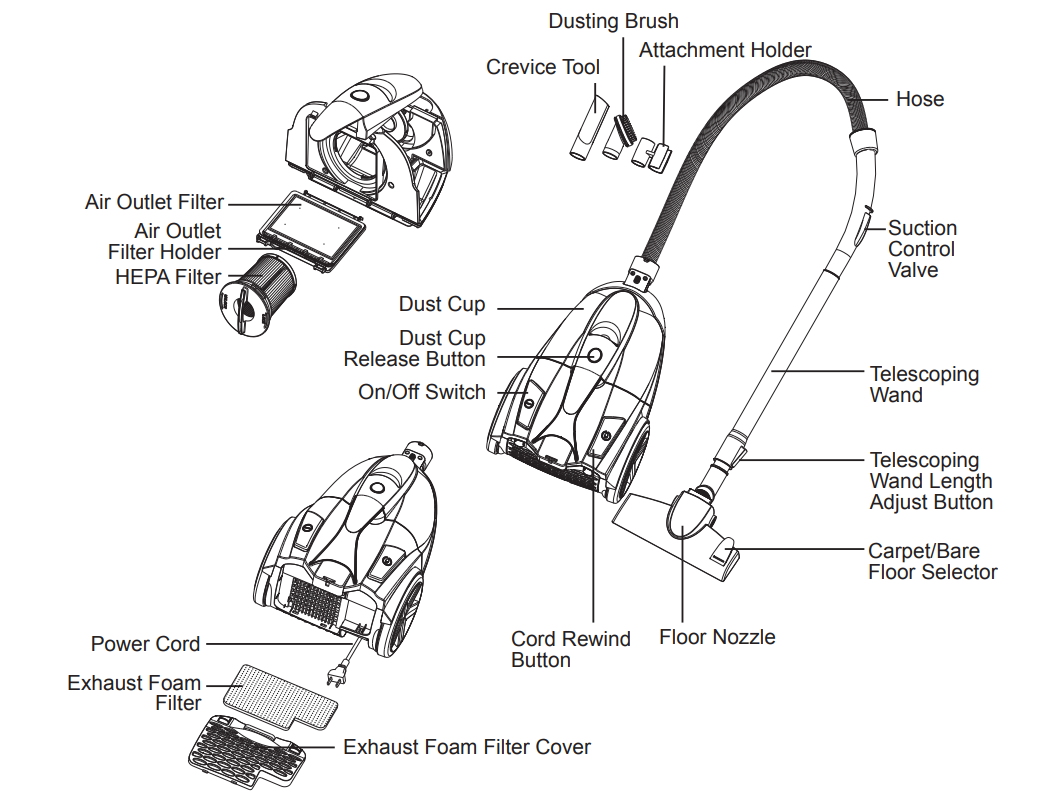
Replacement Parts

Assembly
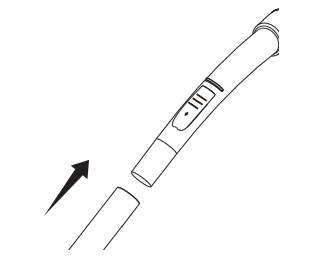
- Insert the hose into the canister with the hose release button upward until you hear a click.
- To remove, press the button on the hose stopper and pull out.

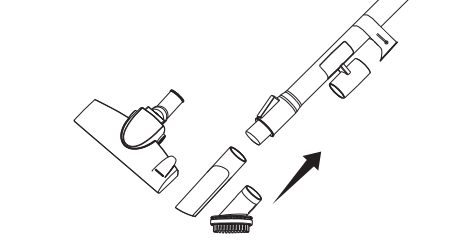
- Insert the telescoping wand into the handle and press it together tightly.
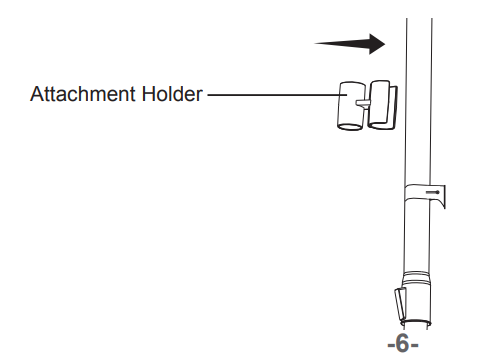
- Push and snap the attachment holder onto the wand.
- Insert the desired accessories into the wand and press them together tightly.
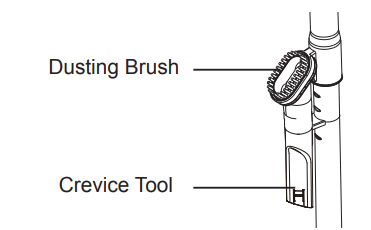
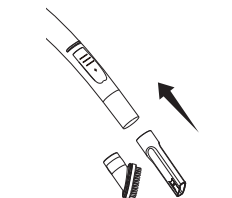
- This vacuum cleaner is equipped with onboard attachment storage. The dusting brush and crevice tool are stored in the attachment holder as shown.

Operation
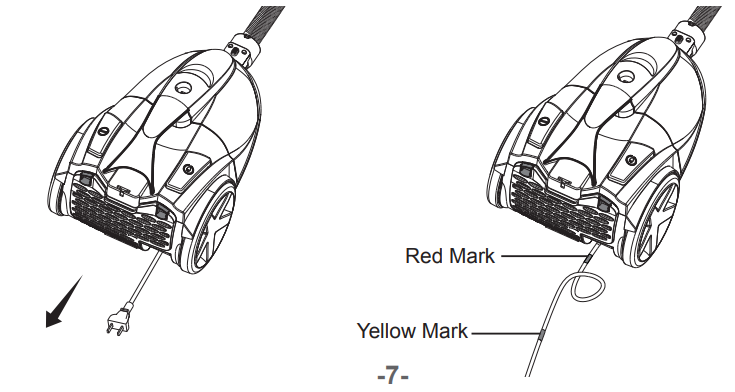
- Pull the cord out of the canister to the desired length.
- Plug the power cord into an outlet located near the floor.
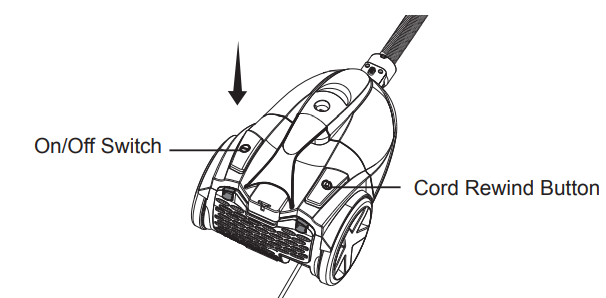
- Press the on/off switch to turn the vacuum on.
- Once you have completed vacuuming, press the on/off button to turn the vacuum off and unplug the power cord from the outlet. Then press the cord rewind button to rewind the power cord.

Using the Attachments
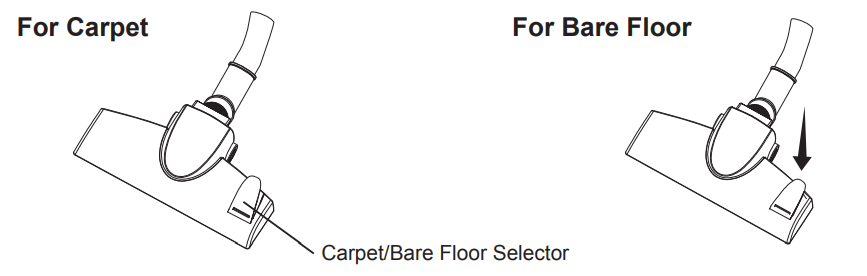
- Use the standard setting for carpet cleaning. Depress the carpet/bare floor selector to transition to bare floor cleaning.
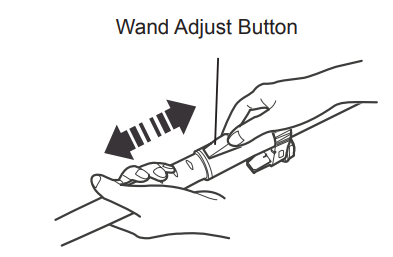
- Telescoping Wan:d Adjust the length of the wand to your desired height by pushing the slider adjust button.
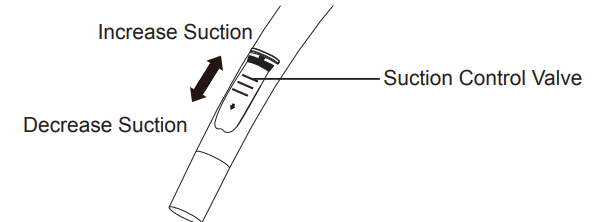
- Hose Slide the suction control valve to change the vacuum cleaner suction for different fabric and carpet weights. Opening the valve decreases suction for lightweight rugs. Closing the valve increases suction for upholstery and carpets.
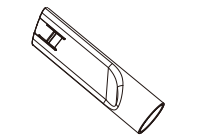
- Crevice Tool: For vacuuming edges and gaps.
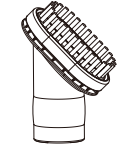
- Dusting Brush: For vacuuming fragile or easily scratched items, such as furniture
Storing Your Vacuum
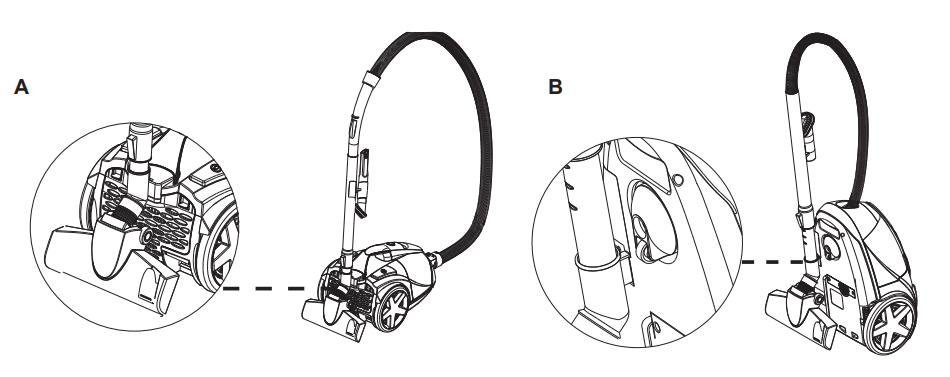
- This vacuum provides two ways of storage.
- The floor nozzle stores into the slot located on the back of the canister.
- With the floor nozzle attached, the telescoping wand stores in the slot located on the bottom of the canister.
- Store the tool and dusting brush in the attachment holder located on the telescoping wand.
- Press the cord rewind button to rewind the power cord.
- Store the vacuum cleaner in a dry, indoor area.
Maintaining Your Vacuum
Emptying the Dust Cup
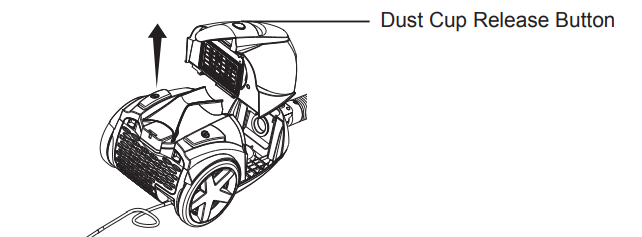
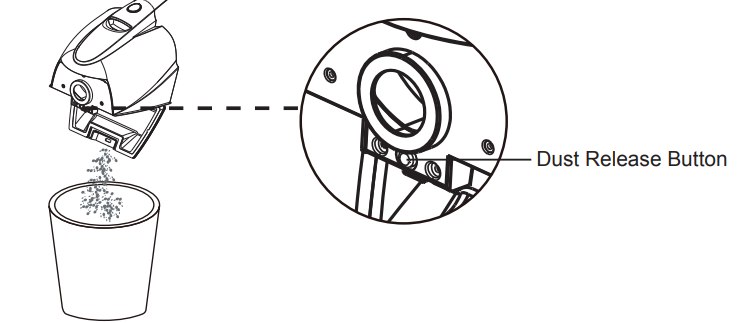
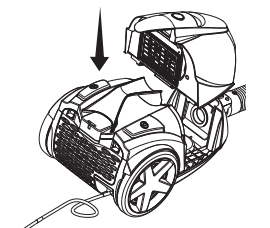
- Press the dust cup release button as shown to separate the dust cup & filters from the canister.
- Hold the handle and position the dust cup over a waste receptacle.
- Press the dust release button to open the dust cup lid and allow contents to drop into the waste receptacle.
- Reinstall and insert the dust cup into the main body until you hear a click.
Cleaning the Filter
- Press the dust cup release button as shown to separate the dust cup & filters from the canister.
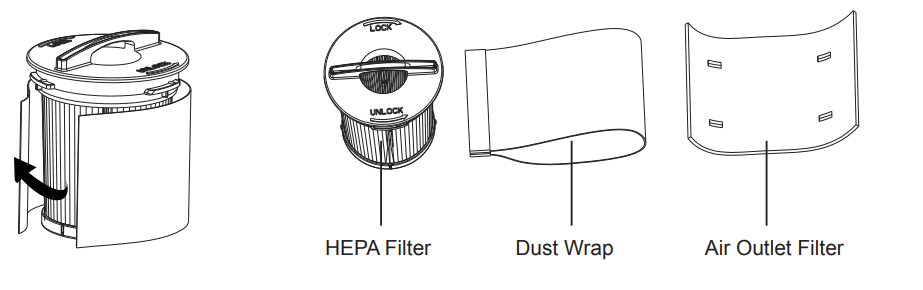
- Open the air outlet filter holder and separate the air outlet filter from the holder.
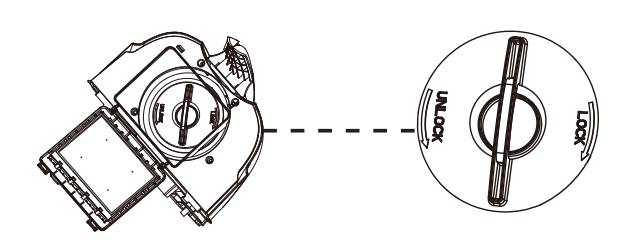
- Rotate the HEPA filter counterclockwise to unlock it from the canister for cleaning.
- Before cleaning, remove the dust wrap from the HEPA filter.
- Use a soft brush to remove loose debris from filters, then rinse with warm water.
- Rinse and gently squeeze to dry the filters. Set filters aside and allow them to air dry for 24 hours.
- Place the air outlet filter back onto the air VacMaster CC0101 Bagless Canister Vacuum Cleaner outlet filter holder. Then reinstall the HEPA filter with the dust wrap into the dust cup by rotating clockwise.
- Ensure the air outlet filter holder clicks into place, and then place the dust cup back into the canister.r


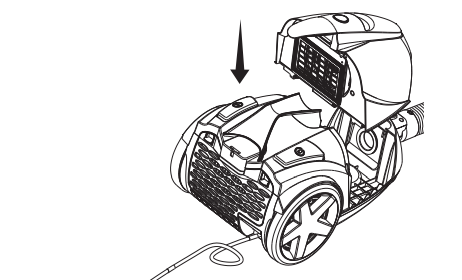
Clean the Exhaust Foam Filter
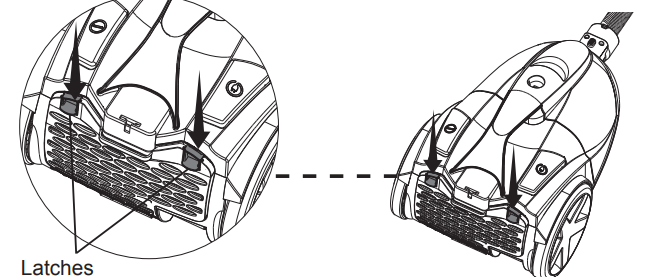
- Press the latches down to release the exhaust foam filter cover from the canister.
- Remove the exhaust foam filter from the canister. Use a soft brush to remove loose debris from filters, then rinse with warm water.
- Rinse and gently squeeze dry the foam filter. Set both filters aside and allow them to air dry for 24 hours.
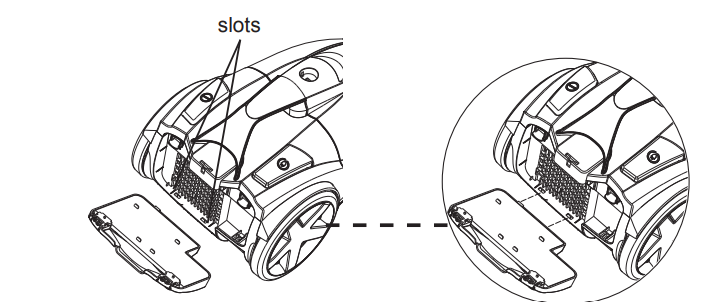
- Reinstall the exhaust foam filter cover by VacMaster CC0101 Bagless Canister Vacuum Cleaner inserting the two tabs on the cover into the slots at the bottom of the canister.
- Then press the cover into place and ensure the release latches snap into place until you hear a click.
Checking and Removing Clogs
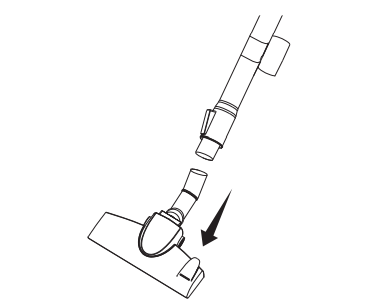
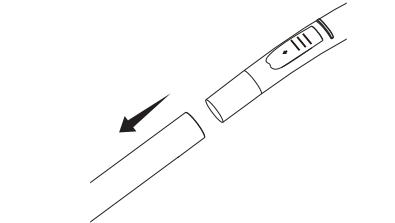
- Turn off the vacuum cleaner. Separate the floor nozzle from the telescoping wand.
- Separate the hose from the telescoping wand and turn the vacuum cleaner on.
- Check the end of the hose for suction.
- If there is good suction on the hose handle, there is no clog in the hose.
- If the suction is low, remove any dirt or debris from the hose and handle.
- Check the wand and remove any dirt or debris in the wand.
- Check the floor nozzle swivel and inlet VacMaster CC0101 Bagless Canister Vacuum Cleaner port. Remove any dirt or debris.
Troubleshooting
Should you have any problem(s) with your vacuum cleaner, review the table below for solutions to minor performance issues.
| PROBLEM | POSSIBLE CAUSE | SOLUTION | ||||
| The vacuum will not power on. | The plug is not plugged into the wall outlet. | Be sure the power cord plug is fully plugged into the outlet. | ||||
| The vacuum is not turned on. | Press the on/off switch to turn the vacuum on. | |||||
| The vacuum body is overheated. | Unplug the power cord and let the vacuum cool down for 50 minutes. | |||||
| The vacuum is damaged. | Call (866) 384-8432 for assistance. | |||||
| The job of dirt pick-up is poor, or the suction power is weak. | The dust cup is full. | Empty dust cup. Follow instructions on page 11. | ||||
| Filters need cleaning. | Follow filter cleaning instructions on page 12. | |||||
| Filters need to be replaced. | Purchase online at www.vacmaster.com or call (866) 384-8432. | |||||
| There is a clog in the vacuum. | Check the nozzle, telescoping wand, hose, and dust cup for clogs and remove them accordingly. | |||||
| The hose is damaged. | Purchase online at www.vacmaster.com or call (866) 384-8432. | |||||
| The vacuum is damaged. | Call (866) 384-8432 for assistance. | |||||
| Dust escapes from the vacuum. | The filter is missing or installed incorrectly. | Check the filter for correct installation. | ||||
| The filter is damaged and needs to be replaced. | Purchase online at www.vacmaster.com or call (866) 384-8432. | |||||
| The cord won’t rewind | The power cord is dirty | Clean the power cord. | ||||
| The power cord is jammed. | Pull out the power cord and rewind it. | |||||
| The cord rewind is damaged. | Call (866) 384-8432 for assistance. | |||||
Customer Support
- Website: www.vacmasterfresh.com/product-registration/
- Visit: vacmasterfresh.com/contact-us/
- Tel: 1-866-384-8432.
FAQs
What type of vacuum is the VacMaster CC0101?
A bagless canister vacuum cleaner made for regular household cleaning is the CC0101. Its lightweight, portable design and strong suction make it perfect for cleaning upholstery, carpets, hard floors, and stairs.
Is the VacMaster CC0101 suitable for both carpets and hard floors?
Indeed! For various surfaces, change the suction or brush settings as necessary.
Is the vacuum suitable for pet hair?
Indeed! It effectively removes pet hair from carpets, rugs, and upholstery thanks to its powerful suction and accompanying attachments (such as the pet or turbo brush, if available).
How long is the power cord, and does it have auto-rewind?
To automatically retract the cord after use, press the foot pedal.
Is it easy to move around the house?
Of course. The CC0101 is a lightweight canister that is easy to move between rooms and around furniture thanks to its 360° swivel hose and smooth-rolling wheels.
Can I vacuum liquids with this machine?
Unfortunately, the CC0101 is only a dry-use hoover. To avoid damaging the motor and voiding the guarantee, do not use it to hoover water, wet debris, or damp surfaces.
1 Comment
Pingback: VacMaster VFB511B Wet and Dry Vacuum | Full User Manual