



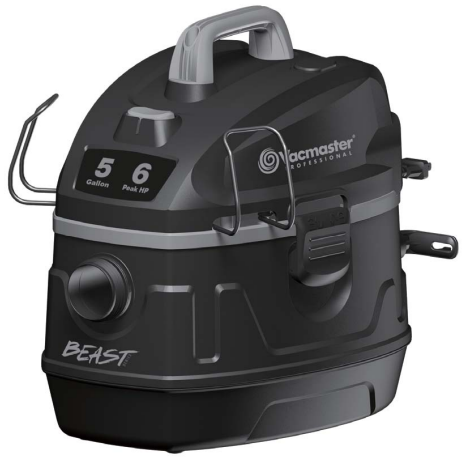
VacMaster VFB511B Wet And Dry Vacuum
Safety Instructions
- Do not run the vacuum unattended.
- Do not vacuum anything that is burning or smoking, such as cigarettes, matches, or hot ashes.
- Keep the cord away from heated surfaces.
- Do not expose to rain. Store indoors.
- Do not unplug by pulling on the cord. To unplug, grasp the plug, not the cord.
- Do not use with a damaged cord, plug, or other parts.
- Do not run the Wet/Dry Vac over the cord.
- Do not handle the plug or the Wet/Dry Vac with wet hands.
- Do not use or store near hazardous materials.
- Do not allow it to be used as a toy. Close attention is necessary when used by or near children.
- Turn off the Wet/Dry Vac before unplugging.
- Keep free of dust, lint, hair, or anything that may reduce air flow.
- Keep hair, loose clothing, fingers, and all parts of the body away from openings and moving parts.
- To reduce the risk of falls, use extra care when cleaning on stairs.
Double Insulation
This Wet/Dry Vac is double-insulated, eliminating the need for a separate grounding system. Use only identical replacement parts. Read the instructions for Servicing Double-Insulated Wet/Dry Vacs before servicing. Use this Wet/Dry Vac as described in this manual. Observe the following warnings that appear on the motor housing of your Wet/Dry Vac.
Extension Cords
When using an extension cord with your Wet/Dry Vac, refer to the following table to determine the required
A.W.G. wire size. Before using the cleaner, make sure the power cord and extension cord are in good working
condition. Make repairs or replacements before using the vacuum cleaner. Only use extension cords that
are rated for outdoor use.
| Length of Extension Cord | ||||
| 110V-120V | 25 Feet 7.5 Meters | 50 Feet 15.25 Meters | 100 Feet 30.5 Meters | 150 Feet 45.7 Meters |
| Amps | A.W.G Wire Size | |||
| 0-6 | 18 | 16 | 16 | 14 |
| 7-10 | 18 | 16 | 14 | 12 |
| 11-12 | 16 | 16 | 14 | 12 |
| 13-16 | 14 | 12 | Not recommended | |
Unpacking & Content
Remove the entire contents of the carton. Check each item against the carton contents list.
Carton contents lists

- Vac Assembly
- Hose
- Utility Nozzle
- Caster Foot W/Accessory Storage..
- Caster
- 4 Screws (Bag)
- Foam Sleeve Filter
- Extension Wand
- Car Nozzle
- Concentrator Nozzle
- Crevice Tool
- Cartridge Filter
- Filter Retainer
- Adaptor
- Diffuser
- Operator’s Manual
Overview
The hose and accessories for this vacuum are 2.5 inches in diameter.

Assembly Instructions

- Verify that the power cord is disconnected from the outlet.
- Undo the latches.
- Lift the power head off the container.
- Remove the contents from inside the container, make sure you have all contents as listed on page 5.
- For wet vacuum cleaning, install the supplied foam filter.
- Place the power head back on the container, aligning the top section with the latches, and snap it into place. Keep in mind to position the power head so that the blower port is towards the rear.
- Insert the locking end of the hose into the port of the container and lock it in place.
- Choose the desired wands or accessories and push them onto the hose.
- Turn the container upside down and insert the four caster feet into the slots on the container and tighten with the supplied screws.
- Your vacuum comes ready for dry vacuum cleaning. If the cartridge filter is not installed, refer to page 10 for filter installation.
Noise Diffuser

For quiet operation during vacuuming, install the noise diffuser into the blower port by inserting the locking end of the diffuser into the blower port and turning clockwise to lock into place.
Polarized Plug
To reduce the risk of electrical shock, this appliance has a polarized plug (one with the blade wider than the other). This plug will fit in a polarized outlet only one way. If the plug does not fit fully in the outlet, reverse the plug. If it still does not fit, contact a qualified electrician to install the proper outlet. Do not change the plugin anyway. Double insulation eliminates the need for the three-wire grounded power cord and grounded power supply system.
Operation

- Verify that the power cord is disconnected from the outlet.
- In order to prepare your vacuum for dry vacuuming, verify that the cartridge filter is securely mounted. Make sure the filter is pushed in until it stops against the power head.
- Place the filter retainer on top of the cartridge filter and tighten it down by turning the retainer handle clockwise.
- Place the power head back on the container, aligning the top section with the latches, and snap it into place.
- Insert the locking end of the hose into the vacuum port on the front of the tank and lock it in place. Push the required attachment onto the free end of the hose or extension.
- Plug in the power cord into the outlet.
- Turn the motor on by flipping the switch to the ‘I’ ON position.
- Once you have completed vacuuming, flip the switch to the ‘O OFF’ position and unplug the power cord from the outlet.

Liquid Vaccum Operation

- Verify that the power cord is disconnected from the outlet. (fig. 1) Verify that the container is clean and free of dust and dirt.
- Remove the cartridge filter, then carefully install the foam sleeve filter over the filter cage and place the power head back on the container.
- Fit the desired nozzle to the vacuum hose.
- Verify that the switch is in the ‘O’ OFF position before plugging the power cord into the outlet.
- Turn the motor on by flipping the switch to the ‘I’ ON position.
- After use, empty the container by unscrewing the drain cap. Drain liquids into a suitable receptacle or drain. Remember to refit the drain cap to the container after draining the container.
Blowing

- Verify that the power cord is disconnected from the outlet.
- Remove the noise diffuser from the blower port.
- While squeezing the locking lever, lift the detachable blower from the vacuum lid.
- Insert the adaptor into the blowing port and fit the desired extension wands and or nozzles.
- Ensure the power switch is turned off and plug it into the power supply.
- Firmly hold the blower before turning it VacMaster VBV1210 Wet Dry Vacuum Cleaner on. Turn the motor on by flipping the switch to the ‘I’ ON position.
Maintainance

- Verify that the power cord is disconnected from the outlet. (fig.1)
- Disconnect the hose from the unit. (fig. 2)
- Undo the latches and remove the power head from the container. (fig. 3)
- Clear all dirt or debris from the container and hose. (fig. 4)
- Clean the foam filter by washing it with water and mild soap. (fig. 5)
- Check the hose, attachments, and power cord to verify that they have not been damaged.
Blower Intake
After using the blower, examine the bottom of the blower for debris and blockages and remove them if found. To clean the foam pad of the intake:

- Verify that the power cord is disconnected from the outlet.
- Remove the four screws holding the intake shield and lift off the shield.
- Remove the foam pad from the blower and clean the foam pad with soapy water, and allow it to dry.
- Check the foam pad for reuse. If you need to replace the foam pad, consult the parts list in the manual.
- Replace the foam pad on the blower, aligning the wholes to the screw tabs.
- Reinstall the intake shield and the four screws.
Cleaning Filter

- Verify that the power cord is disconnected from the outlet.
- Remove the ID and the power head and VacMaster VBV1210 Wet Dry Vacuum Cleaner place it upside down.
- Install the cartridge filter over the filter cage with the flat end of the filter towards the vacuum lid.
Carefully push the filter in until it stops against the lid. - Place the filter retainer on top of the cartridge filter over the raised lip and tighten down by turning the retainer clockwise; do not over-tighten.
Removing the Filter
- Unlock and remove the filter retainer by turning the retainer handle counterclockwise.
- Carefully hold and pull the cartridge filter up for removal.
- Clean the cartridge filter by gently tapping or brushing dirt off.
- Cleaning should not be done indoors in living areas. For optimal performance, a new filter is recommended.
- Install a cleaned or new filter in place as instructed above in steps 2 and 3 of Installing Cartridge Filter.
- Wet filters should be removed and allowed to air dry for 24 hours before installing them into the filter cage.
Foam Filter

- Verify that the power cord is disconnected from the outlet.
- Remove the overhead and place it upside down. Follow instructions to remove the cloth filter.
- Carefully slide the foam sleeve filter VacMaster VBV1210 Wet Dry Vacuum Cleaner down over the filter cage, making sure the whole cage is covered.
- Replace the power head on the toe container.
Cleaning Foam Sleeve Filter
- With the removed power head in the upside-down position, carefully remove the foam sleeve filter.
- Use a mild soap and water solution to wash the foam sleeve filter and rinse with clean water.
- Allow the filter to air dry before installing and using it again.
Troubleshooting
| Symptom | Possible Causes | Corrective Action |
| The vacuum will not operate | No power supply. | Check power supply – cord, breakers, fuses. |
| Faulty power cord. | Unplug and check the power cord. If damaged, have it repaired by a professional. | |
| The container is full. | Empty container. | |
| Dust comes out from the motor cover. | The cartridge filter is missing or damaged. | Attach or replace the cartridge filter. |
| Reduced efficiency and motor/speed vibration. | There is a blockage in the nozzle, hose, or container inlet. | Check nozzle, hose, and container inlets for blockage. |
Customer Support
- Website: www.vacmasterfresh.com/product-registration/
- Visit: vacmasterfresh.com/contact-us/
- Tel: 1-866-384-8432.
FAQs
Q: Do I need to change filters when switching between wet and dry cleaning?
True. Utilise the dust bag or cartridge filter (if included) to remove dry debris.
When vacuuming liquids, remove the dust bag and cartridge filter and install the foam filter. When reinstalling filters for dry use, make sure they are completely dry. For more details on filter types and bagless vacuum maintenance, you can also check the VacMaster CC0101 Bagless Canister Vacuum User Manual for guidance on a different VacMaster model.
Q: Can I use this vacuum as a blower?
This is great for removing leaves, dusting outdoor spaces, or inflating particular goods.
Q: How do I properly drain liquids from the tank?
Unplug and turn off the Hoover. Use the drain port (if available) or carefully tilt the tank to release the liquid after removing the power head. After wet use, always clean and dry the tank to avoid mould growth or smells.
Q: What is the tank capacity of this model?
The VacMaster VFB511B features a 5-gallon (approximately 19-liter) tank capacity, allowing for extended cleaning sessions before needing to empty the container.
Q: Is it safe to use the VacMaster outdoors?
Yes, you may use it outside to clean garages, automobiles, and patios. However, when working outside, make sure the electrical parts and plug remain dry and steer clear of standing water.
Q: What should I do if the motor overheats or shuts off unexpectedly?
If the unit overheats, switch it off immediately and unplug it. Check for clogs or a full tank. Allow the motor to cool down for at least 30 minutes before restarting. Persistent overheating may signal the need for filter cleaning or service.