

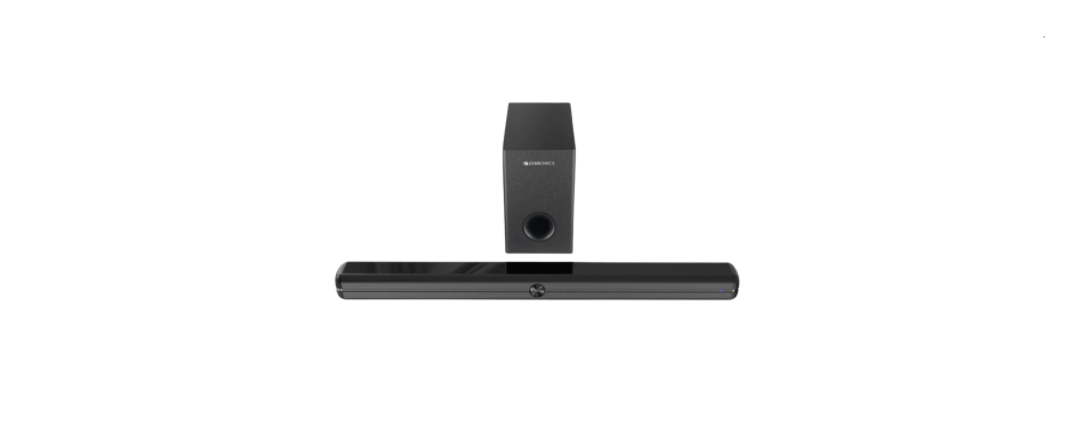

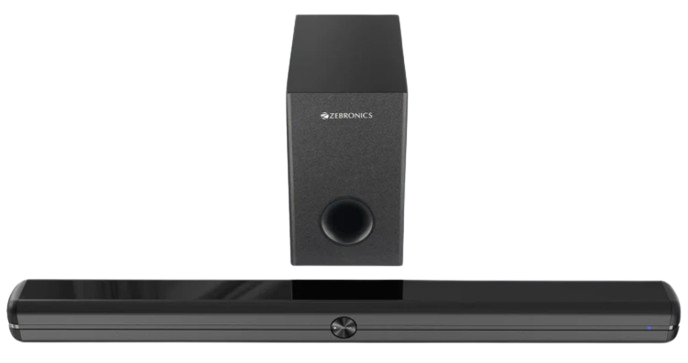
Zebronics 3920 Zeb-Juke Bar Soundbar
Safety Instructions
- To prevent possible hearing damage, do not listen at high volume levels for long time periods or at a sudden high volume level.
- Never use the device unsupervised! Switch off the device whenever you are not using it, even if not using it for only a short while.
- The appliance is not intended to be operated by means of an external timer or separate remote control system.
- If the supply cord is damaged, it must be replaced by the manufacturer, its service agent, or similarly qualified persons in order to avoid a hazard.
- Before operating this system, check the voltage of this system to see if it is identical to the voltage of your local power supply.
- The unit should not be impeded by covering the ventilation opening with items such as newspapers, tablecloths, curtains, etc. Make sure that therisre at least 20 cm of space above and at least 5 cm of space on each side of the unit.
- The apparatus must not be exposed to dripping or splashing liquids; no objects filled with liquids, such as vases, should be placed on the apparatus.
- To prevent fire or shock hazard, do not expose this equipment to direct heat, rain, moisture, or dust.
- Do not position this unit near any water sources, e.g,. Taps, bathtubs, washing machines, or swimming pools. Ensure that you place the unit on a dry, stable surface.
- Do not place this unit close to a strong magnetic field.
- Do not place the unit on an amplifier or receiver.
- Do not place this unit in a damp area, as the moisture will affect the life of the electronic components.
Features
- Multi Connectivity (BT v5.1/TV (ARC)/USB/AUX)
- 13.33 cm Subwoofer
- r LED Indicator
- Volume/Media Control
- Compact Sound Bar with Dual Drivers
- Wall Mountable
- Glossy Finish
- Remote control
Prepration
Unpacking and Set Up
- Remove the Soundbar from the carton and remove all packing material from the Soundbar. Save the packing material, if possible, in case the Soundbar ever needs to be serviced or transported. The original carton and packing materials are the only safe way to pack your Soundbar to protect it from damage in transit. Remove any descriptive labels or stickers on the front or top of the device’s exterior casing.
- Do not remove any labels or stickers from the back or bottom of the device’s exterior casing. Place your Soundbar on a level surface such as a table, desk, or shelf, convenient to an AC outlet, out of direct sunlight, and away from sources of excess heat, dirt, dust, moisture, humidity, or vibration. Unwind the Line cord connecting the DC adapter and extend it to its full length.
Protect Your Furniture
- This model is equipped with non-skid rubber ‘feet’ to prevent the product from moving when you operate the controls. These ‘feet’ are made from non-migrating rubber material specially formulated to avoid leaving any marks or stains on your furniture.
- However, certain types of oil-based furniture polishes, wood preservatives, or cleaning sprays may cause the rubber ‘feet’ to soften, and leave marks or a rubber residue on the furniture.
- To prevent any damage to your furniture, we strongly recommend that you purchase small self-adhesive felt pads, available at hardware stores and home improvement centers everywhere, and apply these pads to the bottom of the rubber ‘feet’ before you place the unit.
Representation
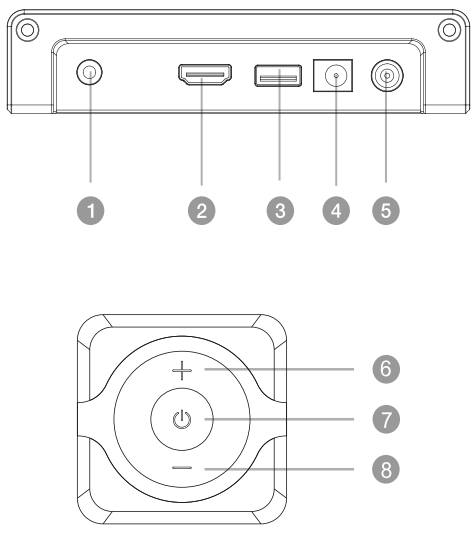
- AUX
- HDMI(ARC)
- USB
- DC IN
- SW OUT
- POWER
- VOLUME+
- VOLUME-
Remote Control
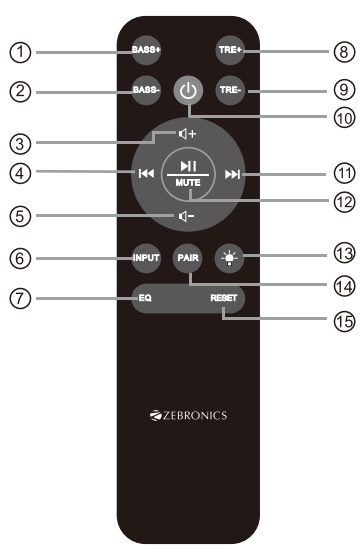
- Bass +
- Bass –
- 4: Master volume up
- 14: Previous program (Only works under USB & BT Mode).
- 4-: Master volume down
- INPUT : Input mode (AUX / USB / TV (ARC) / BT).
- EQ: MUSIC / MOVIE / NEWS / 3D
- TR+: Treble volume up.
- TR- Treble volume down.
- U: Standby mode for power on/o.
- * Next button: Next program. (Only works in USB and BT mode).
- Ml: Play/Pause (Only works under USB and BT mode). MUTE: Mute mode.
- @: Press to turn off the indicator. When there is no indicator, press to light up the indicator.
- PAIR: Connect or disconnect to the pairing device. (Press the button for more than 2 seconds).
- Press and hold the button for more than 2 seconds to set all functions to manufacturer defaults.
Postioning
Table Placement
Place the soundbar horizontally on a solid surface such as a TV unit or shelves, and align it centrally with the TV screen. For the best sound output and good airflow around the soundbar, place your soundbar and subwoofer as shown on the right.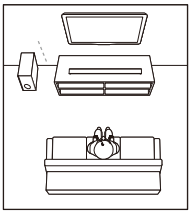
Mount on the wall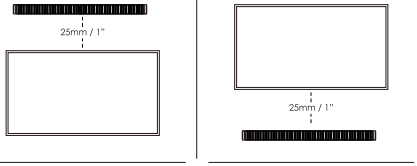
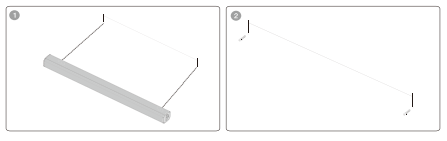
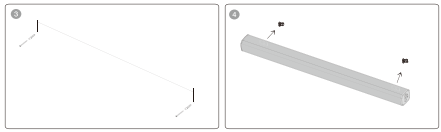
Follow the steps below to mount the sound bar on the wall
- Make 2 holes in the wall with a distance the same as the wall bracket on the soundbar
- Put the plastic anchors onto the wall and secure the screws to the plastic clip. Do not tighten the screws all the way; make sure to leave some space
- Attached the 2 EVA pads to the wall mount bracket. This will make sure that there is enough space between the wall and the soundbar outlet, a minimum of 15mm
- Once the screws are securely fastened, hang the sound bar by inserting the screws into the wall mount bracket
Operation
LED Indicators LED
Indicators on the soundbar appear below according to the input mode selected.
- Blue: BT Mode
- Pink: USB Mode
- Green: AUX Mode
- Cyan: TV(ARC) Mode
Powering On/Off
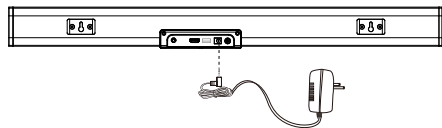
- Plug the sound bar adapter into a wall outlet. It will automatically enter standby mode.
- Short-press the power/standby button either in the soundbar or the remote control to turn on the soundbar.
- To turn off, press either the STANDBY button on the remote control or the soundbar or unplug from the wall outlet.
Use
Playing Audio via BT Connection
- Use the “Input” button on the remote to activate BT mode. A Blue LED indicator will indicate that BT mode has been selected.
- Activate the pairing function on your phone or other compatible device and select “ZEB-JUKE BAR 3920”
- When successfully paired, you will hear a tone, and the LED indicator will stay on.
- The remote control includes BT mode playback controls
Notes
- If your pairing device switches off or is manually disconnected, the sound bar will automatically enter pairing mode.
- If the connected device is switched off or manually disconnected, the sound bar will automatically enter pairing successfully connected device wwill Once you re-enter the wireless range (10 meters).
- To connect to other devices, repeat the above pairing steps.

Playing Audio via USB Port
- Ensure that your USB flash drive contains an MP3 audio file (other file types are not supported).
- Connect the USB flash drive to the USB port on the soundbar or by USB adapter (or your own USB extension cable connected to the USB port), and the music will be played automatically. 3. The remote control includes USB input mode playback controls.
Audio Input (Aux) Connection
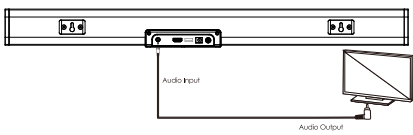
- First, connect the soundbar to your PC, laptopsmartphonene, TV, or other audio devices by using the AUX cable provided. Make sure that these devices have both AUX IN and AUX out terminals.
- Then press the INPUT button on the remote Zebronics 3920 Zeb-Juke Bar Soundbar control to switch the soundbar to Aux mode, indicated by the Green LED. And the music on your connected device will play.
TV (ARC) Mode
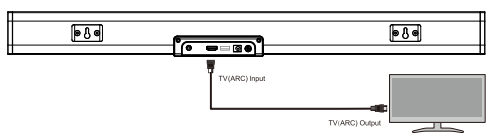
- The soundbar supports TVARC. With an audio Zebronics 3920 Zeb-Juke Bar Soundbar return channel (ARC). You can hear the TV audio through your soundbar by using a single TVARC. Cable. But on condition that your TV is ARC compliant.
- Using a high-speed TV(ARC) cable, connect the Zebronics 3920 Zeb-Juke Bar Soundbar TV connector on the soundbar to the TVARC. Connector on the TV. The TVARC) The connector on the TV might be labeled differently. For details, see the user manual of your TV.
- When TVARC is connected, the TV sound setting in “sound output” mode should be set as < external PCM Stereo>. In addition, the digital audio output mode should be set as ‹automatic> or <decoded output as PCM state>. When the TVARC) The cable is connected, and the TV’s digital audio output is set to the PCM format. Then start playing music on the TV.
- Press the “INPUT” button on the remote control to select TVARC. mMode indicated by Cyan LED. Different TTVs might have different settings. Please refer to your TV User Manual.
- Use the volume buttons to adjust the volume to your requirements.
- You can also change the audio settings by using the relevant buttons on the remote control.
Specifications
- Specifications Output Power (RMS)|
- Subwoofer: 70W
- Soundbar: 30Wx2
- Total:130W|
- Driver Size Subwoofer: 13.33 cm
- Soundbar: (5x9cm) x2
- Impedance
- Subwoofer: 40
- Soundbar: 82×2
- Frequency Response: 55Hz-20kHz S/N
- Ratio: ≥72dB
- Separation: 236dB
- File Format Support: MP3 (USB)|
- Line Input: 3.5mm, TV (ARC)
- Max Supported Memory Size (USB):32 GB BT
- Name: ZEB-JUKE BAR 3920
- BT Version: 5.1
- Product Dimension (W x D x H)
- Subwoofer: 15 × 30.5 × 25 cm
- Sound bar: 79.2 × 6.7 × 6.2 cm
- Net. Weight
- Subwoofer:2.21 kg
- Soundbar: 1.03 kg
- Total:3.2 kg
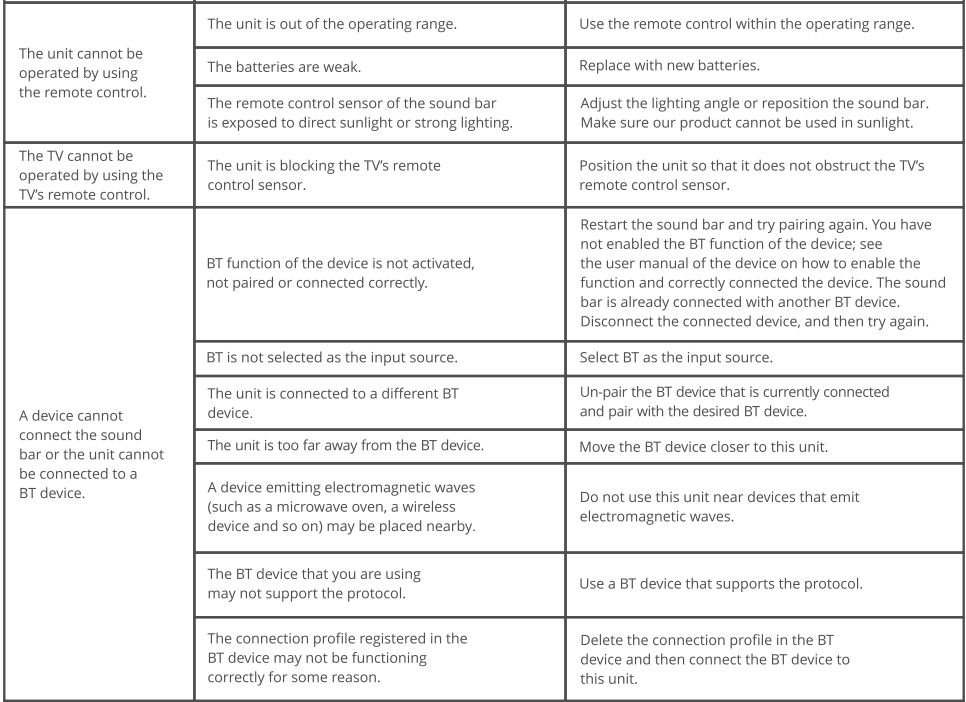
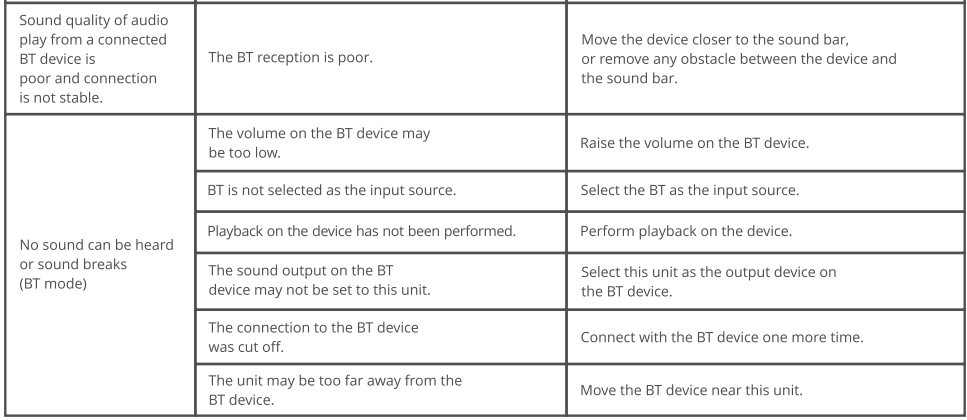
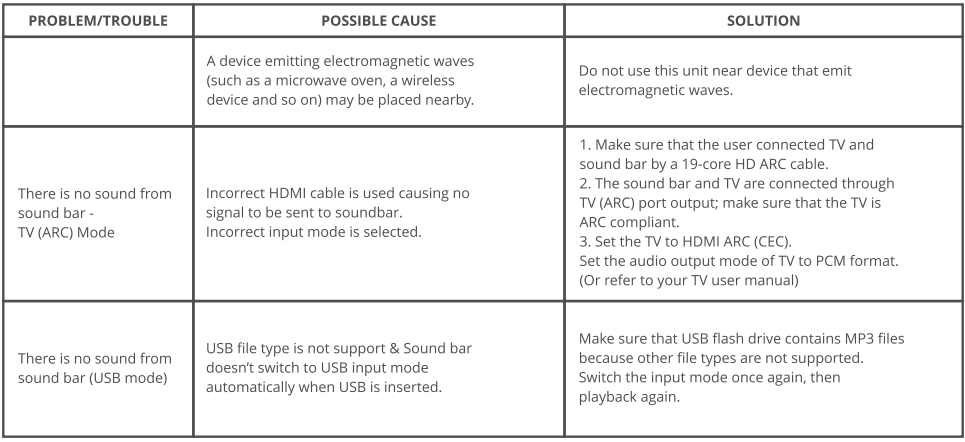
TROUBLESHOOTING
FAQs
Q: What audio inputs does the Zeb-Juke Bar support?
Ans: For a variety of connectivity choices, the Zeb-Juke Bar has support for Bluetooth, USB, AUX, and optical (TOSLINK) inputs.
Q: How do I pair my device with the soundbar via Bluetooth?
Ans: Select “Zeb-Juke Bar” from the list of devices that are available after turning on Bluetooth on both your device and the soundbar. Enter the pairing code 1234 or 0000 when requested.
Q: Can I control the soundbar using the remote?
Ans: Yes, there is a specific remote control for the Zeb-Juke Bar that lets you change input modes, adjust volume, and access preset equaliser settings.
Q: Does the soundbar support surround sound or virtual surround modes?
Ans: Virtual surround sound modes on the Zeb-Juke Bar provide immersive audio effects to improve your listening experience.
Q: How do I connect the soundbar to my TV?
Ans: For optimal digital audio quality, connect using an optical cable; for wireless audio streaming, use an AUX cable or Bluetooth.
Q: What is the power output of the Zeb-Juke Bar?
Ans: With a total RMS power of 20 Watts, the soundbar produces loud, clean sound that is appropriate for small to medium-sized spaces.
Q: How do I reset the soundbar to factory settings?
Ans: After turning off the soundbar, press and hold the Power and Volume Up buttons at the same time for approximately five seconds, or until the device restarts.