



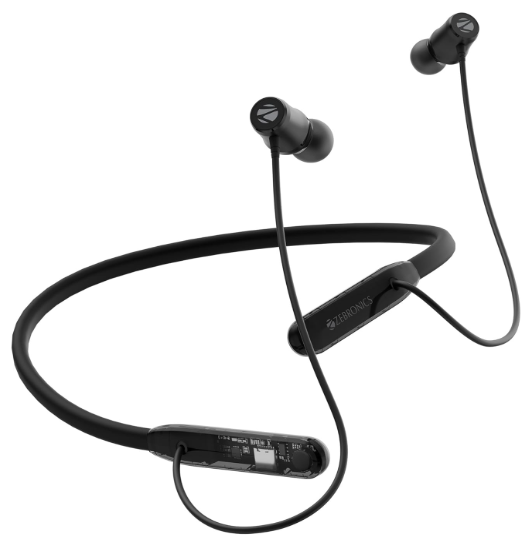
ZEBRONICS RAGAF1 Wireless Neckband Earphones
Features
- Wireless BT earphones with Neckband
- Volume/Media Control|
- Call Function
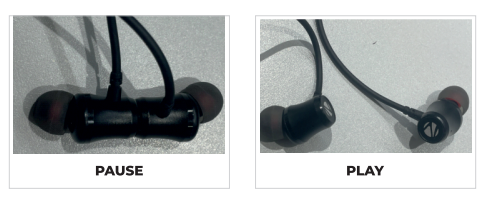
- Magnetic Switch Control
- Voice Assistant support
- Built-In Rechargeable Battery
- Flexible Neckband
- Type-C Charging
- Environmental Noise Cancellation (ENC)
- Gaming Mode (Low Latency)
- Dual Pairing
- Dual EQ modes
Package contents
- Neckband: 1
- Eartips : 4 บ
- Charging cable : 1 บี
- QR Code Guide : 1 บี
Usage Instruction
Bluetooth Pairing
- STEP 1- Press and hold the MFB to power ON the earphones and to take them into pairing mode with Red & Blue LED blinking alternatively.
- STEP 2 – Switch ON the Bluetooth in your mobile phone & search for the BT name “ZEB- RAGA F1”
- STEP 3 – Once the BT name is visible in your mobile phone, tap to connect it.
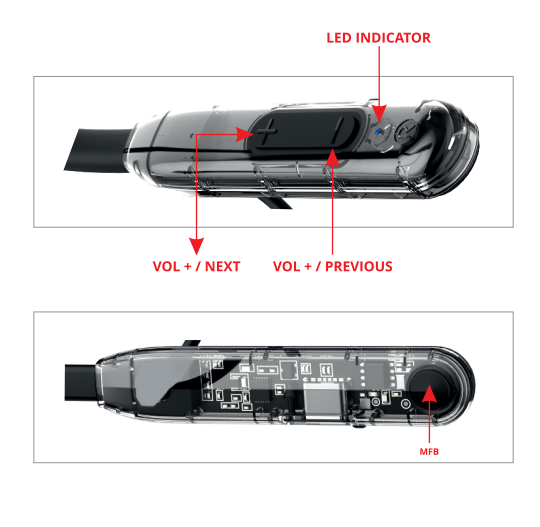
Product Representation
Button Usage
- MFB Single Press: Play/Pause the music
- MFB Double Press: Switch EQ mode between Equalizer & Sound monster mode
- MFB Triple Press: Switch mode between Gaming ZEBRONICS RAGAF1 Wireless Neckband Earphones & Music mode MFB Press & Hold Wakes Voice assistant|
- MFB Long Press: Call Reject
- Short Press +/-: Volume Up and Down
- Single Press +/-: Next/Previous track
Activating Smart smartphone’s assistant
- When the neckband is connected to a mobile phone, Press and hold the MFB for 3 seconds to activate the voice assistant.
Call Function
- Short-press the MFB to attend or end the incoming call. Press and hold the MFB for 2 seconds to reject the incoming call.
Charging Instruction
- Connect the Type-C charging cable to the charging port of the earphones & connect the other end to the DC 5V adapter.
LED Indication
- Charging indication: Red LED glows
- The full charge indication LED turns off.
- Discover mode: Red & Blue LED blink rapidly till it gets paired.
- Connection Established: Bue.
Specifications
- BT Versio: 5.4
- Supported BT Profile: HFP / AVRCP / A2DP
- Drive size: 110 mm
- Speaker iimpedance329
- Playback time: 40h*
- Charging time 1h approx
- Talk time:30h*
- Standby time: 00h
- Net. weight: 3.4g
Customer Support
- Website: www.zebronics.com
- Tel: 044 40000004
FAQs
Q: What is the battery life of the RAGAF1 neckband?
Ans: Depending on usage and loudness, the RAGAF1 can play for up to 17–20 hours on a full charge.
Q: Do the earbuds support magnetic earpieces?
Ans: Indeed, when not in use, the RAGAF1’s magnetic earphones help keep the neckband secure and clear of tangles.
Q: Is the neckband sweat or water-resistant? Indeed, the ZEB-RAGAF1 has an IPX4 rating, which protects against perspiration and mild splashes, making it perfect for outdoor use and exercise.
Q: Can I connect the neckband to two devices at the same time?
Ans: No, multi-point communication is not supported by the RAGAF1. Only one device can be connected at once.
Q: Does the neckband support fast charging?
Ans: Although the RAGAF1 lacks fast charging, the normal charge time is quite short—less than two hours.
Q: How far can I move away from the connected device?
Ans: In an open area, the Bluetooth range is up to 10 meters (33 ft). The effective range may be decreased by walls and other objects.
Q: Is there any audio lag when watching videos or gaming?
Ans: With its low latency, the neckband is ideal for casual gaming and video streaming. It isn’t made for competitive or professional gaming, though.
Q: Does it have noise cancellation?
Ans: There is no active noise cancellation (ANC) on the ZEB-RAGAF1. Passive noise isolation is provided by its in-ear design, though, for making calls and listening to music.