



ZEBRONICS ZEB-CK500 Cleaning Kit Instructions
Features
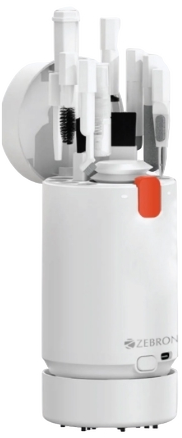
- Desktop Vacuum Cleaner
- All-in-1 Cleaner Kit
- Dust Blower
- Refillable Spray
- Spray & Wipe
- Tubular Storage
- Precise Cleaning
- For Smartphones / Tablets / Cameras / Laptops / Keyboards / Earphones, etc..
- Cleaners & Brushes
- 6 in 1 Extender • Microfiber Screen Cleaner on Lid
- Press to Open Design • Soft Lens Cleaning Pad
Package contents
- Cleaning Kit: 1 U
- Vacuum Cleaner Extension: 2 U
- Charging Cable: 1 U
- QR Code Guide: 1 U
Representation
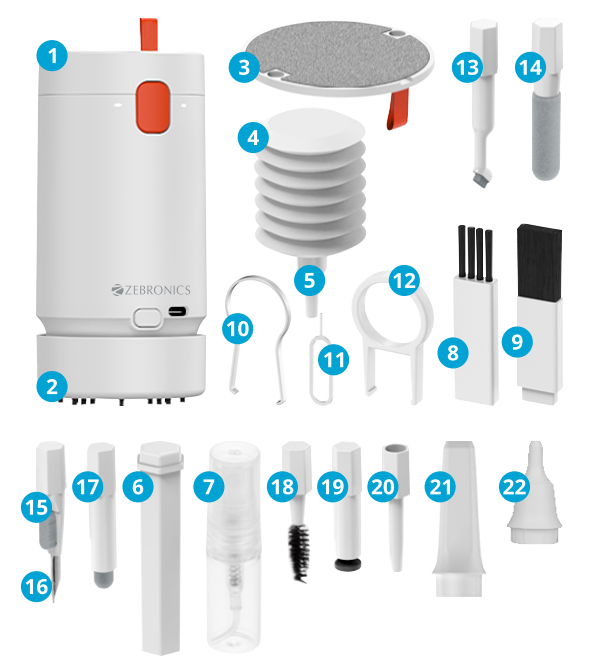
- Product Storage Box 13. Small Elbow Brush
- Workbench Vacuum 14. Earphone Compartment Cleaner
- Microfiber Screen Cleaner 15. Nib Cleaner on Lid 16. Short Head Ear Tips Cleaner
- Air Blower 17. Soft Bristle Brush
- Air Blower Extension 18. Earphones Compartment Short Rod Brush
- Accessory Extension Rod 19. Soft Lens Cleaning Pad
- Refillable Spray Bottle 20. Air Blower Extension
- Flat Hard Bristle Brush Long Rod
- Flat soft Bristle Brush 21. Vacuum Cleaner Extension
- Keyboard Switch Puller Long Rod
- Sim Ejector Tool 22. Vacuum Cleaner Extension
- Keyboard Keycap Puller Short Rod
Vacuum Cleaner Description
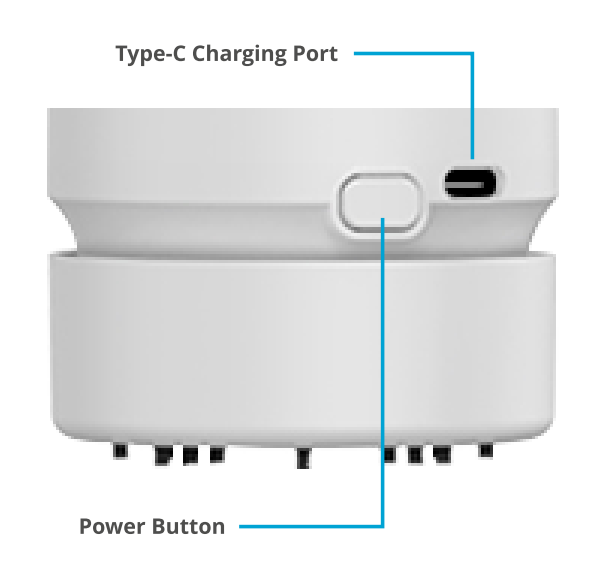
Charging Instructions: Kindly charge the unit before using it. And use a Type C cable with the required power DC 5V, 0.5A.
Usage Instructions:
- Power On: Press the power button once. The vacuum cleaner will start operating at the first speed level.
- Increase to Second Speed: Press the power button ZEBRONICS ZEB-CK500 Cleaning Kit Instructions a second time. The vacuum cleaner will shift to the higher, second speed level.
- Power Off: Press the power button a third time. The vacuum cleaner will turn off.
Cleaning the Bin
- To detach the vacuum bin, rotate it towards the direction shown in image 1.
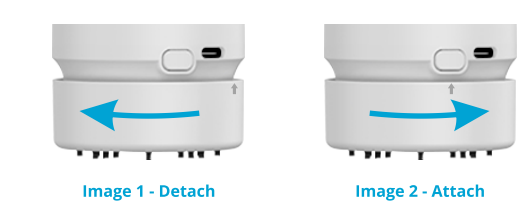
- After removing the bin, clean it thoroughly.
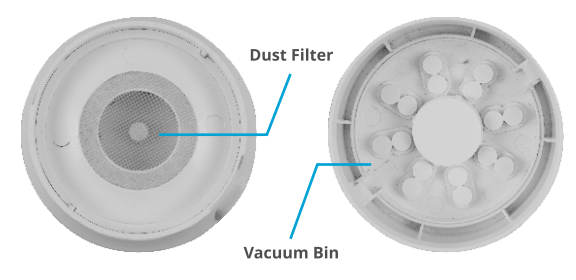
- To reattach, align the bin with its slot and rotate towards the opposite direction as shown in image 2 until the lock clicks in.
Specifications
- Vacuum Cleaner
- Speed: 15000 rpm (Max.)
- Fan Dimension: 6.15 x 6.1 cm
- Noise Level: <35 dB
- Suction Adjustments: 2 Levels
- Suction Power: 1.5W
- Power Consumption: DC 5V, 0.5A (Max.)
- Bin capacity: 20 cm3
- Spray Bottle Capacity: 5ml
- Material: ABS Body
- Product Dimensions: 6.1 x 13 cm (Dia x H)
- Net Weight: 190g
Customer Support
- Website: www.zebronics.com
- Tel: 044 40000004
FAQs
Q: Can I refill the spray bottle with other cleaning liquids?
Ans: You can, however,o prevent harming your gadgets; it is advised that you only use screen-safe, alcohol-free cleaning products.
Q: Is this kit safe for anti-reflective or matte-coated screens?
Ans: Yes, the microfiber cloth and cleaning solution are mild enough for coated, matte, or anti-glare displays. To prevent streaks, make sure to wipe in a single path while applying mild pressure.
Q: Can I use this cleaning kit for my car’s infotainment screen or dashboard?
Ans: Indeed! Car touchscreen panels and glossy surfaces can be safely cleaned with a cloth and a cleaning solution. Dust hard-to-reach places using the blower and vents, and edges with the brush.
Q: What is the shelf life of the cleaning solution?
Ans: Typically, the solution lasts 12 to 24 months after it is manufactured. To preserve its qualities, keep it sealed, cool, and out of direct sunlight.
Q: Is the brush soft enough for lens cleaning or screens?
Ans: Indeed. The gentle bristles of the supplied brush make it safe for sensitive surfaces like keyboards, displays, and camera lenses.
Q: Where should I store the cleaning kit?
Ans: All parts should be kept in a dry, dust-free pouch or container. Don’t leave the solution bottle in a hot or muggy place.
Q: Is the kit travel-friendly?
Ans: Indeed, the ZEB-CK500 is small and light, which makes it appropriate for travel cases or laptop bags. If you’re flying, just make sure the cleaning solution doesn’t exceed the carry-on liquid restrictions.
Q: Does ZEBRONICS offer refills for the cleaning solution?
Ans: ZEBRONICS does not yet provide stand-alone refills. You can buy a new ZEB-CK500 kit or refill with any appropriate screen-safe cleaning solution.