



ZEBRONICS ZEB-CLIPPE Portable BT Speaker
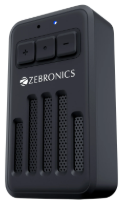
Features
- BT v5.3 | mSD
- Built-in Rechargeable Battery
- TWS Function
- Carry Loop
- LED Indicator
- Media/Volume Control
- Type-C Charging
- Call Function Compact design
- Magnetic Clip
Button Inscription
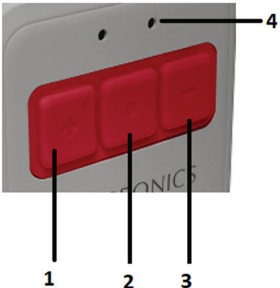
- Volume increase/ Next Track
Long Press to change the media (Next track) • Short press to increase volume level - Play/Pause
Short-press to play/pause the music. • Long-press to On/Off the speaker • During a call short short-press to attend the incoming call, and press & hold for 2 seconds to reject the incoming call - Volume decrease/ Previous
Long-press to change the media(Previous track). • Short-press to decrease the volume level - LED indication
Port Inscription
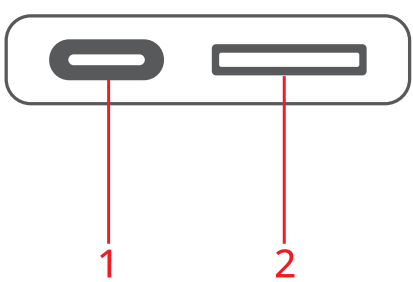
- Type C charging Port
- mSD Card Slot
General Instructions BT Mode
- Power ON the speaker.
- Turn ON BT on your Source Device and search for nearby BT devices.
- Search for the BT name ZEB-CLIPPER and tap to connect it.
mSD Mode
- Connect the mSD device to the respective ports, and the speaker will automatically start playing from the mSD device.
TWS Connectivity
- Turn on both “ZEB-CLIPPER” Speakers in BT mode.
- Press and hold the & – Buttons for 2 Seconds in any one of he speakers to initiate TWS pairing.
- After A few seconds, both speakers will get connected successfully.
- Now search for nearby BT Devices in your Mobile phone or other source device and tap on the BT name “ZEB-CLIPPER” to connect.
Note: Requires two ZEB-CLIPPER speakers for using the TWS feature.
Charging the Speaker
- Connect the Type-C charging cable to the DC 5V charging port of the speaker and insert the other end into a USB power adapter.
- Red LED glows, indicating that the battery is being charged. The Red LED will turn off once it is fully charged.
Dear Customer
Thank you for purchasing ZEB-PARADISE NEO R(ZEB-WHP 11) Wireless headphone. Please read this user manual carefully before operation & save this user manual for further reference.
Note
- Avoid the use of this product in high-temperature and high-humidity environments.
- Avoid self-disassembly of the product, ZEBRONICS ZEB-CLIPPE Portable BT Speaker or it will result in the failure of the warranty.
- Please charge the product with a power adapter with an output rated voltage of DC 5V. Avoid using the headphones while charging.
Specifications
- Model No. : ZEB-PSPK 58
- Output Power (RMS): 4W
- BT Version v5.3
- Driver Size:3.6 cm
- Speaker Impedance : 0
- Frequency Response: 8Hz-20kHz
- S/N Ratio : ≥85dB Max Supported
- mSD memory size 32 GB Supported
- Audio formats: MP3
- Charging time: 1.5h
- Playback time: 20h*
- Product Dimension : 4.2 x 3.1 x 7.4 cm
- Net. Weight: 70g
Customer Support
- Website: www.zebronics.com
- Tel: 044 40000004
FAQs
Q: What type of device is the ZEB-CLIPPE?
Ans: Featuring a built-in rechargeable battery, a compact design, and several playback modes, the ZEB-CLIPPE is a portable wireless Bluetooth speaker. It’s perfect for travel, outdoor use, and casual listening.
Q: What Bluetooth version does the ZEB-CLIPPE support?
Ans: With a range of up to 10 meters (in open space), it usually supports Bluetooth v5.0 or above, providing dependable connections and minimal power consumption.
Q: Does it support memory cards or USB drives?
Ans: Yes, USB drives and microSD cards (TF cards) are supported by the ZEB-CLIPPE for MP3 playback. To switch playing sources, insert your storage device and press the Mode button.
Q: Does the ZEB-CLIPPE support hands-free calling?
Ans: Yes, there is a built-in microphone in the speaker. When you pair it with your phone via Bluetooth, you can use the multifunction button to accept or reject calls.
Q: Is the speaker waterproof or water-resistant?
Ans: The ZEB-CLIPPE is not waterproof unless specifically mentioned in the product documentation or packaging. Keep it away from damp surfaces, splashes, and rain.
Q: Can I connect it to my laptop or desktop?
Ans: Yes, provided that your gadget has Bluetooth. It can also be connected to a 3.5mm headphone jack using an AUX wire.
Q: Can I clip it to a bag or bike?
Ans: Indeed! With its integrated clip/hook, the ZEB-CLIPPE is simple to fasten to belts, backpacks, or bicycle handles for portability.
Q: What audio formats are supported via USB or TF card?
Ans: MP3 and WAV files are usually supported formats. For optimal compatibility, make sure your media is saved in the FAT32 file system.