



Close Menu
onyxguides.comonyxguides.com

    Subscribe to Updates

    Get the latest creative news from FooBar about art, design and business.

    What's Hot

    DJI Neo 4K UHD Camera QuickShots Mini Drone User Manual

    February 10, 2026

    Marshall CV506-H12 Miniature High-Speed Camera User Guide

    February 9, 2026

    Marshall V-702W-12G-V2 Rack Mount Monitor User Guide

    February 9, 2026
    Facebook X (Twitter) Instagram
    onyxguides.comonyxguides.com
    Facebook X (Twitter) Instagram Pinterest
    • Home
    • About us
    • Terms & Conditions
    • Privacy Policy
    • FAQs
    • Contact us
    onyxguides.comonyxguides.com
    Home » ZEBRONICS ZEB-EnergiPod 10R2 Power Bank User Manual
    ZEBRONICS

    ZEBRONICS ZEB-EnergiPod 10R2 Power Bank User Manual

    By Gabriel SmithOctober 12, 2025Updated:October 13, 2025No Comments3 Mins Read
    Facebook Twitter Pinterest LinkedIn Tumblr WhatsApp Telegram Email
    ZEBRONICS-ZEB-EnergiPod-10R2-Power-Bank-featured
    Share
    Facebook Twitter LinkedIn Pinterest Email

    zebronics-logo

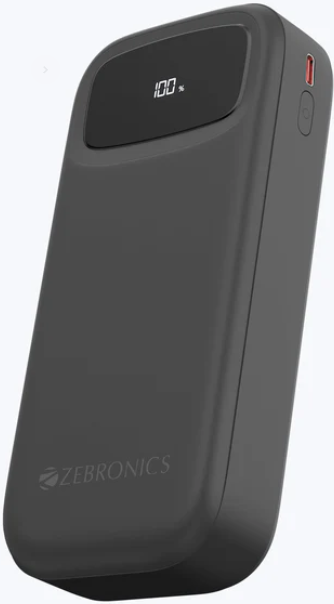
    ZEBRONICS ZEB-EnergiPod 10R2 Power BankZEBRONICS-ZEB-EnergiPod-10R2-Power-Bank-product

    Features

    1. 22.5W Max Output|
    2. Rapid Charging
    3. LED Percentage Display
    4. Mobile/Tablet Compatible
    5. Type-C Input & Output Port
    6. Over Charge Protection
    7. Overload Protection
    8. Short Circuit Protection
    9. Attached Output Cables

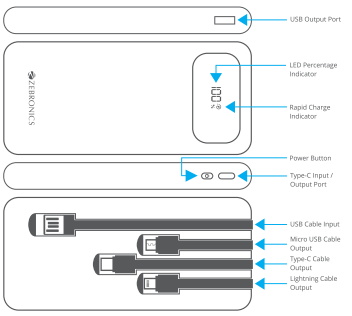
    Port Descriptions
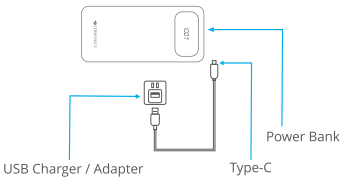
    Charging Instructions

    • Connect the Type C end of the charging cable to the power ZEBRONICS ZEB-EnergiPod 10R2 Power Bank bank and the USB end to the charger, or can charge through the built-in USB cable.
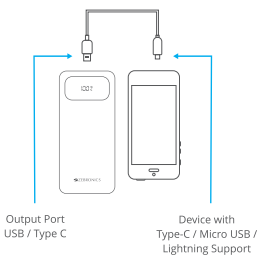
    Charging your Device with the Power Bank

    • Connect the Type-C / Micro USB / Lightning end of the charging cable to the device and the USB / Type-C end to the output ports of the power bank.
    Specifications

    1. Battery Capacity: 10000mAh
    2. No. of Inputs: 2
    3. No. of Outputs: 5
    4. Inputs Type-C Port: DC 5V/3A, 9V/2A, 12V/1.5A
    5. USB Cable: DC 5V/2A
    6. Outputs USB Port|: DC 5V/3A, 9V/2A, 12V/1.85A
    7. Type-C Port: DC 5V/3A, 9V/2.2A, 12V/1.67A
    8. Type-C Cable: DC 5V/3A, 9V/2A, 12V/1.85A
    9. Micro USB Cable: DC 5V/2.4A
    10. Lightning Cable: DC 5V/2.4A (22.5W Max. Output)
    11. Charging Time: 3h, 26Mins. Approx,
    12. Product Dimension: 6.7 × 2.1 x 14.8 cm
    13. Net Weight: 233g|

    Customer Support

    • Website: www.zebronics.com
    • Tel: 044 40000004

    FAQs

    Q: What is the battery capacity of the ZEB-EnergiPod 10R2?

    Ans: With its 10,000mAh lithium-polymer battery, the ZEB-EnergiPod 10R2 is perfect for repeatedly charging smartphones, Bluetooth devices, and other USB-powered electronics.

    Q: How many output ports does it have?

    Ans: You can charge two gadgets at once thanks to its dual USB output connections.

    Q: Does the EnergiPod 10R2 support fast charging?

    Ans: It does not support fast-charging protocols like Qualcomm Quick Charge or USB-PD, but it does enable normal high-speed charging (up to 2.1A).

    Q: Can I charge the power bank using a Type-C cable?

    Ans: Indeed, the power bank itself can be charged via the Type-C connection, giving you flexibility with the cables you have on hand.

    Q: How long does it take to fully charge the power bank?

    Ans: The ZEB-EnergiPod 10R2 takes about 4 to 6 hours to completely charge using a typical 5V/2A adapter.

    Q: Does it support pass-through charging?

    Ans: No, in order to maintain battery longevity and ensure safety, pass-through charging—charging the power bank and output device at the same time—is not supported.

    Q: Is it compatible with iPhones and Android devices?

    Ans: Yes, as long as the appropriate charging cable—Lightning, Type-C, or Micro USB—is used, it is compatible with both iOS and Android devices.

    Q: Can I use this power bank to charge small gadgets like smartwatches or earbuds?

    Ans: Of course. Its low-power output capability makes it appropriate for charging fitness trackers, smartwatches, TWS earphones, and other tiny gadgets.

    OnyxGuides Manual User Manual ZEB-EnergiPod 10R2 Power Bank Guide ZEBRONICS ZEB-EnergiPod 10R2 Manual ZEBRONICS ZEB-EnergiPod 10R2 Setup Guide
    Share. Facebook Twitter Pinterest LinkedIn Tumblr Email
    Gabriel Smith

      Related Posts

      Sony ILCE-6700 Interchangeable Lens Digital Camera User Guide

      December 7, 2025

      Bose MA12 Panaray Modular Line Array Loudspeaker User Guide

      December 4, 2025

      Bowers & Wilkins Px8 Wireless Headphones User Manual

      December 4, 2025

      Sonos Arc Black Voice Control Ultra Soundbar User Manual

      December 4, 2025

      JANAM GT1 Self Mobile Entry Head Unit Instruction Manual

      December 4, 2025

      Ronix 1250 Carpet Vacuum Cleaner Instruction Manual

      December 4, 2025
      Add A Comment

      Comments are closed.

      Don't Miss
      DJI

      DJI Neo 4K UHD Camera QuickShots Mini Drone User Manual

      February 10, 2026

      DJI Neo 4K UHD Camera QuickShots Mini Drone Overview Forward-Facing LiDAR [1] Omnidirectional Vision…

      Marshall CV506-H12 Miniature High-Speed Camera User Guide

      February 9, 2026

      Marshall V-702W-12G-V2 Rack Mount Monitor User Guide

      February 9, 2026

      Makita VC2211M Wet & Dry Vacuum Cleaner Instruction Manual

      February 8, 2026
      Stay In Touch
      • Facebook
      • Twitter
      • Pinterest
      • Instagram
      • YouTube
      • Vimeo

      Subscribe to Updates

      Subscribe to Updates

      Follow us

      Facebook X-twitter Instagram Pinterest

      © 2025 All rights reserved Onyx Guide.