



ZEBRONICS ZEB-SOUND FEAST 85 BT Speaker User Manual
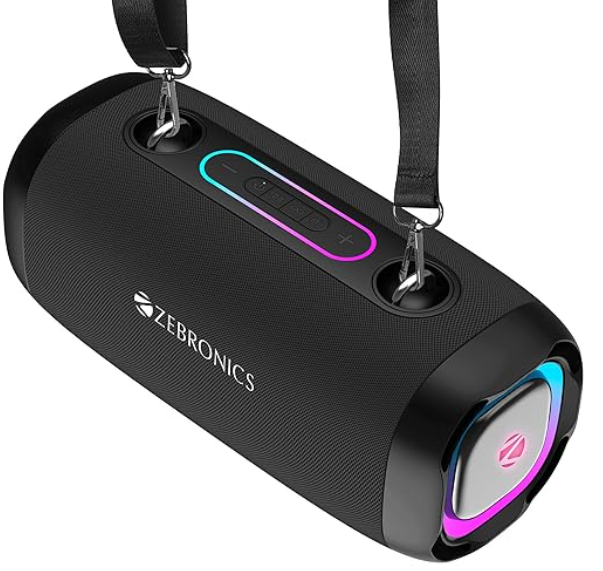
Features
- 16W RMS Output
- Up to 24h* Backup
- Dual 10.16cm Drivers
- TWS Function BT v5.4 | USB | mSD | AUX | FM
- 6.3mm Mic Input
- 4 RGB LED Modes
- Carry handle
- Media / Volume control
- Built-in Rechargeable battery
Package Contents
- Speaker: 1U
- Charging Cable: 1U
- Input Cable: 1U
- QR Code Guide : 1U
Buttons and Ports Description
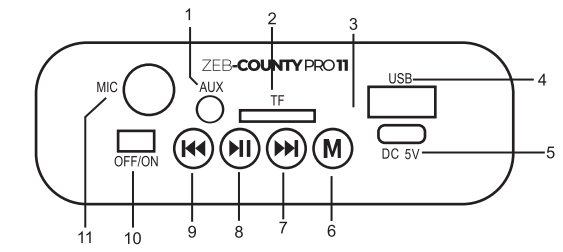
- AUX Input port
- mSD card slot
- Charging Indication LED
- USB Input port
- Charging input port
- Mode Switch
- Next Track/ Volume Increase
- Play/Pause
- Previous Track/Volume Decrease
- Power ON/OFF
- Microphone input port
Button Function
Power On/off Use the power ON/OFF slider switch to switch ON/OFF the speaker.
BT Connectivity
- Once the Speaker is ON, please make sure that the speaker is in BT mode
- Now, search for the nearby BT device in your mobile and tap on the BT name “ZEB-COUNTY PRO 11” to connect
- Short press@ or to control the media.
- Long-press @ or a to adjust the Volume.
- Press the “Play/Pause” button to play/pause the music.
USB/Micro SD card Mode
- Once the speaker is ON, insert a USB pendrive /Micro SD card into the respective port of the speaker.
- The Speaker will automatically detect the songs from the USB/ Micro SD card, and the supported audio content will be played from it.
Note: This mode isn’t selectable on the speaker unless a USB microSD flash card is connected. - Short-press @ or @ to control the media
- Long-press @ or @ to adjust the Volume.
- Press “Play/Pause” to play/pause the music.
FM Radio
- Once the speaker is ON, please switch the speaker to FM mode using the mode button.
- Press the “Play/Pause” key to auto-scan the ZEBRONICS ZEB-COUNTY PRO 11 BT Speaker available FM channels.
- Short-press to change the scanned FM channels
- Long-press to adjust the Volume.
TWS Function
Turn on the two ZEB-COUNTY PRO 11 speakers you want to pair. Double-click click “Play/pause” button on any one speaker to activate TWS mode. After a few seconds, both speakers will be connected successfully. Now, search for the nearby BY device in your mobile ZEBRONICS ZEB-SOUND FEAST 85 BT Speaker and tap on the BT name “ZEB-COUNTY PRO 11” to connect.
AUX-In
Switch the speaker to AUX Mode, connect one end of the AUX cable to the speaker & connect the other end to an audio source. The songs played from the audio source can be heard through the speaker.
RGB Light Control
When the speaker is turned on, the RGB light is on automatically. The User can switch the light modes by long-pressing the mode button.
Charging instruction
Connect the charging cable to the speaker. The red LED indicates that the speaker is charging. The red light turns off once the speaker is fully charged.
Specifications
- Model: ZEB-PSPK 55
- Output Power (RMS)| 16W|
- BT Version: v5.4 Driver Size: 10.16cm X 2
- Speaker Impedance 20
- Frequency Response: 40Hz-20kHz|
- S/N Ratio : ≥70dB|
- Max. Supported USB/mSD
- Memory Size: 32GB Supported
- Audio Formats MpMP3harging Time:5h
- Playback Time: 24h*
- Product Dimension (W x D x H) 16.5 × 15.2 x 36 cm|
- Net. Weight:1.1Kg
Customer Support
- Website: www.zebronics.com
- Tel: 044 40000004
FAQs
What connectivity options does the ZEB-SOUND FEAST 85 BT speaker support?
For a variety of audio source choices, the speaker has Bluetooth wireless connectivity, AUX input, USB playback, and microSD card capability.
How do I pair my device with the ZEB-SOUND FEAST 85 BT speaker via Bluetooth?
Activate Bluetooth on your device and turn on the speaker. From the list of available devices, choose “ZEB-SOUND FEAST 85.” You will hear a confirmation beep after pairing.
What is the battery life of the speaker on a full charge?
Up to six hours of continuous listening at moderate volume levels are possible with the integrated rechargeable battery.
How long does it take to fully charge the speaker?
Usually, a full charge with the provided USB charging cord takes three to four hours.
Can I use the speaker while it’s charging?
You don’t have to pause your music because the speaker may play while charging.
Does the speaker have a built-in microphone for hands-free calls?
Indeed, when paired with your smartphone, the ZEB-SOUND FEAST 85 BT’s integrated microphone enables hands-free call taking.
How do I reset the speaker if it becomes unresponsive?
After turning off the speaker, reset it by holding down the power button for ten seconds. Consult the manual’s troubleshooting section if problems continue.
What is the effective Bluetooth range?
In open areas with no obstructions, the speaker’s Bluetooth range is normally up to 10 meters, or roughly 33 feet.