



Zebronics Zeb-Sound Feast 90 Portable BT Speaker
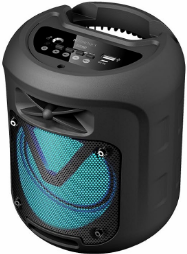
Features
- BT vS.0
- Supports USB & mSD
- Built-in FM Radio
- AUX Input
- TWS Function
- 6.3mm Microphone Input
- Media I Volume Control
- Built-in Rechargeable Battery
- LED Lights
- Wired Mic
Package Contents
- Speaker: 1 U
- Micro USB Charging/ 3.5mm Aux Cable: 1 U
- Wired Mic: 1 U
- QR Code Guide: 1 U
Control Panel Functions
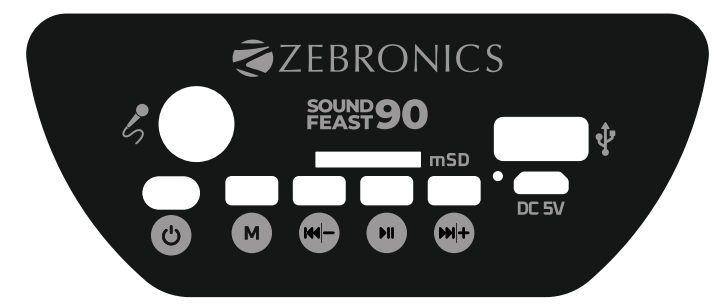
- OFF/ON Button – Power OFF/ON switch
- M Button Long press – TWS function. Single press – Switching between inputs.
- Previous / Volume – [/ – ] – [short press for Previous/ Press and hold for Volume decrease]
- Play/Pause/LED Button- [short press for Play / pause the media I press and hold – LED ON/OFF]
- Next/ Volume+ [1+1 / + ]:- [short press for Next/ Press and hold for Volume increase]
- LED Indicator
- DC SV – Power Input
- USB port
- Micro SD slot
- MIC – Microphone input
General Instructions
Charging
- Connect one end of the power cable to the speaker and connect the other end to a rated DC SV 1A adapter. The Speaker has a constant red LED indication when the speaker is charging. The Indicator turns off when the speaker is completely charged.
BT Mode
- Power ON the speaker, press the “M” button to switch to BT Mode. Switch ON BT on your phone or tablet and search for nearby BT devices. Search for the BT name” ZEB SOUND FEAST90″ and tap to connect it.
USB/mSD Mode
- The speaker automatically switches to USB/microSD input mode when a USB flash drive/microSD Card is inserted. The songs from the audio source can be heard through the speaker (this mode isn’t selectable on the speaker unless a USB/microSD flash drive is connected). Single-press the Previous / -button to switch to the Previous audio track, and Zebronics Zeb-Sound Feast 90 Portable BT Speaker single-press the Next / + button to switch to the Next audio track.
AUX-IN
- Switch the speaker to AUX mode. The speaker can be connected to an audio source using a 3.5mm cable. Connect one end of the cable to the speaker and the other end to an audio source. The songs from the audio source can be heard through the speaker.
FM Radio
- Switch the speaker to FM mode. In FM mode, single-press the Play/Pause button in the control panel to scan for the available FM channels.
- Press the Previous / – button to switch to the previous FM channel, and Press the Next / + button to switch to the next FM channel.
- Press the Play/Pause/ LED button to play/pause the FM Media.
TWS Function
- Turn on two ZEB-SOUND FEAST 90 speakers.
- Press and hold the “M” button for a few seconds on any one speaker to activate the TWS function.
- Now, search for the nearby BT device in your mobile and tap on the BT name ZEB-SOUND FEAST90to pair the speaker.
Specifications
- Output Power (RMS) : 10W
- BT Version: vS.O
- Driver Size: 10.16cm
- Speaker Impedance:20
- Frequency Response: 1 Hz-20kHz
- S/N Ratio: 80dB
- Max Supported USB/ mSD memory size:32GB
- Audio formats: MP3 /WAV
- Charging time: 2-3h
- Playback time: 3h*
- Product Dimension (Dia x H): 15.2 x 19 cm
- Net. Weight: 650g
Customer Support
- Website: www.zebronics.com
- Tel: 044 40000004
FAQs
Q: What is the Bluetooth range of the speaker?
Ans: In an open area, the effective range is up to 10 meters (33 ft). Interference or walls may make it harder to connect.
Q: What audio formats are supported via USB/microSD?
Ans: Using USB drives and microSD cards, the speaker can play popular audio file types like MP3 and WAV.
Q: Is there an app to control the Zeb-Sound Feast 90?
Ans: No, an app is not necessary to use the Zeb-Sound Feast 90. The speaker buttons or your connected device can be used to control any function.
Q: Can I charge the speaker with a power bank?
Ans: Yes, you can charge the speaker while on the move using a regular USB power bank and a Type-C connector.
Q: Does the speaker support voice assistants like Google Assistant or Siri?
Ans: Although the speaker lacks native support for voice assistants, you can still use your phone to access your assistant when it is connected.
Q: Is there a warranty for this speaker?
Ans: Indeed, Zebronics offers a limited guarantee for one year from the date of purchase. For warranty claims, save your receipt or invoice.