

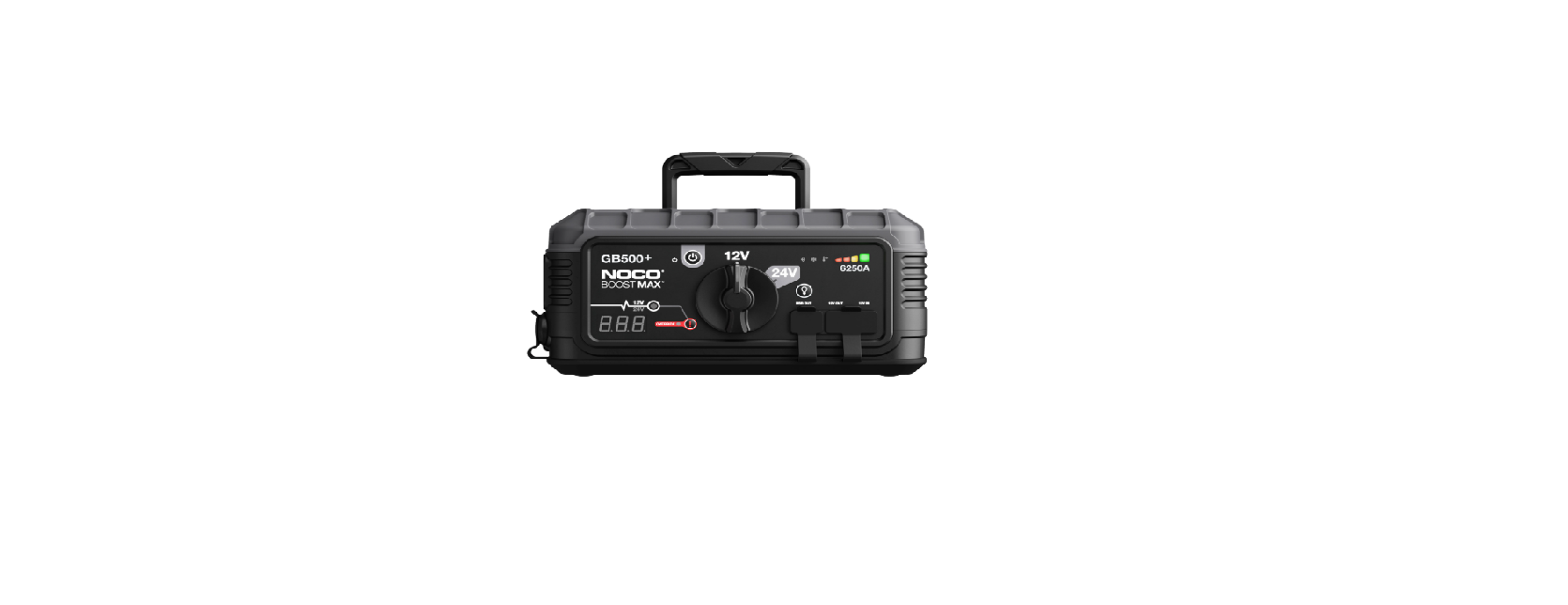

NOCO GB500 6250A Lithium Jump Starter

Safety Instructions
- Electrical Shock. A product is an electrical device that can shock and cause serious injury. Do not cut power cords. Do not submerge in water or get wet.
- Explosion. Unmonitored, incompatible, or damaged batteries can explode if used with the product. Do not leave the product unattended while in use. Do not attempt to charge a damaged or frozen battery. Use the product only with batteries of the recommended voltage. Operate the product in well-ventilated areas.
- Fire. A product is an electrical device that emits heat and is capable of causing burns. Do not cover the product. Do not smoke or use any source of electrical spark or fire when operating the product. Keep the product away from combustible materials.
- Eye Injury. Wear eye protection when operating the product. Batteries can explode and cause flying debris. Battery acid can cause eye and skin irritation. In the case of contamination of the eyes or skin,
Flush the affected area with running clean water and contact poison control immediately. - Explosive Gases. Working in the vicinity of a lead-acid battery is dangerous. Batteries generate explosive gases during normal battery operation. To reduce the risk of battery explosion, follow all safety information instructions and those published by the battery manufacturer and the manufacturer of any equipment intended to be used in the vicinity of the battery. Review cautionary markings on these products and on the engine.
Mounting
It is important to keep in mind the distance to the battery. The DC cable length from the charger, with either the battery clamp or eyelet terminal connectors, is approximately 72 inches (182.88cm). Allow for 12 inches (30.4cm) of slack between connections.
Proposition 65
Battery posts, terminals, and related accessories contain chemicals, including lead. These materials are known to the State of California to cause cancer and birth defects, and other reproductive harm.
Minors
If the product is intended by “Purchaser” to be used by a minor, the purchasing adult agrees to provide detailed instructions and warnings to any minor before use. Failure to do so is the sole responsibility of the “Purchaser,” who agrees to indemnify NOCO for any unintended use or misuse by a minor.
Handling
Handle the product with care. The product can become damaged if impacted. Do not use a damaged product, including, but not limited to, cracks to the casing or damaged cables. Do not use the product with a damaged power cord. Exposure to humidity and liquids may damage the product. Store and operate products in dry locations. Do not allow the hanger to remain wet. Do not disconnect the product by pulling on the cables.
Modifications
Do not attempt to alter, modify or repair any part of the product. Disassembling the product may cause injury, death or property damage. If the product becomes damaged, malfunctions or comes in contact with any liquid, discontinue use and contact NOCO. Any modifications to the product will void your warranty.
Accessories
This product is only approved for use with NOCO accessories. NOCO is not responsible for user safety or damage when using accessories not approved by NOCO.
Location
Prevent battery acid from coming in contact with the product. Do not operate the product in a closed-in area or an area with restricted ventilation. Do not set a battery on top of the product. Position cable leads to avoid accidental damage by moving vehicle parts (including hoods and doors), moving engine parts (including fan blades, belts, and pulleys), or what could become a hazard that may cause injury or death.
Operating Temperature
This product is designed to work in ambient temperatures between -4° F and 122° F (-20° C and 50° C). Do not store or operate outside of the specified temperature ranges. Do not charge a frozen battery. Discontinue use of the product immediately if the battery becomes excessively warm.
Storage
Do not use or store your product in areas with high concentrations of dust or airborne materials. Store your product on flat, secure surfaces so it’s not prone to falling. Store your product in a dry location. The storage temperature is -30ºC – 60ºC (average temperature). Never exceed 80ºC under any condition.
Compatibility
The product is only compatible with 6-volt, 12-volt and 24-volt Lead-Acid, AGM, and 6-volt, 12-volt and 24-volt Lithium batteries. Do not attempt to use the product with any other type of battery. Charging other battery chemistries may result in injury, death or property damage. Contact the battery manufacturer before attempting to charge the battery. Do not charge a battery if you are unsure of the battery’s specific chemistry or voltage.
Medical Devices
The product may emit electromagnetic fields. The product contains magnetic components which may interfere with pacemakers, defibrillators, or other medical devices. These electromagnetic fields may interfere with pacemakers or other medical devices. Consult with your physician before use if you have any medical devices, including pacemakers. If you suspect the product is interfering with a medical device, stop using the product immediately and consult your physician.
Cleaning
Power off the product before attempting any maintenance or cleaning. Clean and dry the product immediately if it comes in contact with liquid or any type of contaminant. Use a soft, lint-free (microfiber) cloth. Avoid getting moisture in openings.
Explosive Atmospheres
Obey all signs and instructions. Do not operate the product in any area with a potentially explosive atmosphere, including fueling areas or areas which contain chemicals or particles such as grain, dust or metal powders.
High-Consequence
Activities. This product is not intended for use where the failure of the product could lead to injury, death or severe environmental damage.
Radio Frequency Interference
The product is designed, tested, and manufactured to comply with regulations governing radio frequency emissions. Such emissions from the product can negatively affect the operation of other electronic equipment, causing it to malfunction.
Features
- Internal Battery Level indicates the charge level of the internal battery.
- Error LED Illuminates Red if reverse polarity is detected, or blinks “On” and “Off” when the internal battery temperature is too high.
- Power Button Push to turn unit “On” & “Off”.
- Power LED Illuminates White when the unit is “On”.
- Light Mode Button Toggles the ultra-bright LED light through 7 light modes: 100% > 50% > 10% > SOS > Blink > Strobe > Off.
- Voltmeter. The built-in voltmeter reads the voltage of the vehicle’s battery for enhanced diagnostics and troubleshooting.
- The voltmeter will automatically read the voltage of any battery (or battery system) when the battery clamps are connected, even if the unit is powered off. The voltmeter will read voltage between ~3V and ~20V. If the connected battery is below 3V, nothing will display.
- Boost LED Illuminates White when Boost is active.
- Manual Override Button: To enable, push and hold for three (3) seconds.

Troubleshooting
Technical Specifications
- Internal Battery: Lithium Ion
- Peak Current Rating: 3000A
- Operating Temperature: -20°C to +50°C
- Charging Temperature: 0ºC to +40ºC
- Storage Temperature: -20ºC to +50ºC (Avg Temp.)
- Micro USB (Input): 5V, 2.1A
- USB (Output): 5V, 2.1A
- 12V (Input): 12V, 5A
- 12V (Output): 12V, 15A
- Housing Protection: IP65 (w/Ports Closed)
- Cooling: Natural Convection
- Dimensions (L x W x H): 12.3 x 7 x 2.7 Inches
- Weight: 7.5 Pounds
Warranty
NOCO One (3) Year Limited Warranty
NOCO warrants that this product (the “Product”) will be NOCO GB150 3000A Jump Starter free from defects in material and workmanship for a period of three (3) years from the date of purchase (the “Warranty Period”). For defects reported during the Warranty Period, NOCO will, at its NOCO GB150 3000A Jump Starter discretion, and subject to NOCO’s technical support analysis, either repair or replace defective Products. Replacement parts and products will be new or serviceably used, comparable in function and performance to the original part and warranted for the remainder of the original Warranty Period.
THIS LIMITED WARRANTY DOES NOT COVER: (1) NOCO GB150 3000A Lithium Jump Starter normal wear and tear; (2) cosmetic damage that does not affect functionality; or (3) Products where the NOCO serial number is missing, altered, or defaced. You may register your NOCO product online at: no.co/register. If you have any questions regarding your warranty or product, contact NOCO Support (email and phone number above) or write to: The NOCO Company, at 30339 Diamond Parkway, #102, Glenwillow, OH 44139 USA.
Customer Support
- Website: https://no.co/support
- Ph: 1.800.456.6626
FAQs
Q: Is the GB500 safe to use around children?
Although it has reverse polarity protection and is spark-proof, you should never let kids use the device. When using, always keep an eye on everything.
Q: Can I leave the GB500 connected to the vehicle while not in use?
No, when the engine is not being started, disconnect the jump starter. Over time, leaving it connected can deplete the battery in the car or device.
Q: Can I use it in extreme temperatures?
Yes, but the temperature range for operation is 32°F to 104°F (0°C to 40°C). Performance or battery life may be lowered if it is charged or used outside of this range.
Q: Is the device waterproof?
Although the GB500 can withstand splashes, it shouldn’t be immersed in water. Steer clear of the rain when operating.
Q: Can it jump-start a completely dead battery?
Indeed. Though results may differ for batteries with internal damage, the GB500 can fully recover dead batteries.
Q: Can the jump starter be used on diesel engines?
Yes, but only for 3.0L and smaller diesel engines. A higher-capacity variant can be necessary for larger diesel engines.
Q: Is it safe to store in a vehicle?
Yes, but stay out of direct sunshine and intense heat, as these conditions can gradually deteriorate the lithium battery.
Q: Can I charge it while using it to jump-start?
No, you cannot charge and jump-start at the same time. Before jump-starting, make sure the device is always unplugged from the power supply.