

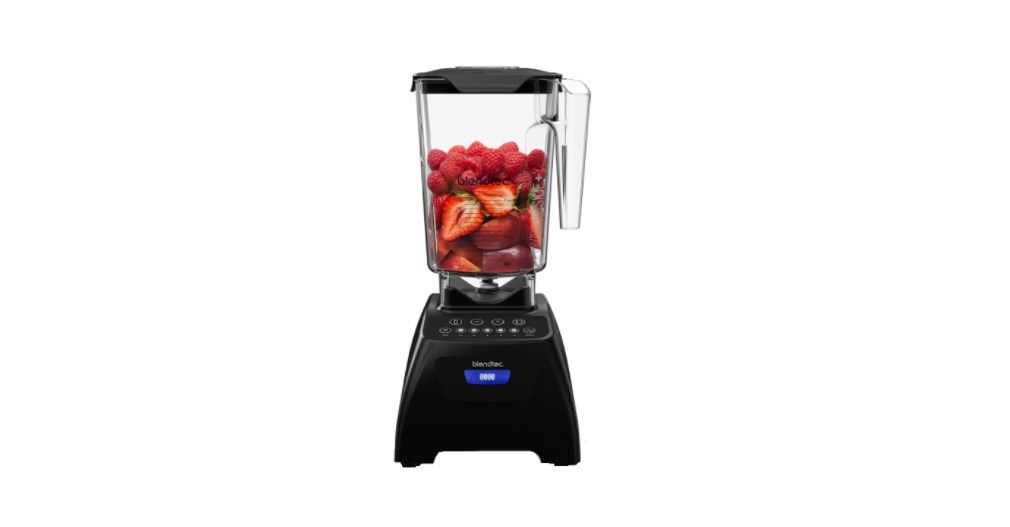

BLENDTEC Classicb 575 Series Blender

Safety Instructions
Read all instructions carefully before using your Blendtec® blender. Following these instructions will help prevent injuries and damage to the machine and will ensure that you have the best possible experience with your new series blender.
- ALWAYS keep fingers, hands, hair, and clothing away from all moving parts.
- NEVER touch the blade with your fingers, whether it is on or off the motor base.
- NEVER place a jar into the drive socket if the blender motor is operating.
- DO NOT rock or remove the blender jar during operation.
- These precautions will prevent personal injury and/or damage to the blender.
- If the blender malfunctions, call your service agent first.
- To protect against the risk of electrical shock, do not put the motor base in water or other liquids.
- Do not use the blender outdoors where it is subject to precipitation. This will void the warranty.
- Utensils, rocks, and glass are dangerous if placed in a jar.
- Damage caused by such foreign objects will void the warranty.
- Starting blend cycles with boiling or very hot liquids may result in burns or cause the lid to blow off.
- When blending on the Hot Soup cycle, the friction of the blade will heat the contents.
- Be careful not to come in contact with any steam coming from the clear center lid.
- DO NOT permit the cord to hang over the edge of the work surface.
- NEVER use an extension cord with the unit.
- Unplug the blender motor when not in use, before changing blender locations, or when cleaning.
Unpacking
You should have received the following items:
- Classic series motor base. Blender jar with lid.
- Additional literature may be included depending on package configuration.
- Remove the blender motor base, blender jar, and lid from the packaging.
- Unwind the power cord. Inspect all items to ensure no damage occurred during shipment.
- If any damage has occurred, contact your Blendtec service agent immediately.
Know Your Product
- Touchpad: Consists of one-touch pre-programmed cycles and speeds, as well as Stop and Pulse buttons.
- Hardened Metal Drive Socket: Where the jar couples with the motor to turn the blade assembly; made of hardened metal.
- LCD Information Center: Displays the number of times a blend cycle button has been pressed.
- Power Unit: This unit is located within the blender motor base and contains the computerized electronics that run the blender.
- Motor Base Cover: Houses the power unit in a durable plastic material.
- Power Switch: Located on the back, lower-right corner of the motor base cover.
- Power Cord: Located at the back of the motor base cover.
Blender Jar Assembly
The blender jar assembly consists of the blender jar, blade assembly, and lid.
- Jar: Durable, BPA-free jar; easy to clean.
- Blade Assembly: Uniquely designed stainless steel blade provides fast, consistent blending.
- Lid: Vented gripper lid seals liquids within the jar during blending.
Installation
- Place the blender on a flat, clean, and dry surface.
- Blender vents should be unobstructed to allow proper cooling during use.
- Make sure an outlet is available within two feet (61cm) of the blender motor.
- Ensure the Power Switch located on the back of the motor base is turned off before plugging it in.
- Turn the unit on by toggling the Power Switch to the ON position.
- Place the appropriately filled blender jar, with the lid in place, onto the blender base.


Operation
- Choose a recipe. Gather all of the ingredients.
- Load the blender jar as indicated in the recipe. Plug in the blender.
- Attach the blender lid to the jar; ensure that it sits on the jar completely.
- Turn on the main power switch located on the back of the blender motor base.
- Place the blender jar onto the base, making sure the jar is secure and fully seated on the motor base.
- Press the indicated touch pad button from the recipe once (or as indicated in the recipe).
- When the cycle is complete, remove the blender jar from the motor base.
- Remove the jar lid and serve as indicated in the recipe.
- For best cleaning results, clean immediately after blending. (See CARE AND CLEANING, 6.1)
Blend Cycles
Blend cycles are timed cycles designed for specific types of blends. These one-touch cycles speed up, slow down, and shut off automatically, so results are perfect every time. Each blender in the Classic series features several pre-programmed cycles and settings that provide a wide range of recipes and functions*:
- Smoothie — Fruit smoothies, green smoothies, milkshakes
- Mixed Drinks — mixed drinks, milkshakes, crushed ice
- Frozen Treats — ice cream, frozen yogurt, sorbets
- Batters — sauces, dips, dressings, batters
- Whole Juice — juices, green drinks
- Hot Soup — soups, hot chocolate, syrups, fondues
- One-Touch Timed — Used to blend ingredients for a 60-second or 90-second timed cycle
- Incremental Speed — 50-second cycles that blend at Lo, Medium-Lo, Medium, Medium-Hi, and Hi speeds
- Clean — Automatic cleaning cycle
- Stop — Stops the blender at any point during blending
- Pulse — used to quickly stir, chop, or mince at a high speed
CLASSIC 475™
Smoothie
This cycle is designed specifically for various types of smoothies and thick drinks that frequently use dense or frozen ingredients. It slows down and speeds up automatically during the course of the cycle. This allows the blender to draw the ingredients into the blending vortex, creating the desired texture.
Incremental Speed
The Classic 475 comes with three incremental speed cycles that allow you to completely customize the consistency of your blend. Each manual cycle is 50 seconds long and blends at the following speeds:
- Low: Speed 1
- Medium: Speed 5
- Hi: Speed 9
You can switch to a different speed at any point during the cycle. To stop the cycle at any point during blending, press Stop.
Pulse
The Pulse function is used for chopping, mincing, whipping, or other momentary tasks that do not require a long blend cycle. You can also pulse to quickly stir a blend before serving. The Pulse setting runs at speed 7 and will only run while the Pulse icon remains pressed. When the icon is released, the motor shuts off.
CLASSIC 560™

Incremental Speed
The Classic 560 comes with four incremental speed cycles that allow you to completely customize the consistency of your blend. Each manual cycle is 50 seconds long and blends at the following speeds:
- Lo: Speed 1
- Medium: Speed 5
- Medium-hi: Speed 7
- Hi: Speed 9
You can switch to a different speed at any point during the cycle. To stop the cycle at any point during blending, press Stop.
Pulse
The Pulse function is used for chopping, mincing, whipping, or other momentary tasks that do not require a long blend cycle. You can also pulse to quickly stir a blend before serving. The Pulse setting runs at speed 7 and will only run while the Pulse icon remains pressed. When the icon is released, the motor shuts off.
CLASSIC 570™

This cycle is designed specifically for various types of smoothies and thick drinks that frequently use dense or frozen ingredients. It slows down and speeds up automatically during the course of the cycle. This allows the blender to draw the ingredients into the blending vortex, creating the desired texture.
The Classic 570 comes with three incremental speed cycles that allow you to completely customize the consistency of your blend. Each manual cycle is 50 seconds long and blends at the following speeds:
- Lo: Speed 1
- Medium: Speed 5
- Hi: Speed 9
You can switch to a different speed at any point during the cycle. To stop the cycle at any point during blending, press Stop.
Hot Soup
This cycle is designed for hot recipes. The cycle’s length of time, combined with the speed of the motor, heats the ingredients to a hot temperature. This cycle can also be used for hot chocolate, syrups, and fondue.
When using fresh ingredients, remember that the speed of the blade generates enough heat to warm the ingredients. Do not add any liquids or ingredients over 115 °F (46 °C) to the jar when preparing soups or hot items.
One-Touch Time Cycle
The Classic 575 comes equipped with two one-touch timed cycles: one 60-second and one 90-second. These cycles free your hands for other kitchen tasks and are ideal for recipes that require longer blending times, such as hot soups or bread dough.
Cleaning
This cycle automatically cleans the inside of your blender jar. To use the Clean cycle:
- Add 1 cup (240 ml) of water and a drop of dish soap to the blender jar.
- Secure the lid and place the jar on the blender base.
- Press the Clean button. Once the cycle is complete, remove the jar and rinse.
- For best results, use the Clean cycle immediately after blending.
Functions

- BATTERS
This cycle stays at relatively low speeds for shorter periods of time. This combines your batters, allowing the flavors to blend properly, without over-mixing. - MIXED DRINKS
This cycle is used for mixed drinks, iced coffees, and milkshakes. The length of time creates a consistency that is ideal for these types of recipes. - SMOOTHIE
This cycle is designed specifically for various types of smoothies and thick drinks that frequently use dense or frozen ingredients. - FROZEN TREATS
This cycle is designed specifically for frozen treats, including ice cream, sorbets, and frozen yogurt. - WHOLE JUICE
This cycle is designed to completely blend tough and dense ingredients, including carrots, celery, and seeds. - HOT SOUP
This cycle is designed for hot recipes. The cycle’s length of time, combined with the speed of the motor, heats the ingredients to a hot temperature. - PULSE
Use Pulse for chopping, mincing, whipping, or other tasks that do not require a long blend cycle. You can also pulse to quickly stir a blend before serving.
Care & Cleaning
- Add 1 cup (240 ml) of hot water and a drop of dish soap to the blender jar.
- Place the lid tightly onto the jar.
- Place the jar on the blender base and, with your hand placed on top of the lid.
- Press the Pulse button for 5 seconds or press the Clean cycle button. Rinse well.
- Clean the blender base by simply wiping the base and interface with a damp cloth.
- For long-term sanitation, fill the blender jar with hot water.
- Add one to two teaspoons (5-10 ml) of liquid chlorine bleach to the jar.
- Stir for 10 seconds to mix water and bleach. Let the mixture stand in the blender jar for five minutes.
- Empty water/bleach mixture. Turn the jar upside down on the dish rack until dry.
- NEVER submerge the blender motor in water. Avoid submerging blender jars for more than 5 minutes.
- Extreme temperatures damage the lower seal of the jar.
- We recommend hand washing to prolong the life of the blender jar.
- We do not recommend the jar be used or exposed to temperatures above boiling (212 °F, 100 °C)
TROUBLESHOOTING
While we don’t expect you to have any problems with your BLENDTEC Classicb 575 Series Blender with your blender, sometimes failures do occur. Use the following guidelines to see if the problem is easily fixed or requires service.
BLENDER MOTOR WILL NOT TURN ON (NO POWER)
If the blender motor will not turn on, try the following:
- Determine if the Liquid Crystal Display (LCD) is lit.
- An absence of a lit LCD indicates a lack of power to the unit.
- Make sure the main power switch on the back, lower-right corner, is turned on.
- Check your house circuit breaker switch to make sure it is set to the ON position.
- Unplug the power cord from the wall receptacle, wait 5 seconds, then plug the power cord back in.
Error Messages
- Overload: This message indicates an overload on the motor. Turn off and unplug the unit.
- If the blade does not move freely, check for any obstruction in the jar.
- The problem may also be the jar itself, not the motor.
- If the blade moves freely, plug in the unit and turn the blender on.
- If the overload condition reoccurs, please contact your Blendtec Service Agent for further assistance.
- Overtemp: This message indicates that the motor is overheating.
- The blender has been disabled until the unit cools to operating temperature.
- Turn off and unplug the unit. Allow it to cool for at least 20 minutes.
- E-05 (Reset Error): This message indicates a permanent failure of the electronics in the unit.
- E-04 (No Zero Crossing): This message indicates failure of a component on the electronic board.
Noise Level Changes
If the blender noise level has increased from original levels, determine whether the sound is coming from the blender motor or the jar.
- Blender motor: Remove the jar, and press BLENDTEC Classicb 575 Series Blender Pulse. Listen to the motor. If it is excessively noisy, please contact your Blendtec Service Agent for evaluation.
- Jar: After checking the motor, fill the jar with 2 cups (480 ml) of water and place it back on the motor base. Run the blender for a few seconds by pressing the Pulse button.
Warranty
Blendtec warrants Blendtec Commercial counter-top blenders and jars against defects in materials and workmanship under normal use and maintenance for the applicable warranty period on parts and labor required to repair or replace components that, in the sole opinion of Blendtec, are defective. The warranty period may vary as established at the time of purchase.
- Damage caused by: improper installation or ventilation of the blender; electrical supply (e.g., electrical power failure, improper electrical connections, low voltage BLENDTEC CQB1 Stealth 885 Commercial Blender or voltage drops to the unit); water supply; drainage; exposure to water; or floods, storms, or other acts of God.
- Normal maintenance, adjustments, and cleaning as outlined in this manual.
- Cost of premium labor rates due to holidays, overtime, shipping, etc.
- Parts or assemblies subjected to misuse, abuse, neglect, or accident, or lack of specified maintenance or operational procedures.
- Damage or problems caused by installation, relocation of the unit, cleaning, and/or maintenance procedures inconsistent with the technical instructions provided in this manual.
- Claims for personal injuries, incidental or consequential damages, or economic loss (profit or revenue), however caused.
Water Damage & Abuse
It is critical to prevent liquids from entering the motor base. However, in some instances, the BLENDTEC CQB1 Stealth 885 Commercial Blender, due to heavy spillage or a lack of appropriate cleaning procedures, liquids may enter the motor housing. It is important to promptly clean up all spills on the motor, around the counter, and under the sound enclosure base (if used).
Country Of Purchase
Use of the equipment BLENDTEC CQB1 Stealth 885 Commercial Blender outside the country of purchase voids all warranties, expressed or implied. If a customer chooses to utilize a local service center outside of the country of original sale, he or she can reasonably expect to pay for parts, labor, shipping, duties, taxes, etc., necessary to make the repair and return the equipment.
Customer Support
- Website: https://www.blendtec.com
- Ph: 1-800-748-5400