Close Menu
onyxguides.comonyxguides.com

    Subscribe to Updates

    Get the latest creative news from FooBar about art, design and business.

    What's Hot

    DJI Neo 4K UHD Camera QuickShots Mini Drone User Manual

    February 10, 2026

    Marshall CV506-H12 Miniature High-Speed Camera User Guide

    February 9, 2026

    Marshall V-702W-12G-V2 Rack Mount Monitor User Guide

    February 9, 2026
    Facebook X (Twitter) Instagram
    onyxguides.comonyxguides.com
    Facebook X (Twitter) Instagram Pinterest
    • Home
    • About us
    • Terms & Conditions
    • Privacy Policy
    • FAQs
    • Contact us
    onyxguides.comonyxguides.com
    Home » INSIGNIA NS-MQP15W22K Wireless Charging Pad User Manual
    Insignia

    INSIGNIA NS-MQP15W22K Wireless Charging Pad User Manual

    By Gabriel SmithSeptember 28, 2025Updated:September 30, 2025No Comments5 Mins Read
    Facebook Twitter Pinterest LinkedIn Tumblr WhatsApp Telegram Email
    INSIGNIA-NS-MQP15W22K-Wireless-Charging-Pad-featured
    Share
    Facebook Twitter LinkedIn Pinterest Email

    INSIGNIA-logo

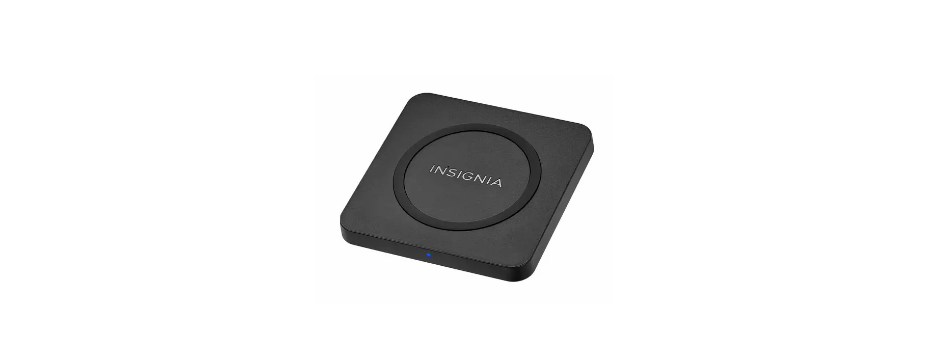
    INSIGNIA NS-MQP15W22K Wireless Charging PadINSIGNIA-NS-MQP15W22K-Wireless-Charging-Pad-product

    Safety Instructions

    • Avoid dropping.
    • Do not disassemble.
    • Do not place metal objects between devices and the wireless charging pads.
    • Thick protective case (≥ .2 in. [5 mm]) or a case that includes a magnet or metallic material may not allow proper charging function.
    • Keep the wireless charging pad away from any liquid or moisture.
    • The maximum ambient temperature during use of this product must not exceed 113° F (45° C).
    • Do not place this device in fire or other excessively hot environments.
    • Must use the provided adapter for proper function; if not, it may malfunction.

    Package Content

    • 15 W Qi Charging Pad
    • DC power adapter with 6 ft. (1.8 m) cable
    • Quick Setup Guide

    Compatibility

    • Any Qi-enabled devices up to 15 W, including smartphones, headphones, and smart watches.

    Features

    • 15 W output designed to fast charge demanding next-generation devices
    • Wireless design charges devices without cumbersome cords
    • Blue LED shows that your device is charging
    • DC power adapter with 6 ft. (1.8 m) charging cable

    Overview

    FrontINSIGNIA-NS-MQP15W22K-Wireless-Charging-Pad-figure-1

    Back INSIGNIA-NS-MQP15W22K-Wireless-Charging-Pad-figure-2

    • Flat size (W×H): 12 × 2.75 in. (304.8 × 69.85 mm)
    • Final folded size: 3 × 2.75 in. (76.2 × 69.85 mm)

    Use

    1. Plug the power adapter into your charging pad and a power outlet.
    2. Place your Qi-enabled device in the center of your charging pad with the screen facing up. If your device is quick charging, the purple LED lights.

    LED Indicator

    Specifications

    Qi Wireless Charging Pad

    • Dimensions: 3.9 × 3.9 × 0.4 in. (10 × 10 × 1.1 cm)
    • Input: DC 15 V/1.8 A
    • Output: 15 W max.

    AC power adapter

    • Input: 100-240 V ~ 50/60 Hz 0.7 A
    • Output: DC 15 V/1.8 A
    • DC charging cable: 6 ft. (1.8 m)

    Troubleshooting

    • Make sure that your device is Qi-enabled.
    • Make sure that your charging pad is connected INSIGNIA NS-MQP15W22K Wireless Charging Pad to a working power outlet.
    • Make sure that your device is positioned correctly on your charging pad.
    • Make sure there are no objects between your device and the charging pad.
    • Remove your device’s case. It may be blocking the wireless signal.
    • Your device may charge more slowly with the charging pad than with a charging cable. This is normal behavior.
    • Make sure that your device is positioned in the center of your charging pad.
    • Make sure there are no objects between your device and the charging pad.


    One Year Warranty

    Definitions

    The Distributor* of Insignia-branded products warrants to you, the original purchaser of this new Insignia-branded product (“Product”), that the Product shall be free of defects in the original manufacturer of the material or workmanship for one (1) year from the date of your purchase of the Product (“Warranty Period”).

    How to obtain warranty service?

    If you purchased the Product at a Best Buy retail store location or from a Best Buy online website, please take your original receipt and the Product to any Best Buy store. Make sure that you place the Product in its original packaging or packaging that provides the same amount of protection as the original packaging. To obtain warranty service, in the United States and Canada, call 1-877-467-4289. Call agents may diagnose and correct the issue over the phone.

    Where is the warranty valid?

    This warranty is valid only in the United States and Canada at Best Buy branded retail stores or websites to the original purchaser of the product in the country where the original purchase was made.

    Customer Support

    • Ph: 1-877-467-4289
    • Website: www.insigniaproducts.com

    INSIGNIA is a trademark of Best Buy and its affiliated companies. Distributed by Best Buy Purchasing, LLC 7601 Penn Ave South, Richfield, MN 55423 U.S.A.

    ©2021 Best Buy. All rights reserved.

    FAQs

    Q: Which devices are compatible with this wireless charging pad?
    Ans: The majority of contemporary cellphones from companies like Apple, Samsung, Google, and others are compatible with the INSIGNIA NS-MQP15W22K. Verify the Qi wireless charging compatibility of your gadget by looking at its specifications.

    Q: What is the maximum charging wattage this pad supports?
    Ans: For compatible devices, this wireless charger offers up to 15W fast charging, delivering power quickly and efficiently.

    Q: Why is my phone not charging on the pad?
    Ans: Make sure the phone and the pad’s charging coil are positioned correctly. Remove any thick or metal cases, and confirm the charger is plugged into a suitable power source. To start charging, certain phones might need the screen to be on.

    Q: Does the charging pad get hot during use?
    Ans: It’s typical for the pad to get a little warm while charging. Unplug it and let it cool down before using it if it gets too hot.

    Q: How do I clean and maintain the charging pad?
    Ans:
    The pad should be unplugged before cleaning. Wipe the area with a dry or slightly moist cloth. Do not immediately touch the device with water or strong chemicals.

    Buy INSIGNIA NS-MQP15W22K Wireless Charger Online INSIGNIA NS-MQP15W22K Charger INSIGNIA NS-MQP15W22K Fast Charging Pad INSIGNIA NS-MQP15W22K Qi Certified Charging Pad INSIGNIA NS-MQP15W22K Wireless Charging Pad
    Share. Facebook Twitter Pinterest LinkedIn Tumblr Email
    Gabriel Smith

      Related Posts

      Insignia NS-AF5DSS2 Digital Control Air Fryer User Manual

      October 27, 2025

      INSIGNIA NS-S6CCBK2 6-Sheet Cross Cut Shredder User Manual

      October 23, 2025

      INSIGNIA NS-DWH2BS8 Top Control Dishwasher User Manual

      October 23, 2025

      INSIGNIA NS-DWR3SS1 Top Control Dishwasher User Manual

      October 23, 2025

      INSIGNIA NS-MW12SS6 1.2 Cu. Ft. Microwave Oven User Manaul

      October 23, 2025

      INSIGNIA NS-CF43SS6 4.3 Cubic Refrigerator User Manual

      October 23, 2025
      Add A Comment

      Comments are closed.

      Don't Miss
      DJI

      DJI Neo 4K UHD Camera QuickShots Mini Drone User Manual

      February 10, 2026

      DJI Neo 4K UHD Camera QuickShots Mini Drone Overview Forward-Facing LiDAR [1] Omnidirectional Vision…

      Marshall CV506-H12 Miniature High-Speed Camera User Guide

      February 9, 2026

      Marshall V-702W-12G-V2 Rack Mount Monitor User Guide

      February 9, 2026

      Makita VC2211M Wet & Dry Vacuum Cleaner Instruction Manual

      February 8, 2026
      Stay In Touch
      • Facebook
      • Twitter
      • Pinterest
      • Instagram
      • YouTube
      • Vimeo

      Subscribe to Updates

      Subscribe to Updates

      Follow us

      Facebook X-twitter Instagram Pinterest

      © 2025 All rights reserved Onyx Guide.