

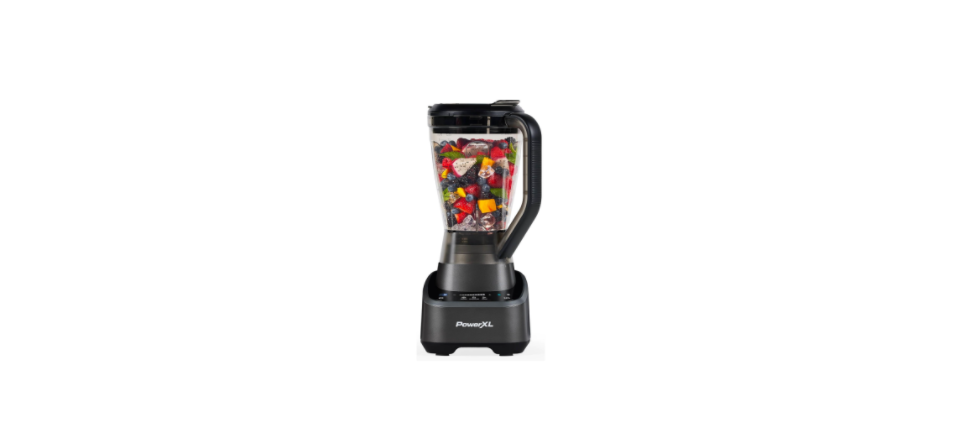

PowerXL BL7019 Series Food Processor Blender

Safety Instructions
- To protect against the risk of electrical shock, do not immerse the cord, plugs, or appliance in water or other liquids.
- Close supervision is necessary when any appliance is used by or near children.
- Unplug from the outlet when not in use, before putting on or taking off parts, and before cleaning.
- A flashing start light or an illuminated pulse light indicates ready to operate.
- Avoid inadvertent contact with the touch screen.
- Avoid contacting moving parts.
- The use of attachments, including canning jars, is not recommended by the manufacturer, may cause fire, electric shock, or injury.
- Do not use outdoors.
- Do not let the cord hang over the edge of the table or counter or touch hot surfaces.
- Do not place on or near a hot gas or electric burner or in a heated oven.
- Keep hands and utensils out of the container while blending to reduce the risk of severe injury to persons or damage to the blender. A scraper may be used, but it must be used only when the blender is not running.
- Blades are sharp. Handle carefully
POLARIZED PLUG (120V models only)
- This appliance has a polarized plug (one blade is wider than the other).
- To reduce the risk of electric shock, this plug is intended to fit into a polarized outlet only one way.
- If the plug does not fit fully into the outlet, reverse the plug.
- If it still does not fit, contact a qualified electrician. Do not attempt to modify the plug in any way
Electrical Cord
- A short power-supply cord is provided to reduce the risk resulting from becoming entangled or tripping over a longer cord.
- Extension cords may be used if care is exercised in their use. If a long detachable extension cord is used.
- The marked electrical rating of the power cord or extension cord should be at least as
great as the electrical rating of the appliance. - If the appliance is of the grounded type, the extension cord should be a grounded-type
3-wire cord. - The cord should be arranged so that it will not drape over the countertop or tabletop,
where it can be pulled on by children or tripped over.
Know Your Product

- Blender lid
- Pour spout
- Ingredient slot
- Large blending jar
- Blade assembly
- Appliance base
- Touch screen
- Personal blending jar with lid
Touch Screen

- Power On/Off
- Sensing Light Bar
- Pulse
- Smart Sensing Functions
- Stop
- Start
- Speed Slider with – and +
- LCD Display
Power
- The power symbol ( ) illuminates when the unit is plugged in and in standby mode.
- Press to see the available functions and make selections.
- If the unit sits without interaction, the screen will go back into standby mode, where only the power button is half illuminated.
Smart Sensing Function
- CRUSH, SMOOTHIE, and CHOP are all smart sensing functions, and will adjust depending on the food in the blender. Press the desired function and press play ( ).
- A countdown will start after initial sensing, but it is only a guide.
- Time will adapt as the unit senses ingredients and thickness.
- The unit will also indicate when more liquid is needed by displaying AL (Add Liquid).
Manual Mode
- To manually choose a desired speed, press the + or – buttons on the speed slider to adjust to a number on the LCD or a level on the bar. Press play ( ) to start the blender.
- Speed adjustments can be made while the unit is running by pressing the + or – buttons and pressing PULSE.
Controls chart

Getting Started
- Remove all packing material, any stickers from the product, and the plastic band around the plug.
- Please go to www.prodprotect.com/powerxl to register your warranty.
- Remove and save literature.
- Wash all removable parts as instructed in the Care & Cleaning Section of this manual.
Blender Assembly
- Turn the jar upside down and place it flat on the countertop or work surface.
- Place the blade assembly in the bottom opening of the jar with blades down (A).

- Rotate the blade assembly clockwise until it is tight.
- Turn the assembled jar right side up.
- Place the blender lid with the cap on top of the jar and align with the arrows (B).

- Unwrap the power cord from the storage area under the appliance base.
- Place the jar assembly onto the appliance base and turn clockwise until the jar locks onto the base and the arrows align (C).

- Plug the appliance into the outlet. Blender is ready for use.
Using the Blender
- Make sure the appliance is OFF.
- Make sure the lid is securely on the jar and the lid cap is in place.
- Select the speed or function that best suits your desired task.
- You may drop ingredients through the ingredient slot while the blender is running.
- Make sure blades have completely stopped before attempting to remove the jar from the base.
- To remove the jar, rotate counterclockwise, grasp the handle, and lift.
- Remove lid to serve. Note: Unplug the appliance when not in use.
- Make sure the appliance is OFF.
- Place the personal blender jar on a flat surface with the open end facing up.
- Fill the jar with ingredients. Do not fill ingredients past the “MAX.” marking.
- Place the lade assembly in the personal jar with blades down and rotate clockwise until it is tight.
- It is important to tighten to prevent leaking during blending.
- Turn the personal jar upside down and place it on the blender base.
- Select the appropriate speed or use PULSE ((P)) to blend to the desired consistency.
Do Not Use
- Large pieces of frozen food. Tough foods such as raw turnips, sweet potatoes, and potatoes
- Bones
- Cured meats such as hard salami or hard PowerXL BL7019 Series Food Processor Blender pepperoni
- Boiling liquids (cool for 5 minutes before placing in the blending jar)
Error
- The screen will display “AL” for “add liquid”.
- This means the recipe is too thick and there is an air bubble over the blades.
- To resolve, add liquid PowerXL BL7019 Series Food Processor Blender and/or stir and mix.
- Continue by entering Smart Functions, or choose a manual speed.
- The screen will display “H” before an overheated situation.
- This is a precaution to extend the life of your blender motor.
- To resolve, press the power button to power down and allow 1 minute for your blender to cool down.
- Restart the blender, and it will automatically know when it is ready to blend again.
- The screen will display “Er” when the touch interface has been held for more than 30 seconds.
- To resolve, clean the touch surface with a dry wipe, making sure no liquid residue is left behind.
- Then press the power button and restart.
Not Working
The smart sensing functions of the unit work through sensing and advanced intelligence. Sometimes, with different incoming voltages or after repeated use of the blender, it may need a “tune-up.” Run the following calibration cycle to realign the smart sensing functions:
- Place 1 cup of water into the large jar with the blade assembly attached.
- Assemble the appliance base and place the blender lid on top of the jar.
- Press Crush and Chop at the same time for 3-5 seconds. “C” will appear on the display.
- Press play. The calibration will run automatically for 7-10 seconds.
- When the unit finishes calibrating, it will return to the “On” mode.
- The calibration is now complete and can be used as intended.
Cleaning
- Before cleaning, turn off and unplug the appliance.
- Lift the blending jar by the handle off the base.
- Remove the jar base by turning it counterclockwise until loose.
- Remove the blade assembly. Blades are sharp. Handle carefully.
- Remove lid. Wash removable parts by hand or in the dishwasher.
- Place the jar on the bottom rack and the rest of the parts on the top rack only.
Two-Year Limited Warranty
(Applies only in the United States and Canada)
For service, repair, or any questions regarding your appliance, call the appropriate 800 number listed within this section. Please DO NOT return the product to the place of purchase. Also, please DO NOT mail the product back to the manufacturer and DO NOT bring it to a service center. You may also want to consult the website listed on the cover of this manual.
What does it cover?
Any defect in material or workmanship provided; however, Empower Brands, LLC’s liability will not exceed the purchase price of the product.
For how long?
Two years from the date of original purchase with proof of purchase.
What will we do to help you?
Provide you with a reasonably similar replacement product that is either new or factory refurbished.
How does state law relate to this warranty?
This warranty gives you specific legal rights. You may also have other rights that vary from state to state or province to province.
What does your warranty not cover?
- Damage from commercial use.
- Damage from misuse, abuse, or neglect.
- Products used or serviced outside the country of purchase.
- Shipping and handling costs associated with the replacement of the product.
- Consequential or incidental damages (please note, however, that some states do not allow the exclusion or limitation of consequential or incidental damages, so this limitation may not apply to you).
Are there additional warranty exclusions?
This includes, without limitation, any warranty claims implicating parties from, or otherwise located in, Cuba, Iran, North Korea, Syria, and the disputed Crimea region.
Customer Service
- Website: www.prodprotect.com /powerxl
- Tel: 1-800-577-1557
- Ph:1-800-738-0245.
FAQs
Q: What are the main functions of the PowerXL BL7019 Food Processor Blender?
Ans: With the BL7019, you can quickly and effectively chop, blend, puree, and mix foods by combining the functions of a food processor and a blender.
Q: What is the capacity of the blender jar and food processor bowl?
Ans: The food processor bowl can contain 7 cups, making it ideal for making large quantities, while the blender jar can store up to 64 ounces (8 cups).
Q: Is the PowerXL BL7019 suitable for crushing ice?
Ans: Indeed, the robust stainless steel blades and strong motor are made to efficiently smash ice for smoothies, frozen drinks, and other applications.
Q: How do I safely assemble and disassemble the attachments?
Ans: Before assembling, always make sure the unit is unplugged. Attachments use a straightforward twist-and-lock mechanism to lock firmly into position. For detailed instructions, consult the manual’s assembly diagrams.
Q: Can the food processor handle tough ingredients like nuts and hard vegetables?
Ans: Of course! The purpose of the food processor blade is to swiftly and uniformly chop hard foods like carrots and almonds.
Q: How do I clean the blender and food processor components?
Ans: Dishwasher safe for the majority of detachable parts. Just use a moist towel to clean the motor base.
Q: What speed settings are available?
Ans: With its pulse feature and several speed settings, the BL7019 gives you exact control over texture processing and blending.