

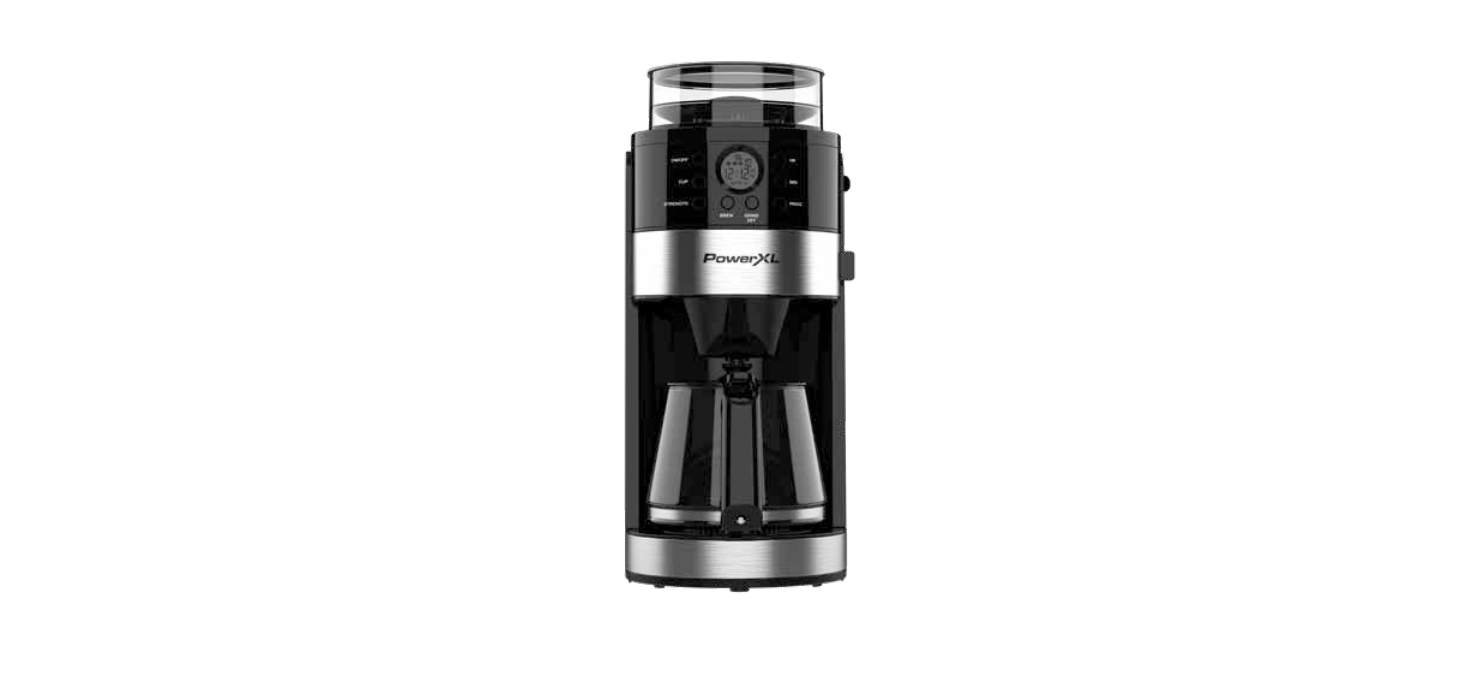

PowerXL CM917 Smart Brew 10-Cup Coffee Maker

Introduction
The PowerXL® Air Fryer will provide you with many years of delicious family meals and memories around the dinner table. But before you begin, it’s very important that you read this entire manual, making certain that you are totally familiar with this appliance’s operation and precautions.
Safety Instructions
- Close supervision is necessary when any appliance is used by or near children.
- DO NOT place on or near a hot gas or electric burner or in a heated oven.
- DO NOT place your appliance on a cooktop, even if the cooktop is cool, because you could accidentally turn the cooktop on, causing a fire, damaging the appliance, your cooktop, and your home.
- DO NOT place or use this appliance near water.
- When cooking, DO NOT place the appliance against a wall or within 5 inches of other appliances.
- DO NOT place anything on top of the appliance.
- A fire may occur if this appliance is covered by or touching flammable material, including curtains, draperies, walls, and the like, when in operation.
- DO NOT place the appliance in any container or small confined space while the appliance is heated or in operation.
- This appliance should be serviced ONLY by qualified service technicians.
- DO NOT immerse the cord or plugs, or expose the electrical components to water or other liquids.
- DO NOT plug in the power cord or operate the appliance controls with wet hands.
Operational Safety
- Should the appliance emit smoke, UNPLUG IMMEDIATELY and wait for the smoking to stop before handling the appliance. Allow the appliance to cool and wipe excess oil and grease from the appliance.
- Cooking appliances should be positioned in a stable location with the handles (if any) positioned to avoid the spillage of hot liquids.
- NEVER operate the appliance unattended.
- The use of accessory attachments not recommended by the appliance manufacturer may cause injuries.
- Avoid touching moving parts.
- UNPLUG the appliance from the outlet when not in use and before cleaning. ALLOW 30 minutes to cool before handling, putting on, or taking off parts, cleaning, or storing.
Polarized Plug
- To reduce the risk of electric shock, this plug is intended to fit into a polarized outlet only one way.
- If the plug does not fit fully into the outlet, reverse the plug.
- If it still does not fit, contact a qualified electrician. Do not attempt to modify the plug in any way.
- A short power-supply cord is provided to reduce the risk resulting from becoming entangled in or tripping over a longer cord.
- Longer detachable power-supply cords or extension cords are available and may be used if care is exercised in their use.
- If a longer detachable power-supply cord or extension cord is used:
- The marked electrical rating of the cord set or extension cord should be at least as great as the electrical rating of the appliance.
- The cord should be arranged so that it will not drape over the countertop or tabletop, where it can be pulled on by children or tripped over unintentionally.
Electric Power
- This appliance should be operated on a dedicated electrical outlet.
- If the electrical outlet is overloaded with other appliances, your new appliance may not operate properly.
Automatic Shut-Off
- The appliance has a built-in shut-off device that will automatically shut off the appliance when the cooking time has completed.
- You can manually switch off the appliance by pressing the Power Button. The fan will continue running for 10–20 seconds to cool down the appliance.
Overheating Protection
- Should the inner temperature control system fail, the overheating protection system will be activated, and the appliance will not function.
- Should this happen, unplug the appliance. Allow time for the appliance to cool completely before restarting or storing.
Electromagnetic Fields
- This appliance complies with all standards regarding electromagnetic fields.
- If handled properly and according to the instructions in the user manual, the appliance is safe to use based on scientific evidence available today.
Parts & Accessories
Control Panel

- ON/OFF Button: Once the appliance is plugged in, press to turn the appliance on or off.
- CUP Button: Press to set the number of cups of coffee you are brewing. The number at the top right of the display panel will show the number of cups of coffee you select.
- Use the markings on the Water Tank Window to ensure that the water you add to the Water Tank matches the number of cups of coffee being brewed.
- STRENGTH Button: Press to set the strength of the coffee you are brewing. The icons on the display panel will illuminate to show the selected coffee strength level (1–3).
- PROG Button: Press and then use the HR Button and MIN Button to set a time to start brewing coffee. The coffee’s digital clock must be set before attempting to program a delayed brew time (see the “Setting a Delay Timer” section). When the delay timer is set, the “AUTO” icon will illuminate on the display panel.
- HR Button: Press to adjust the appliance’s digital clock hour setting. The “PM” icon will illuminate on the display panel to indicate that the digital clock is being set after noon. After pressing the PROG Button, press to adjust the hour setting of the brew time.
- MIN Button: Press to adjust the appliance’s digital clock minute setting. After pressing the PROG Button, press to adjust the minute setting of the brew time.
- GRIND OFF Button: Press to disable the grind function during the brewing process (use with pre-ground coffee). When the grind setting is disabled, the icon will disappear.
- BREW Button: Press to start brewing coffee
Before First Use
- Unpack all parts from the box and remove any clear or blue protective film on the components.
- Check all packaging material thoroughly for accessories.
- Wash any accessories with warm, soapy water before first use.
- Remove and save all literature. Return the parts to the appliance.
- Open the Water Tank Lid. Add water to the Water Tank. Do not exceed the “10” line in the Water Tank.
- Plug the appliance’s power cord into an electrical outlet.
- Press the ON/OFF Button to turn the appliance on.
- Press the GRIND OFF Button once to set the grind setting to off.
- The appliance will heat the water and clean the Water Tank and internal water tubes.
- Repeat 1–2 times before using the appliance to brew coffee.
Operation Instructions
- Open the Water Tank Lid. Measure water according to the number of cups of coffee desired (see Fig. A). Do not exceed the “10” line in the Water Tank.
- Open the door on the appliance. Place the Filter in the Filter Holder (a paper filter can be used instead).
Close the door. Note that this door must be closed or the appliance will not be able to brew coffee. - Open the Coffee Bean Box Lid. Add a maximum of 7 oz (200 g) coffee beans to the Coffee Bean Box. Close the Coffee Box Lid.
- Ensure the Carafe is in position with the Carafe’s lid on the Carafe before brewing coffee.
- Plug the appliance’s power cord into an electrical outlet. Press the ON/OFF Button.
- Press the CUP Button to program the number of cups of coffee you are brewing.
- Press the STRENGTH Button to adjust the strength of your coffee.
- You can use the Grind Adjustment Lever on the side of the appliance to adjust the coarseness of your coffee beans (see Fig. B). For most uses, the medium setting is recommended.
- When the appliance is done brewing coffee, it will beep five times. The heat icon ( ) on the display panel will illuminate, indicating that the appliance is keeping your coffee warm for 2 hours.
- Allow the appliance to cool. Then, check and clean ground coffee residue out of the Filter after each use.
Brewing Pre-Ground Coffee
- Open the Water Tank Lid. Measure water according to the number of cups of coffee desired. Do not exceed the “10” line in the Water Tank.
- Open the door on the appliance. Place the Filter in the Filter Holder ground coffee in the Filter. Close the door.
- Ensure the Carafe is in position with the Carafe’s lid on the Carafe before brewing coffee.
- Plug the power cord into an electrical outlet. Press the ON/OFF Button to turn the appliance on.
- Press the GRIND OFF Button to disable the grind function. The icons should not appear on the display.
- Press the CUP Button to program the number of cups of coffee you are brewing.
- When the appliance is done brewing coffee, it will beep five times.
- If you do not need the appliance to keep your coffee warm, you can press the ON/OFF Button or the BREW Button to stop the appliance from warming your coffee.
- Allow the appliance to cool. Then, check and clean ground coffee residue out of the Filter after each use.
- The Water Tank Window. Each number represents several cups of coffee. Do not fill past the “10” line.

- The Grind Adjustment Lever. The larger setting gives you more coarsely ground coffee, while the smaller setting gives you more finely ground coffee.

Delay Timer
- If the appliance’s digital clock has not yet been set, use the HR and MIN Buttons to set the current time.
- Prepare the appliance with coffee beans or pre-ground coffee and water. Set the number of cups of coffee and the brew strength.
- Press the PROG Button. Use the HR and MIN Buttons to set a time that the appliance will begin making
coffee. - Press the PROG Button to brew coffee at the set time. The “AUTO” icon on the display panel will illuminate. If you want to cancel the timer, press the PROG Button again.
Anti-Drip Feature
- This appliance is equipped with an anti-drip feature that lets you remove the Carafe during the brewing process without spilling coffee.
- When you remove the Carafe, coffee will stop dripping from the appliance temporarily without interrupting the brewing process.
- You must return the Carafe to the appliance within 20 seconds of removing the Carafe, or water will start to overflow from the Filter Slot.
Brewing the Ideal Coffee
- WATER QUALITY: Coffee is 98% water. This means that water quality plays a huge part in the quality of your coffee. For best results, use filtered water to remove impurities, odors, and chlorine from your tap water.
- COFFEE BEANS: The flavor in coffee comes from the coffee beans. The freshest beans tend to taste the best, so for the best results, brew fresh coffee beans within two weeks of buying them.
- GRINDING: A coffee bean’s flavor degrades quickly once the bean is broken, so coffee should be brewed soon after grinding coffee beans. This appliance’s grinder is designed to release more of the oils and flavors that create the best-tasting coffee.
- PROPORTION: To avoid making coffee that is too weak or too strong, you should use the right proportion of coffee to water. If you are using pre-ground coffee, start by using 1 tbsp. Ground coffee or whole beans per cup of coffee, and make adjustments based on your preferences.
Cleaning the Appliance
- Let the appliance cool completely before cleaning.
- Clean the appliance after each use. Always turn the appliance off and unplug it before cleaning.
- After each use, remove the Filter and Filter Holder and discard any coffee grounds.
- Remove the Carafe and pour out any remaining coffee.
- Use a wet cloth to clean the powder outlet on the appliance. Dry completely.
- Wash any parts in warm, soapy water and then rinse thoroughly. Dry the parts completely before returning them to the appliance.
Descaling the Coffee Maker
- Remove any coffee beans or pre-ground coffee from the Coffee Bean Box.
- Open the door on the appliance. Place the PowerXL CM917 Smart Brew 10-Cup Coffee Maker Filter in the Filter Holder. Close the door.
- Ensure the Carafe is in position.
- Plug the appliance’s power cord into an electrical outlet. Press the ON/OFF Button to turn the appliance on.
- Press the GRIND OFF Button to disable the grind function. Press the CUP Button to set the number of cups to 10.
- Press the BREW Button. When about half of the solution has been brewed, press the ON/OFF Button or the BREW Button to cancel the brewing function.
- Let the appliance sit for 30 minutes to allow the vinegar to break down any internal limescale or calcium.
- Repeat the process once more with another 10-cup brew to use up the remaining solution in the Water Tank.
- Once both brewing cycles are complete, discard the vinegar. 11. To flush out all traces of vinegar, run the appliance with fresh water three times.
- Fill the Water Tank to the “10” line with water and repeat steps 3–7.
Storage
- Unplug the appliance and let it cool for PowerXL CM917 Smart Brew 10-Cup Coffee Maker at least 30 minutes before storing.
- Clean the appliance (see the “Cleaning the Appliance” section). Ensure all the components are dry before storing.
- Store in a clean, dry place.
Maintenance
Any other maintenance must be performed by an authorized service technician. Contact customer service using the information on the back of this manual for more information.
Specifications

Troubleshooting

90-Day Money-Back Guarantee
- Proof of purchase is required. Refunds PowerXL CM917 Smart Brew 10-Cup Coffee Maker will include the purchase price, less processing, PowerXL YJ-701A 8 Quart Air Fryer, and handling.
Replacement Guarantee Policy
- Our products, when purchased from an authorized PowerXL YJ-701A 8 Quart Air Fryer retailer, include a 1-year replacement guarantee.
- If your product or part does not perform as expected, the guarantee extends only to the original purchaser and is not transferable.
- If you experience an issue with one of our products within 1 year of purchase, return the product or the part for replacement with a functionally equivalent new product or part.
- Empower Brands, LLC reserves the right to replace the appliance with one of equal or greater value.
Return Policy
Return your product to the address provided below for a replacement, which will incur no additional processing and handling fees, or for the refund of your purchase price, less processing and handling fees. You are responsible for the cost of returning the product. Pack the product carefully and include in the PowerXL YJ-701A 8 Quart Air Fryer package a note with (1)
- Your name
- Mailing address
- Phone number
- Email address
- Reason for return
- Proof of purchase or order number
Refund
- Refunds requested within the money-back guarantee timeframe will be issued to the payment method used at purchase if the item was purchased directly from Empower Brands, LLC.
- If the item was purchased from an authorized retailer, proof of purchase is required, and a check will be issued for the item and sales tax amount. Processing and handling fees are non-refundable.
Customer Service
- Website: www.prodprotect.com/powerxl
- Tel: 1-800-577-1557
- Ph:1-800-738-0245
FAQs
Q: What is the maximum coffee capacity of the PowerXL CM917 Smart Brew?
Ans: This coffee maker is ideal for small companies or households because it can produce up to 10 cups of fresh coffee in a single cycle.
Q: What does the “Smart Brew” feature mean?
Ans: The term “Smart Brew” describes its precise brewing technique, which maximises the flavour and aroma of your coffee grinds by adjusting the water temperature and brewing duration.
Q: Can I program the coffee maker to start brewing automatically?
Ans: Indeed! Your coffee will be ready when you wake up or get home thanks to the CM917’s programmable timer, which lets you set a brew time up to 24 hours in advance.
Q: Is there a keep-warm function? How long does it keep coffee warm?
Ans: Yes, the machine automatically enters a keep-warm mode after brewing, which keeps the coffee at a consistent temperature for up to two hours.
Q: Can I use ground coffee or coffee pods?
Ans: Only ground coffee is intended for use with the PowerXL CM917. Capsules and coffee pods are incompatible.
Q: Does the coffee maker have a pause-and-serve feature?
Ans: Indeed! There won’t be any spills or mess if you stop the brewing cycle and pour a cup in the middle.
Q: Is the carafe dishwasher safe?
Ans: For ease of cleaning, the filter basket and the glass carafe are both top-rack dishwasher safe.
Q: How do I know when it’s time to descale the coffee maker?
Ans: Slower brewing times or a shift in coffee flavour could be seen. Depending on the hardness of the water, descale should be done after 40 brews or once a month.