

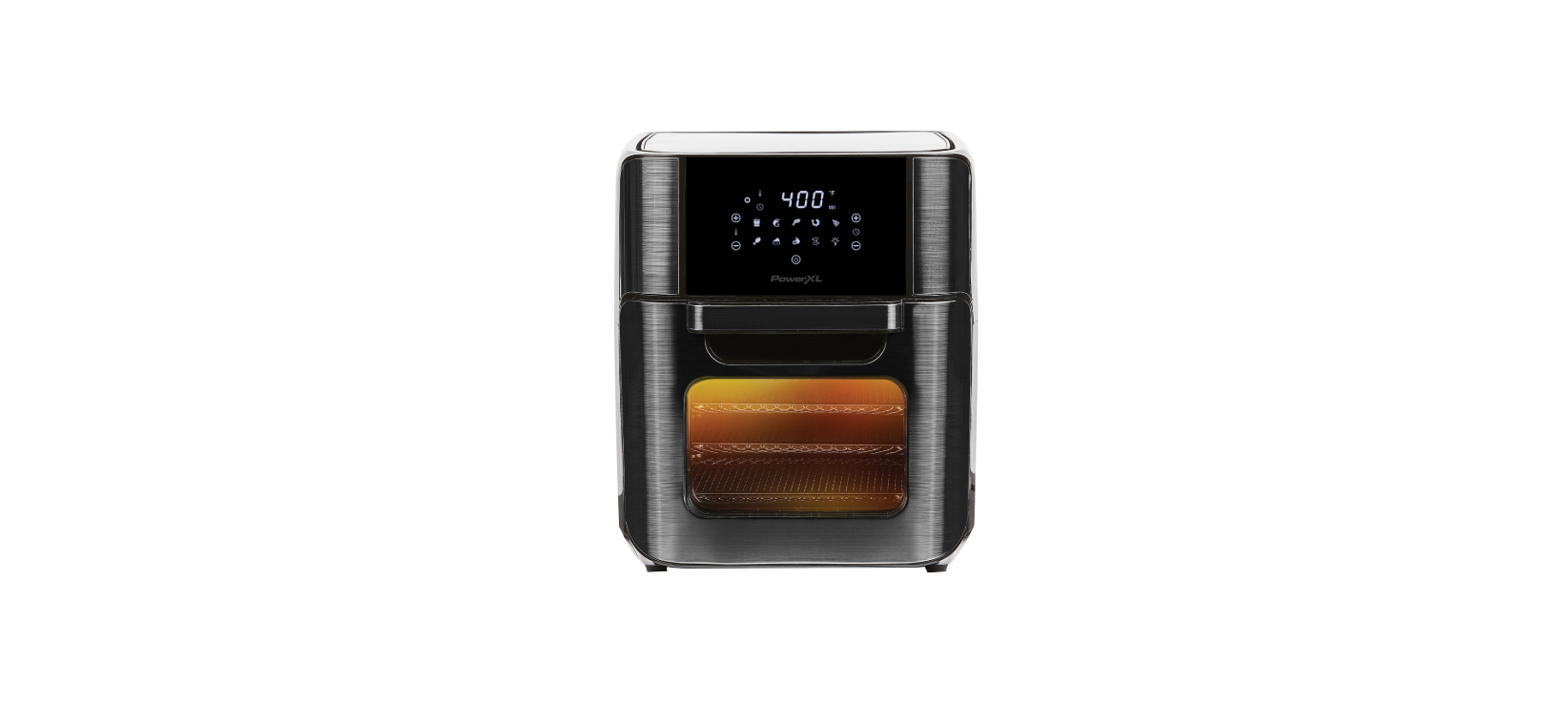

PowerXL GLA-1003-NR Air Fryer Pro Plus

Introduction
The PowerXL® Air Fryer will provide you with many years of delicious family meals and memories around the dinner table. But before you begin, it’s very important that you read this entire manual, making certain that you are totally familiar with this appliance’s operation and precautions.
Safety Instructions
- Close supervision is necessary when any appliance is used by or near children.
- DO NOT place on or near a hot gas or electric burner or in a heated oven.
- DO NOT place your appliance on a cooktop, even if the cooktop is cool, because you could accidentally turn the cooktop on, causing a fire, damaging the appliance, your cooktop, and your home.
- DO NOT place or use this appliance near water.
- When cooking, DO NOT place the appliance against a wall or within 5 inches of other appliances.
- DO NOT place anything on top of the appliance.
- A fire may occur if this appliance is covered by or touching flammable material, including curtains, draperies, walls, and the like, when in operation.
- DO NOT place the appliance in any container or small confined space while the appliance is heated or in operation.
- This appliance should be serviced ONLY by qualified service technicians.
- DO NOT immerse the cord or plugs, or expose the electrical components to water or other liquids.
- DO NOT plug in the power cord or operate the appliance controls with wet hands.
Polarized Plug
- To reduce the risk of electric shock, this plug is intended to fit into a polarized outlet only one way.
- If the plug does not fit fully into the outlet, reverse the plug.
- If it still does not fit, contact a qualified electrician. Do not attempt to modify the plug in any way.
- A short power-supply cord is provided to reduce the risk resulting from becoming entangled in or tripping over a longer cord.
- Longer detachable power-supply cords or extension cords are available and may be used if care is exercised in their use.
- If a longer detachable power-supply cord or extension cord is used:
- The marked electrical rating of the cord set or extension cord should be at least as great as the electrical rating of the appliance.
- The cord should be arranged so that it will not drape over the countertop or tabletop, where it can be pulled on by children or tripped over unintentionally.
Electric Power
- This appliance should be operated on a dedicated electrical outlet.
- If the electrical outlet is overloaded with other appliances, your new appliance may not operate properly.
Automatic Shut-Off
- The appliance has a built-in shut-off device that will automatically shut off the appliance when the cooking time has completed.
- You can manually switch off the appliance by pressing the Power Button. The fan will continue running for 10–20 seconds to cool down the appliance.
Overheating Protection
- Should the inner temperature control system fail, the overheating protection system will be activated, and the appliance will not function.
- Should this happen, unplug the appliance. Allow time for the appliance to cool completely before restarting or storing.
Electromagnetic Fields
- This appliance complies with all standards regarding electromagnetic fields.
- If handled properly and according to the instructions in the user manual, the appliance is safe to use based on scientific evidence available today.
Parts & Accessories

- MAIN APPLIANCE: Cleans easily with a damp sponge or cloth and a mild detergent. Avoid harsh, abrasive cleaners. NEVER submerge this appliance in water or liquids of any kind.
- CONTROL PANEL: Allows you to control the functions of the appliance (see the “Using the Digital Control Panel” section).
- AIR INTAKE VENTS: DO NOT COVER the Air Intake Vents while the appliance is operating.
- HOT AIR OUTLET VENTS: DO NOT COVER the Air Outlet Vents while the appliance is operating. Do not place within 5 inches of other objects.
- POWER CORD
- DRIP TRAY: Always cook with the Drip Pan in place for easy clean-up.
- CRISPER TRAYS: Can be used for dehydration, to cook crispy snacks, and to reheat foods like pizza.
- ROTISSERIE SHAFT, FORKS & SET SCREWS: Use for roasts and whole chicken. Slide the Shaft lengthwise through the center of the meat. Slide the Forks onto the Shaft from each end and then into the meat. Lock in place with the Set Screws.
- ROTISSERIE FETCH TOOL: The Rotisserie Fetch Tool should be used to insert and remove any foods prepared using the Rotisserie Shaft or Skewers. Place under the Rotisserie Shaft and lift (left side first), and then gently extract the food.
- ADJUSTABLE SKEWERS RACK: Used when making kabobs. Skewer Racks fit over Sthe shaft and lock in place with Set Screws.
- SKEWERS: Great for all your kabob recipes, meat, fish, or veggies.
- ROTATING MESH BASKET: Great for fries, roasted nuts, and other snacks. Use the Rotisserie Fetch Tool when inserting or removing the Basket.
Using the Accessories
Placing Crisper Trays into the Appliance
- Insert the Drip Tray into the bottom of the appliance.

- Place Crisper Trays into the appliance by sliding them through the side grooves and onto the back lip.

- Place the Crisper Trays closer to the top heating element for faster cooking and added crisp. 4. Rotate the Crisper Trays mid-cycle for even cooking.
Using the Rotisserie Spit
- With the Forks removed, force the Rotisserie Shaft through the center of the food lengthwise. NOTE: To support the food on the Rotisserie Spit better, insert the Rotisserie Forks into the food at different angles.

- Slide the Forks (a) onto each side of the Spit and secure them in place by tightening the two Set Screws (b).
- Hold the assembled Rotisserie Spit at a slight angle with the right side higher than the left side and insert the left side of the Spit into the Rotisserie connection inside the appliance.

- With the left side securely in place, lower the right side of the Spit into the Rotisserie connection on the right side of the appliance.

- To remove cooked food, see the “Removing the Rotisserie Spit” section.
Removing the Rotisserie Spit
- Using the Fetch Tool, hook the bottom of the left and right sides of the shaft attached to the Rotisserie Spit.

- Pull the Rotisserie Spit away from the left Rotisserie Socket and then lift the Spit upward to remove and disconnect the Spit from the Rotisserie Sockets.
- Carefully pull and remove the Rotisserie Spit from the appliance.
Assembly
- Insert each Skewer point through the holes on the left Skewer Rack.

- Squeeze the clip end of each Skewer as you insert the Skewer into the opposite Skewer Rack slot to secure.
- Release the clip to securely rest the Skewer in the slot.

- Repeat steps 3–6 in a uniform manner around the Skewer Rack. Make sure the Skewers are evenly spaced.

- Ensure the Skewer Racks are inside the indentations on the Shaft. Tighten the Set Screws and ensure they are securely in place.
- Use caution while inserting the Shaft into the appliance. The Skewer ends are sharp and can poke you.
Control Panel

- Power Button Once the appliance is plugged in, the Control Panel will light up. Pressing the Power Button will set the appliance to a default temperature of 370° F (188° C) and time of 15 minutes.
- Pressing the Power Button again will start the cooking process. Pressing the Power Button during the cooking cycle will shut off the appliance.
- Internal Light: Selecting this button will help you check cooking progress while the appliance is in operation.
- Rotation Button:n Select this button when cooking anything using the Rotisserie Mode. The icon will blink while in use.
- Temperature Control Buttons: These buttons enable you to raise or lower cooking temperature by 5° F (2.7° C) intervals, ranging from 150° F (66° C) to 400° F (200° C). Dehydration ranges from 90° F (30° C) to 170° F (75° C).
- Time Control Button: These buttons enable you to select an exact cooking time to the minute, from minutein. To 90 mins. In all modes except when dehydrating, which uses 30 minutes. Intervals and an operating time of 2–24 hrs.
- LED Digital Display: The Digital Numeric Display will alternate between displaying the temperature and the remaining time during the cooking process.
- Cooking Preset:sSelecting any Preset Button sets the time and temperature to the preset’s default value.
- The cooking process starts aautomatically after5 seconds. After the Preset has been selected, or the Power
- The button can be pressed after the Preset Button to start the appliance immediately.
- You may use the Time and Temperature Buttons to override the preset settings.
Cooking Presets
Preset Button Cooking Chart
- Cooking time for a whole roasted chicken will vary with weight. Use a meat thermometer to check the internal temperature as per the chart below.

Using the Appliance Without Presets
- The time and temperature on the chart above refer to the basic default settings. As you become familiar with the appliance, you will be able to make minor adjustments to suit your taste.
Cooking Guidelines

Internal Temperature Meat Chart
Use this chart and a food thermometer to ensure that PowerXL GLA-1005 Air Fryer Pro Oven meat, poultry, seafood, and other cooked foods reach a safe minimum internal temperature.
For maximum food safety, the U.S. Department of Agriculture recommends 165° F for all poultry; 160° F for ground beef, lamb, and pork; and 145° F, with a 3-minute resting period, for all other types of beef, lamb, and pork. Also, review the USDA Food Safety Standards.
Before the First Time
- Read all material, warning stickers, and labels.
- Remove all packing materials, labels, and stickers.
- Hand-washing is recommended. Wash all parts PowerXL GLA-1005 Air Fryer Pro Oven and accessories used in the cooking process with warm, soapy water.
- Never wash or submerge the cooking appliance in water. Wipe the inside and outside of the cooking appliance with a clean, moist cloth. Rinse with a warm, moist clot.h
- Before cooking food, preheat the appliance for a few minutes to allow the manufacturer’s protective coating of oil to burn off. Wipe the appliance with PowerXL GLA-1005 Air Fryer Pro Oven warm, soapy water and a dishcloth after this burn-in cycle.
A Versatile Appliance
The appliance is designed to cook a wide variety of your favorite foods. The charts and tables provided within this manual and the Recipe Guide will help you get great results. Please refer to this information for proper time/temperature settings and proper food quantities.

Operating Instructions
- Place the ingredients on your chosen accessory.
- Plug the power cord into a 120V dedicated outlet. Put the PowerXL GLA-1005 Air Fryer Pro Oven, the chosen accessory, into the appliance and shut the door.
- When the chosen accessory and food are in place, press the Power Button once.
- Select a preset function (see the “Cooking Presets” section) or manually set the temperature and then the time.
- The appliance will automatically start the cooking cycle a few seconds after a preset function is selected or the time and/or temperature are adjusted manually.
- Alternatively, you can press the Power Button to begin the cooking cycle immediately once the desired cooking time and temperature have been selected.
Cooking Chart

Settings
- The Cooking Chart will help you select the PowerXL GLA-1003-NR Air Fryer Pro Plus correct temperature and time for the best results. As you become more familiar with the appliance’s cooking process, you may adjust these settings to suit your own personal tastes.
Cleaning
Clean the appliance after each use. The cooking accessories are made of durable stainless steel and are dishwasher safe. Never use abrasive cleaning materials or utensils on these surfaces.
- Remove the power cord from the wall socket and be certain the appliance is thoroughly cooled before cleaning.
- Wipe the outside of the appliance with a warm, moist cloth and mild detergent.
- To clean the door, gently scrub both sides with warm, soapy water and a damp cloth.
- DO NOT soak or submerge the appliance in water or wasit h in the dishwasher.
- Clean the inside of the appliance with hot water, a mild detergent, and a nonabrasive sponge.
- Do not scrub the heating coils because they are fragile and may break.
- Then, rinse the appliance thoroughly with a clean, damp cloth.
- Do not leave standing water inside the appliance.
- If necessary, remove unwanted food residue with a soft nylon bristle brush.
Storage
- Unplug the appliance and follow the PowerXL GLA-1003-NR Air Fryer Pro Plus instructions in the “Cleaning” section.
- Make sure all components are clean and dry.
- Place the appliance in a clean, dry place.
Troubleshooting

Error Codes

90-Day Money-Back Guarantee
- Proof of purchase is required. Refunds will PowerXL GLA-1003-NR Air Fryer Pro Plus include the purchase price, less processing, PowerXL YJ-701A 8 Quart Air Fryer, and handling.
Replacement Guarantee Policy
- Our products, when purchased from an PowerXL GLA-1003-NR Air Fryer Pro Plus authorized PowerXL YJ-701A 8 Quart Air Fryer retailer, include a 1-year replacement guarantee.
- If your product or part does not perform as expected, the guarantee extends only to the original purchaser and is not transferable.
- If you experience an issue with one of our products within 1 year of purchase, return the product or the part for replacement with a functionally equivalent new product or part.
- Empower Brands, LLC reserves the right to replace the appliance with one of equal or greater value.
Return Policy
Return your product to the address provided below for a replacement, which will incur no additional processing and handling fees, or for the refund of your purchase price, less processing and handling fees. You are responsible for the cost of returning the product. Pack the product carefully and include in the PowerXL YJ-701A 8 Quart Air Fryer package a note with (1)
- Your name
- Mailing address
- Phone number
- Email address
- Reason for return
- Proof of purchase or order number
Refund
- Refunds requested within the money-back guarantee timeframe will be issued to the payment method used at purchase if the item was purchased directly from Empower Brands, LLC.
- If the item was purchased from an authorized retailer, proof of purchase is required, and a check will be issued for the item and sales tax amount. Processing and handling fees are non-refundable.
Customer Service
- Website: www.prodprotect.com/powerxl
- Tel: 1-800-577-1557
- Ph:1-800-738-0245
FAQs
Q: What is the cooking capacity of the PowerXL GLA-1003-NR Air Fryer Pro Plus?
Ans: With its 10-quart capacity, the PowerXL GLA-1003-NR is perfect for batch cooking or large families. A entire chicken, many snack trays, or tiered meals can all fit inside.
Q: Can I cook multiple items at once?
Ans: Indeed! You may make more than one dish or bigger quantities in a single cycle thanks to the multi-rack design, which enables multi-level cooking.
Q: Is the appliance safe to use on kitchen countertops?
Ans: Yes, the item has a cool-touch casing and non-slip feet. For adequate ventilation, make sure there is at least 5 inches of space surrounding the device.
Q: Is preheating required before cooking?
Ans: For best results, preheating is advised, particularly when baking or cooking frozen meals. Before putting food in, use the preheat option or wait two to three minutes.
Q: Does it come with a rotisserie kit?
Ans: Indeed, the GLA-1003-NR comes with a rotisserie spit and forks, which makes it simple to cook roasts or whole chickens evenly and without using your hands.
Q: Can I use aluminum foil or parchment paper?
Ans: Yes, but take care not to obstruct fan circulation or air vents. To prevent airflow problems or fire concerns, only use foil or parchment in the basket or tray.
Q: Can I check the food while it’s cooking?
Ans: Yes, you can check or rotate the food by opening the door while it’s cooking. When the door is shut, the oven will automatically pause and restart.
Q: Does the unit remember my previous settings?
Ans: No, it resets after each use. Nonetheless, the majority of presets can be accessed with a single tap, and re-entering manual settings is simple.