

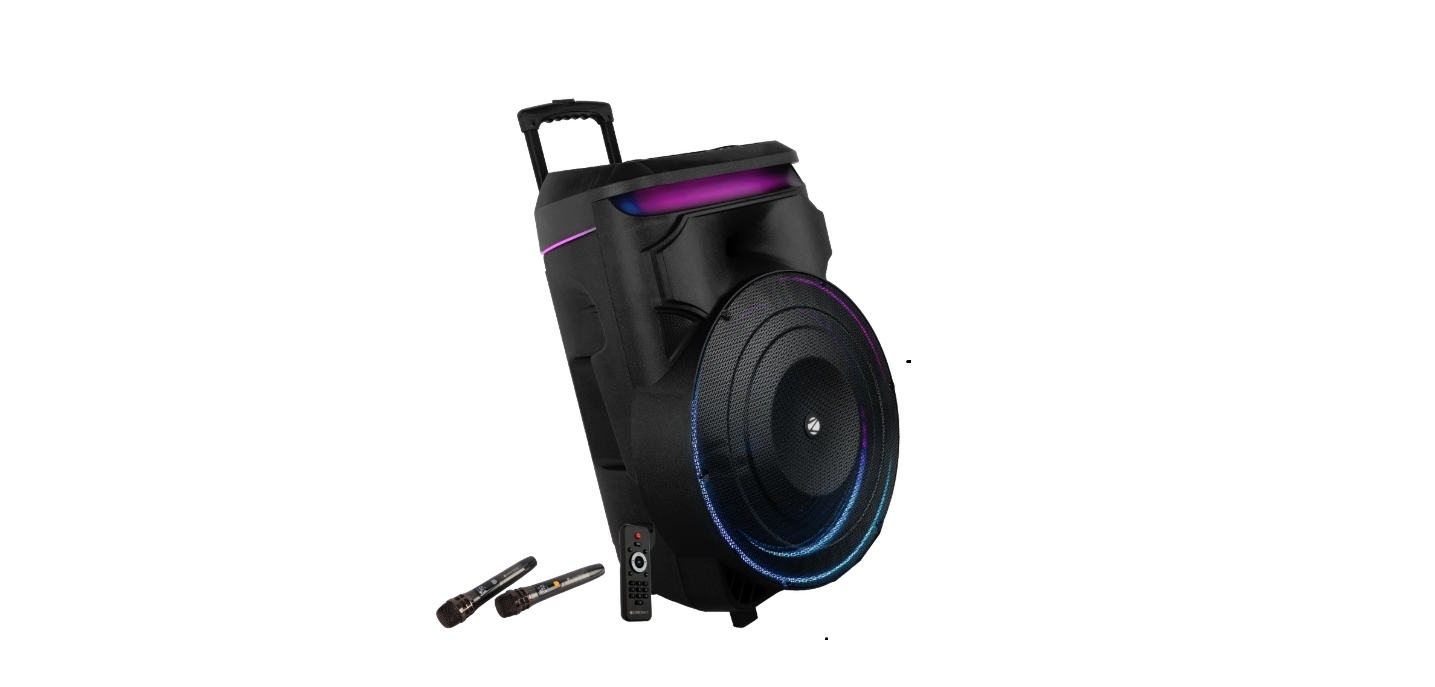
 ZEBRONICS OCTANE 601 Trolley DJ Speaker

Features
- BTv5.0 | USB mSD SD | FM | AUX | MIC IN | Guitar IN
- Karaoke Function
- MIC Recording
- LED display
- Remote control
- Dual UHF wireless mic
- Volume, Bass & Treble Controls
- Mic Volume & Echo Controls
- Bass Boost
- TWS Function
- Retractable Handle with Wheels
- Supports an external battery
- Tripod Mount
Package Contents
- Trolley DJ Speaker: 1 U
- Remote: 1 U
- Wireless Mic: 2 U
- Power Cord: 1 U
- Input cable: 1 U
- DC cable: 1 U
- QR Code Guide: 1 U
Description
Control Panel Description
- POWER: ON/OFF SWITCH
- EQUALIZER
- MIC INPUT JACK
- GUITAR INPUT JACK
- MIC PRIORITY SWITCH
- M.HI: INCREASE/DECREASE MIC TREBLE
- M.LO: INCREASE/DECREASE MIC BASS
- ECHO ADJUST
- GUITAR VOLUME ADJUST
- BASS BOOST
- AUX PORT
- EXT DC 12V IN
- mSD CARD SLOT
- USB PORT
- SD CARD SLOT
- MODE
- LED CONTROL
- RECORD
- DISCONNECT
- PLAY/PAUSE/TWS/SCAN
- PREVIOUS
- REPEAT NEXT
- VOLUME CONTROL
- MIC VOLUME CONTROL
Back Panel
- POWER INPUT (AC 110V-240V)
- FM ANTENNA

Remote Control
- Standby
- USB/SD/LINE/BLUETOOTH (Audio input)
- Prev/FM CH-
- Play/pause/FM tuner
- Next/FM CH+|
- Repeat
- Stop
- Volume up
- Volume down
- Mute
- Equalizer
- Number

General Instructions
BT Connectivity
- Switch the source to BT mode.
- Turn on BT on your mobile and scan for nearby BT devices.
- Tap on “ZEB-OCTANE 601” to connect.
USB/SD/mSD Mode
- Insert the USB/SD/microSD card into the slot provided on the speaker.
- The speaker will automatically detect the USB/SD/microSD card, and the supported audio content will be played from it.
FM Radio
- Switch the speaker to FM mode
- Long-press the Play/Pause button to scan the available FM channels.
- Once the scanning is done, the first scanned channel will start playing.
AUX-IN
- The speaker can be connected to an audio source using a 3.5 to 3.5mm cable.
- Connect one end of the cable to the AUX-In port on the speaker and the other end to an audio source.
- The audio from the source can be played through the speaker.
TWS Function
- Push the Mode Button on both speakers until ZEBRONICS OCTANE 601 Trolley DJ Speaker the speakers are in Bluetooth Mode. The screen will display the word “BLUE”
- When both speakers are in Bluetooth mode, push and hold the TWS button for 3 seconds. You will hear a beep & screen display “t-on”. Next time you put both speakers in Bluetooth mode at the same time, the speakers will connect automatically.
- On your device, turn your Bluetooth settings “ON”, and you will then select the unit and pair. Enjoy TWS (True Wireless Stereo) sound from your phone via Bluetooth!
Charging Instruction
- Connect the pre-included charger to the speaker & connect the other end to a 230V power supply.
Charging Indication
- Red LED Light will GLOW constantly on the speaker LED Display.
Specifications
- Output Power (RMS): 120W
- Driver Size Full range: 46cm
- Tweeter: 8 cm
- Impedance Full range: 40
- Tweeter: 60
- Frequency Response:40Hz-20kHz
- S/N Ratio : ≥86dB
- Separation : ≥50db
- File format support (USB/mSD): M3, WMA, WA, FLACC
- Line input: 3.5mm
- Max Supported USB/microSD memory size: 32GB
- FM frequency range: 87.5 MHz – 108 MHz
- Charging time: h
- Playback time h
- BT name: ZB-OCTANE 601
- BT version: v50
- Product DimDimensionalx D x H): 50 x 42.5 x 74 cm
- Net. Weight: 18.8kg
Customer Support
- Website: www.zebronics.com
- Tel: 044 40000004
FAQs
Q: What is the battery backup time?
Ans: Depending on usage and volume level, the integrated rechargeable battery can play music for up to four to five hours. Connect to a power source for prolonged use.
Q: How long does it take to fully charge the speaker?
Ans: Using the provided power adapter, charging the OCTANE 601 takes about five to six hours.
Q: Can I adjust bass and treble levels?
Ans: Indeed. Depending on the model version, the speaker has manual control knobs or EQ settings to modify the overall volume, mic echo, bass, and treble.
Q: How far is the Bluetooth range?
Ans: In open spaces, the speaker’s wireless range is up to 10 meters (33 ft). This distance may be shortened by walls and interference.
Q: Is the RGB lighting customizable?
Ans: The song is programmed to cause the RGB LED lights to flash or pulse. Using the LED or Light button on the device or remote, certain models enable switching between lighting settings or turning them off.
Q: Can the speaker be used while charging?
Ans: Indeed, the OCTANE 601 is perfect for extended events or parties because it can be utilised in plug-and-play mode even while charging.
Q: Can the speaker be used outdoors?
Ans: Indeed! It is portable thanks to its handle and wheels, and it can be used outdoors thanks to its integrated battery. Avoid using the device in wet or rainy situations, though, as it is not water-resistant.
Q: Does the speaker support TWS (True Wireless Stereo)?
Ans: TWS pairing with an additional speaker is not supported by the OCTANE 601. Use line-in or AUX to connect external mixers or amplifiers for stereo sound.