

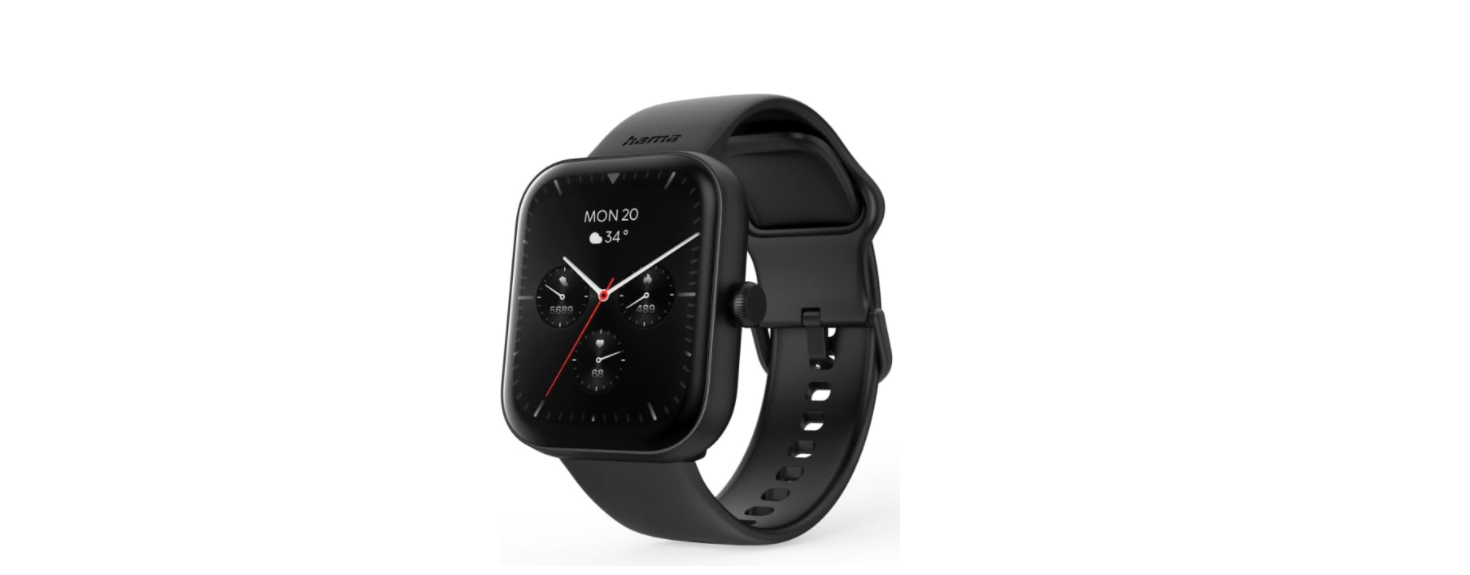

Hama 00178614 Fitness Tracker Smartwatch

Safety Instructions
Before using the Hama 00178614 Fitness Tracker Smartwatch, carefully read the following safety instructions to ensure proper and safe use. For users who enjoy Hama wearable technology, the Hama 00178614 Fitness Tracker Smartwatch pairs well with Hama audio devices. You can also check out the Hama Freedom Light Bluetooth Earphones for a complete fitness and audio experience.
- This product is intended for private, non-commercial use only.
- Use the Hama 00178614 Fitness Tracker Smartwatch for its intended purpose only.
- Protect the product from dirt, moisture, and overheating, and only use it in a dry environment.
- Do not use the Hama 00178614 Fitness Tracker Smartwatch in the immediate vicinity of heaters or other heat sources or in direct sunlight.
- Do not operate the product outside the power limits given in the specifications.
- Do not use the product in areas where the use of electronic devices is not permitted.
- The battery is integrated and cannot be removed.
- Do not open the device or continue to operate it if it becomes damaged.
- Do not attempt to service or repair the product yourself. Leave the service work to qualified experts.
- Do not drop the product and do not expose it to any major shocks.
- Do not modify the product in any way. Doing so voids the warranty.
- Dispose of packaging material immediately according to locally applicable regulations.
- Do not throw the battery or the product into a fire.
- Do not tamper with or damage/heat/disassemble the batteries/ rechargeable batteries.
- Always pay attention to the surrounding traffic and your environment.
- Consult your doctor before starting an exercise programme.
- Consult your doctor if you have a medical condition and wish to use the product.
- Use the item only in moderate climatic conditions
Battery Instructions
- Only use suitable charging devices or USB connections to charge the Hama 00178614 Fitness Tracker Smartwatch.
- As a rule, do not use defective charging devices or USB connections to charge the Hama 00178614 Fitness Tracker Smartwatch, and do not try to repair them yourself.
- Do not overcharge the Hama 00178614 Fitness Tracker Smartwatch or allow the battery to completely discharge.
- Avoid storing, charging, or using the device in extreme temperatures and extremely low atmospheric pressure (for example, at high altitudes).
- When stored over a long period of time, batteries should be charged regularly (at least every three months).
- This product generates magnetic fields. Since this product may interfere with the operation of pacemakers, persons with pacemakers should consult a doctor before using this product.
Technical Specifications
The following are the key technical specifications of the Hama 00178614 Fitness Tracker Smartwatch, detailing its design, battery, display, and connectivity features.
| Frequency band(s) | ||
| Maximum radio-frequency power transmitted | ||
| Bluetooth version | BLE 5.3 | |
| Screen type | TFT-LCD | |
| Display size | 1.65‘‘ | |
| Dimensions | 47 x 39 x 13 mm | |
| Weight | 40 g | |
| Strap material | Silicone | |
| Housing material | Plastic | |
| Protection class | IP68 | |
| Battery type | Lithium polymer battery | |
| Battery capacity | 300 mAh | |
| Charging time | < 2.5 h | |
| Battery life | approx. 5 – 7 days | |
Care and Maintenance
- Never use old and new batteries in the replacement remote control at the same time, as old batteries tend to leak and can lead to a loss of performance.
- Never clean the replacement remote control with scouring agents or harsh cleaning agents.
- Keep the replacement remote control free of dust by cleaning it with a dry soft cloth.
For users who enjoy Hama wearable technology, the Hama 00178614 Fitness Tracker Smartwatch pairs well with Hama audio devices. You can also check out the Hama Freedom Light Bluetooth Earphones for a complete fitness and audio experience.
Warranty
Hama GmbH & Co KG assumes no liability and provides no warranty for damage resulting from improper installation, handling, or misuse of the Hama 00178614 Fitness Tracker Smartwatch, or from failure to follow the operating instructions and safety notes.
Disclaimer
Hama GmbH & Co KG accepts no liability or warranty for damage resulting from improper installation,
assembly, or improper use of the product or failure to observe the operating instructions and/or safety instructions.
Service and Support
Please contact the Hama product advisory service if you have any questions about the product.
Declaration of conformity
Hama GmbH & Co KG hereby declares that the radio equipment type[00176638]complies with Directive 2014/53/EU.
Customer Service
- Website: https://de.hama.com
- Ph: 49 9091 502-0
FAQs
Q: What is the Hama Fitness Tracker Smartwatch 5000 used for?
The Smartwatch 5000 is a wearable fitness and health tracker that offers notifications for calls, messages, and apps in addition to tracking activities like steps, heart rate, sleep, and calories burned.
Q: Can I track my heart rate continuously?
In order to conserve battery life, the smartwatch’s continuous heart rate monitoring capability can be turned on or off via the app.
Q: How accurate is the step and activity tracking?
A 3-axis accelerometer is used by the Smartwatch 5000 to count steps. Depending on wrist movement, speed, and stride length, accuracy may vary slightly.
Q: Can I monitor my sleep with this smartwatch?
Yes, it automatically monitors the length of your sleep as well as its quality (light, deep, and waking times). The SmartFit app allows you to view data.
Q: Can I control music with the smartwatch?
Yes, using the linked smartphone, the smartwatch allows basic music controls like play, pause, next, and previous.
Q: Can I use it for sports tracking?
Yes, it offers a variety of sports modes, including walking, cycling, and running.
Q: Can I change the watch face?
Indeed, the SmartFit app offers a variety of digital and analogue watch faces. Depending on the characteristics of the program, you can make your own faces or download extra ones.