


 Bowers And Wilkins CDA-2HD Distribution Amplifier
Welcome to Bowers & Wilkins and CDA-2HD
Thank you for choosing Bowers & Wilkins. When John Bowers first established our company, he did so in the belief that imaginative design, innovative engineering, and advanced technology were keys that could unlock the enjoyment of audio in the home. His belief is one that we continue to share and inspires every product we design, tailored for new audio experiences inside the home.
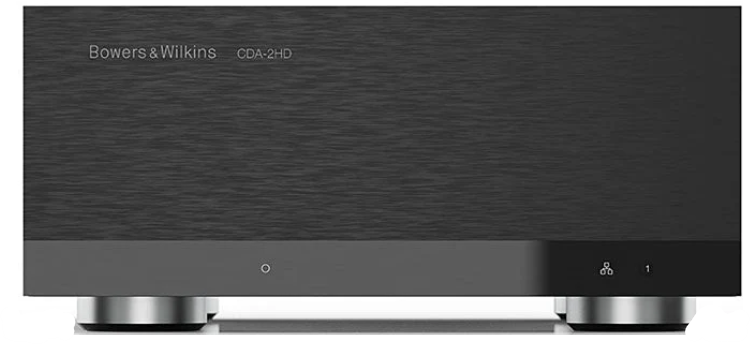
CDA-2HD distribution power amplifier can drive any Bowers & Wilkins custom installation speaker to new heights of performance. Offering 2 channels of high-quality amplification, the CDA-2HD can enable your home with sound yet takes up minimal space thanks to its compact 2U, half-width design. CDA-2HD configuration also supports bridging of its Class D stereo channels into even more powerful mono outputs, if needed.
Features
- 2-channel amplification with 500 watts per channel delivering high-resolution audio
- Engineered to work with Bowers & Wilkins installation speakers and subwoofers.
- Three power mode control options – on, auto detect, or 12V trigger. Robust and reliable protection features, preventing damage due to overload, short circuits, or heat.
- The Product Configuration page allows a customizable setup for various use case configurations
- Audio Video Bridging (AVB) compatible
Carton Contents
- 1 x CDA-2HD
- 2 x Rack-mount ears
- 1 x Link bracket
- 1 x Power cable
- 4 x Rack-mount ear screws (M5 x 8mm)
- 4 x Feet screws (M4 x 6mm)
- 4 x Feet
- 1 x Link bracket screw (M4 x 8mm)

Installation
Rack mounting
The CDA-2HD is supplied with two rack mounting ears for installation in standard equipment racks. Attach the brackets by inserting machine screws through each bracket into the threaded holes in the side of the amplifier, see Diagram 2. To rack mount two CDA-2HD, please use the link bracket provided and use the shorter side of the ear mount for installation. Single CDA-2HD rack mounting. Two CDA-2HD rack mounting

Foot mounting
CDA-2HD can also be table-mounted and is supplied with feet and feet screws, see Diagram 4. Ensure that, once positioned, the amplifier is well ventilated and that the ventilation apertures are not obstructed. If the system is taken out of use for a long period, disconnect the amplifier from the mains power supply.
To prevent damage, maintain adequate ventilation space to the sides of the amplifier. CDA-2HD can be stacked vertically, but be sure not to place the amplifier next to other components, or against the side of a cabinet. Doing so will block ventilation openings.
Controls and Connections
Rear panel sockets and switches, see Diagram 5
- Power input socket (IEC C14)
- Reset button
- Ethernet (RJ45) socket
- 12V trigger in / out
- Digital inputs
- Analogue inputs
- Outputs
- Power LED
- Ethernet LED
- Zone status LEDs
Reset Button
- Using the factory reset can erase all settings and revert the amplifiek to the factory flashed firmware.
Reboot
- This allows the device to gracefully shut down and restart.
- Single press of the reset button – The LED will flash green while rebooting.
Reset
- This will reset all settings and all saved presets.
- Press and hold the reset button for 5 seconds until the LED starts flashing green.
- Release the button and wait for the device to restart.
Factory Reset
This will reset all settings, all saved presets, and device firmware to its original factory settings.
- Make sure the unit is turned off using the AC power inlet switch.
- Press and hold the reset button and turn the AC power inlet switch on
- Keep pressing for 10 seconds until the LED starts flashing green.
- Release the reset button and wait for the device to restart. a. Single press of the reset button
- The LED will flash green while rebooting.
Reset
- Press and hold the reset button for 5 seconds until the LED starts flashing green.
- Release the button and wait for the device to restart.
Factory Reset
This will reset all settings, all saved presets, and device firmware to its original factory settings.
-
- Press and hold the reset button and turn the AC power inlet switch on.
- keep pressing for 10 seconds until the LED starts flashing green.
- Release the reset button and wait for the device to restart.
Connecting
- Connecting speaker wires or input cables while the amplifier is powered may cause electrical shock and could damage the amplifier. Unplug the power cord before making connections.
Connecting from the source
- There are three options when connecting audio inputs to the CDA-2HD distribution amplifier. Ethernet (network connection)
Audio Video Bridging (AVB) connection
- Used to make a connection to a wired network. Once connected, the amplifier will become visible on the network to other Bowers & Wilkins CDA devices.

Analogue Input
- Use these inputs for Analogue Audio Source,

Digital Input
- Use this input for Digital Audio Source.
Connecting to speakers
CDA-2HD can power one stereo output of audio and has a SpeakOn for speaker connections. Speakers can also be wired to bridge into a single channel to increase the power available to a single speaker. To connect stereo speakers,
- Connect the speaker cable to the SpeakOn connector and reinsert it into the amplifier, see Diagram 10.
- Do not connect the L – and R – (negative) terminals together.
- Doing so will result in a fault condition, and the amplifier will either shut down or not work properly.

- Check the polarity of the speakers and wires before connecting to the amplifier.
- To connect bridged-tied load speakers,

- Select BRIDGE-TIED LOAD in the product configuration page
- Connect the + terminal from the speaker to the + terminal of the right channel (R).
- Connect the – terminal from the speaker to the – terminal of the left channel (L) on the amplifier.
The two terminals for a bridged pair of speakers are marked by 1- & 2+. In bridge mode, both amplifiers in the zone combine to make a mono output of double the power.
The minimum load impedance in bridge mode is 8Ω. Connecting 4Ω loads may result in lower output power, distortion, and overheating.
Setting Power Mode
CDA-2HD can be set up to automatically power on when needed. The POWER MODE can be selected via the Product Configuration Page, allowing the CDA-2HD to be powered on at all times when POWER MODE is set to ON. The CDA-2HD can also be turned on when an audio signal is present at any audio input by selecting AUTO DETECT or the 12V TRIGGER.
To set up CDA-2HD to be controlled by a 12V trigger:
- Connect the 12V trigger cable to the 3.5mm 12V TRIGGER IN socket, see Diagram 12. Ensure a 12V signal is present.
- Select 12V TRIGGER in the POWER MODE settings.
- (Optional) Connect the 12V TRIGGER OUT socket to a 12V TRIGGER IN on another amplifier to link the power control together..r In this mode, CDA-2HD will turn on when a 12V signal is present on the 12V Trigger Input. This 12V trigger input can be wired to the 12V trigger output from an audio matrix switch or a relay.
Network Connection Instruction
Connecting to your Product Configuration Page
- The amplifier’s factory default setting has DHCP set to ON.

- Connect the amplifier to a network with a router using an RJ-45 cable. Make sure the computer/tablet and amplifier are on the same network.
- Turn on the amplifier.
- Open a web browser.
- Enter the CDA-2HD default network address [product name]+[serial number], for example: http://cda-2hd_XXXX-xxxxxxx.local in the browser address field and press “return”. This will open the Product Configuration Page.
Alternatively, all network IP addresses will be accessible from your Router configuration page.
Configuring your Amplifier
Basic Settings
In the Basic Settings tab, users can edit general amplifier settings. The following section will take you through each of the functions on this tab.
Information
In this section, the user can add a name for the CDA-2HD amplifier and enter the installation details. The amplifier model, Firmware version, serial number, temperature,a nd time/date are displayed;e, they are non-editable.

Identification Mode
When this option is switched ON, the front power LED will start flashing (White) to indicate which amplifier you are programming.
Network
DHCP ON / OFF CDA-2HD’s factory default setting has DHCP (Dynamic Host Connection Protocol) set to ON. DHCP shows the current IP address used when DHCP is ON. When DHCP is set to OF, this allows you to enter a desired static IP address.
- If changing the IP address or the Subnet Mask, the new IP address will need to be entered into the web browser to see the amplifier’s web portal settings again.
Auot-Detect
- This mode uses signal sense to turn the amplifier on.
12V TRIGGER
- In this mode, the amplifier will turn on when a 12V signal is detected, and turn off when not..
- During the setup, it is strongly recommended that you keep the POWER MODE method set to ON to prevent the amplifier from shutting off.
Auto On Delay
- The amplifier can be set from 0-20 seconds.
- This is useful when you want a series of amplifiers to switch ON in a specific sequence.
Wake On Lan
- This allows the amplifier to be powered on or awakened from standby, from another device on a network.
- Recommend keeping Wake on Lan switched ON. When OFF, IP commands will not be available.
| Power Mode | Power in Standby Mode | Network Communication in Standby Mode |
| On | N/A | N/A |
| Auto Detect with Wake on Lan OFF | 0.5W | NO |
| 12V Trigger with Wake on Lan OFF | 0.5W | NO |
| Auto Detect with Wake on Lan ON | 0.5W | YES |
| 12V Trigger with Wake on Lan ON | 0.5W | YES |
Control Systems
Wake on LAN must be enabled to control the unit via a control system. Only one active connection to the unit will be available at any given point. We recommend setting up and tuning the unit via the web portal before connecting to a control system. The control system will need to be switched off before connecting to the unit via the web portal again.
Notifications
In this section, the user can turn ON notifications and select notification alerts from the list. An alert notification will be sent to your desired email address when the selected alerts are triggered.
Settings Management: Import / Restore and Export Settings
The Import / Restore and Export button allows you to import and export saved settings from a location on your computer. This can be very useful when setting up multiple amplifiers.
Update Firmware
- The Update Firmware button will allow users to attach a .bin file to install firmware.
- The latest firmware will be available for download on our website: www.bowerswilkins.com
Lock Settings
- When LOCKED, changes cannot be made on the device configuration page
- The PRINT button will output a complete list of all settings for the amplifier.
Reboot
- The REBOOT button allows the device to gracefully shut down and restart.
Reset
- The RESET button will reset all settings and all saved presets.

Input / Output Settings
In the Input / Output Settings tab, the configuration of the routing for each input to a selected output can be made. Mode of use, individual trim level, and volume parameters can also be set.

Input Source Setup
- This displays the input signal sent to the amplifier.
- Select input source from the following selection: Analogue / Digital / AVB*
AVB Input Sources
- AVB input sources will be available when sibling devices are able to recognize each other on the network.
- You will be able to select either of the inputs from that device to use.
Trim Level
- The trim level allows levelling of the inputs before being amplified.

Mode of Use
The Mode of Use defines the system setup and the number of possible speaker configuration variants. There are 2 options: Speaker Mode and Bridged-Tied Load Mode.
- Choosing a different mode will determine the type of Bowers & Wilkins products available for selection in the next section. Examples of the mode and configuration

Speaker Mode
- Two channels driving two speakers in stereo or mono.
Bridge-Tied Load Mode
- When more power is required, two channels can be bridged into one.

Output Setup Output Level Meter
- This monitors the audio output level sent to the speakers.
Output Name
- This section lists all available output channels.
Speaker
- When using a non-Bowers & Wilkins product, please choose any User Preset.
Amplifier Mode
- Connecting to speakers on how to connect a Bridge-Tied Load product.
Zone
- CDA is a single-zone product. This groups the settings: Output Volume, Turn on Volume, and Mute on this product.
Output Volume Output Volume
- Main volume level control for each channel.
Maximum Volume
- This is an independent setting not affected by the Output Zone.
Mute
- Eliminates the output from the speakers. Channels placed in the same Output Zone will change simultaneously.

DSP Configuration
In the DSP Configuration tab, you can make fine adjustments to Phase, Delay, and Tone Control on Bowers & Wilkins products.
Bowers & Wilkins products

Third-party products when a User Preset is selected

Output Information
This section displays the output selection made in the previous Output Setup page.
Test Signal
The CDA-2HD includes a built-in pink noise generator.
Volume
The Volume setting here allows you to change the volume of the pink noise. Changes applied here to the volume settings are independent of the Output Volume settings and will not affect those settings.
On/Off
The On/Off lets you play the test signal to the channel chosen.
All Presets
IMPORT (all presets) allows importing of all saved presets from a computer. This is useful when setting up multiple amplifiers. EXPORT (all presets) allows saving all presets from the amplifier to a computer.
Single Preset
- IMPORT (single preset) allows importing of the selected presets from a computer.
- EXPORT (single preset) allows saving the selected preset from the amplifier to a computer.
Rename Presets
- This allows changing the name of the selected preset.
DSP Settings for Bowers & Wilkins products
- Select each output tab to modify output settings.
Output Tab
- Select the output tab to make adjustments to speaker settings for each output channel.
Speaker
- This shows the product model selected for the output.
Phase
- When turned ON, the Phase will invert at 180°.
Delay
- The minimum delay is 0.01 milliseconds, and the maximum delay is 20 milliseconds.
Tone Control
TONE CONTROL allows fine adjustment to the BASS and TREBLE.
DSP Settings for third-party products
Output Tab
- Select the output tab to make adjustments to speaker settings for each output.
EQ Settings
Graph
- The EQ graph reflects the changes to the EQ Parameter.
Parameter
- The CDA-2HD features an 8-band parametric EQ.
On/Off
- Use the On/Off button to switch the frequency band to activate the frequency bandwidth applied.
Frequency Hz
- The lower the Q factor, the wider the bandwidth. The higher the Q factor, the narrower the bandwidth.
Gain
- EQ Gain increases or decreases the gain at the selected frequency.
Filter Type
- Filter Type available: Parametric, High Shelf, or Low Shelf.
Crossover
- Crossover available: Off, High Shelf,f, or Low Shelf.
Filter Order (dB/Oct)
- Filter Order selectable between -6dB, -12dB, 18dB, -24d, B or Off.
Save / Reset
- To apply the EQ and Crossover configuration made on the channel, click Save before moving to the next tab. To restore the default setting or clear the settings made to this section, click the Reset button.
Phase
- Phase default is set to OFF. When turned ON, Phase will invert at 180°.
Delay
The minimum delay is 0.01 milliseconds, and the maximum delay is 20 milliseconds.
LED status
Power LED
Zone status LED
Network status LED

Specifications
Audio Specifications
- Load impedance range: >3Ω per channel (>6Ω in bridge mode)
- Output Power per channel, non-clipped: 250W into 8Ω, 500W into 4Ω
- Output Power bridge mode, non-clipped: 1,000W into 8Ω
- Output Power total, all channels: 1,000W short term >250W continuous
- DC offset voltage: <50mV
- Frequency Response (-3dB): <10Hz to >30kHz, any load impedance Frequency response accuracy 20Hz-20kHz: +/-1dB
- Dynamic range: >85dB
- A-Weighted THD+N (1kHz, 500W, 4Ω): less than 1%
- Voltage Gain: 21dB to 45dB, adjustable
- Input impedance: 10KΩ Maximum
- input voltage: 4 Vrms
- Signal sense threshold: 2.5mV (independent of Gain setting)
- Wake-up time: <0.2s (If other zones are active) <2s (From all zones inactive).
- Turn-off time: 15 minutes from the last signal detected 12V
- trigger input threshold: typically 3V (recommended input is 5-15V)
Controls & Indicators
- Front panel: 1 x Power LED (Unit active – White, Fault – Red) 1 x Network status LEDs (Network present – White, Fault – Red) 1 x Zone status LEDs (Signal present – White, Fault – Red)
- Rear panel: Reset button
Connectors
- Input: 1 x RCA (pair) Phono socket, Analogue line in 1 x RCA Phono socket, Digital line in 1 x Ethernet
- Output: 1 x SpeakOn
- 12V trigger control: 1 x 3.5 mm jack – 12V trigger IN 1 x 3.5 mm jack – 12V trigger OUT (Maximum 100mA pass-through)
Power
- Power consumption: <0.5W Standby, WoL disabled <0.5W Standby, WoL enabled 200W maximum average 2,800W peak
- AC supply: 100-240V 50/60Hz
- AC inlet: IEC C14, switched
Thermal
- Thermal dissipation: 1.7 BTU/hr (standby), 150 BTU/hr (Idle), 850 BTU/hr (max)
Dimensions
- Height:
- Width:
- Depth: 85 mm (3.4 in) 1U [100 mm (3.9 in) plus feet] 218 mm (8.6 in) 323 mm (12.7 in)
- Net weight: 3.4kg (7.5lb)
- Finish: Black
Environmental Information
- This product automatically manages its power state without the need for any interaction.
- This product complies with international directives, including but not limited to the Restriction of Hazardous Substances (RoHS) in electrical and electronic equipment, the Registration, Evaluation, Authorization and restriction of Chemicals (REACH), and the disposal of Waste Electrical and Electronic Equipment (WEEE).
- Consult your local waste disposal authority for guidance on how to properly recycle or dispose of this product.
Customer Service
- Ph: 800 370 3740
- Website: https://www.bowerswilkins.com/
FAQs
Q: Does the CDA-2HD support 70V/100V systems?
No, low-impedance speaker systems are the intended use for the CDA-2HD. It is not a commercial 70V amplifier or a constant-voltage amplifier.
Q: Can the amplifier be rack-mounted?
Indeed. The CDA-2HD is compatible with racks and usually comes with optional rack-mounting gear or rack ears.
Q: Can I use the CDA-2HD to power subwoofers?
Yes, the amplifier can power passive subwoofers when set up in bridged mode. Verify that the subwoofer’s impedance and bridged-power ratings match those of the amplifier.
Q: Is there a fan inside the amplifier?
Internal fans may be part of the quiet, effective cooling systems used by the majority of CDA-2HD models.
Q: Where can I find full technical specifications?
The CDA-2HD User Guide’s specs section contains a list of all the specs, including power ratings, impedance requirements, DSP features, input types, dimensions, and temperature restrictions.
Q: Can the CDA-2HD drive multiple pairs of speakers at once?
Yes, provided that the total impedance does not drop below the minimum rating of the amplifier. Use parallel wiring carefully and make sure your load doesn’t overrun the amplifier when connecting several speakers to a single channel.
6 Comments
Can you be more specific about the content of your article? After reading it, I still have some doubts. Hope you can help me. https://accounts.binance.info/da-DK/register?ref=V3MG69RO
Your point of view caught my eye and was very interesting. Thanks. I have a question for you.
Thank you for your sharing. I am worried that I lack creative ideas. It is your article that makes me full of hope. Thank you. But, I have a question, can you help me? https://www.binance.com/register?ref=IHJUI7TF
Thanks for sharing. I read many of your blog posts, cool, your blog is very good.
Thanks for sharing. I read many of your blog posts, cool, your blog is very good. https://www.binance.com/futures/ref?code=MBLCVVZG
Thanks for sharing. I read many of your blog posts, cool, your blog is very good. https://accounts.binance.com/register-person?ref=JW3W4Y3A