



Bowers And Wilkins DB Series Powered Subwoofer
Introduction
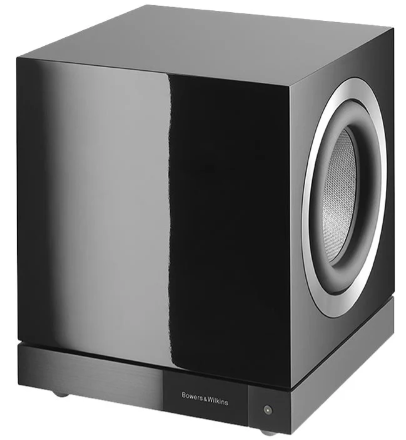
Your DB Series subwoofer is an extremely high-performance product that will reward thoughtful installation. We suggest that you take some time to read this manual before you begin.
Carton Contents
- DB Series subwoofer
- Power cable(s)
- Speaker grilles
- Spike, decoupling, and rubber feet
- Literature pack
Set Up and Control
Before you begin installing your subwoofer, please download and install the DB Subwoofers app on your iOS or Android device. It is not possible to set up or use a DB Series subwoofer without the app.
Room Equalisation
DB Series subwoofers can automatically optimize their performance to match the acoustic characteristics of the listening environment.
Multiple Inputs
DB Series subwoofers provide RCA Phono and balanced XLR stereo analogue inputs. The inputs can be connected simultaneously and configured independently for different system applications.
If you’re setting up your system with ceiling-mounted speakers, you may also find the Bowers & Wilkins CI 300 In-Ceiling Speakers manual helpful for understanding compatibility and installation.
Level Adjustment
DB Series subwoofers incorporate both level adjustment and trim adjustment. The trim adjustment enables optimum matching of different source output levels so that the subwoofer volume level matches that of the main speakers for all inputs.
Low Pass Filter Set up
DB Series subwoofers provide low-pass filter options for stereo configurations for both RCA and XLR connections.
Input EQ
DB Series subwoofers provide optional equalization presets designed to suit music and movie programme material. Custom equalization via a five-band equalizer is also provided.
Installing your Subwoofer
Before You Begin
Please follow the unpacking instructions printed on the outer carton. Your DB Series subwoofer is heavy and should be unpacked by two people working together close to its final installed position.
Positioning
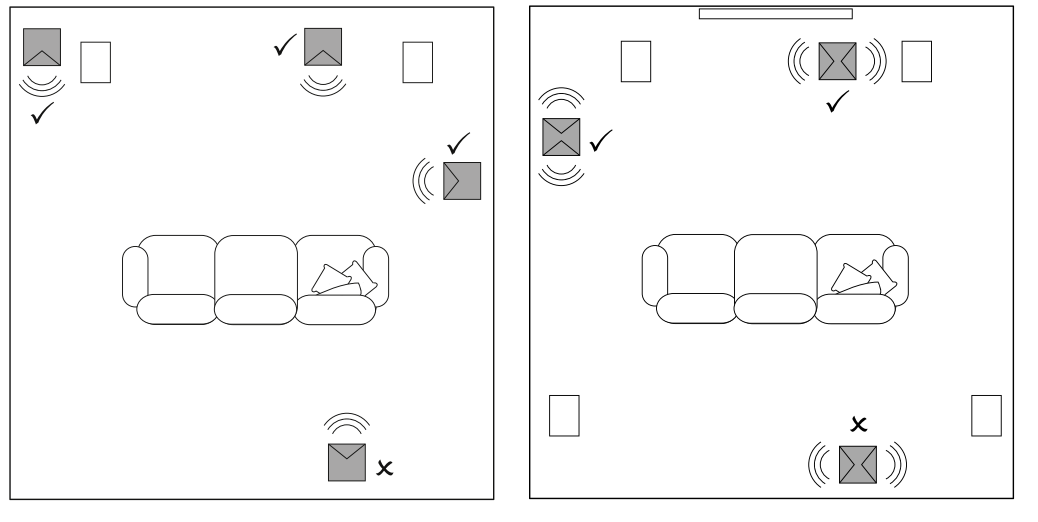
DB Series subwoofers are more versatile than most subwoofers in terms of positioning, thanks to their Room EQ optimization system that can compensate for less-than-ideal positioning.
Placing a subwoofer to the side, but still to the front of the listeners, is an acceptable compromise for domestic considerations; however, the subwoofer should not be located behind the listening position.
Subwoofer Foot Options
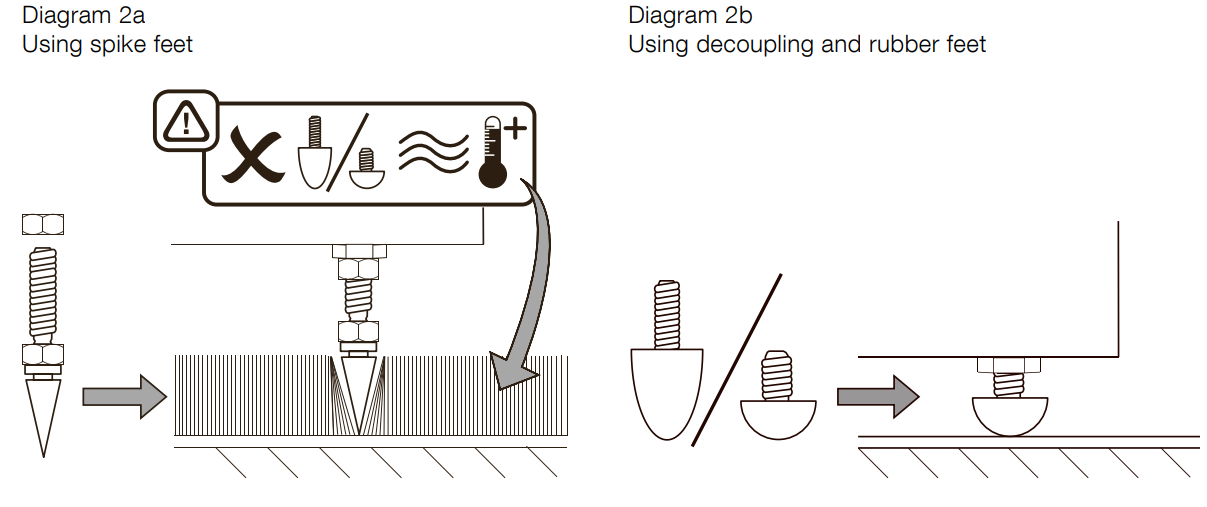
- The spike feet are intended for use on carpeted floors. The spikes pierce the carpet and rest on the floor beneath both to protect the carpet from indentation and to provide the subwoofer with a solid foundation.
- The decoupling feet are intended to be used on suspended wooden floors. The rubber material of the foot provides a degree of decoupling between the floor and subwoofer.
Take care not to damage the drive units when handling the subwoofer, and ensure that when upside-down that the subwoofer rests on a surface that will not damage its finish.
Fit the feet by screwing one into each of the four screw holes in the subwoofer’s underside. In the case of spike feet, initially screw the lock nuts fully onto the thread before screwing the feet into the subwoofer. The lock nut should then be used to raise the subwoofer above the carpet pile and to enable adjustment to minimize rocking.
Diagrams 2a and 2b illustrate the use of each foot type. Once the feet are fitted, the subwoofer can be turned back on to its feet. Take care not to allow the entire weight of the subwoofer to rest at an angle on one or two feet.
Subwoofer Grilles
Your DB Series subwoofer is supplied with optional fabric-covered grilles (a single grille in the case of the DB4S). The subwoofer can be used with or without grilles fitted. The grilles are attached magnetically.
Connections
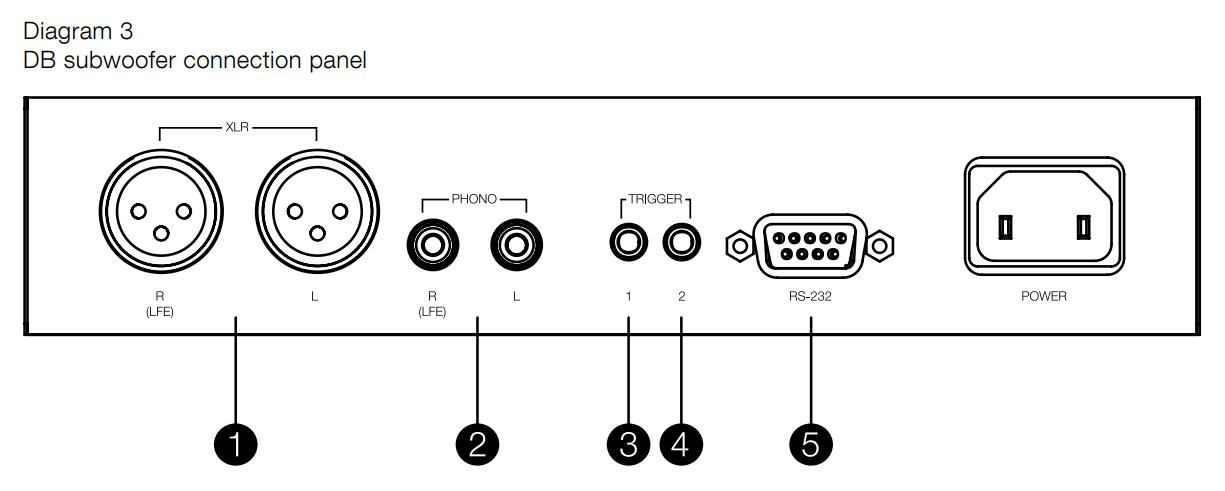
DB Series subwoofers require connection to a mains power supply and an input signal. Connectors for optional 12V trigger and RS232 control are also provided. Diagram 3 illustrates the DB Series subwoofer connection panel.
Mains Power
A variety of different power cables may be packed with your subwoofer. Use the cable appropriate for the mains socket in your territory. The subwoofer will switch on in operational mode, with its standby button indicator illuminated green, as soon as it is connected to mains power.
If the subwoofer remains unused for more than 20 minutes, it will automatically switch to standby mode with the indicator illuminated red
Signal Connections
DB Series subwoofers provide stereo RCA Phono and stereo balanced XLR inputs. It is possible to use the Phono and XLR sockets as independently selectable inputs.
XLR inputs
The balanced XLR inputs are intended for use with preamplifiers or audio-visual processors that provide balanced stereo outputs.
RCA Phono inputs
The unbalanced RCA Phono inputs are intended for use with preamplifiers or audio-visual processors that provide only unbalanced stereo out. puts
Control Connections
In addition to mains and signal input sockets, the DB Series subwoofer connection panel carries the following optional control interface sockets:
12V Trigger 1: 3.5mm jack socket
- The Trigger 1 socket enables wired remote control of the subwoofer switch on and standby functions.
12V Trigger 2: 3.5mm jack socket
- The Trigger 2 socket enables wired remote control of subwoofer input selection.
RS-232: 9-pin D connector
The RS232 interface enables subwoofers to be incorporated in remote control home automation systems. Your Bowers & Wilkins retailer will be able to provide more information on RS232-based home automation systems.
Set Up and Control
Your DB Series subwoofer can only be set up and controlled using the DB Subwoofers app. If you have not already downloaded and installed the app on your iOS or Android device, please do so now.
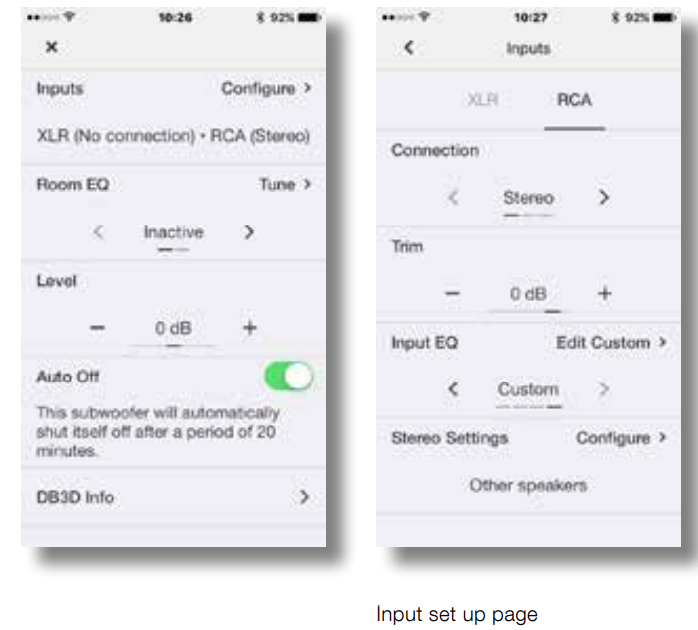
- Launch the DB Subwoofers app and confirm Bluetooth pairing. When pairing is complete, the app will display the app home page.
- The home page provides subwoofer level adjustment, product information, auto-standby options, and access to the Room EQ optimization procedure.
- Using Room EQ is not mandatory; however, doing so will ensure that your subwoofer performs optimally in your room.
Input Set Up
- Selecting one of the inputs also makes it active. The input setup arises ascribed in the following paragraphs:
- Trim: Input sensitivity. Begin with the input sensitivity set to 0dB.
- Input EQ: Flat (no EQ), Music, Movie, Custom. Select Flat to apply no input EQ.
- Select Music to apply an input EQ character appropriate for a music programme.
- Select a Movie to apply an input EQ character appropriate for the movie programme.


- Stereo Settings: Configure. The Stereo Settings option is available only if the Stereo input connection option is selected.
- Bowers & Wilkins or the alternative speaker manufacturer will be able to assist with the appropriate information if necessary.
Room Equalisation
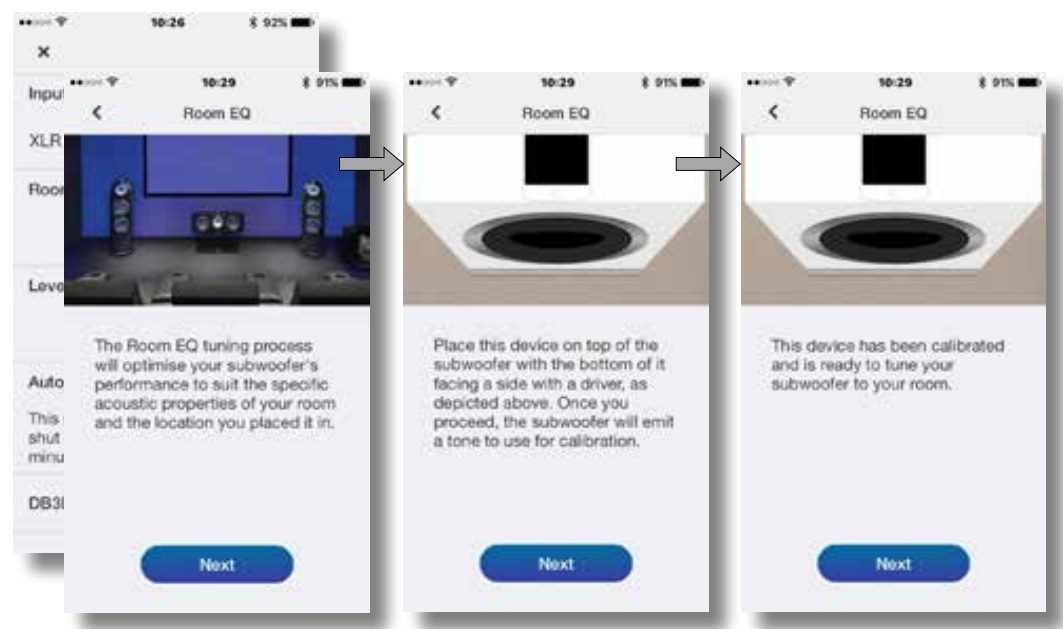
- To begin the Room EQ procedure, select Tune on the nome page.
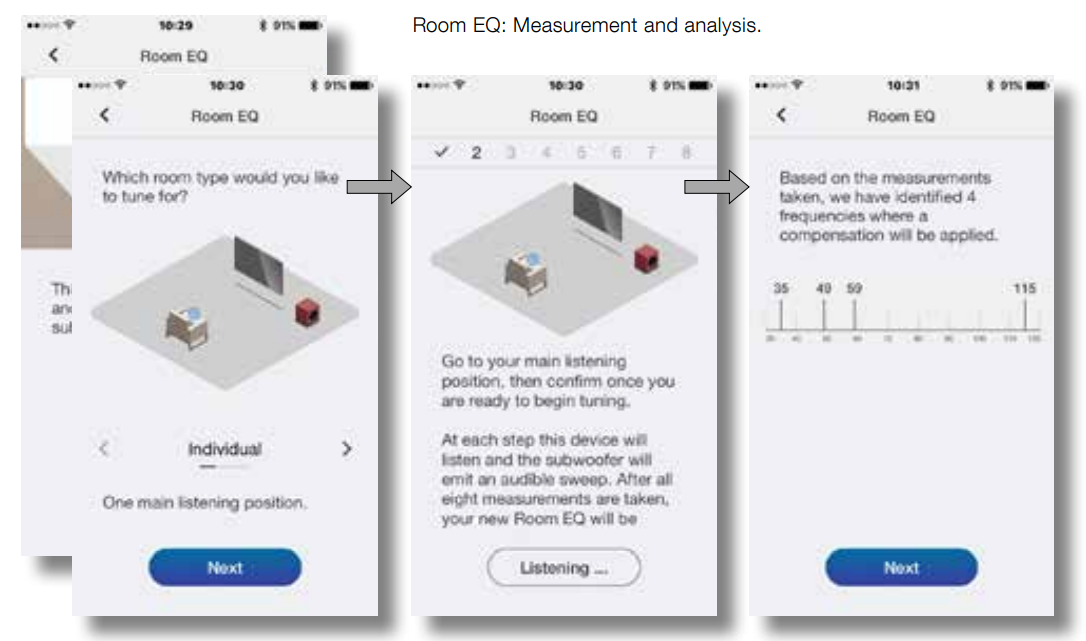
- Choose your preferred option and select Next.
- The subwoofer will generate a series of eight separate test signals and use the mobile device microphone to measure the sound in the room and automatically apply an optimal EQ curve.
- Room EQ will then be complete. On selecting, NextNext app will return to the home page.
Mobile device microphone calibration.
Measurement and analysis.
Subwoofers In Use
Normal daily use requires a little adjustment should be necessary you may wish to adjust the subwoofer volume level, use an alternative iOrut EQ, or select the other input.
- To adjust subwoofer volume, use the level control on the app home page.
- To select an alternative Input E, Q, select from the input setup page.
- To select the alternative input, select the alternative tab on the input setup page.
- To switch your subwoofer to standby mode, press the standby button.
- The button indicator will illuminate red. Please remember that your DB Series subwoofer is capable of volume levels that have the potential to cause nuisance. If in any doubt, reduce the volume.
Default Reset
To return your subwoofer to its default settings, press the standby button three times in quick succession. When the default reset is complete, the subwoofer will switch off. Press the standby button or launch the app to switch on.
Cleaning
Wipe surfaces with a clean, lint-free cloth. If you wish to use a cleaning agent, apply it onto the cleaning cloth, not directly onto the subwoofer.
Test a small area first, as some cleaning products may damage some of the surfaces. Avoid abrasive products that contain acid, alkali, or antibacterial agents.
Home Page 
Customer Service
- Ph: 800 370 3740
- Website: https://www.bowerswilkins.com/
12 Comments
Pingback: Bowers & Wilkins CI 300 In-Ceiling Speakers User Guide
Thanks for sharing. I read many of your blog posts, cool, your blog is very good.
I don’t think the title of your article matches the content lol. Just kidding, mainly because I had some doubts after reading the article.
I don’t think the title of your article matches the content lol. Just kidding, mainly because I had some doubts after reading the article. https://accounts.binance.info/zh-CN/register-person?ref=WFZUU6SI
Can you be more specific about the content of your article? After reading it, I still have some doubts. Hope you can help me.
I don’t think the title of your article matches the content lol. Just kidding, mainly because I had some doubts after reading the article.
Can you be more specific about the content of your article? After reading it, I still have some doubts. Hope you can help me. https://www.binance.info/register?ref=IXBIAFVY
Your point of view caught my eye and was very interesting. Thanks. I have a question for you. https://www.binance.com/sl/register?ref=GQ1JXNRE
Thanks for sharing. I read many of your blog posts, cool, your blog is very good.
Your article helped me a lot, is there any more related content? Thanks! https://www.binance.info/register?ref=JW3W4Y3A
Can you be more specific about the content of your article? After reading it, I still have some doubts. Hope you can help me. https://www.binance.info/register?ref=JW3W4Y3A
Thanks for sharing. I read many of your blog posts, cool, your blog is very good.