


SoundBoks Go, Portable Bluetooth Speaker
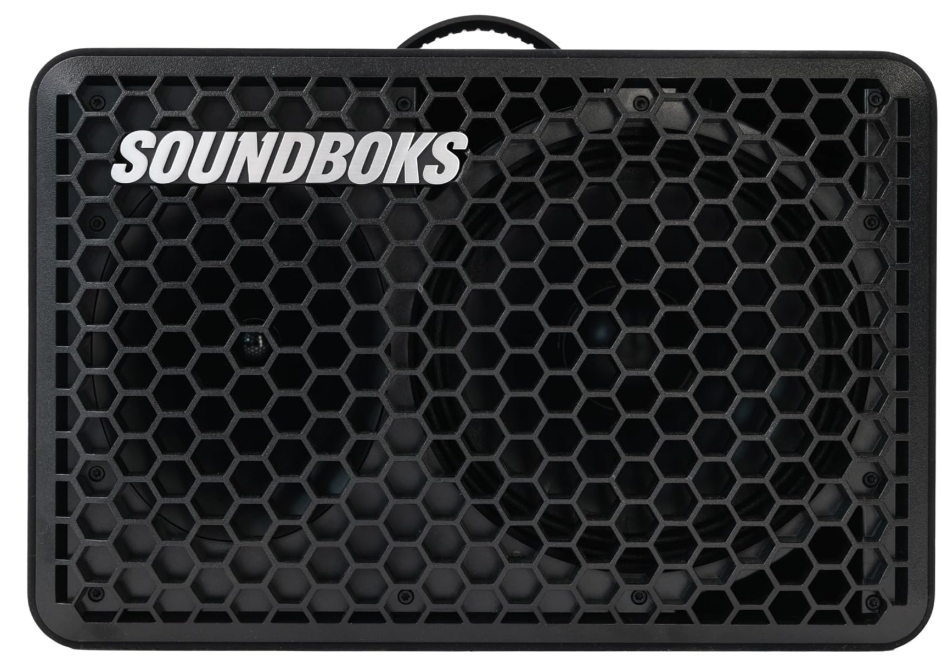
Ready To Go
You’ve got your SOUNDBOKS Go. No, where are some tips to get going?
- 01 Charge your BATTERYBOKS fully for ~3.5 hours for optimal performance.
- 02 Once charged, slide (don’t force) your BATTERYBOKS LED-side-down until it fits snugly into the battery slot. Then plug in the DC connector.

- 03 You can play your SOUNDBOKS while charging. Just connect the battery to the charger and insert the combo plug into the speaker.

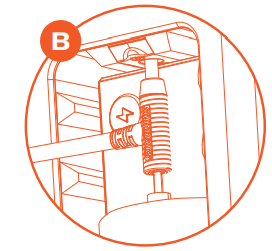
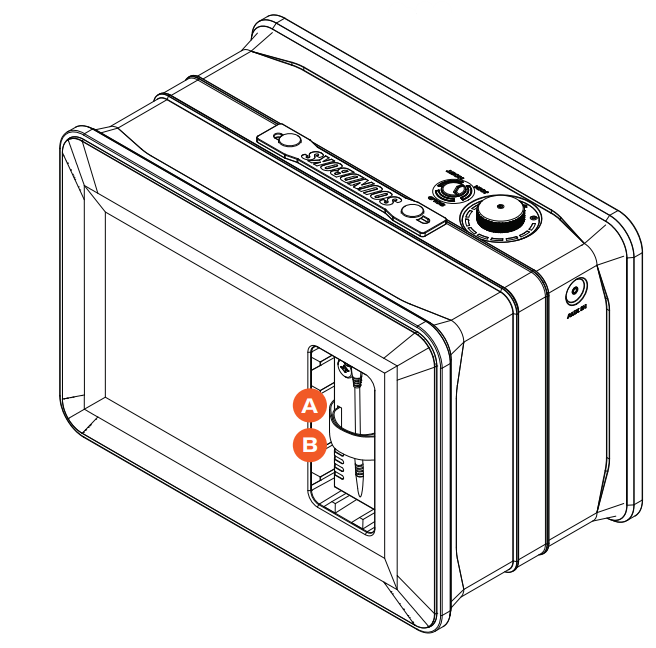
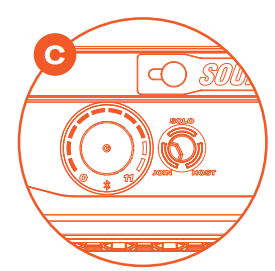
- 04 Power up your speaker by firmly pressing the volume knob. When the LEDs around the volume knob light up, you’re ready to connect.
- 05 To connect, go to your device’s Bluetooth settings, find and select SOUNDBOKS #YourTeamID. Your unique Team ID is located on the left side of your speaker.
- 06 Choose your favourite song, turn up, go out, and Break Through the Noise.



Overview
01 Tweeter // 02 Bass Driver // 03 Reflex Ports // 04 Rubber Bumper
13 Team ID 
05 Power Button // 06 Volume Knob // 07 Bluetooth LED Indicator // 08 Bond Button // 09 Connect Button // 10 Handle // 11 Loop Velcro Strap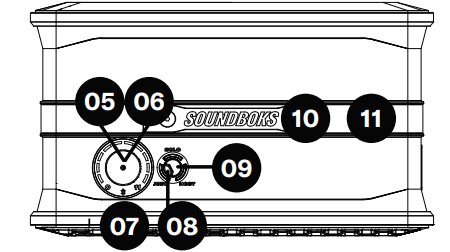
14 Battery Port // 15 DC Input // 16 BATTERYBOKS // 17 Strap // 18 LED Battery Life Indicator // 19 Battery Level Status Button // 20 Rubber Bumper

12 AUX Connector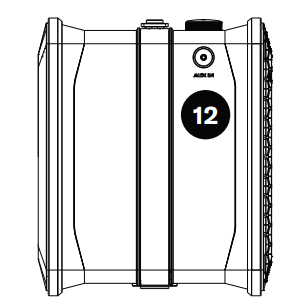
21 Pole Mount 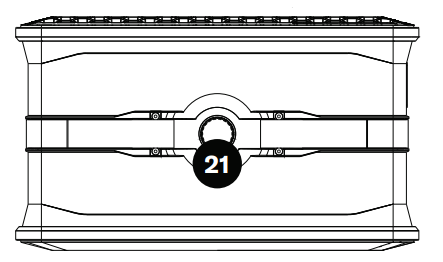
Specifications
- Amplifier: Patented Infineon MERUSTM multilevel amplifier technology for industry-leading efficiency
- Driver Units: 1 × 10” 96dB Woofer Bass reflex system\ 1 × 1” 10Horn-mountednted tweeter
- Acoustics: SOUNDBOKS Bass Enhancer DSP (custom software to boost bass and loudness, similar in style to SOUNDBOKS (Gen. 3), but custom-made for SOUNDBOKS Go).
- Connectivity: Bluetooth 5.0 TeamUp connection – Wirelessly daisy chain up to 5 (total) nearby SOUNDBOKS Go speakers (SKAA), AUX socket
- Compatibility: Compatible with iPhone® and Android™ BUILD
- Dimensions: 32 × 46 × 27 cm ( 12.6 × 18.1 × 10.1 inches (H × W ×D))
- Weight: 9.2 kg / 21 lb
- Materials: ABS and Polycarbonate Front Baffle, Centre Cabinet, and Back Plate ABS Battery Port, Powder Coated Aluminium Volume Knob, Silicone Rubber Handle, Bond and Connect Button, Woven Polyester Strap with Polyester Velcro
- Features: Loops in Strap for clipping on accessories, Swappable Battery, and three reflex ports for increased bass response. Ø35mm Pole mount, Host/Join mode for wireless TeamUP Volume Control with On/Off functionality
- Battery: Design 5-Step LED battery-life indicator, Heavy-duty DC-connector
- Cell Type: 12.8V, 7.8Ah Lithium Iron Phosphate (LiFePO4)
- Temperature range: -10 ºC to 40 ºC (14 ºF to 100 ºF) Capacity: 99.84Wh or 7.8Ah
- Battery Life: 40 hours at mid-volume in Powerr,r mode, 10 hours at full volume in Powerr mode, 3.5 hours full recharge
- Battery Management System (BMS): Over and under-discharge pr, Short circuit protection, Overheat protection, Cell voltage.e management
This is SOUNDBOKS Go
- Once you’ve unboxed your new tower, besure too keep all original packaging for travel, transport, or shipping for returns and repairs.
- Fully charge your BATTERYBOKS for ~3.5 hours (for more information, go to the ‘Batteryboks & Charger’ section) for optimal performance and battery life.
- Once charged, slide (don’t force) your BATTERYBOKS into the battery slot and plug in the DC connector. The BATTERYBOKS should fit snugly without too much resistance.
- To turn on your speaker, firmly press the volume knob on the UI Panel. When the LEDs around the volume knob light up, you’re ready to connect.
- Time to connect to your music.
- Via Bluetooth: if the blue indicator on the UI Panel is illuminated, just go to your player’s Bluetooth settings, search for devices, and find your SOUNDBOKS #YourTeamID (your unique Team ID is located on your SOUNDBOKS of your SOUNDBOKS Go).
- Via TeamUP: On the UI Panel, press the TeamUP button twice to place your SOUNDBOKS Go in Join mode to join a hoscreate aBOKS and create a stereo setup with the SOUNDBOKS app.
- Via AUX socket: ConnAUX cable of an AUXcable to your compatible device and the other to the AUX socket on the left side of your\ SOUNDBOKS Go- Now start playing your music!
- Now turn up, go o, ut and Break Through the Noise.
LED Behaviour
Your SOUNDBOKS Go will preserve power by deactivating trailing LEDs after 10 seconds of constant volume level.

Battery
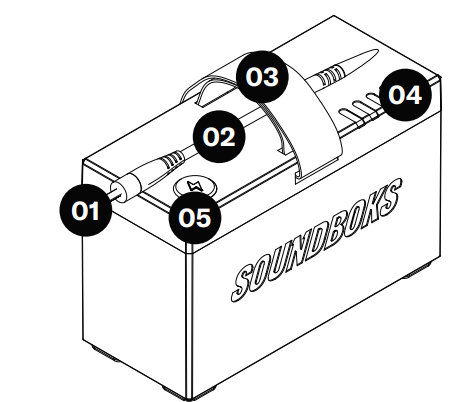
01 Battery DC Plug // 02 DC Cable // 03 Carry Strap // 04 LED Battery Life Indicator // 05 Battery Level Status Button
01 Power Supply Cable – EU (standard), US (standard), UK, and CH plugs available // 02 Battery DC Input // 03 Charger DC Plug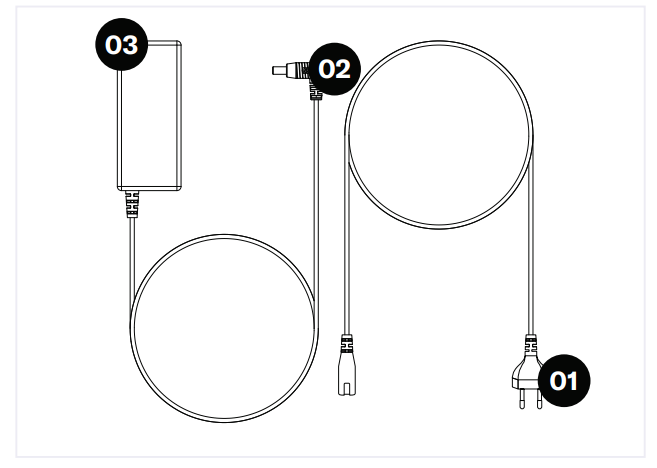
Bond Button
| Bond Button | Command | Indicator | Meaning | |
| Hold for a few seconds | Add / Delete Manually add/delete the current transmitter to/from your Green List. | to flash | Added Deleted | |
| Hold for a few seconds | Auto Add SKAA will automatically add the current Amber transmitter to your Green List if you listen to it for 30 minutes. | to | Added | |
| 1 Click | Green Mode: Rotate through your list of favourite | dim | Hunting | |
| transmitters (Green List) — when a favourite transmitter is found, the search stops and audio | flash | Next one | ||
| Plays from that transmitter. | bright | Bonded | ||
| 2 Clicks | Amber Mode: Explore for new, unknown transmitters | dim | Hunting | |
| (ones which are not already on your Green List). | bright | Bonded | ||
| 3 Clicks | Mute do again to Unmute; any Click command will | or | Muted | |
| First, Unmute and then do its function. | slow flash | |||
| 4 Clicks | Red Mode: If you have 2 or more transmitters on your | dim | Hunting | |
| Green List, power on just the one you want to hear, and it plays automatically. | bright | Bonded | ||
| 6 Clicks | Factory Reset Clear Green List. Start over! | flash | Reset done | |
Charge the battery outside
Insert the BATTERYBOKS DC Plug into the DC Input of your charger and plug the charger’s power supply cable into your nearest power outlet.
Charge the battery while it’s in the SOUNDBOKS Go.
Slide your BATTERYBOKS into the Battery Port on the back of your SOUNDBOKS Go. Once inserted, plug the DC Plug of the battery into the DC input on the top side of the battery compartment. Then attach the DC input of your charger to the DC Plug of your BATTERYBOKS.
Warranty Information
At SOUNDBOKS (collectively, SOUNDBOKS APS and SOUNDBOKS, Inc.), we know that you have probably been waiting with excitement to get your SOUNDBOKS speaker and turn it up to 11. But, before you become the envy of all your friends, we’ve been told by some lawyers that you should read this really interesting text. Basically, this explains all the fun legal stuff about your brand-spanking-new SOUNDBOKS speaker. We aren’t promising a thrilling read, but it is pretty important, and we’d appreciate you having a quick look through it. Then go amplify the neighbourhood all you want!
Specifications
Li-Ion Rechargeable Battery 7.8Ah l 12.8V 99.84Wh LiFePO4 4IFpP6/65/134-2
- Output: 12.8V 7.8A
- Input: 14.5V 3.0A
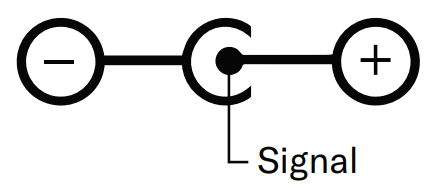
Battery meets the regulations of UN manual of test and criteria part III, Subsection 38.3 P/N SB201 – TG 5565D4 BATTE.RYBOKS
SPECIFICATIONS – CHARGER
- Input: 100–240V ~ 50–60Hz, 1.2A MAX
- Output: 14.0V 3.3A
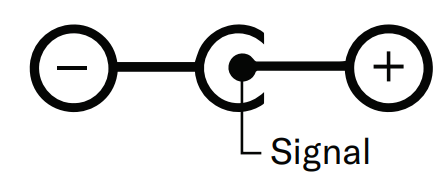
Warranty & Service
This Limited Warranty extends to TWO (2) YEARS
from the Customer’s original purchase of the SOUNDBOKS product. If SOUNDBOKS receives, during the applicable warranty period, a valid notice of a defect of any SOUNDBOKS product covered by SOUNDBOKS’ warranty, for a list of covered products, go to SOUNDBOKS.com/help. SOUNDBOKS will, at SOUNDBOKS’ option, a) within a reasonable time after being notified of the defect: b) repair the defect at no charge, using new or refurbished replacement parts, or c) replace the product. Response time may vary from country to country nd is, among other things, subject to the availability of partslabo, and transport.
At SOUNDBOKS (collectively, SOUNDBOKS APS and SOUNDBOKS, Inc.), we know that you have probably been waiting with excitement to get your SOUNDBOKS speaker and turn it up to 11. But, before you become the envy of all your friends, we’ve been told by some lawyers that you should read this really interesting text. Basically, this explains all the fun legal stuff about your brand-spanking-new SOUNDBOKS speaker. We aren’t promising a thrilling read, but it is pretty important, and we’d appreciate you having a quick look through it. Then go amplify the neighbourhood all you want!
Marking
See more about this in the section “CONSUMER INFORMATION. Finally, our batteries are capacity marked in regard to the relevant IEC standards. The capacity markings show possible outlet from the battery in given situations, for example, temperature change, charging, and recharging. These markings will be visible on the product itself.
Disclaimer
SOUNDBOKS needs to, in connection with the aforementioned, draw special attention to the fact that the following actions will exempt SOUNDBOKS from any responsibility:
- Wrongly plugging in the batteries and the speaker
- Prolonged exposure of the SOUNDBOKS product to any form of precipitation
- Submerging any part of the SOUNDBOKS product in any form of liquid
- Using SOUNDBOKS products for purposes other than what they are regularly used for
- Using other chargers than the one produced and delivered by SOUNDBOKS
- Using batteries other than the ones produced and delivered by SOUNDBOKS
- Unsanctioned modification, rebuilding, or repurposing of any parts of any SOUNDBOKS product, except the removal and customisation of the SOUNDBOKS grill, using the provided hex key
Trademarks
Names and logos in this user manual or on the product packaging are trademarks owned by SOUNDBOKS. These may not be copied or used without the permission of SOUNDBOKS.
Compliance
EU, UNITED KINGDOM
Hereby, SOUNDBOKS ApS, the manufacturer of the SOUNDBOKS Go, declares that this SOUNDBOKS GGo compliesce with the essential requirements and other relevant provisions of the following EU Compliance Directive Information. Conforms to European Union Low Voltage Directive 2014/35/EU; European Union EMC Directive 2014/30/EU; European Union Radio Equipment Directive (RED) 2014/53/ EU. European Union Eco-Design Directive 2009/125/EC; European Union WEEE Directive 2012/19/EU; European Union Restriction of Hazardous Substances Recast (RoHS2) Directive 2011/65/EU; European Union Registration, Evaluation, Authorization and Restriction of Chemicals (REACH) Directive 2006/121/EC.
FCC Statements
This device must accept any interference received, including interference that may cause undesired operation. This equipment generates, uses, and can radiate radio frequency energy and, if not installed and used in accordance with the instructions, may cause harmful interference to radio communications. However, there is no guarantee that interference will not occur in a particular installation.
- Reorient or relocate the receiving antenna.
- Increase the separation between the equipment and receiver.
- Consult the dealer or an experienced radio/TV technician for help.
RF exposure warning
End-users and installers must provide antenna installation instructions and transmitter operating conditions to satisfy RF exposure compliance. This device must accept any interference, including interference that may cause undesired operation of the device.
Radio Frequency (RF) Exposure Information
The radiated output power of the Wireless Device is below the Innovation, Science and Economic Development Canada (ISED) radio frequency exposure limits.
Customer Service
We hope that you’ll have an awesome time with your SOUNDBOKS product, and please feel free to reach out to us with questions, ideas, or anything else. We’d love to talk to you!
- Business Address: SOUNDBOKS Inc. 2711 Centerville Road, Suite 400, Wilmington, New Castle County, Delaware 19808.United States of America
- Ph: +1 (310) 774-0480
- Visit: info@SOUNDBOKS.com
For the rest of the World:
- Address: SOUNDBOKS ApS CVR: 36457597 Esromgade 15, 1107 2200 Copenhagen N, Denmark
- Ph: +45 78 75 03 06
- Website: www.SOUNDBOKS.com
FAQs
Q: How do I pair my SoundBoks Go with a Bluetooth device?
After turning on the speaker and pressing the Bluetooth button until it starts blinking, choose “SOUNDBOKS Go” from the Bluetooth menu on your device. The light will solidify after it is linked.
Q: Can I connect multiple SoundBoks speakers?
Indeed. To connect the SoundBoks Go to other SoundBoks Go or SoundBoks (Gen 3) speakers, use TeamUp Mode. Just select Host or Join after pressing the TeamUp button.
Q: How long does the battery last on a full charge?
At mid-volume, the SoundBoks Go can usually play for up to 40 hours. Increased volume will shorten the battery’s life.
Q: How do I check the battery level?
Press the power button once. The remaining battery level will be displayed by the LED indicators. Additionally, you can use the SOUNDBOKS App to check the battery status.
Q: Is the SoundBoks Go water-resistant?
Indeed. Because of its IP65 rating, it can withstand dust and low-pressure water jets. It should not be submerged, but it can withstand light rain and splashes.
Q: How do I update the speaker’s firmware?
When a new firmware version becomes available, install the SOUNDBOKS App, connect your speaker, and adhere to the automatic update prompts.
Q: Why won’t my speaker turn on?
Make sure the battery is charged and inserted correctly. Try taking the battery out and putting it back in, then attach the charger for at least half an hour if the speaker still won’t turn on.
Q: Can I charge other devices using the speaker’s battery?
No, the SoundBoks Go battery does not have USB-out charging capabilities and is just intended to power the speaker.