



Sony BVM-E250 Full-HD 24.5-inch OLED Monitor
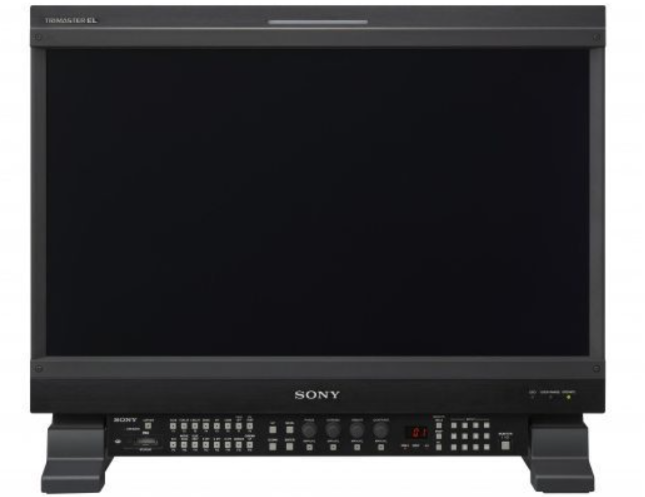
Overview
Professional applications
For professional applications such as colour grading, high-end editing, broadcasting and scientific research, Sony’s leading-edge Organic Light-Emitting Diode (OLED) technology and signal processing technology ensures outstanding erformance with the BVM-E250.State-of-the-art product Super Top Emission technology enhances OLED’s intrinsic benefits to deliver outstanding black performance, a quick response with virtually no motion blur, and a wide colour gamut.
An all-new 12-bit output digital signal processing engine provides a nonlinear cubic conversion colour-management system that delivers precise colour reproduction, stunning picture uniformity, smoother-than-ever gamma performance, and picture quality consistency. Accepts computer signals via HDMI. The BVM-E250 accepts various computer signals input up to 1920 x 1080 through its HDMI connector. It is also equipped with DigitalCinema features.
Superb Picture Performance
Sony TRIMASTER EL technology combines the ultimate performance of Sony OLED display with the highly sophisticated TRIMASTER technology to provide the highest level of picture performance: Accurate Black Reproduction, High purity and accurate colour reproduction, Quick response with virtually no motion blur, High Contrast Performance..ce
Super Top Emission™ technology
Sony’s Super Top Emission™ technology has a micro-cavity structure which incorporates colour filters. The micro-cavity structure uses an optical resonance effect to enhance colour purity and improve light-emission efficiency. In addition, the colour filter of each RGB further enhances the colour purity of emitted light and reduces ambient light reflection.
Ultimate Display Engine
High-precision signal processing engine has been developed to fulfil the reference monitor criteria and is optimised to maximise OLED panel performance. This engine incorporates 12-bit output accuracy at each process, and provides both a high-quality I/P conversion algorithm and a highly accurate colour management system.
Multi-format Signal Support
The BVM-E250 monitor can accept almost any SD or HD video format, both analogue and digital, and variable computer signals up to 1920 × 1080. In addition to the standard inputs, four option board slots are offered to configure this monitor according to different user needs
Versatile video inputs
This monitor is equipped as standard with two 3G/HD/SD-SDI inputs, an HDMI (with HDCP) input and a DisplayPort* for the future. Expansion. In addition, four option ports are available. * DisplayPort input will be supported from monitor software version 1.1 or later.
Four Slots for Optional Video Input Decoders
The monitor can accept up to four optional video input boards simultaneously. Available formats include analogue, composite, Y/C, components, RGB and digital 3G/HD/SD SDI.
3D signal analyzing functions (3D signal input, 2D display)
By installing the optional BKM-250TG 3G/HD-SDI input adaptor*, the BVM-E250 can support a variety of 3D signal analyses. The 3D signals* are displayed in 2D mode.
- Difference display
- Checkerboard display
- L/R switch display
- Horopter check display
- Flip H display
* Requires the BKM-250TG 3G-SDI input adaptor (serial number 7200001 or later). 3D signals are not displayed in stereoscopic view.
Auto White Balance
The colour temperature and white balance of BVM-E and F Series monitors can be automatically adjusted by the Auto White Balance function using specified colour temperature probes, such as the Konica Minolta CA-210, CS-200, DK-Technologies PM5639/06, and X-Rite i1 (Eye-One) Pro.
High Quality I/P Conversion Technology
The BVM-E250 monitor uses a sophisticated I/P conversion technique that keeps artefacts that are often seen in flat panel displays to a minimum, such as edge jaggedness, conversion errors, etc.
Low video delay
The BVM-E250 display engine ensures a picture delay that is less than one field.
Panel Calibration
Every BVM-E250 monitor is carefully calibrated at the factory on an individual basis, providing a high level of accuracy and stability for characteristics such as gamma and uniformity.
Colour Feedback System
Using a colour feedback system, the BVM-E250 monitor achieves the stability required for Broadcast critical monitoring applications.
Interlaced Display Mode
Faithfully reproduces interlaced signals, emulating CRT monitors.
Picture
The unique Picture
Gamut Error Display
BVM-E250 master monitor incorporates a Gamut Error Display that detects irregular signal input.
S-LOG Gamma
BVM-E250 master monitor incorporates gamma tables to reproduce images captured using S-LOG Gamma technology. SLOG gamma is a technique used in Sony’s digital cinematography cameras that allows the full latitude of the camera’s CCD to be maintained throughout the production chain.
2K Picture Resolution
The 2048 Image Slide function of the BVM-E250 allows 2K resolution (2048 x 1080 pixels) images to be mapped, pixel-to-pixel, on the full-HD (1920 x 1080 pixels) panel without picture degradation.
HD Frame Capture Mode
The HD Frame Capture function of the BVM-F Series allows a
picture frame from the 3G-SDI and HD-SDI inputs to be captured
and saved as a picture file on a Memory Stick™ media.
Separate Control unit with memory stick slot
A separate control unit, BKM-16R is available for the BVM-E250. It is equipped with a Memory Stick, enabling users to download and save all monitor set-ups such as input channel configuration, control preset adjustments, white balance settings and maintenance parameters.
Centralised Monitor-Wall Control
Multiple monitors can be easily managed by a single con,,trol unit BKM-16R via an Ethernet connection
Specifications
| Picture Performance |
Panel OLED panel
| Picture Size (Diagonal) | 623.4 mm 24 5/8 inches |
| Effective Picture Size
(H x V) |
543.4 x 305.6 mm
21 1/2 x 12 1/8 inches |
| Resolution (H x V) | 1920 x 1080 pixels (Full HD) |
| Panel Drive | RGB 10-bit |
| Panel Frame Rate | 48 Hz, 50 Hz, 60 Hz, 72 Hz, 75 Hz *1 |
| Viewing Angle (Panel
Specification) |
89°/89°/89°/89° (typical)
(up/down/left/right contrast > 10:1) |
| Normal Scan | 0% scan |
| Native Scan | Mapping the pixels of the signal to the panel to one-to-one mode, or displaying an SD signal of nonsquare pixels (the number of H pixels of the signal system is 720 or 1440) or a 640 × 480 SD signal of HDMI video by scaling processing of doubling for the V direction and correct aspect ratiofor the H direction and also optimizing and sidplaying a picture by modifying the aperture coefficient value, filter coefficient value, etc. |
| Under Scan | 3% under scan |
| Over Scan | Mask of 5% over the scan portion in the normal scan |
| Color Temperature | D55, D61, D65, D93, D-Cine *2 , User |
| Color Space (Color
Gamut) |
ITU-R BT.709, EBU, SMPTE-C, D-
Cine *3 , E250 Native *4 , S- GAMUT *5 |
| Warm-up Time | Approx. 30 minutes |
| Input |
Quantization
| HDMI Input | HDMI (x1) (HDCP correspondence,
Deep Colour correspondence) |
| DisplayPort | DisplayPort connector (x1) *6 |
| Option Port | Four (4) ports |
| Parallel Remote | D-sub 9-pin (female) (x1) |
| Serial Remote (LAN) | RJ-45 (x1) (Ethernet, 10BASE-
T/100BASE-TX) |
| Output | |
| SDI Output | BNC (x1) (monitor output) *7 Output signal amplitude: 800 mVp-
p±10% Output impedance: 75 Ω unbalanced Transmission distance 3G-SDI: 70 m max. *8 HD-SDI: 100 m max. *8 SD-SDI: 200 m max. *9 |
| DC 5 V Output | Circle 4-pin (female) (x1) |
| General | |
| Power Requirements | 100 V to 240 V AC, 1.6 A to
0.8 A, 50/60 Hz |
| Power Consumption | Approx. 145 W (max.) Approx. 72 W (average power consumption in the default status) |
| Inrush Current | (1) Maximum possible inrush current at initial switch-on (Voltage changes caused by manual
switching): 53 A peak, 17 A r.m.s. (240V AC) (2) Inrush current after mains interruption of five seconds (Voltage changes caused at zero-crossing): 39 A peak, 6 A r.m.s. (240V AC) |
| Operating Temperature | 0°C to 35°C
(Recommended: 20°C to 30°C) 32°F to 95°F (Recommended: 68°F to 86°F) |
Operating Humidity
| Storage/Transport
Temperature |
-20°C to +60°C
-4°F to +140°F |
||
| Storage/Transport Humidity | 0% to 90% | ||
| Operating/Storage/Transport
Pressure |
700 hPa to 1060 hPa | ||
| Dimensions (W x H x D) *10 | 576.0 x 424.0 x 148.0 mm 22 3/4 x 16 3/4 x 5 7/8 inches | ||
| Mass | Approx. 13.0 kg
Approx. 28 lb 11 oz |
||
| Supplied Accessories | AC power cord (1)
AC plug holder (1) Bracket (1) Operation Manual (Japanese, English, each 1) CD-ROM (1) Using the CD-ROM Manual (1) |
||
Disposal
For the Customers in Europe
The recycling of materials will help to conserve natural resources. For more detailed information about the recycling of this product, please contact your local Civic Office, your household waste disposal service, or the shop where you purchased the product.
Notice for the customers in the countries applying EU Directives > Manufacturer: Sony Corporation, 1-7-1 Konan Minato-ku, Tokyo, 108-0075 Japan. For EU product compliance: Sony Belgium, bijkantoor van Sony Europe Limited, Da Vincilaan 7-D1, 1935
For the Customers ithe n the Republic of India
Reduction in the Use of Hazardous Substances in Electrical & Electronic Equipment. This product and its components, consumables, parts, or spares comply with the hazardous substances restriction of India’s E-Waste (Management) Rules. The maximum allowable concentrations of the restricted substances are 0.1% by weight in homogenous materials for Lead, Mercury, Hexavalent Chromium, Polybrominated Biphenyls (PBB) and Polybrominated Diphenyl Ethers (PBDE), and 0.01% by weight in homogenous materials for Cadmium, except for the exemptions specified in Schedule II of the aforesaid Rules.
Customer Service
- Website: https://www.sony.com/
- Ph: 800-326-9551
9 Comments
I don’t think the title of your article matches the content lol. Just kidding, mainly because I had some doubts after reading the article.
Your point of view caught my eye and was very interesting. Thanks. I have a question for you.
Your article helped me a lot, is there any more related content? Thanks! https://www.binance.info/register?ref=IXBIAFVY
Your point of view caught my eye and was very interesting. Thanks. I have a question for you. https://accounts.binance.com/register-person?ref=IXBIAFVY
Your point of view caught my eye and was very interesting. Thanks. I have a question for you.
Can you be more specific about the content of your article? After reading it, I still have some doubts. Hope you can help me.
Thanks for sharing. I read many of your blog posts, cool, your blog is very good.
Thanks for sharing. I read many of your blog posts, cool, your blog is very good. https://accounts.binance.info/register/person?ref=L4EUT9FG
I don’t think the title of your article matches the content lol. Just kidding, mainly because I had some doubts after reading the article.