

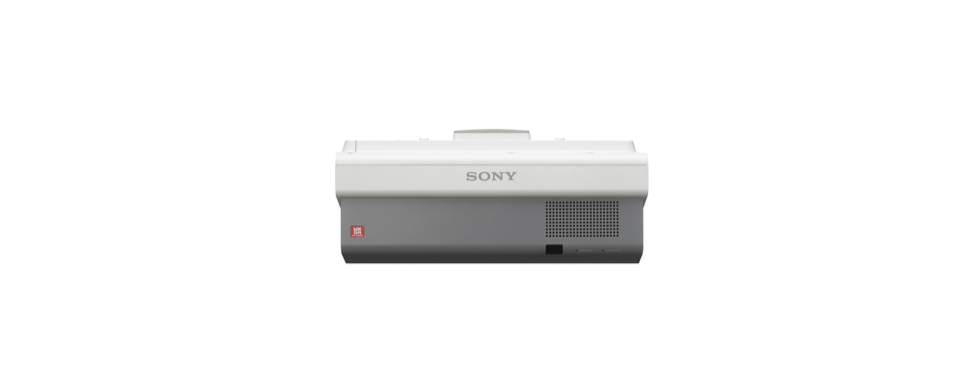

Sony VPL-SW630C Ultra Short Throw Projector
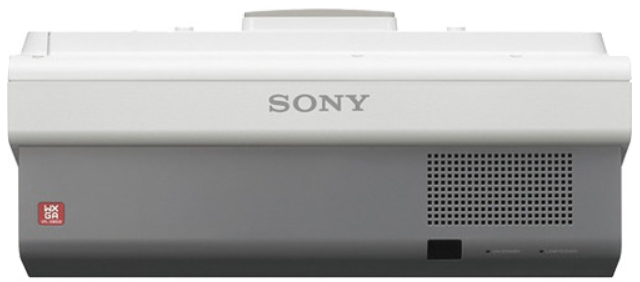
Overview
Bright, high contrast widescreen projector with easy installation, environmentally friendly features, ideal for medium-sized rooms, with optional wireless connectivity and PC based interactivity function
- Thanks to 3LCD BrightEra™ panel technology by Sony, users can enjoy extremely bright, high contrast, widescreen WXGA images with excellent colour stability.
- Easy to install with plenty of interfaces for connection with other devices, the VPL-SW630C integrates seamlessly with school or office networks.
- Adding an optional Wi-Fi module lets users wirelessly share homework, images and graphics from devices like PCs, smartphones and tablets.
- There’s a wide range of smart energy-saving features built in. In addition, extended lamp replacement time up to 8,000 hours allows synchronized filter and lamp maintenance, reducing the product’s downtime and minimizing costs.
- Learning’s made even smarter, more satisfying and collaborative with dual pen interactivity, allowing teacher and pupil to write on screen simultaneously
Long-lasting lamp
- 8000 hours in Low mode.
Wireless presentation with tablet
- The wireless presentation capability makes it easy to present files from your tablet device or smartphone.
Interactive Presentation Utility application
- Supplied with dual pen auto calibration interactivity and IPU2 software.
Features
Extremely bright, clear images with a maximum 3100 lumens colour light output. The projector’s high light output ensures that presentations are seen clearly in any classroom or meeting room. There’s a choice of three brightness modes to suit any environment, from bright daylight to darkened rooms.
WXGA resolution for detail-packed presentations. WXGA (1280 x 800) resolution gives lots of crisp, fine detail: perfect for making presentations directly from a laptop or PC. 3LCD BrightEra™ technology. The projector’s efficient 3LCD panel system is enhanced by advanced BrightEra™ technology by Sony. You’ll see the difference with impressively bright, high-resolution images and increased panel reliability.
Up to 8000 hours long-lasting lamp for reduced maintenance and downtime. Teach for longer without interruption, with reduced maintenance that contributes directly to lower lifetime ownership costs. Filter cleaning cycles are synchronized with lamp replacement, cutting scheduled maintenance visits even further.
Advanced energy-saving features
Advanced lamp technology enables robust energy-saving features. For example, greater brightness control in Auto Light Dimming mode saves considerable energy when the projector is left on without being used. During projection, Auto Picture Mode automatically adjusts light output to suit the projected scene. When you need to mute the picture temporarily, light output can be completely deactivated to minimize energy consumption.
Network presentation (LAN/Wireless LAN)
When the projector is installed on a LAN/Wireless LAN, presentations can be projected from any PC or Mac on the network. A tablet or smartphone can be connected at the same time. The wireless presentation capability makes it easy to present files from your tablet device or smartphone. You can project JPG, PDF and other supporting formats. Up to four users can project PC/Mac images simultaneously, while up to eight users can connect to one projector. For Windows/Mac, an application ”Projector Station for Network Presentation” is provided. For tablet/smartphone, an application is provided by Pixelworks, downloaded from the web.
Remote control for iOS device
Projector Remote is a simple remote control app for projectors. Remote Control allows you to operate the projector with simple and easy-to-read buttons.
Networked Control
For Windows, an application ”Projector Station for Network Control” is provided.
USB Media viewer
Insert a USB drive to effortlessly display photos, images and graphics with no PC needed.
USB display
The projector allows you to display pictures and audio* with one USB cable. You do not need to install any driver for this function. It is a convenient way to connect to the projector when you want to connect easily. * There is a time lag in video and audio. When not in simple use, it is recommended to use Line-in or HDMI-in.
Interactive Presentation Utility application
- Supplied with dual pen auto calibration interactivity and IPU2 software.
Clear, rich audio from the built-in speaker
- There’s no need to add an extra audio system: enjoy rich, room-filling sound from the powerful 16W speaker.
Easy to install
- Adjustable optical zoom and lens shift simplify speedy, fuss-free installation in any classroom.
- Generous connections simplify hook-ups with PCs, DVD players, microphones and other AV devices.
Specifications
| Display system | |
| Display system | LCD system |
| Display device | |
| Projection lens | |
| Focus | Manual |
| Zoom – Powered/Manual | Manual |
| Zoom – Ratio | Approx. x 1.03 |
| Throw Ratio | 0.27:1 to 0.27:1 |
| Lens shift –
Powered/Manual |
Manual |
| Lens shift – Range Vertical | +/- 3.7% |
| Lens shift – Range Horizontal | +/- 2.3% |
| – | – |
| Light source | – |
| TypeUltra-high-pressure | mercury lamp |
| Wattage | 225 W type |
| Lamp mode: Standard | 5000 H |
| Lamp mode: Low | 8000 H |
| Screen size | |
| Screen size | 65″ to 110” (1.65 m to 2.79 m) (measured diagonally) |
| – | – |
| Light output | – |
| Lamp mode: High | 3100 lm |
| Lamp mode: Standard | 2300 lm |
| Lamp mode: Low | 1900 lm |
| – | – |
| Colour light output | – |
| Lamp mode: High | 3100 lm |
| Vertical | 48 Hz to 92 Hz |
| – | – |
| Display resolution | – |
| Computer signal input | Maximum display resolution: UXGA 1600 x 1200 dots*3 |
| Video signal input | NTSC, PAL, SECAM, 480/60i, 1080/60p, 1080/50p |
| INPUT C | HDMI input connector: HDMI 19-pin, HDCP support |
| S VIDEO IN | S video input connector: Mini DIN 4-pin
Audio input connector: Pin jack (x2) (shared with VIDEO IN) |
| VIDEO IN | Video input connector: Pin jack
Audio input connector: Pin jack (x2) (shared with S VIDEO IN) |
| OUTPUT | Monitor output connector*4: Mini
D-sub 15-pin (female) Audio output connector*5: Stereo mini jack (variable out) |
| REMOTE | RS-232C connector: D-sub 9-pin
(male) |
| LAN | RJ-45, 10BASE-T/100BASE-TX |
| USB | Type-A |
| USB | Type-B |
| MICROPHONE IN | Microphone input: Mini Jack |
| Acoustic noise |
| Mass | |
| Mass | Approx. 6.2 kg (13 lb) |
| Notes | |
| *1 | This figure is expected maintenance time, not guaranteed time. |
| *2 | The value is average. |
| *3 | Available for the VESA Reduced Blanking signal. |
| *4 | From INPUT A and INPUT B. |
| *5 | Works as an audio switcher function. Output from a selected channel; not available in standby. |
Disposal
For the Customers in Europe
The recycling of materials will help to conserve natural resources. For more detailed information about the recycling of this product, please contact your local Civic Office, your household waste disposal service, or the shop where you purchased the product.
Notice for the customers in the countries applying EU Directives > Manufacturer: Sony Corporation, 1-7-1 Konan Minato-ku, Tokyo, 108-0075 Japan. For EU product compliance: Sony Belgium, bijkantoor van Sony Europe Limited, Da Vincilaan 7-D1, 1935
For the Customers ithe n the Republic of India
Reduction in the Use of Hazardous Substances in Electrical & Electronic Equipment. This product and its components, consumables, parts, or spares comply with the hazardous substances restriction of India’s E-Waste (Management) Rules. The maximum allowable concentrations of the restricted substances are 0.1% by weight in homogenous materials for Lead, Mercury, Hexavalent Chromium, Polybrominated Biphenyls (PBB) and Polybrominated Diphenyl Ethers (PBDE), and 0.01% by weight in homogenous materials for Cadmium, except for the exemptions specified in Schedule II of the aforesaid Rules.
Customer Service
- Website: https://www.sony.com/
- Ph: 800-326-9551
4 Comments
Your point of view caught my eye and was very interesting. Thanks. I have a question for you.
Thanks for sharing. I read many of your blog posts, cool, your blog is very good. https://www.binance.com/register?ref=JW3W4Y3A
Can you be more specific about the content of your article? After reading it, I still have some doubts. Hope you can help me.
I don’t think the title of your article matches the content lol. Just kidding, mainly because I had some doubts after reading the article. https://accounts.binance.bh/en-NG/register/person?ref=YY80CKRN