


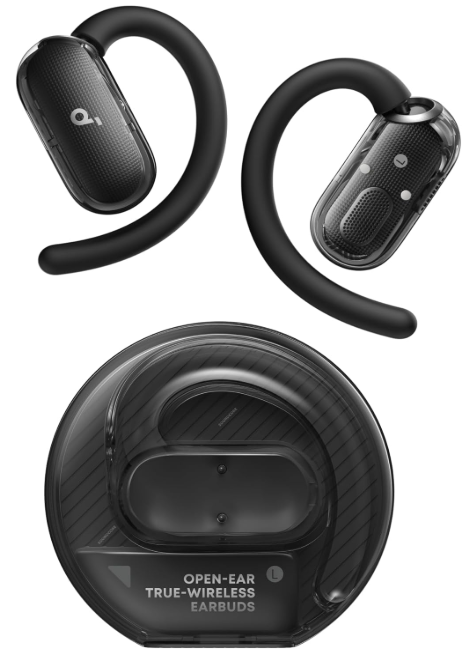
 SoundcoreV40i Open-Ear Headphones

OVERVIEW
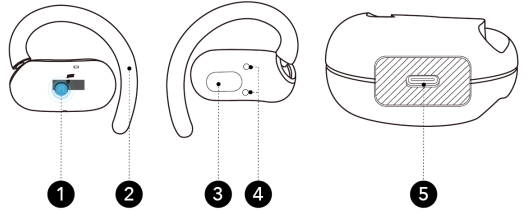
- Touch-Control Area
- Adjustable Ear Hook
- Speaker
- Charging Contactors
- USB-C Charging Port
CONTROLS
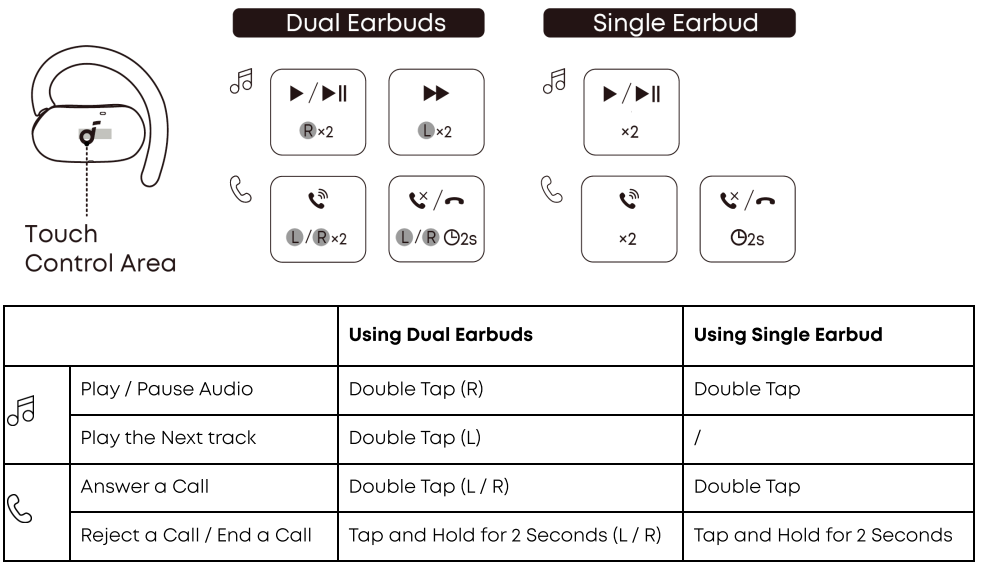
Customize Touch Controls in the soundcore App.
Access Controls on the home page to customise touch commands for the left or right earbud, including volume adjustment, skipping tracks, play/pause, and voice assistant activation.
CHARGING
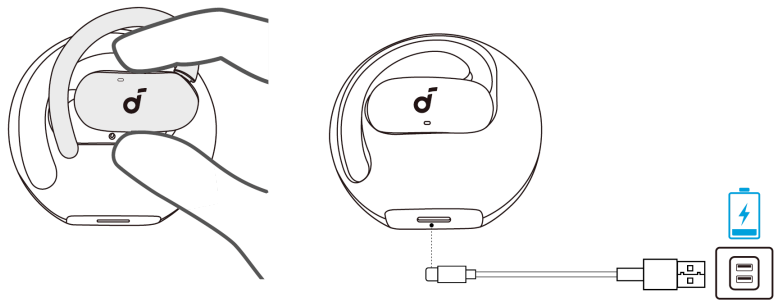
- Place the earbuds back into the charging case.
- Ensure the earbuds and the USB-C charging port are fully dry before charging.
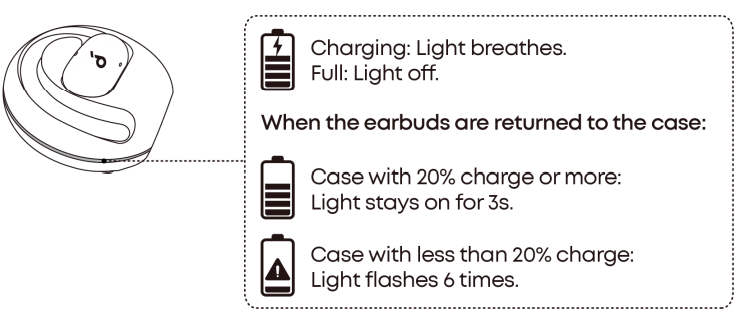
- Connect the charging case to a power supply using the included USB-C cable. The case’s LED indicator will flash during charging. Once fully charged, the LED will stay on for 3 seconds before turning off.
- The case fully recharges in about 2.5 hours via USB-C.
POWERING

- For first-time use, remove the insulation stickers.
- Return the earbuds to the charging case.
- Take out the earbuds again; they will automatically power on and enter Bluetooth pairing mode.
- Select “Soundcore V40i” from your device’s Bluetooth list to connect.
Once connected, the earbuds will automatically reconnect to your device every time you take them out, as long as you haven’t deleted the pairing history from your device.
MANUAL PAIRING
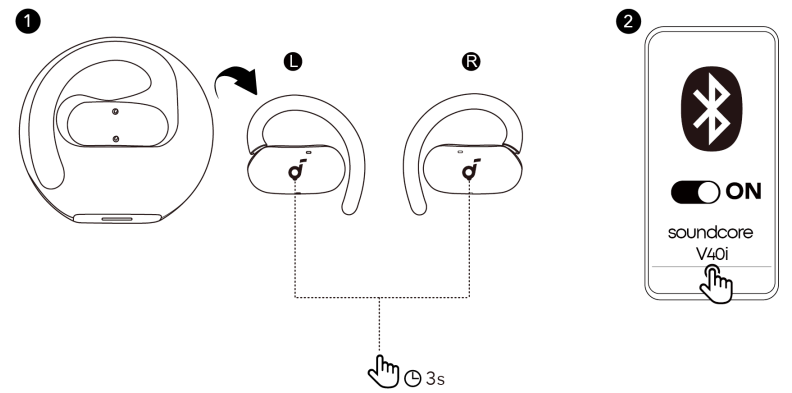
To manually enter Bluetooth pairing mode, take the earbuds out of the case, then press and hold the touch control areas on both earbuds for 3 seconds.
DUAL CONNECTIONS
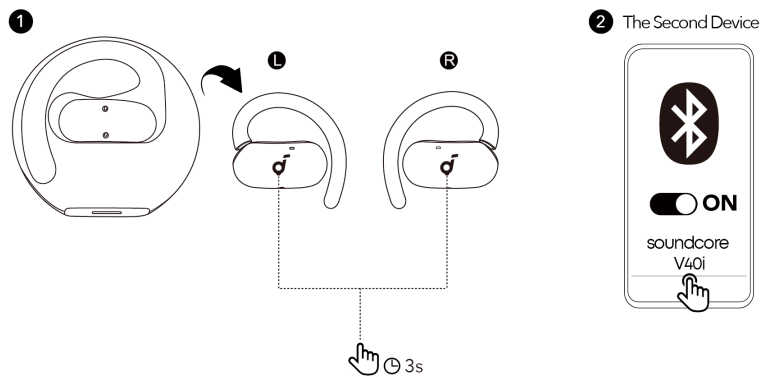
Dual Connections is enabled by default. To connect your earbuds to two Bluetooth devices simultaneously, there are two methods:
Method 1
Manually Pair with the Second Device
While wearing the earbuds, press and hold the touch-control areas on both earbuds for 3 seconds until you hear a sound prompt. You can then proceed to pair with the second device.
Method 2
Use the Soundcore App
In the Soundcore app, tap Dual Connections on the main interface, then proceed to Connect New Device. The option names may vary based on your app’s language settings. Follow the corresponding terms in your app to complete the process.
WEARING
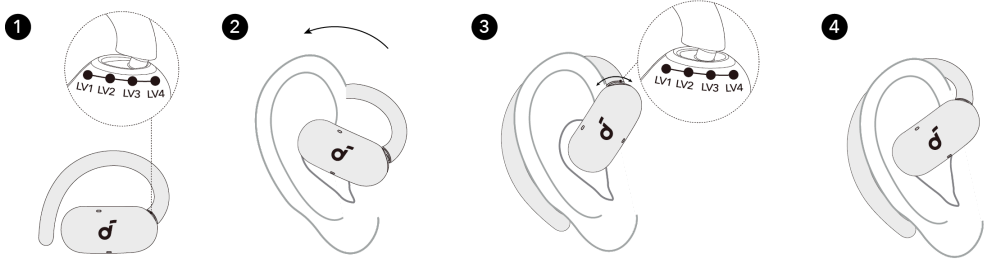
- Set the ear hooks to the LV4 position, which offers the largest fit.
- Put on the earbuds and rotate the ear hooks along your outer ear for proper positioning.
- Adjust between the four positions to find the most comfortable and secure fit.
LED Indicator Guide
| Input | Charging Case: 5V 0.5A |
| Output | Charging Case: 5V 0.2A (0.1A Per Port) |
| Battery Capacity | Earbuds: 60mAh |
POWERING OFF
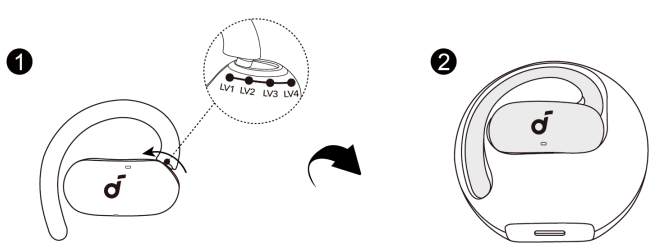
To power on, set the ear hooks to the LV1 position and return the earbuds to the case. When outinf the case, the earbuds will automatically power off after 30 minutes if not connected. Adjust the shutdown time in the Soundcore app.
RESET
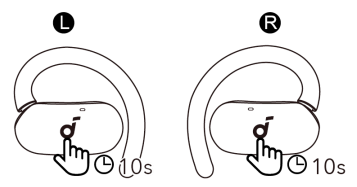
Reset the earbuds if they’re malfunctioning. While wearing them, tap and hold the touch-control areas on both earbuds for 10 seconds until you hear a voice prompt. Your earbuds are now successfully reset.
FIRMWARE UPDATE
When the earbuds are connected to the app, you’ll be notified if a new firmware version is available. Keep the earbuds in the charging case until the update is complete and avoid using them during the process.
Specification
Specifications are subject to change without notice.
| Charging Case: 470mAh | |
| Charging Time | Earbuds: 1H
Charging Case: 2H |
| Driver | 16 × 13 × 4mm |
| Frequency Response | 20Hz – 20kHz |
| Impedance | 16Ω |
| Waterproof and Dustproof
Rating (Earbuds) |
IP55 |
| Bluetooth Version | 5.4 |
| Bluetooth Range | 10m (32ft) |
APP
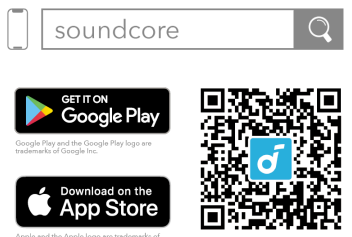
Download the Soundcore app to adjust EQ settings, customise touch controls, update firmware, and explore more features. If your earbuds cannot connect to the Soundcore app, try reinstalling the app or updating it to the latest version available in your mobile app store.
CUSTOMER SERVICE
- Email: service@soundcore.com
- Email: support.mea@soundcore.com (For Middle East and Africa Only)
- Email: support@anker.com (日本)
- Email: support.kr@anker.com
US/Canada
- Call: +1 (800) 988 7973
UK
- Call: +44 (0) 1604 936200 (UK)
DE
- Call: +49 (0) 69 9579 7960
UAE
- Call: +971 8000320817
KSA
- Call: +966 8008500030
Kuwait
- Call: +965 22069086
Egypt
- Call: +20 8000000826
Australia
- Call: +61 3 8331 4800
Türkiye
- Call: +90 (850) 460 14 14
Russia
- Call: +8 (800) 511-86-23
India
- Call: 000-8000-504-414
FAQs
Q: What type of headphones are the V40i?
The V40i are open-ear, hook-style wireless headphones that use adjustable ear hooks for a snug fit instead of plugging in.
Q: Why choose an open‑ear design over in‑ear or over‑ear headphones?
No ear canal pressure, greater comfort (particularly for extended wear), and—most importantly—maintaining awareness of your surroundings are all benefits of an open ear. Excellent for riding, walking, commuting, and situations when you need to be aware of your surroundings.
Q: Who might find these especially useful?
Individuals who are looking for lightweight, breathable headphones for daily use, commuters, people who want to be aware of outside noise (traffic, surrounds), and people who avoid ear discomfort.
Q: How good is the sound — can open‑ear headphones deliver decent bass and clarity?
To improve bass and volume, the V40i has 16 × 13 mm drivers with a unique chamber design. They overcome some of the drawbacks associated with open ear designs in order to produce “punchy bass and clear sound.”
Q: Are they loud enough for noisy environments?
Indeed, a lot of customers claim that the V40i can achieve fairly high volume levels. The design is meant to be used outside or in noisy environments (streets, gym, etc.).
Q: Are they good for music, podcasts, calls — or all?
They perform well in a variety of use cases, including calls, music, podcasts, and watching videos. The V40i’s four microphones and AI-based noise filtering are designed to provide “crystal clear” voice pickup during calls, even in busy settings.
Q: What’s the battery life like?
With the charging case, you can play for up to 21 hours altogether, or about 6 hours on a single charge.
Q: What kind of wireless connectivity do they use?
They make use of Bluetooth 5.4, which supports contemporary devices and guarantees stable pairing.
8 Comments
Can you be more specific about the content of your article? After reading it, I still have some doubts. Hope you can help me.
Thank you for your sharing. I am worried that I lack creative ideas. It is your article that makes me full of hope. Thank you. But, I have a question, can you help me?
Thank you for your sharing. I am worried that I lack creative ideas. It is your article that makes me full of hope. Thank you. But, I have a question, can you help me?
Thanks for sharing. I read many of your blog posts, cool, your blog is very good.
Your article helped me a lot, is there any more related content? Thanks! https://accounts.binance.info/register-person?ref=QCGZMHR6
I don’t think the title of your article matches the content lol. Just kidding, mainly because I had some doubts after reading the article.
Can you be more specific about the content of your article? After reading it, I still have some doubts. Hope you can help me. https://accounts.binance.info/register/person?ref=QCGZMHR6
I don’t think the title of your article matches the content lol. Just kidding, mainly because I had some doubts after reading the article.