


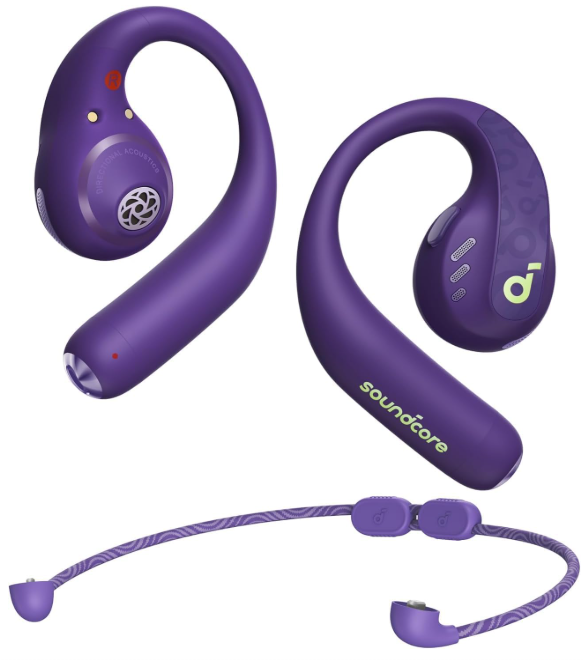
 Soundcore AeroFit Pro Open-Ear Headphones

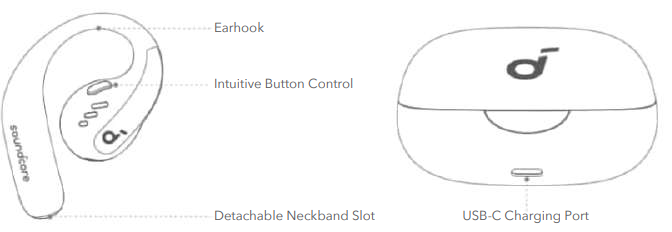
Overview
Wearing
Without Detachable Neckband (Daily Use)
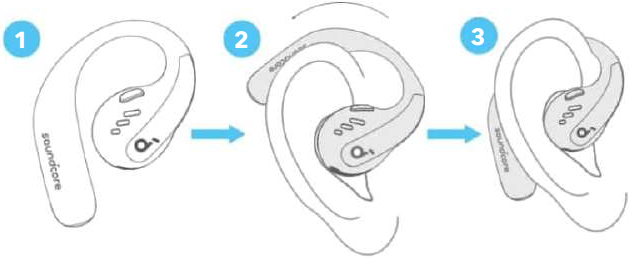
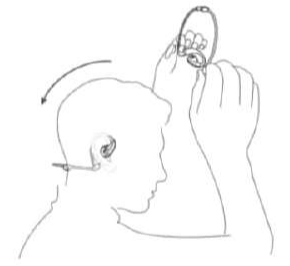
Pick up the earbuds from the charging case, then rotate the earhooks along the auricles of your ears to achieve proper positioning.
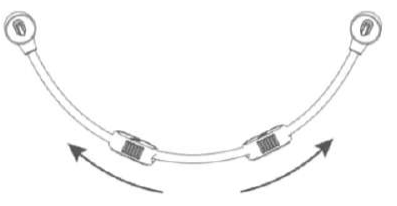
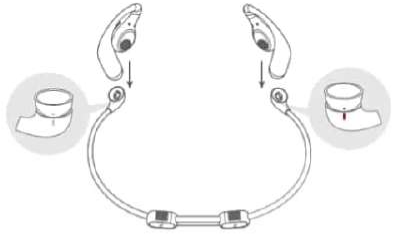
Detachable Neckband
- Adjust the detachable neckband to an appropriate length.

- Snap the earbuds onto the detachable neckband. Make sure the orientation is correct by aligning the marks on the earbuds and detachable neckband.

- Put on the detachable neckband behind your neck, and position the earhooks on your ears.

Charging
Remember to tear off the insulation stickers on the earbuds before first use.
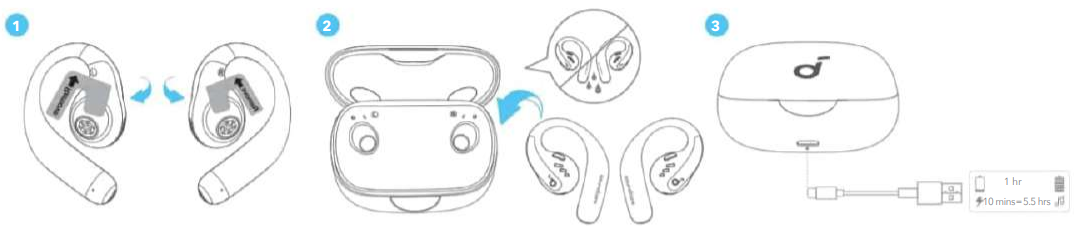
- Place the earbuds in the charging case and close it.
- Fully dry off the earbuds and the USB-C charging port before charging.
Low Battery Indication
Earbuds
- You will hear a voice prompt that the battery is running low.
Charging case
- The LED light strip glows.
Power On/Off
With the Charging Case
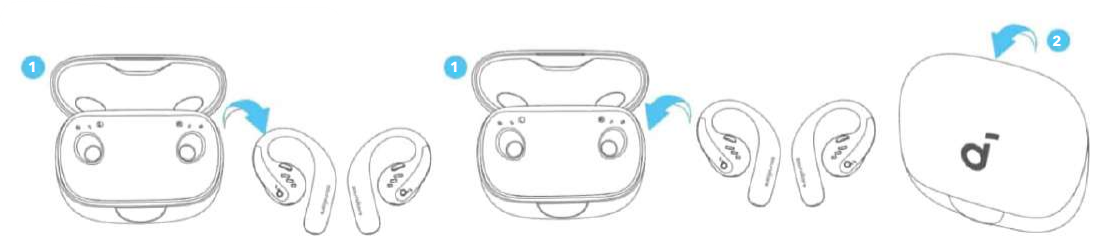
Press to open the charging case, and he earbuds will automatically power on. To power off, return the earbuds to the charging case and close it.
Without the Charging Case
- To power on a single earbud, press and hold the button of the corresponding earbud for 2 seconds.
- To power off both earbuds, press and hold the button of the left or right earbud for 2 seconds.
The earbuds will automatically power off after 30 minutes if they are not connected. The duration can be customised in the Soundcore app.
Pairing
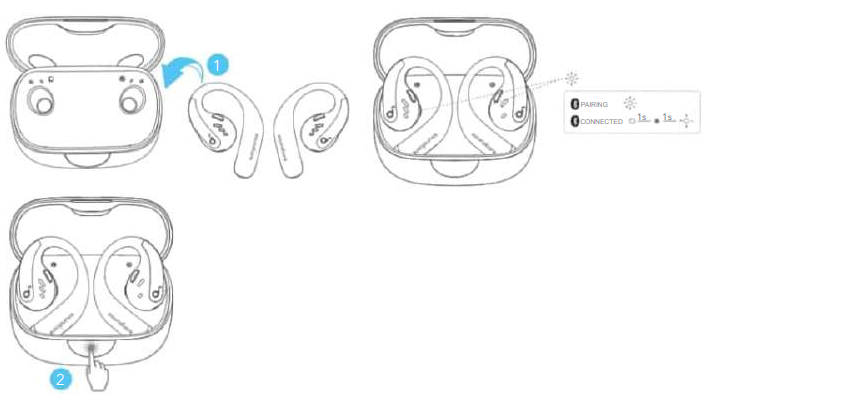
- After removing the insulation stickers on the earbuds, return the earbuds to the charging case, then press the button to activate Bluetooth pairing.
- Also, you can pair by closing and reopening the case lid once the earbuds are back in the case.
- The earbuds will automatically enter Bluetooth pairing mode when connecting for the first time.
- Select “SoundcoreAeroFit Pro” on your device’s Bluetooth list to connect.
- When pairing, the LED indicators inside the charging case will start flashing quickly.
- After the pairing is successful, the LED indicators inside the charging case will stay on for 1 second and go off.
- Then, they will start flashing slowly.
- Once connected successfully, they’ll automatically reconnect to your device every time you open the charging case, as long as you haven’t deleted the pairing history from your device.
Manual Pairing
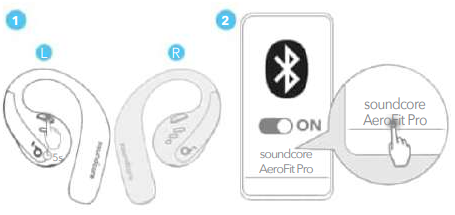
To connect to your device when the earbuds are turned off, press and hold the button on either earbud for 5 seconds to enter Bluetooth pairing mode.
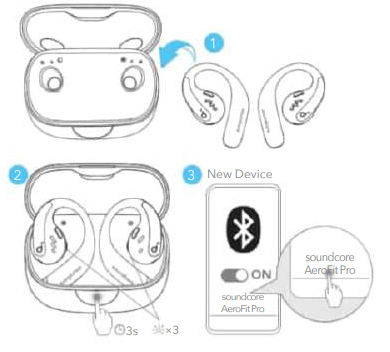
If you want to connect the earbuds to a new device for subsequent use, please follow the steps below:
- Place the earbuds back into the charging case.
- Press down the button on the charging case and hold for 3 seconds until the LED indicators inside the case flash three times.
- Select “SoundcoreAeroFit Pro” on your new device’s Bluetooth list to connect.
Dual Connections
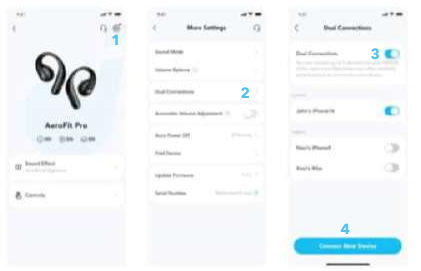
To connect the earbuds with two Bluetooth devices at the same time, open the Soundcore app, go to settings, and select Dual Connections > Enable Dual Connections > Connect New Device.
- This feature is turned off by default.
Button Controls
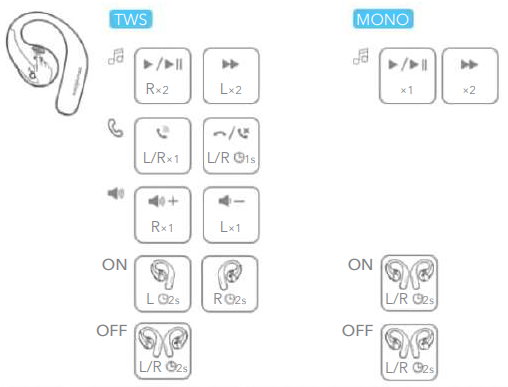
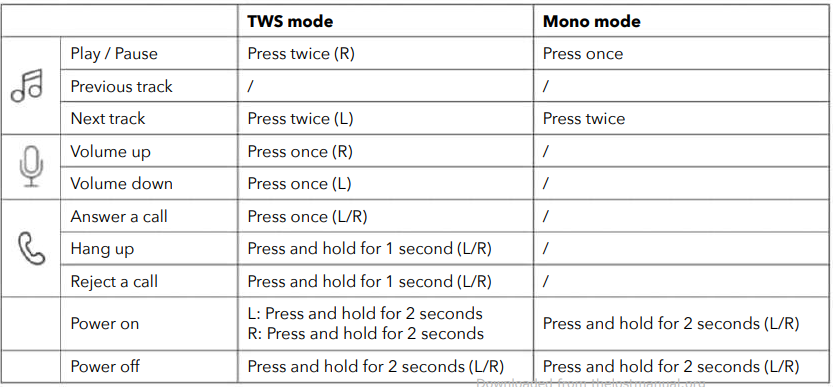
LDAC
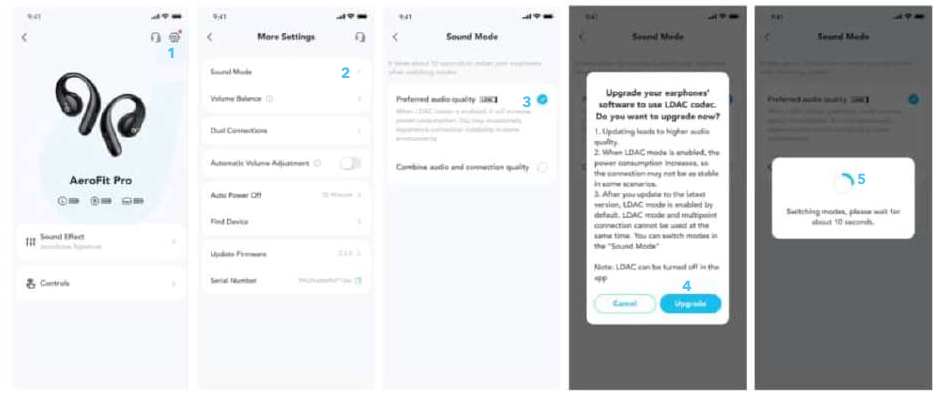
- Enable LDAC in the Soundcore app for higher-quality audio.
- Only available on devices powered by Android 8.0 or later.
Firmware Update
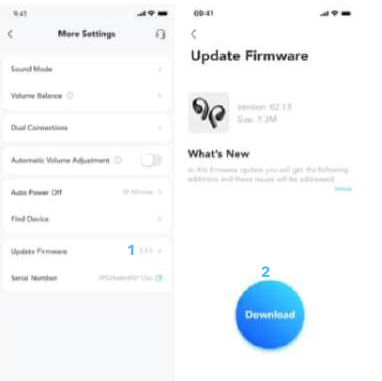
You will be informed once a new firmware version is detected when you connect the earbuds to the app. Ensure the earbuds are placed in the charging case nd the case remains open until the firmware update is complete. During the update, ensure the earbuds are being charged and avoid any usage.
Reset
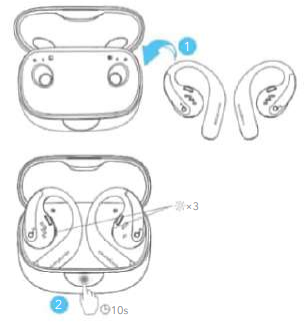
Reset if the earbuds have issues pairing with each other or with other devices. Delete the pairing history from your Bluetooth device first. Place the earbuds in the charging case and leave the case open. Press the charging case button all the way down and hold for 10 seconds until the LED indicators on the charging case flash three times.
A3871 SGS Certification Mark
App
- Download the Soundcore app to experience Spatial Audio, adjust EQ settings, update firmware, and explore more.
- If your earbuds cannot connect with the Soundcore app, reinstall the app or update it to the latest version in your mobile app store.
Specifications Customer Support
- Website: https://www.soundcore.com/
- Tel: +1 (800) 988-7973
6 Comments
Can you be more specific about the content of your article? After reading it, I still have some doubts. Hope you can help me. https://accounts.binance.com/lv/register?ref=SMUBFN5I
Your article helped me a lot, is there any more related content? Thanks!
Thank you for your sharing. I am worried that I lack creative ideas. It is your article that makes me full of hope. Thank you. But, I have a question, can you help me? https://accounts.binance.com/register-person?ref=IXBIAFVY
Your article helped me a lot, is there any more related content? Thanks!
Thank you for your sharing. I am worried that I lack creative ideas. It is your article that makes me full of hope. Thank you. But, I have a question, can you help me? https://www.binance.com/register?ref=MBLCVVZG
Your article helped me a lot, is there any more related content? Thanks!