

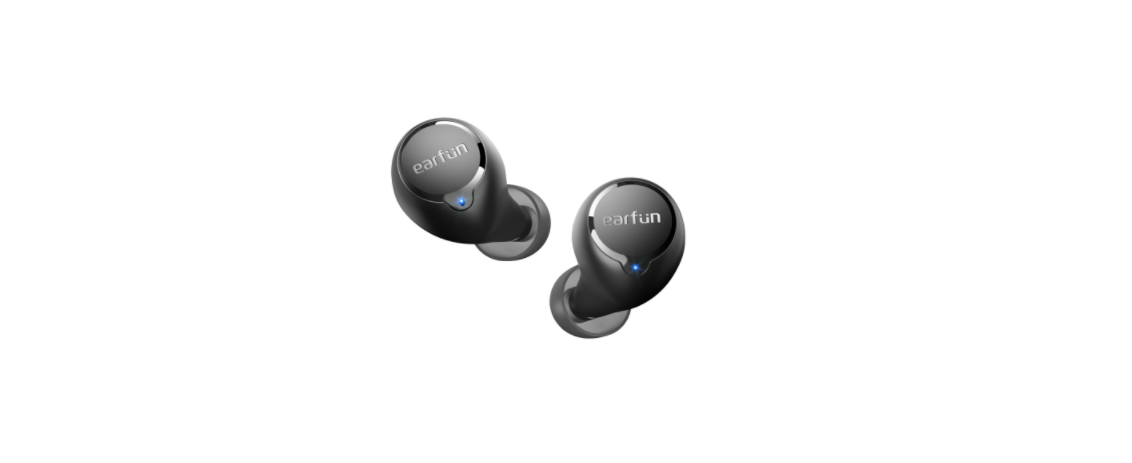

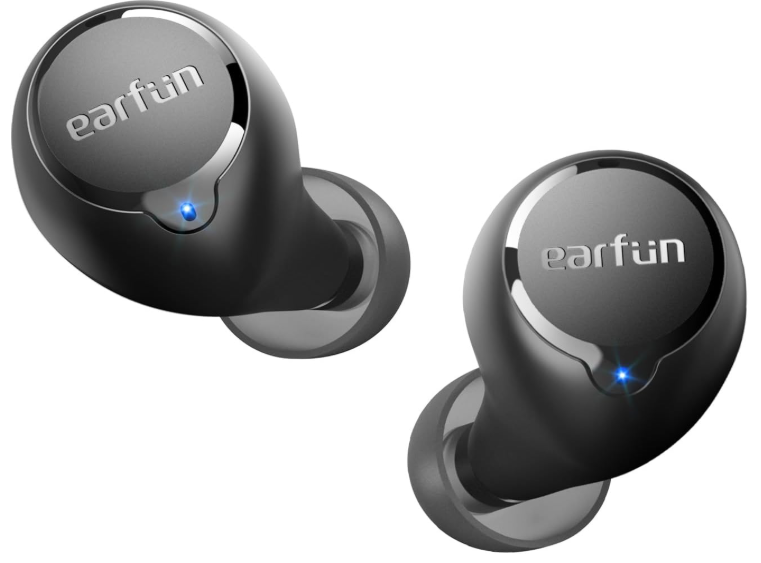
EarFun TW100S Free 1S Wireless Earbuds
How to Fit
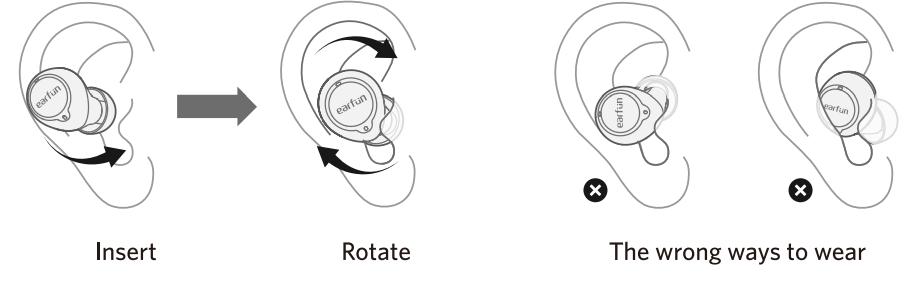
- Select the left or right earbud, and insert it into the corresponding ear.
- Rotate the eartip back and forth for the eartip to create a comfortable seal.
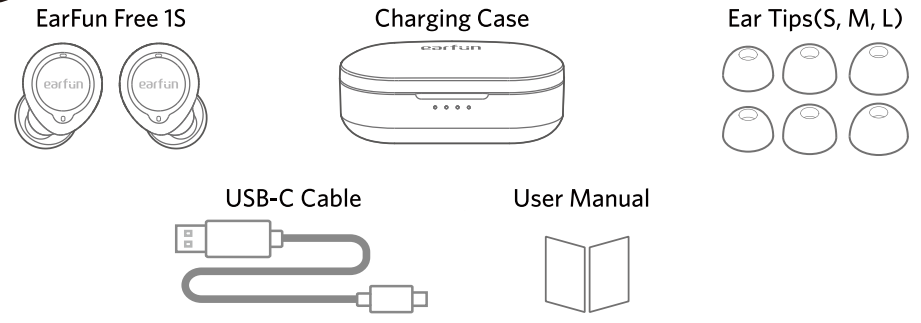
What’s in the Box
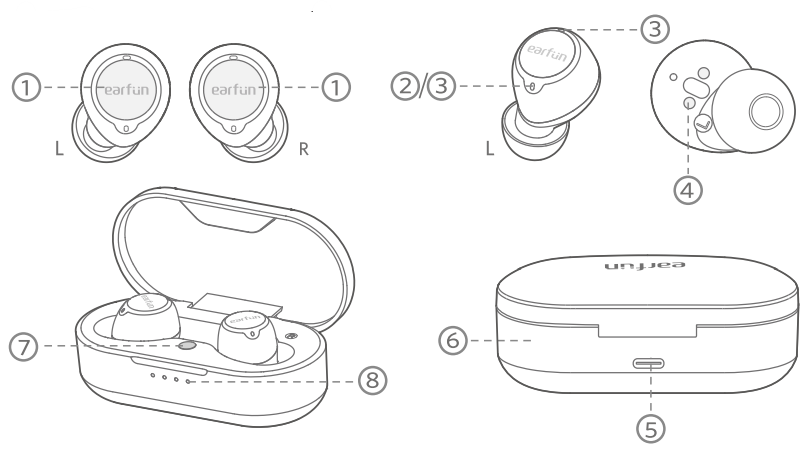
Product Diagram
- Touch control zone
- Earbuds LED indicator
- Microphone
- Charging contactor
- USB-C charging port
- Charging case
- Charging case button
- Charging case indicators
Pairing Your Earbuds
- First-time Pairing with Device
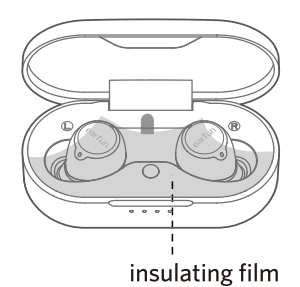
- Step1. Remove the insulating film from both earbuds.
- Step2. Put both earbuds back into the charging case and close the charging case.

- Step 3. Open the charging case, and the earbuds will automatically power on and enter pairing mode.
- Step 4. Activate Bluetooth on your Bluetooth-enabled device and search for other Bluetooth devices.
- Step 5. Select “EarFun Free 1S” from the list of Bluetooth devices shown. If a password is needed, type ‘0000’.
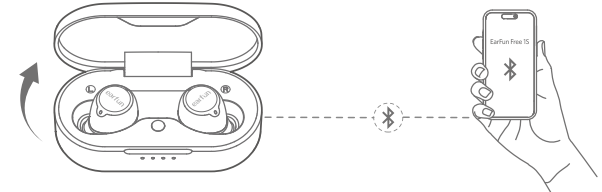
- The earbuds will automatically connect with the device paired last time when the case is open.
- Each earbud could be used independently.
Option A
- Step 1. Unpair the earbuds from the Bluetooth-enabled device that’s connected.
- Step 2. Search on the new device and connect.
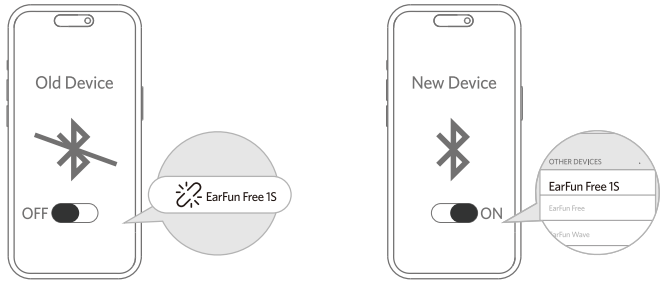
Option B
- Step 1. Put both earbuds back into the charging case and make sure they are being charged.
- Step 2. Search on the new device and connect.


Playing Music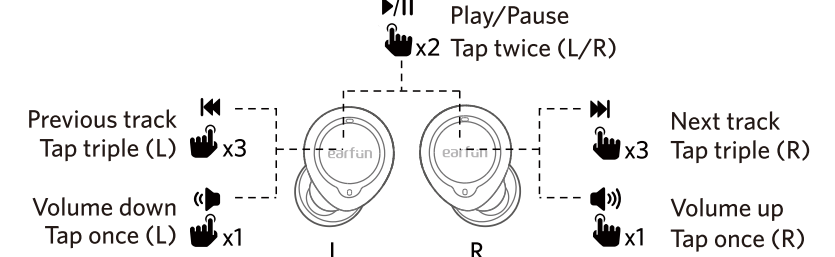
Hands free conversatior
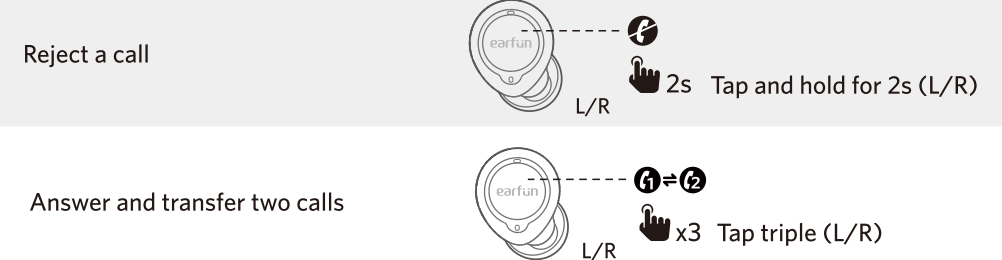
Activate the voice assistant
Game Mode Earbuds LED Indicator

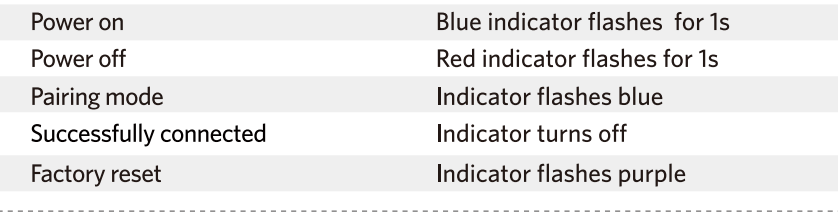
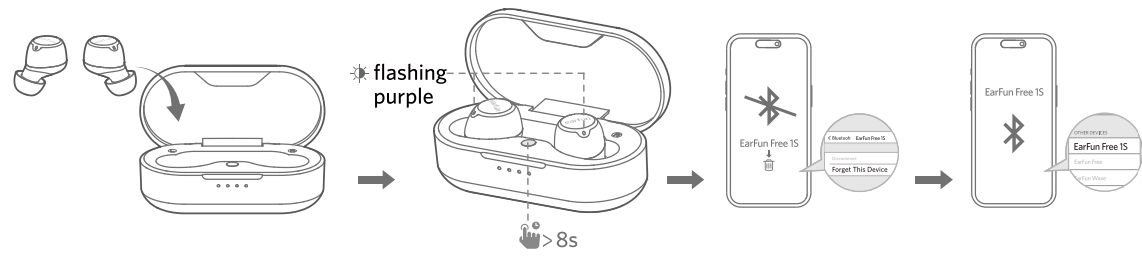
Reset and Reconnecting
If you fail to build a connection between two earbuds or between earbuds and a Bluetooth device, please try the following steps:
- Put both earbuds into the charging case.
- Keep the charging case open, then press and hold the button on the case for at least & seconds until both earbuds flash purple. The earbuds have been successfully reset.
- Delete the previous connection from the Bluetooth device and reconnect to “EarFun Free 1S”.
Charging
- Dry the earbuds, charging contactors and USB port completely before charging.
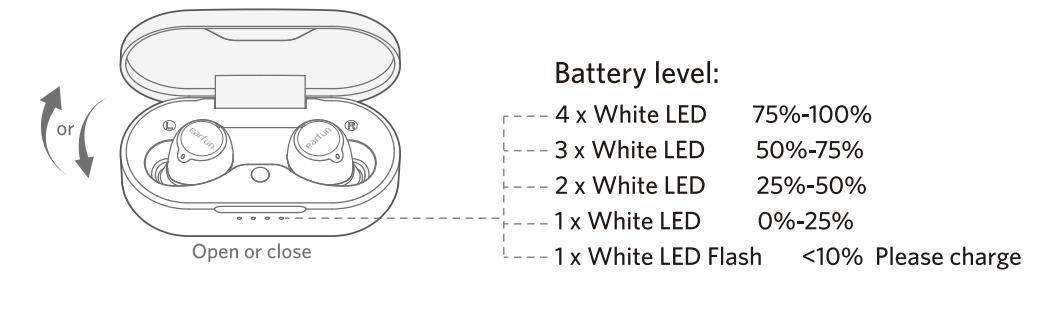
- Open or close the charging case to activate the case battery level LED indicator.
- Put the earbuds back into the charging case, and the earbuds will start charging.
- Fully charge both the earbuds and the charging case before first use.
Connect the USB-C cable for charging.g
Wireless charging supported(wireless charging pad not included)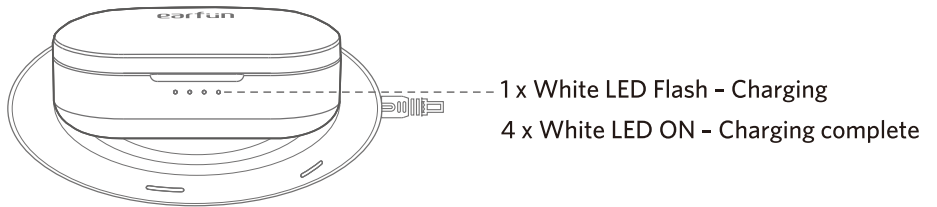
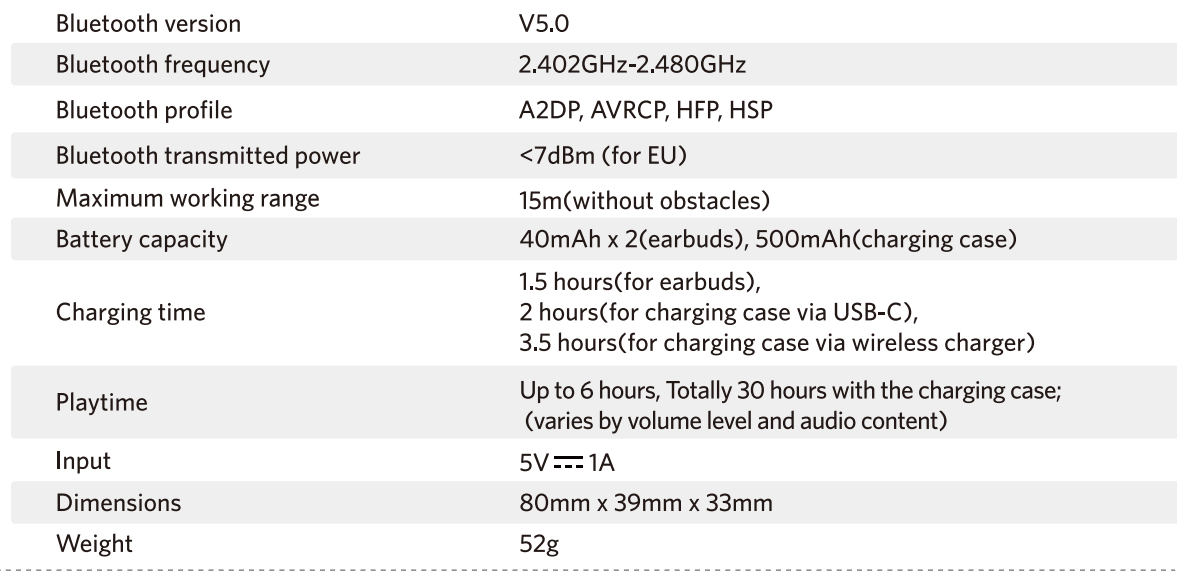
Specifications Troubleshooting
- Q: Can I use both earphones separately?
- A: Yes, each earbud could be used independently.
- Q: The earphones are turning on, but they don’t connect to my device.
- A: To connect the earbuds to your device, please ensure the insulating films on both earbuds are removed first, then check if Bluetooth is enabled. If the earbuds still don’t connect to your device, please perform a reset or contact our customer support.
- Q: Why is the connection not stable and cuts out intermittently?
- A: Please make sure there are no objects between the earphones and your Bluetooth device, and make sure there is no radio or WIFI interference nearby.
- Q: What is the range of Bluetooth earphones?
- A: Bluetooth earphones have a maximum range of 49 feet (15m, no obstacles). However, the actual range will depend on usage and environment.
- Q: Is there volume control on the earphones?
- A: Yes, 1x tap on the left earbud decreases the volume and 1x tap on the right earbud increases it.
- Q: My earphones will not switch on.
- A: Please recharge them and make sure they have enough battery power. If they are fully charged and still nothing happens, or if you are not able to charge them, please contact our customer support.
- Q: Is the charging case waterproof?
- A: No, the earbuds are sweat and waterproof, but the charging case is not.
- Q: Will the earbuds shut off automatically?
- A: The earbuds will stay on as long as they are connected to a device. If no audio is playing, they will enter power-saving mode and wake up once audio playback resumes. If the earbuds are not connected to any devices, they will automatically power off after 10 minutes.
Warranty Conditions
A new product purchased in the Alza.cz sales network is guaranteed for 2 years. If you need repair or other services during the warranty period, contact the product seller directly. You must provide the original proof of purchase with the date of purchase. The following are considered to be a conflict with the warranty conditions, for which the claim may not be recognised:
- Using the product for any purpose other than that for which the product is intended or failing to follow the instructions for maintenance, operation, and service of the product.
- Damage to the product by a natural disaster, the intervention of an unauthorised person or mechanical damage through the fault of the buyer (e.g., during transport, cleaning by inappropriate means, etc.).
- Natural wearageing of consumables or components during use (such as batteries, etc.).
- Exposure to adverse external influences, such as sunlight and other radiation or electromagnetic fields, fluid intrusion, object intrusion, mains overvoltage, electrostatic discharge voltage (including lightning), faulty supply or input voltage and inappropriate polarity of this voltage, chemical processes such as used power supplies, etc.
- If anyone has made modifications, alterations to the design or adaptations to change or extend the functions of the product compared to the purchased design or use of non-original components.
WEEE
This product must not be disposed of as normal household waste in accordance with the EU Directive on Waste Electrical and Electronic Equipment (WEEE – 2012/19/EU). Instead, it shall be returned to the place of purchase or handed over to a public collection point for the recyclable waste.
By ensuring this product is disposed of correctly, you will help prevent potential negative consequences for the environment and human health, which could otherwise be caused by inappropriate waste handling of this product. Contact your local authority or the nearest collection point for further details. Improper disposal of this type of waste may result in fines in accordance with national regulations.
FCC Statement
This device complies with Part 15 of the FCC Rules. Operation is subject to the following two conditions. This device may not cause harmful interference. This device must accept any interference received, including interference that may cause undesired operation.
Changes or modifications not expressly approved by the party responsible for compliance could void the user’s authority to operate the equipment. This equipment generates uses and can radiate radio frequency energy and, if not installed and used in accordance with the instructions, may cause harmful interference to radio communications. However, there’s no guarantee that interference will not occur in a particular installation.
- Consult the dealer or an experienced radio/TV technician for help.
- Increase the separation between the equipment and the receiver
- Reorient or relocate the receiving antenna.
Radiation Exposure Statement
This equipment complies with FCC radiation exposure requirements. The device can be used in portable exposure conditions without RF restriction. This device complies with Industry Canada licence-exempt RSS standard(s). Operation is subject to the following two conditions
- This device may not cause interference, and
- This device must accept any interference, including interference that may cause undesired operation of the device.”
EU Declaration of Conformity
Earfun Technology (HK) Limited hereby declares that this equipment complies with the essential requirements and other relevant provisions of Directive 2014/53/EU and RoHS 2011/65/EU Directive.
UK Declaration of Conformity
Hereby, [Earfun Technology (HK) Limited] declares that the radio equipment type [K2] complies with UK Radio Equipment Regulations (SI 2017/1206).
ISED Compliance Statements
This device contains licence-exempt transmitters/receivers (s) that comply with Innovation, Science and Economic Development Canada’s licence-exempt RSS(s). Operation is subject to the following two conditions:
- This device may not cause interference.
- This device must accept any interference, including interference that may cause undesired operation of the device.
This equipment complies with IC RSS-102 radiation exposure limits set forth for an uncontrolled environment.
Customer Service
- Website: www.myearfun.com
- Email: service@myearfun.com
- Ph: +91-99997-92449
FAQs
Q: What devices are compatible with the EarFun Free 1S earbuds?
Any Bluetooth-enabled device, such as iOS/Android phones, tablets, laptops, smartwatches, and Bluetooth-capable gaming devices, can be used with these earbuds.
Q: How long is the battery life?
With many hours of playback on a single charge, the Free 1S earbuds are made for prolonged listening. For use throughout the day, the charging case offers extra full charges.
Q: Are the EarFun Free 1S earbuds water-resistant?
Indeed. They are appropriate for running, exercise, and mild outdoor use because they are sweat and splash-resistant.
Q: Do the earbuds support single-ear usage?
Absolutely. For calls or situations where you need to be aware of your surroundings, you can utilise the left or right earbud separately.
Q: How do I control music and calls?
You can control volume, play/pause, skip tunes, answer calls, and turn on your phone’s voice assistant with the earbuds’ user-friendly touch controls.
Q: Do these earbuds support fast charging?
Fast USB-C charging is usually supported by the case, allowing you to play for several hours on a single charge.
Q: What is the Bluetooth range?
Under ideal conditions, you’ll get around 10 meters (30 ft) of stable Bluetooth connection. Walls or interference may reduce this slightly.
Q: Do the EarFun Free 1S earbuds support noise cancellation?
They use passive noise isolation, which means that sounds from the outside are partially blocked by the silicone tips. Active noise cancelling is not one of them.
1 Comment
udjroojkurmdsttoijersdyfyweusn