


 Tribit TS-BTS20 XSound Go Wireless Speaker


Safety instructions
- Avoid dropping. Do not disassemble. Avoid extreme temperatures.
- Do not use the device outdoors during thunderstorms.
- Do not use any corrosive cleaners/oils to clean.
Content in the Box

Overview
Connection

It is not recommended to use the USB socket of a laptop or desktop computer to charge the product; too low a voltage may cause the product to fail to charge.
Bluetooth Connection

Specification
- Bluetooth version: V5.0
- Support: A2DP, AVRCP, HFP, HSP
- Output power: 2 x 8W
- Frequency band: 2.402GHz~2.480GHz
- Maximum transmission power: =20dBm
- Battery: (3.7V 4400mAh)/16.28Wh
- Battery charge time: 5 hours
- Input: DC5V/1A
- Dimension: 175 x 59 x 56 (mm)
- Weight: 380g
Stereo Mode
- Make sure both speakers are on.
- Press the Bluetooth sign-on button on one of the speakers to enter pairing mode.
- Press the Bluetooth sign on the other speaker for 5 seconds, then release the button to enter Stereo pairing when you hear the “Stereo mode” sound.
- When you hear “Left channel” on the left speaker and “Right channel” on the right speaker, the “Stereo mode” is on.
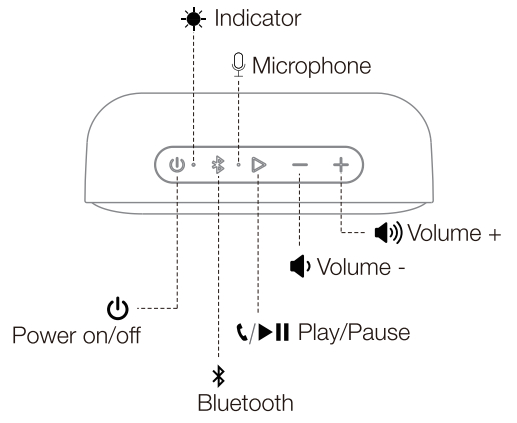
Buttons
 Indicator


Reset
If this speaker has a problem, you can try to press and hold the “Volume +” and “Volume -” buttons simultaneously for 5 seconds to reset, and then pair again (delete the old pairing in your device).
FCC Statement
Changes or modifications not expressly approved by the party responsible for compliance could void the user’s authority to operate the equipment. This equipment has been tested and found to comply with the limits for a Class B digital device, pursuant to Part 15 of the FCC Rules. These limits are designed to provide reasonable protection against harmful interference in a residential installation.
This equipment generates uses and can radiate radio frequency energy and, if not installed and used in accordance with the instructions, may cause harmful interference to radio communications. However, there is no guarantee that interference will not occur in a particular installation. If this equipment does cause harmful interference to radio or television reception, which can be determined by turning the equipment off and on, the user is encouraged to try to correct the interference by one or more of the following measures.
- Reorient or relocate the receiving antenna.
- Increase the separation between the equipment and receiver.
- Connect the equipment into an outlet on a circuit different from that to which the receiver is connected.
- Consult the dealer or an experienced radio/TV technician for help.
This device complies with part 15 of the FCC rules. Operation is subject to the following two conditions. This device may not cause harmful interference. This device must accept interference received, including interference that may cause undesired operation.
IC Caution
This device complies with Industry Canada licence-exempt RSS standard(s). Operation is subject to the following two conditions
- This device may not cause interference, and
- This device must accept any interference, including interference that may cause undesired operation of the device.
EU Declaration of Conformity
Hereby, Thousandshores Deutschland GmbH declares that the radio equipment type Portable Wireless Speaker TS-BTS20 complies with Directive 2014/53/EU. To get the full text of the EU declaration of conformity, http://files.
Disposal
Valuable raw materials can be reused by recycling.
- Unplug the appliance from the mains.
- Cut through the power cord.
- Close the main gas tap.
- Dispose of the appliance in an environmentally friendly manner.
Information about current disposal methods is available from your specialist dealer or local authority. This appliance is labelled in accordance with European Directive 2012/19/EU concerning used electrical and electronic appliances (waste electrical and electronic equipment – WEEE). The guideline determines the framework for the return and recycling of used appliances as applicable throughout the EU.
Customer Service
- Website: https://tribit.com/
- Ph: +91 9810348155