Close Menu
onyxguides.comonyxguides.com

    Subscribe to Updates

    Get the latest creative news from FooBar about art, design and business.

    What's Hot

    GEPRC RAD VTX 5.8G 4-7 Inch FPV Freestyle Drone User Guide

    March 2, 2026

    Autel Robotics EVO Max 4T 8K Camera Drone User Manual

    March 2, 2026

    NVIDIA DGX Spark Personal AI Desktop Chip User Manual

    March 1, 2026
    Facebook X (Twitter) Instagram
    onyxguides.comonyxguides.com
    Facebook X (Twitter) Instagram Pinterest
    • Home
    • About us
    • Terms & Conditions
    • Privacy Policy
    • FAQs
    • Contact us
    onyxguides.comonyxguides.com
    Home » Tribit IC-BTS25 MAXSound Plus Wireless Speaker User Guide
    Other

    Tribit IC-BTS25 MAXSound Plus Wireless Speaker User Guide

    By Gabriel SmithDecember 26, 2025Updated:February 23, 2026No Comments3 Mins Read
    Facebook Twitter Pinterest LinkedIn Tumblr WhatsApp Telegram Email
    Tribit-IC-BTS25-MAXSound-Plus-Wireless-Speaker-featured
    Share
    Facebook Twitter LinkedIn Pinterest Email

    tribit-logo

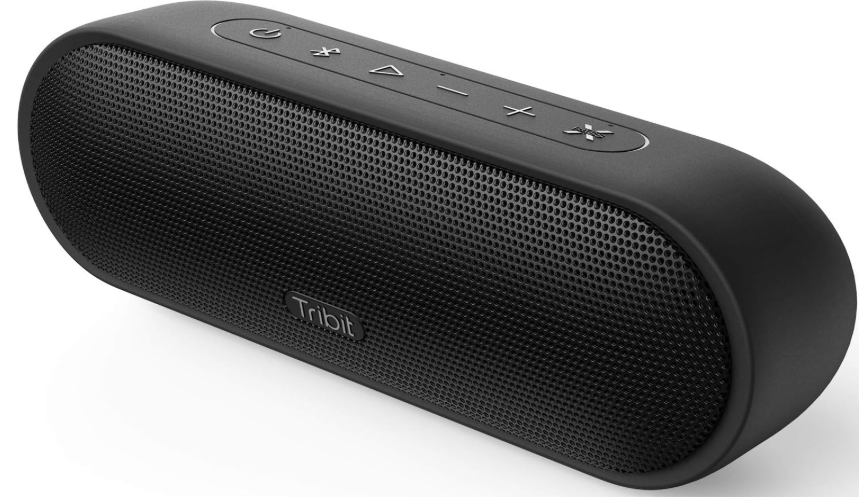
    Tribit IC-BTS25 MAXSound Plus Wireless SpeakerTribit-IC-BTS25-MAXSound-Plus-Wireless-Speaker-PRODUCT


    Safety Precautions

    •  Avoid dropping the speaker on the floor.
    • Do not try to disassemble or repair the speaker unless you are a technician.
    • Do not submerge the speaker in water.
    • Never expose the speaker to extreme high or low temperatures.
    • Stop use immediately if a thunderstorm happens.
    • Do not clean its surface with any corrosive cleanser or other chemical solutions.

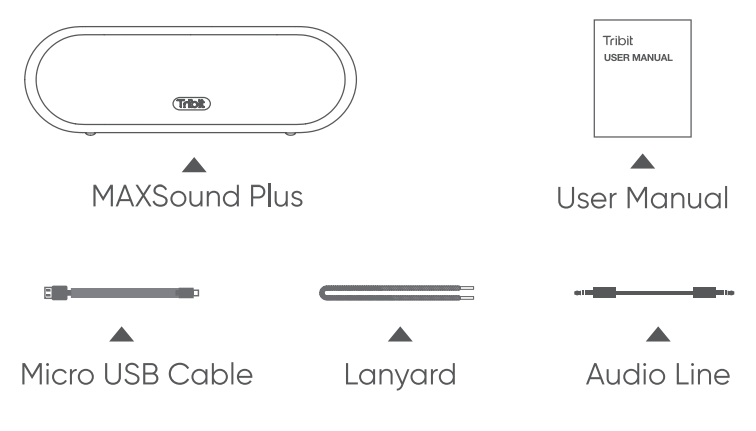
    What’s in the BoxTribit-IC-BTS25-MAXSound-Plus-Wireless-Speaker-FIGURE-1

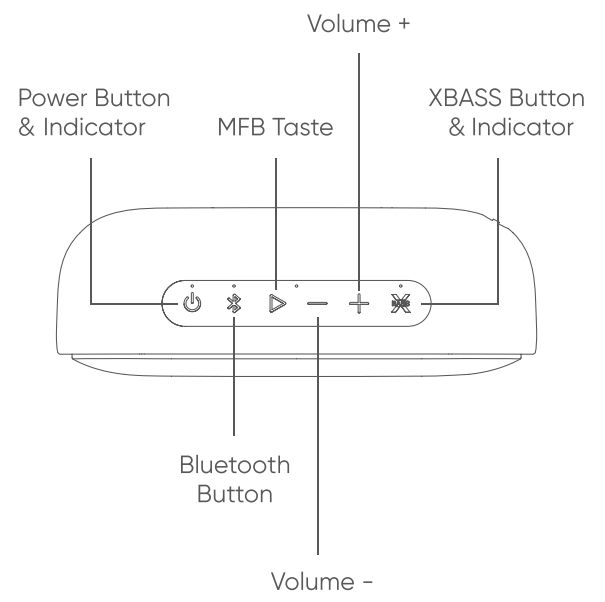
    Overview Buttons & Indicators

    Tribit-IC-BTS25-MAXSound-Plus-Wireless-Speaker-FIGURE-2

    Tribit-IC-BTS25-MAXSound-Plus-Wireless-Speaker-FIGURE-3

    ConnectionsTribit-IC-BTS25-MAXSound-Plus-Wireless-Speaker-FIGURE-4

    Bluetooth PairingTribit-IC-BTS25-MAXSound-Plus-Wireless-Speaker-FIGURE-5

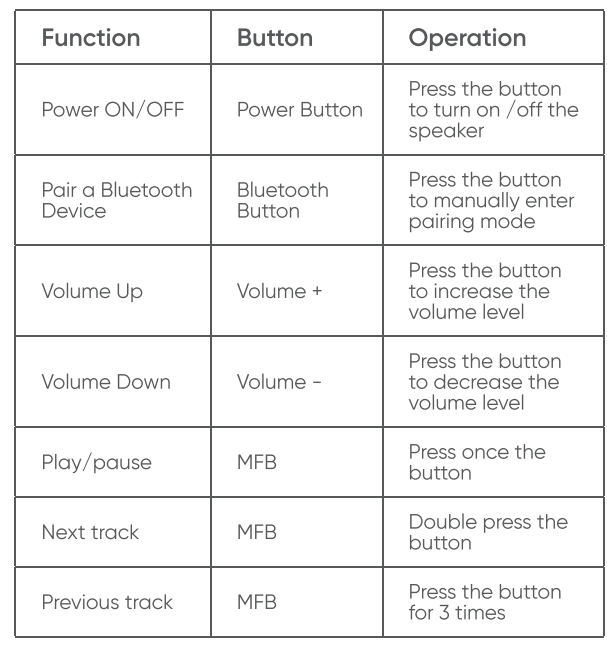
    ButtonsTribit-IC-BTS25-MAXSound-Plus-Wireless-Speaker-FIGURE-6 Tribit-IC-BTS25-MAXSound-Plus-Wireless-Speaker-FIGURE-7

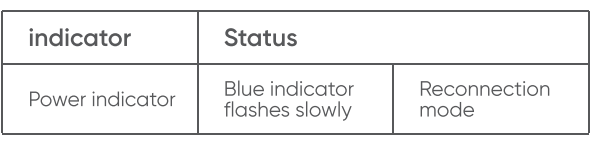
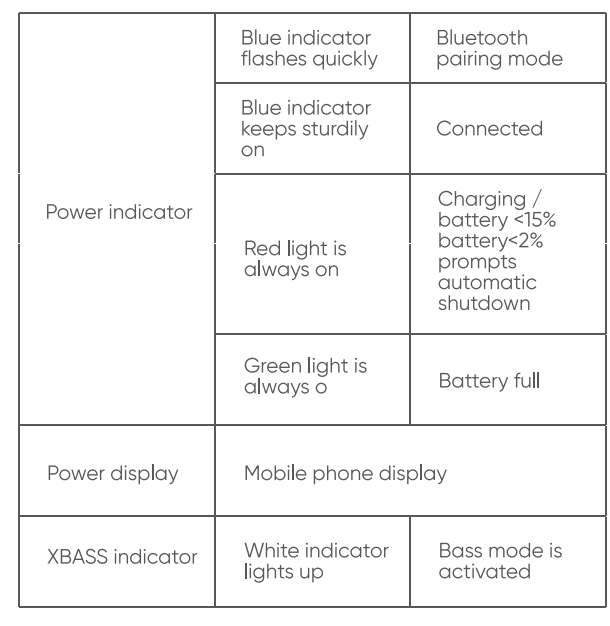
    Indicators

    Tribit-IC-BTS25-MAXSound-Plus-Wireless-Speaker-FIGURE-8 Tribit-IC-BTS25-MAXSound-Plus-Wireless-Speaker-FIGURE-9

    Specifications

    • Bluetooth version: V4.2
    • Bluetooth profile: A2DP, AVRCP, HFP, HSP
    • Driver: 2 × Ф45 Passive radiator
    • Output power: 2 × 12W
    • Signal-to-noise ratio ≥ 80dB
    • Frequency response: 80-20KHz
    • Battery: 7.4V / 2200mAh
    • Music play time: Up to 20 hours ( varies by
    • lume level and music files )
    • Charging time: 4 hours @ 5V/1.5A
    • Dimensions: 65x198x68 mm / 2.56×7.79×2.68 in
    •  Weight: 595g / 20.98oz

    Reset

    If this speaker has any problem, you can try to press and hold Volume + and Volume – buttons simultaneously for 5s to reset this speaker and remove the old pairing in your Bluetooth device, and then pair again.

    FCC Statement

    Changes or modifications not expressly approved by the party responsible for compliance could void the user’s authority to operate the equipment. This equipment has been tested and found to comply with the limits for a Class B digital device, pursuant to Part 15 of the FCC Rules. These limits are designed to provide reasonable protection against harmful interference in a residential installation. This equipment generates uses and can radiate radio frequency energy and, if not installed and used in accordance with the instructions, may cause harmful interference to radio communications. However, there is no guarantee that interference will not occur in a particular installation. If this equipment does cause harmful interference to radio or television reception, which can be determined by turning the equipment off and on, the user is encouraged to try to correct the interference by one or more of the following measures.

    • Reorient or relocate the receiving antenna.
    • Increase the separation between the equipment and receiver.
    • Connect the equipment into an outlet on a circuit different from that to which the receiver is connected.
    •  Consult the dealer or an experienced radio-TV technician for help.

    This device complies with part 15 of the FCC rules. Operation is subject to the following two conditions:

    1. This device may not cause harmful interference.
    2. This device must accept any interference received, including interference that may cause undesired operation.

    Customer Service

    • Email: support@tribitaudio.com
    • 18-month limited warranty
    • For FAQS and more information, please visit:  www.tribitaudio.com (QR code ) facebook QR code.
    Share. Facebook Twitter Pinterest LinkedIn Tumblr Email
    Gabriel Smith

      Related Posts

      GEPRC RAD VTX 5.8G 4-7 Inch FPV Freestyle Drone User Guide

      March 2, 2026

      Autel Robotics EVO Max 4T 8K Camera Drone User Manual

      March 2, 2026

      NVIDIA DGX Spark Personal AI Desktop Chip User Manual

      March 1, 2026

      PRO FLIGHT PFBD301 Remote Control Drone User Guide

      March 1, 2026

      Hubsan ZINO Mini SE 40 Mins Flight Time Drone User Manual

      February 27, 2026

      DJI AGRAS T25 Light and Flexible Drone Instruction Manual

      February 27, 2026
      Add A Comment
      Leave A Reply Cancel Reply

      Don't Miss
      Other

      GEPRC RAD VTX 5.8G 4-7 Inch FPV Freestyle Drone User Guide

      March 2, 2026

      GEPRC RAD VTX 5.8G 4-7 Inch FPV Freestyle Drone Arm installation Install the arms, screws,…

      Autel Robotics EVO Max 4T 8K Camera Drone User Manual

      March 2, 2026

      NVIDIA DGX Spark Personal AI Desktop Chip User Manual

      March 1, 2026

      PRO FLIGHT PFBD301 Remote Control Drone User Guide

      March 1, 2026
      Stay In Touch
      • Facebook
      • Twitter
      • Pinterest
      • Instagram
      • YouTube
      • Vimeo

      Subscribe to Updates

      Subscribe to Updates

      Follow us

      Facebook X-twitter Instagram Pinterest

      © 2025 All rights reserved Onyx Guide.