



Marshall BROMLEY 750 Party Speaker
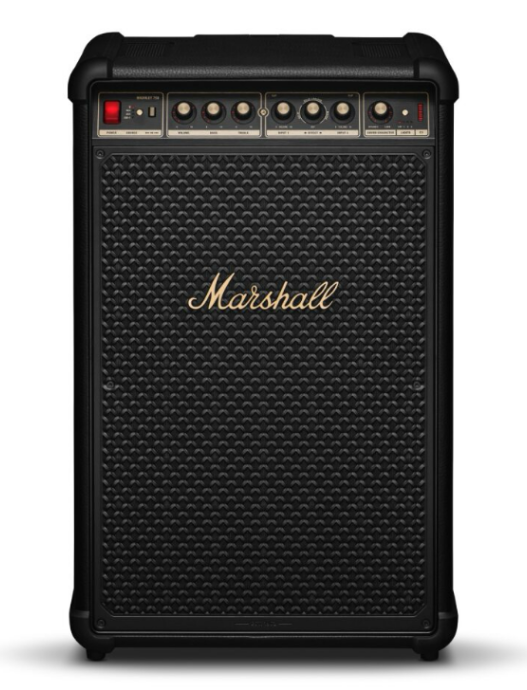
Description
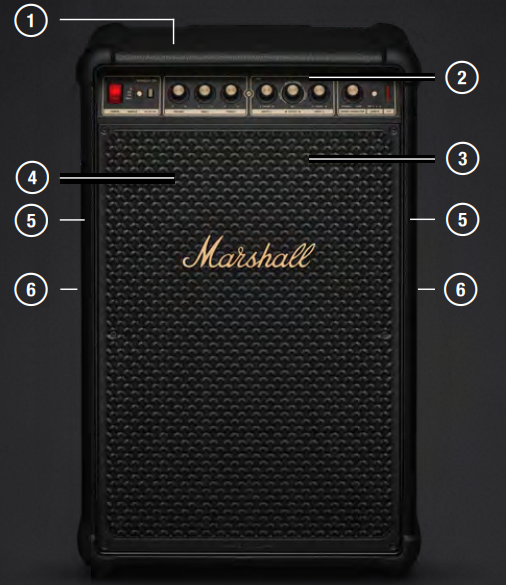
- TOP DRIVERS
- FRONT PANEL
- FRONT DRIVERS
- LIGHT PANEL
- SIDE DRIVERS
- CARRYING HANDLES

- TELESCOPIC HANDLE
- INPUT PANEL
- REAR DRIVERS
- BATTERY HATCH
- MAINS POWER INPUT
- WHEELS
Getting Started
- POWER ON Push the power switch to turn on the speaker.
- START PAIRING Use the source selector to select Bluetooth and then push and hold the button until the LED starts blinking.
- SELECT BROMLEY 750
Open your audio device’s Bluetooth list and select BROMLEY 750. Download the Marshall Bluetooth app to get the most out of your speaker. Caution: Make sure that the volume is set to low on both the speaker and the audio source before using the speaker.
Main Power Input
Open the mains input hatch to access the power input. Connect the mains lead to the speaker and then to the wall socket to power the speaker and charge the battery. Caution: Always unplug the mains lead from the wall socket before disconnecting it from the speaker.
Power Bank
Bromley 750 comes with a removable battery that can also be used as a power bank. The battery is located in the battery socket behind the hatch. More information about the power bank can be found in the Bromley Powerbank online manual at marshall.com.
Battery Socket
Open the hatch to access the battery. Grab the battery while pressing the lock button, then pull to remove it. Insert the battery and push it until you hear a click to install it. The battery is charging when Bromley 750 is plugged into a mains socket.
Connection
Bromley 750 comes with two input channels for microphones or other mono instruments. These channels can be mixed with any other selected input and use the built-in effects. The inputs and gain switches are located on the back of the speaker. INPUT 1 is used in the instruction below, but applies to INPUT 2 as well.
- Set the input gain for your channel. MIC for microphone or INST for line input instrument.
- Connect your microphone or instrument leadto INPUT 1.
- Carefully turn up the volume for INPUT 1 on the front panel.
- If the redCLIP LED is lit, lower the volume on your instrument until it is not lit
Built-In Effect.
INPUT 1 and INPUT 2 can each use one of the three built-in effects: reverb, reverb and delay, and delay.
- Push the effects knob to select the input channel.
- A lit indicator show whatThe channel is selected.
- Turn the effect knob to taste
Sound Character
Sound character control matches the music to the pace of your party. Go from pre-party mingling to the peak and then straight to the after-party with a few simple adjustments. The character goes from DYNAMIC, well-suited for laidback listening at home, to LOUD, when you need full power in a large space. As music and settings are unique, you can fine-tunethe sound character to your current situation.
RCA Input
Plug in an RCA audio device such as a DJ mixer or a CD player.
- Connect a lead with RCA jacks to RCA IN on the back of the speaker.
- Connect the other end of the lead to the output on your audio source.
- Use the source selector button to select RCA.
Aux Input
- Connect a lead with a 3.5 mm stereo jack to AUX IN on the backof the speaker.
- Connect the other end of the lead to the audio output on your audio source.
- Use the source selector button to select AUX.
Cable to USB
- Connect a USB-C audio lead to the USB-C port on theback of the speaker.
- Connect the other end of the lead to the audio output on your audio source.
- Use the source selector button to select USB-C.
Charging Phone
- Ensure that the speaker is on and has more than 20% battery charge.
- Plug in your phone, tablet, or other USB device to the USB OUT on the back of the speaker.
Pairing Bluetooth
Bromley 750 can connect to 2 Bluetooth devices at a time and remembers up to 10 previously paired devices. When in range, it will try to reconnect with the last connected device.
- Use the Source selector button to select Bluetooth.
- Push the Source selector button for 2 seconds until the Bluetooth sourceLED turns to a slow pulse.
- Select Bromley 750 from your audio device’s Bluetooth list
Speakers
- Connect a lead with a 3.5 mm stereo jack to the AUX OUT on the first speaker.
- Connect the other end of the lead to the AUX IN port on the second speaker.
- Use the source selector button to select AUX on the second speaker.
- To add more speakers, repeat the procedure, passing the signal from the send to the third and so on.
Cleaning
Clean your speaker regularly to keep it fresh and last longer. Unplug any leads before cleaning the speaker,r and make sure everything is completely dry before plugging them back in. Gently clean the speaker and the leads with a lint-free cloth, slightly damp with either water, 70% isopropyl alcohol, or 75% ethyl alcohol. ol Note when cleaning the speaker:
- Do not use any sharp or metal objects.
- Do not use compressed air.
- Do not use products containing bleach or hydrogen peroxide.
- Do not submerge the speaker in any cleaning agents.
- Do not rinse the speaker under running water.
Resetting
A factory reset will reset the speaker to its original settings, excluding any firmware updates.
- Remove BROMLEY 750 and BROMLEY 750 [LE] if present, from your sound device’s Bluetooth list.
- Ensure that the speaker is on.
- Push and hold both the Source selector and the M-button for 10 seconds.
- All indicators on the front sstartblinking and the speaker restarts.
Troubleshooting
| PROBLEM | ACTION |
| The speaker does not turn on | Connect the mains lead to the speaker and a working wall socket. |
| Make sure the Bromley battery is charged and installed. | |
| Cannot connect or pair with a Bluetooth device | Activate Bluetooth on your playback device. |
| Make sure that the speaker is turned on before setting it in pairing mode, see Pairing a new device. | |
| Erratic behaviour | Download the Marshall Bluetooth app and connect to the speaker. Follow the in-app instructions to ensure that Bromley 750 has the latest firmware version. |
| Perform a factory reset, see Resetting the speaker.
Bromley 750 needs to be set up again. |
|
| Bluetooth connection drops out. | Move the devices closer to each other so that they are unobstructed by obstacles such as walls or doors.
Move the speaker to another spot or turn off or move the interfering electronic device. |
| PROBLEM | ACTION |
| There is no audio, or the audio is too low | Check that the correct input source is selected. Check the volume on the speaker and the playback device. |
| The audio is distorted. | Turn down the volume on the playback device. Turn down the Sound character knob. |
Customer Service
- Website: https://www.marshall.com/
- Ph: Sweden: +46 8 592 005 00
FAQs
Q: How loud and powerful is the Bromley 750?
Everyone will be able to hear rich, dramatic sounds from any angle thanks to this speaker’s high output and 360° True Stereophonic sound. It may achieve astounding volumes that are appropriate for gatherings and celebrations.
Q: How long does the battery last?
With more than 40 hours of playback on a full charge, the Bromley 750 helps keep the music playing all day and far into the night. Additionally, you may extend the runtime with backup packs because the battery is detachable and interchangeable.
Q: Can I use the speaker while charging?
Yes, you can use the AC cable to switch to mains power and carry on playing uninterrupted if the battery falls low.
Q: What connectivity options are available?
In addition to a number of wired inputs, including USB-C, RCA, 3.5 mm AUX, and two XLR/6.35 mm combo jacks for microphones or instruments, the Bromley 750 offers Bluetooth 5.3 and Auracast for wireless audio.
Q: What is Sound Character control?
This function allows you to switch between “Loud” and “Dynamic” sound profiles to fit your listening situation, whether it’s an outdoor event or a small indoor gathering.
Q: Does it have lights or visual effects?
Yes, it has three built-in LED lighting presets that add to the festive atmosphere. Certain lighting settings provide ambience without overpowering the visuals by responding to the music.
Q: Is the Bromley 750 weather-resistant?
With an IP54 classification, the speaker is resistant to water splashes and dirt, making it appropriate for use outdoors in a variety of weather conditions. Additionally, it has an integrated drainage system to keep moisture out.