


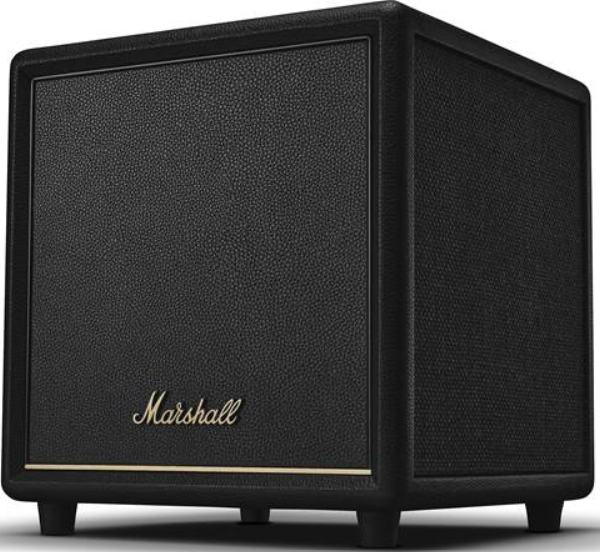
 Marshall 972SUB200B HESTON SUB 200 Subwoofer

Back Panel
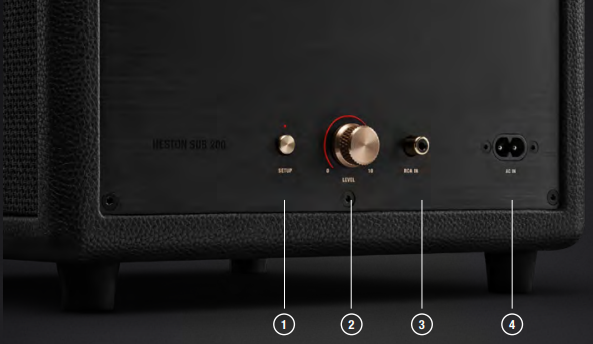
- SETUP BUTTON
- Push for 2 seconds to activate setup mode.
- LEVEL
- Adjust the volume of the subwoofer.
- RCA IN
- Connect to the SUB OUT on your TV soundbar if no wireless connection is possible. (optional)
- MAINS POWER INPUT
- Use the included mains lead to connect Heston Sub 200 to the wall socket.
Getting Started
- PLUG IN MAINS POWER
- Connect the mains lead to Heston Sub 200 and the other end to the wall socket.
- ENTER SETUP MODE
- Push and hold the setup button for 2 seconds until the LED indicator starts to blink slowly.
- DOWNLOAD THE MARSHALL APP
- Download and open the Marshall app and complete the setup.
Wireless Connection
Heston Sub 200 can be wirelessly connected to a Marshall Heston soundbar.
- Complete the setup of your Marshall Heston soundbar in the Marshall app.
- Go to Heston Sub 200 in the app and follow the in-app procedure to connect the subwoofer wirelessly to the soundbar.
RCA Connection
Heston Sub 200 can be connected to any soundbar with a subwoofer line level output using an RCA cable (not included).
- Connect a lead with an RCA jack to the RCA IN on the back of the subwoofer.
- Connect the other end of the lead to the dedicated subwoofer output on your soundbar.
- Make sure that the subwoofer is enabled on your soundbar, if applicable.
Adjusting the Sound
The Marshall app lets you invert the phase, adjust Cutoff frequency, and volume of the subwoofer. Heston Sub 200 has a physical level knob for quick access.
Child Lock
Child lock is a safety feature that prevents the user from accidentally increasing the volume. Triple-press the Setup button to toggle child lock on or off.
Cleaning
Clean your TV subwoofer regularly to keep it fresh and last longer. Gently clean the non-fabric parts and the leads with a lint-free cloth, slightly damp with
- water, 70% isopropyl alcohol, or 75% ethyl alcohol
Carefully clean the fret and openings with a dry and soft brush or a cotton swab.
- Do not use any sharp or metal objects.
- Do not use compressed air.
- Do not use products containing bleach or hydrogen peroxide.
- Do not submerge the subwoofer in any cleaning agents.
- Do not rinse the subwoofer under running water.
Power Modes
- Heston Sub 200 will go into network standby when left unused after the idle timeout has passed.
- Wake up the subwoofer by turning on your TV, using the Marshall app with the subwoofer, or using any button or knob.
| Normal operation | |
| Power mode | Network standby |
| Power consumption | < 2.0 W |
| Idle timeout | ≤ 20 minutes |
Reset
A factory reset will reset the subwoofer to its original settings, excluding any firmware updates.
- Remove Heston Sub 200 from the app and HESTON Sub 200 [LE] if present, from your sound device’s Bluetooth list.
- Ensure that the subwoofer is connected to mains power.
- Push and hold the setup button for 10 seconds until all LEDs blink and the soundbar restarts.
Troubleshooting
| PROBLEM | ACTION |
| Cannot connect wirelessly to a Heston soundbar | Make sure that there are no obstacles such as walls or doors, or interfering electronic devices nearby. |
| Reset Heston Sub 200 and set it up again. | |
| Make sure that the Heston TV soundbar is configured correctly in the Marshall app. | |
| There is no sound | Check the volume on the soundbar and the subwoofer. |
| Check the connection to the soundbar. | |
| Check that the subwoofer is connected to mains power. |
| PROBLEM | ACTION |
| Heston Sub 200 sound dull/weird/bad | Check the volume of the subwoofer. |
| Open the Marshall app and toggle the phase inversion on/off for the subwoofer to find the best sound. | |
| Check the cutoff frequency for Heston Sub 200 in the Marshall app. | |
| If your speaker is connected to a soundbar using an RCA lead, check the soundbar’s cutoff frequency. | |
| Try inverting the phase for Heston Sub 200 in the Marshall app. | |
| How do I turn off Heston Sub 200? | Heston Sub 200 does not come with a power-off button, but it will go into Network standby when not used. |
| Erratic behaviour | Heston Sub 200 is not using the latest firmware version.
Follow the in-app instructions to ensure that it has the latest firmware version. |
| Unplug Heston Sub 200 from the mains power, and wait for 15 seconds before plugging it back in. |
Customer Service
- Website: https://www.marshall.com/
- Ph: Sweden: +46 8 592 005 00