


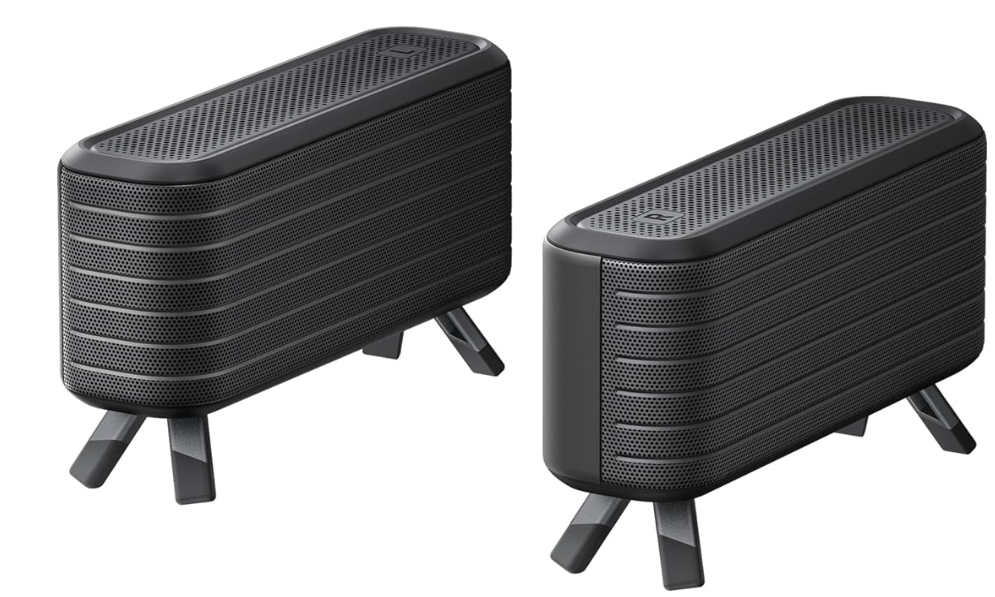
NEBULA D2040R Wireless Satellite Speaker
Important Safety Instructions
- Unless specifically indicated that it is safe to do so in the user guide or instruction manual, avoid exposing your device to direct sunshine or excessively wet environments.
- The suitable temperature for the equipment is 0°C to 35°C (32°F to 95°F) for the device.
- Possibly hazardous optical radiation emitted from this product may be harmful to the eyes. Do not stare at the operating beam.
- Do not open the enclosure of the product.
- Service shall be performed only by authorized, trained servicing personnel.
- Users should comply with the laws and regulations of the corresponding countries and regions where the equipment is located (used), abide by professional ethics, pay attention to safety obligations, and strictly prohibit the use of our products or equipment for any illegal purposes. Our company will not be responsible for any violators’ legal liability under any circumstances.
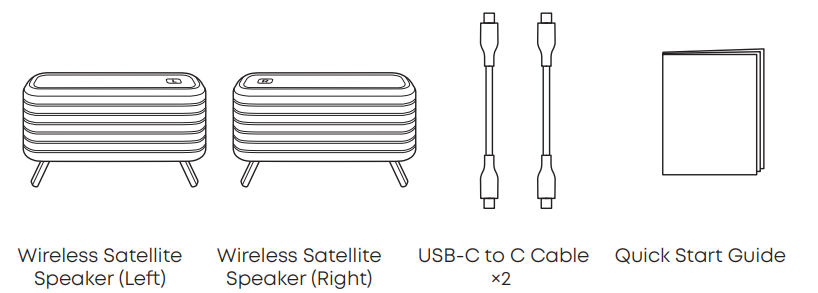
What’s in the Box
Important Tips Before Use
- The left (L) and right (R) wireless satellite speakers are designed exclusively for use with the projector. They cannot be used individually or paired with other mobile devices.
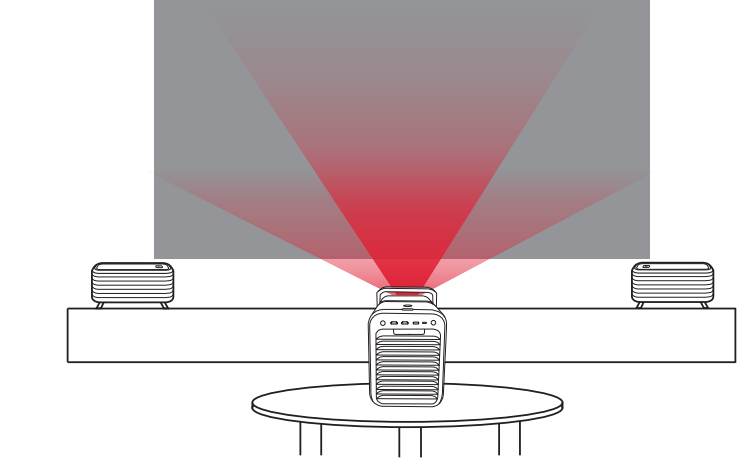
- For the best surround sound experience, place the left and right speakers on either side of the projection screen.
First-time Pairing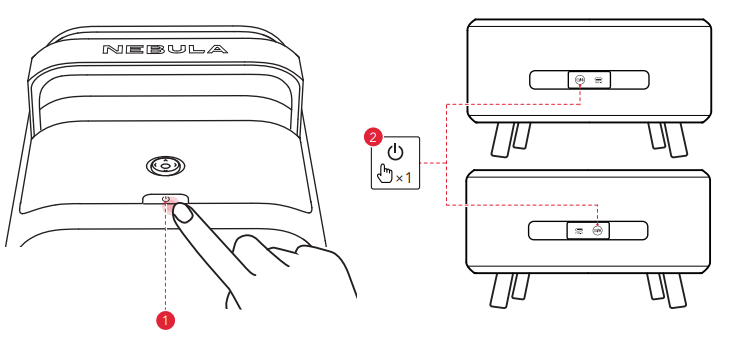
- Before starting the pairing process, make sure the projector is turned on.
- Press the power button on each satellite speaker. Both speakers will power on and automatically enter pairing mode, with their LED light bars flashing quickly. If the speakers do not automatically enter pairing mode, double-press the power button to manually activate pairing mode.
- On the projector, go to: Settings > Remotes & Accessories > Pair More Official Accessories. Follow the on-screen instructions to pair the satellite speakers.

- Upon successful connection, the LED light bars on both speakers will stay on. At this time, the satellite speakers are ready to use.
Daily Use
The LED light bars on the satellite speakers will remain steadily lit to indicate a successful connection.
Button Control
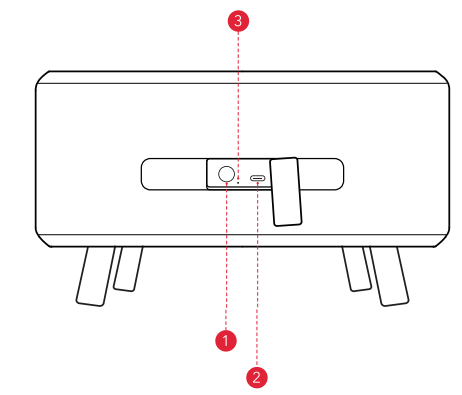
- Power Button: Press to turn on the speaker. Press and hold for 2 seconds to turn off.
- Type-C Charging Port: Used for charging the speaker via the USB-C to C cable.
- Reset Pin Access: Reset the device by inserting a pin (not included) into this access. Press and hold for 10 seconds to complete the reset process.
Charging
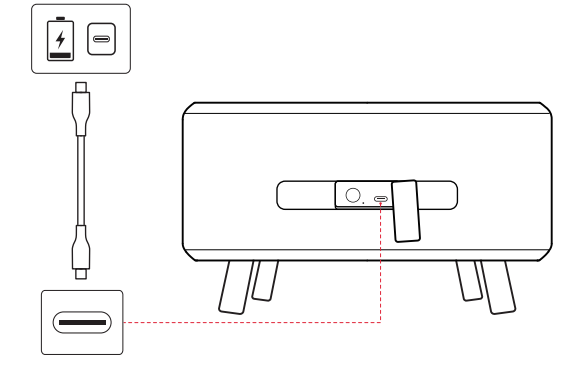
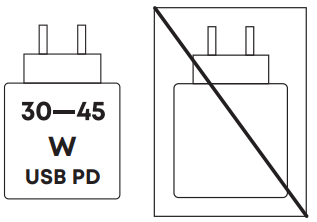
We recommend using a charger with a minimum power output of 30W. It takes approximately 1.5 hours to fully charge the speaker.
LED Indication
Power and Pairing Status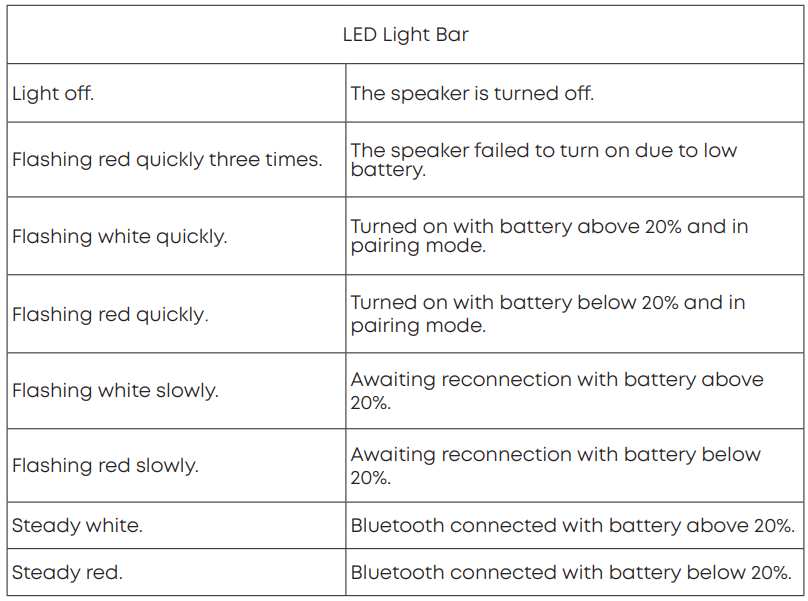
Charging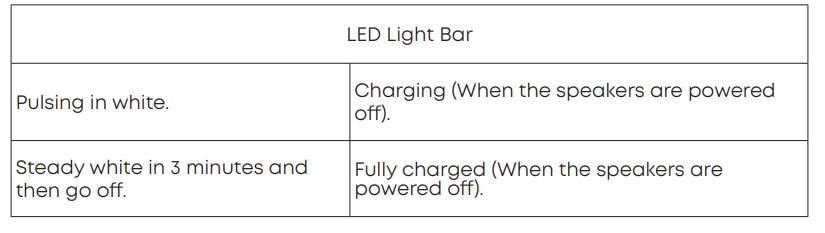 Specs
Specs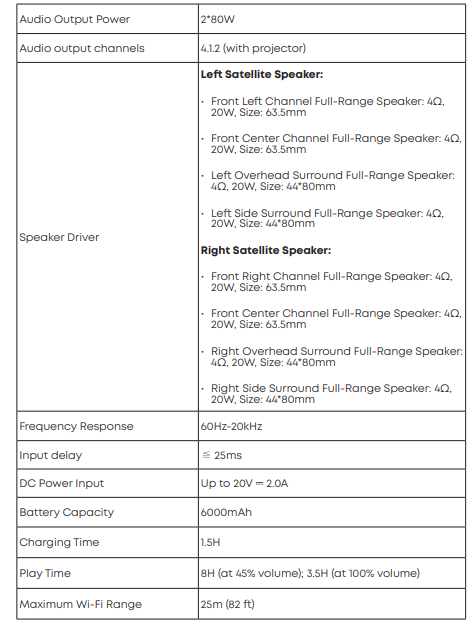
Warning
- Replacement of a battery with an incorrect type can defeat a safeguard.
- Disposal of a battery into fire or a hot oven, or mechanically crushing or cutting a battery, can result in an explosion.
- Leaving a battery in an extremely high temperature environment can result in an explosion or the leakage of flammable liquid or gas.
- A battery subjected to extremely low air pressure may result in an explosion or the leakage of flammable liquid or gas.
Attention
- Remplacement d’une batterie par un type incorrect pouvant supprimer une protection;\
- Mise au rebut d’une batterie dans un feu ou dans un four chaud, ou écrasement mécanique ou coupure d’une batterie, susceptible de provoquer une explosion;
- Maintien d’une batterie dans un environnement à très haute température pouvant provoquer une explosion ou la fuite de liquide ou de gaz inflammables;
- Batterie soumise à une pression de l’air extrêmement faible pouvant provoquer une explosion ou la fuite de liquide ou de gaz inflammables.
FCC Statement
The device has been evaluated to meet general RF exposure requirements. The device can be used in fixed/mobile exposure conditions. The min separation distance is 20cm. The following importer is the responsible party.
Declaration of Conformity
Hereby, Anker Innovations Limited declares that this device is in compliance with the essential requirements and other relevant provisions of Directive 2014/53/EU. For the declaration of conformity, visit the website https://support.seenebula.com/s/articleRecommend?type=DownLoad&secondTy pe=doc.
Statement of Compliance
Hereby, Anker Innovations Limited declares that this device is in compliance with The Product Security and Telecommunications Infrastructure (Security Requirements for Relevant Connectable Products) Regulations 2023. For the Statement of Compliance, visit the website https://uk.seenebula.com/psti-related.
RF exposure information
a distance of d=20 cm between the device and the human body. To maintain compliance with RF exposure requirements, use a product that maintains a 20cm distance between the device and the human body.
Frequency bands and power are as follows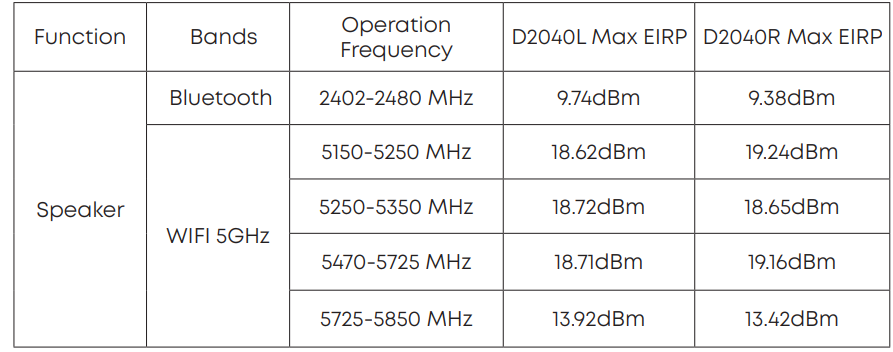
The following importer is the responsible party(contact for EU matters): Anker Innovations Deutschland Gm,bH I Georg-Muche-Strasse 3-5, 80807 Munich, Germany.The following importer is the responsible party (contact for UK matters): Anker Technology (UK) Limited, IGNR8, 49 Clarendon Road, Watford, Hertfordshire, WD17 1HP, United Kingdom
Proper disposal and recycling help protect natural resources, human health, and the environment. For more information on the disposal and recycling of this product, contact your local municipality, disposal service, or the shop where you bought this product.
USB PD fast charging
IC Statement
This device complies with Industry Canada licence-exempt RSS standard(s). Operation is subject to the following two conditions:
- This device may not cause interference, and
- Le présent appareil est conforme aux CNR d’Industrie Canada applicables aux appareils radio exempts de licence. L’exploitation est autorisée aux deux conditions suivantes:
- L’appareil ne doit pas produire de brouillage, et
- L’utilisateur de l’appareil doit accepter tout brouillage radioélectrique subi, même si le brouillage est susceptible d’en compromettre le fonctionnement.” This Class B digital apparatus complies with Canadian ICES(B). Cet appareil numérique de la classe B est conforme à la norme NMB(B) du Canada.
IC RF Statement
Lors de l’utilisation du produit, maintenez une distance de 20 cm du corps afin de vous conformer aux exigences en matière d’exposition RF. 5150~5250 MHz can be used indoors only. 5150~5250 MHz peut être utilisé à l’intérieur uniquement.
Product Name: NEBULA Wireless Satellite Speaker Model: D2040R Model: D2040L Anker Innovations Limited Unit 56, 8th Floor, Tower 2, Admiralty Centre, 18 Harcourt Road, Hong Kong
Other trademarks and trade names are those of their respective owners.