

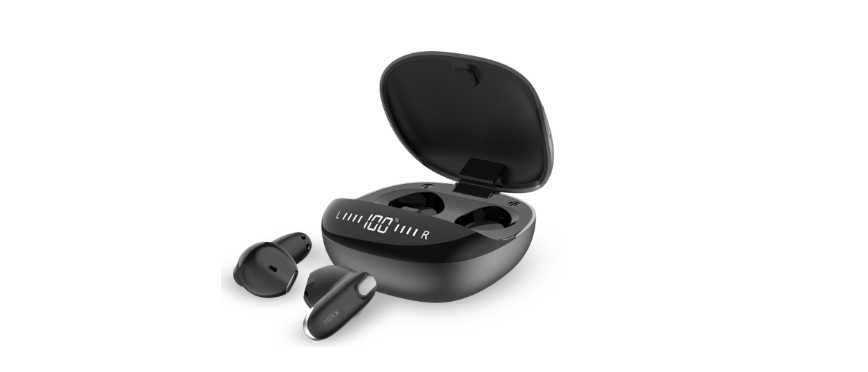

Mixx StreamBuds Hybrid Charge 2 True Wireless Earbuds

LET’S START
What’s in the box?
A pair of earbuds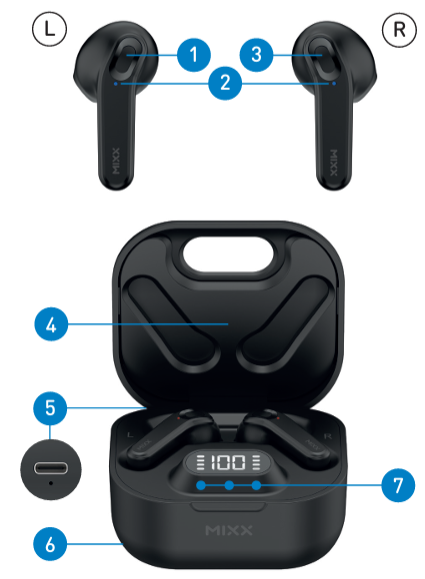
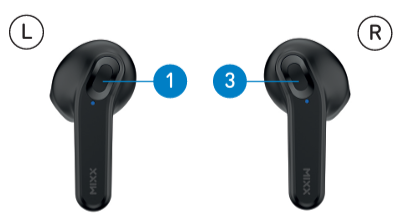
- Left Touch Sensor
- Earbud LED Lights / Microphones
- Right Touch Sensor
- Portable Charging Case
- USB Type C Charging Port (Back)
- Qi Wireless Charging Surface (Base)
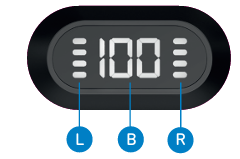
- LED Digital Display and Charge Indicators

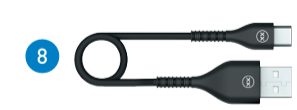
- USB Type C Charging Cable
LET’S CONNECT
First time pairing
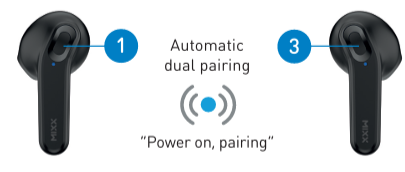
When you open the Portable Charging Case, both earbuds will turn on and connect. A voice prompt will confirm with ‘Power on, pairing’. One Earbud LED Light will flash RED and BLUE to indicate pairing mode.
Go to the Bluetooth settings on your audio device to select ‘MIXX StreamBuds Hybrid’ from the list. Once paired successfully you will hear ‘Connected’ and the Earbud LED Lights will turn off.
You can now enjoy your music, watch a video, or take a call hands-free. The earbuds will automatically reconnect to the last device.
LET’S ASK GOOGLE ASSISTANT / SIRI
Pair your Bluetooth device with your earbuds. Double-tap the RIGHT Touch Sensor to activate Siri or Google Assistant. The voice assistant familiar with ‘Beep’ will sound to confirm the connection. You can now ask Siri or Google Assistant a question or state a command.
LET’S USE THE PRESET EQ SETTINGS
Choose from 3 Equalisation (EQ) modes to suit your personal preference. There is no App required.
- Bass boost mode increases the bass sound.
- Voice mode decreases the bass and the high-frequency tones and increases the speech frequencies.
- Music mode returns you to the optimal EQ for music listening.
To change EQ settings, double tap the LEFT Touch Sensor to cycle through the Music, Bass Boost, and Voice modes to find your preferred sound.
LET’S STAY CHARGED
The Earbuds
A voice prompt ‘Battery low’ allows for 2 minutes of play time before the earbud powers down, stating ‘Battery low, power off’. The Earbuds LED Light Mixx StreamBuds Hybrid Charge 2 will flash RED once and will then switch off. Each LEFT and RIGHT earbud has a 4-line LED Charge Indicator on the case. Place the earbuds in the case and close the lid to charge. The 4 LED indicators will flash to show that the earbuds are charging and will turn off once the earbuds are fully charged.
The Portable Charging Case
To check the battery status of the case, open the lid of the Portable Charging Case. The LED Digital Display will show the percentage of the battery remaining for 30 seconds.
With a Type C charging cable
Always connect the case to a suitable USB wall charger, computer USB port, or a power bank using the USB Type-C charging cable supplied. When the LED Digital Display number reaches 100 (i.e., 100%) the case is fully charged, and the display will switch off.
Qi wireless charging
At the base of the case is a Qi wireless charge surface. Place the case flat on a Qi Wireless Charger (sold separately). B 6 When the LED Digital Display number reaches 100 (i.e., 100%) the case is fully charged, and the display will switch off. Charging the case may take up to 2 hours.
LET’S PLAY
First initial pairing
Remove both earbuds from the charging case. Go to the Bluetooth settings on your audio device to select ‘MIXX StreamBuds Hybrid’ from the list. Once paired you will hear ‘Connected’.
Play / Pause
- Long press for 1 second either Touch Sensor
- Increase Volume 1 Single tap RIGHT Touch Sensor
- Decrease Volume Single tap LEFT Touch Sensor
Activate Siri / Google Assistant
Double ttap the IGHT Touch Sensor. The voice assistant familiar ‘Beep’ will sound and then ask a question or state a command.
Change the Preset Equalisation (EQ) Settings
Double tap the LEFT Touch Sensor to cycle through the Music, Bass Boost, and Voice modes to find your preferred sound.
Answer / End a call
Long press for 1 second either Touch Sensor
Decline an Incoming Call
Double tap either Touch Sensor
Power On
Remove both earbuds from the case and they will automatically turn on and dual pair together. To manually turn it on, long-press each for 2 seconds each Touch Sensor.
Power Off
Insert both earbuds into the case and close the lid. This will automatically turn off the earbuds and the Bluetooth.
TECHNICAL SPECS
- Play time on a single charge: Up to 5 hours
- Play time with charging case: Up to 35 hours extra
- Bluetooth: Version 5.1
- Resistance: IPX5, water and dust resistant
- Supported profiles: HSP, HFP, A2DP, AVRCP
- Wireless range: 10m
- Earbud capacity: 40mAh each side
- Charge case capacity: 300mAh
- Qi wireless charging: 5W
- Standby: 120 days
- Dynamic driver: 6mm
- Frequency response: 20Hz – 20KHz
- Weight including case: Total 60g (earbuds 9g each)
- Portable case dims: 66 x 47 x 27 mm (L x H x D)
Compatibility
Suitable for most Bluetooth audio-supported smartphones, tablets, notebooks, laptops, and computers.
CONTACT MIXX
Feedback is welcome, simply email us at support@mixx-io.com or visit mixxaudio.com for more information.
NEED EXTRA HELP?
Common solutions
If you are experiencing problems with your earbuds:
- Power on the earbuds (see page 8).
- Check the status of the LED Lights (see pages 5-6).
- Charge the earbuds (see pages 5-6).
- Move your device closer to the earbuds and away from any obstructions or interference.
- Try connecting to another device.
Q. How do I turn on my earbuds without using the charging case?
- A. Long press for 2 seconds both Touch Sensors to manually turn them on.
- Q. While pairing with my phone, I see two ‘MIXX StreamBuds Hybrid’ in my Bluetooth menu listing?
- A. Wait for 4 seconds for the earbuds to connect before pairing with your device. If there is still no connection, simply ‘forget’ or ‘unpair’ both earbuds in your Bluetooth settings, place them back in the Portable Charging Case, and start again.
- Q. What smartphone voice assist systems do these earbuds work with?
- A. Connects with Siri, Google Assistant, or Bixby (depending on your device).
LET’S BE SAFE
You must read this section completely, especially the ‘Warning, Caution, and Safe Usage’ instructions.
For your protection, ensure the product is correctly connected using the manufacturer’s original accessories included with the product. Please keep the product out of reach of children and animals. Do not listen to loud music for a long duration of time. Adjust the volume Mixx StreamBuds Hybrid Charge 2 to a comfortable level before listening.
We recommend
To refer all servicing to qualified persons. Servicing may be required when the product has been damaged in any way, does not operate normally, or has been dropped. The operating temperature range for this product is 5º – 40º Celsius.
WARNING: The earbuds, the portable charging case, and the USB Type-C cable connector are not water resistant and should not be exposed to rain, moisture, any splashing, or liquid spills. This may cause excessive heat and may lead to fire damage or personal injury.
CAUTION: This product contains a Lithium battery. Incorrect disposal of this battery may result in an explosion.
LET’S RECYCLE
This product can be recycled. Products bearing this symbol must NOT be thrown away with normal household waste. Take the product to a collection point designated for the recycling of electronic devices. Find out more about return and collection points through your local authority.
SAFE USAGE INFORMATION
Do not crush, puncture, or incinerate the charging case or the earbuds. Only use a certified or the device manufacturer’s charging cable.