

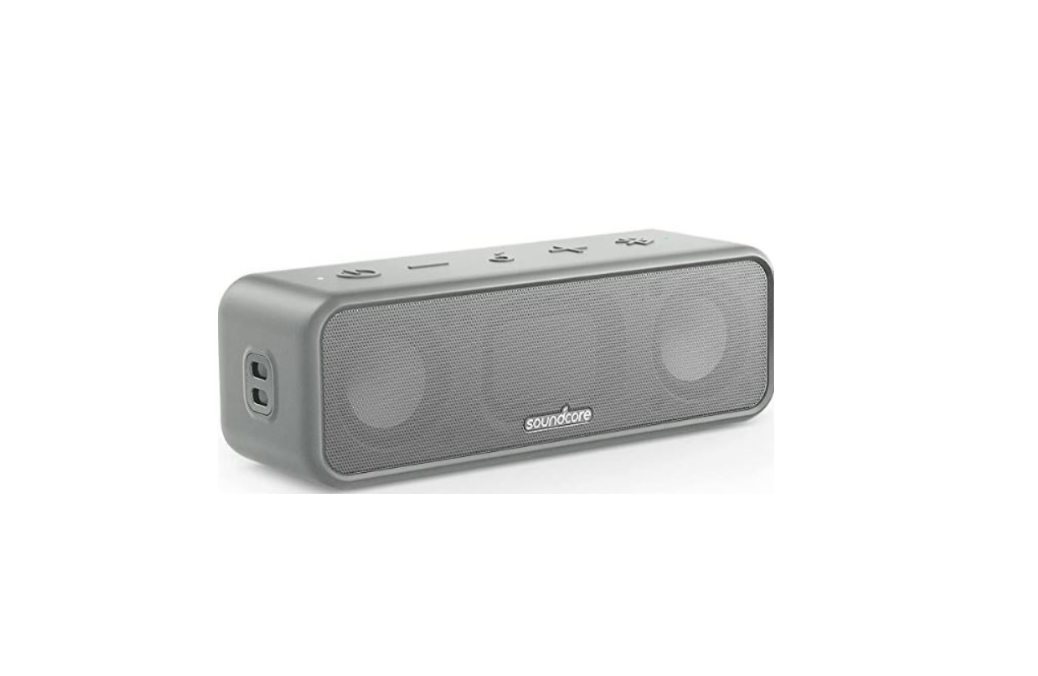

Soundcore A3117 Portable Bluetooth Speaker At a Glance
- Power LED
- Power button
- Volume down button
- Multi-function button
- Volume up button
- Bluetooth/PartyCast button
- Bluetooth/PartyCast LED
- USB-C charging port
Charging
- Fully dry off the USB port before charging. • Use the provided USB-C cable to prevent any damage.
- Fully charge this speaker before first use to prolong the lifespan of the built-in battery.
- Disconnect this speaker from the charger when fully charged. Do not charge for extended periods.

- Flashing red: Low battery
- Steady red: Being charged
- Steady white: Fully charged
Powering On/Off
- Power on: Press
- Power off: Press and hold for 2 seconds
- This speaker will power off automatically 30 minutes after no audio input or button inactivity.
Using your Soundcore 3
Bluetooth Mode
- Dual Bluetooth Connection: This speaker can pair up to 2 mobile devices via Bluetooth. To pair with another device, press the Bluetooth button to re-enter Bluetooth pairing mode.
- This speaker can only play music on one mobile Soundcore A3117 Portable Bluetooth Speaker device at a time. To play from another connected device, pause the currently active device first.
- Each time you power on your Soundcore speaker, it will automatically connect to your last connected device if available within the Bluetooth range. If not, press the Bluetooth button to enter Bluetooth pairing mode.
Party Cast Mode
- Repeat Step 1 on the other Soundcore 3 you want to connect, and then press the Bluetooth button twice to make them secondary speakers in PartyCast pairing.
- The secondary speakers will automatically connect with the primary speaker.

When PartyCast mode is successfully entered
- Any secondary speaker can be switched to become the primary speaker by pressing the Bluetooth button twice and connecting to your smartphone. Any primary speaker can be switched to become the secondary speaker by pressing the Bluetooth Soundcore A3117 Portable Bluetooth Speaker button twice and searching for an available primary speaker.
- To exit the PartyCast mode, press and hold the Bluetooth button on any speaker for 2 seconds.
Button Controls

Soundcore App
- Check product information
- Update firmware
- Indicate battery status
- Remotely control the volume and play/pause
- Customize EQ settings
- Set Auto-power off time

Specifications
Customer Support
- Website: https://www.soundcore.com/
- Tel: +1 (800) 988-7973
FAQs
Q: Is the Soundcore A3117 waterproof?
Ans: Indeed. Because of its IPX7 rating, it can spend up to 30 minutes submerged in water up to one metre deep. But don’t expose it to soapy or salt water, or immerse it for long periods of time.
Q: How long does the battery last on a full charge?
Ans: At a moderate volume, you can enjoy playing for up to 24 hours. Volume levels and usage circumstances affect battery life.
Q: How long does it take to fully charge the speaker?
Ans: Using the provided USB-C charging cord, the speaker takes roughly three to four hours to fully charge.
Q: Can I use the speaker while it’s charging?
Ans: The A3117 can be used while plugged in, yes. But doing so might make charging take a little longer.
Q: Does the A3117 have a built-in microphone for calls?
Ans: Yes, when paired with your smartphone, it has an integrated microphone for hands-free calling.
Q: Can I connect non-Bluetooth devices?
Ans: No, there isn’t an AUX input on the A3117. This wireless speaker is only compatible with Bluetooth.
Q: Is there a companion app for this speaker?
Ans: The Soundcore app is not compatible with the A3117. All controls can be operated through your linked device or the speaker buttons.
Q: Where can I get replacement cables or support?
Ans: Go to Soundcore’s official website or get in touch with Anker customer support. It’s easy to find replacement USB-C charging cords online.