

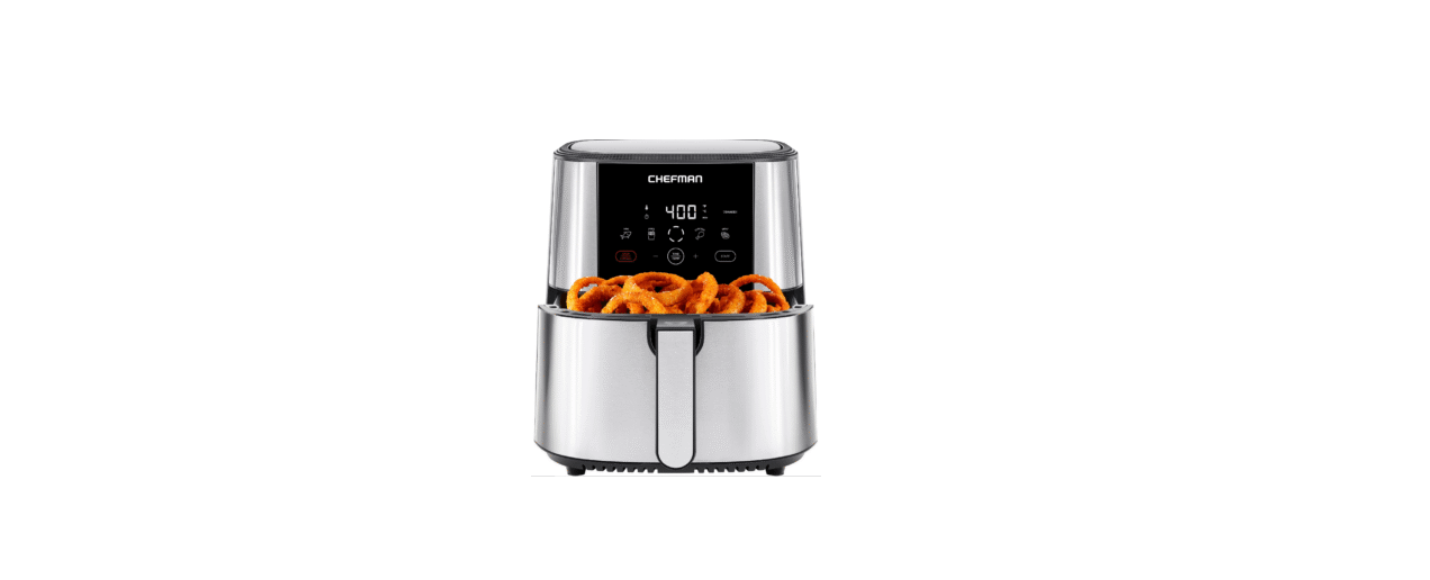

CHEFMAN RJ38-SQ-45T TurboFry Touch Air Fryer
Safety Instructions
When using electrical appliances, basic safety precautions should always be followed, including the following:
- Do not touch hot surfaces. Use handles or knobs.
- To protect against electrical shock, do not immerse the cord or plug in water or other liquid.
- Close supervision is necessary when any appliance is used by or near children.
- Unplug from the outlet when not in use and before cleaning.
- Allow to cool before putting on or taking off parts.
- Do not use outdoors.
- Do not let the cord hang over the edge of the table or counter, or touch hot surfaces.
- Do not place on or near a hot gas or electric burner, or in a heated oven.
- Extreme caution must be used when moving an appliance containing hot oil or other hot liquids.
- To disconnect, turn any control to “off,” then remove the plug from the wall outlet.
- Do not use the appliance for anything other than its intended use.
- Place the unit on a flat, sturdy, heat-resistant surface.
- Do not use near an open flame or flammable materials.
- The unit will emit some heat. Allow sufficient space around the unit when in use, and do not place it near other items or appliances.
Short Cord Instruction
A short power supply cord is provided to reduce the hazards of entanglement or tripping over a longer cord. Longer detachable power-supply cords or extension cords are available and may be used if care is exercised in their use. If a longer detachable power supply extension cord is used:
- The marked electrical rating of the extension cord should be at least as great as the electrical rating of the appliance.
- The cord should be arranged so that it will not drape over the countertop or tabletop, where it can be pulled on by children or tripped over.
Power Cord
- Never pull or yank on the cord or the appliance.
- To insert the plug, grasp it firmly and guide it into the outlet.
- To disconnect the appliance, grasp the plug and remove it from the outlet.
- Before each use, inspect the power cord for cuts and/or abrasion marks. If any are found, this indicates that the appliance should be serviced, and the power cord replaced. Please contact Chefman® Support for assistance.
- Never wrap the cord tightly around the appliance, as this could place undue stress on the cord where it enters the appliance and cause it to fray and break.
Features
- Control panel
- Basket rack
- Basket
- Basket handle
Control Panel
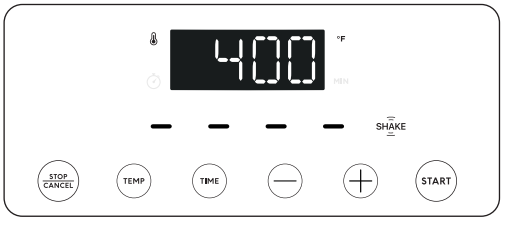
- Temperature/Time Display – Automatically alternates
- Stop/Cancel – Stops heating and fan
- Temp – Sets temperature between 200°F and 400°F
- Time – Sets time (up to 1 hour)
- Minus Sign – Lessens time and lowers temperature settings
- Plus Sign – Adds time and increases temperature settings
- Start – Starts heating and fan
- Shake – Timed reminder to shake the basket if necessary
- Blinking Dashes – Signifies the unit is cooking
Operation
By blowing hot air around food in a small space, the TurboFry® Touch Air Fryer cooks faster than a traditional oven, which means you can enjoy your favorite hot foods in mere minutes. A basic touch-screen control panel and simple two-piece basket make cooking and cleanup a breeze.
Before First Use
For best results, follow these steps before using your air fryer for the first time.
- Remove all packaging materials, read and remove any stickers on the unit (except for the rating label on the bottom, which should remain on the unit), and check to ensure that all parts and accessories are accounted for.
- Wipe down the interior and exterior with a damp cloth.
- Wash the basket and basket rack with warm, soapy water. Dry thoroughly.
How to Cook
- Set the air fryer on a hard, flat surface and plug it in. The control panel will illuminate, and the default temperature and time (400˚F and 15 minutes, respectively) will alternate on the display.
- Pull out the basket. Insert the basket rack, aligning the arrow on the rack with the arrow on the inside of the basket. (For easiest handling of the basket rack, pinch the center grip bar with thumb and index finger.)
- Put food on the fry rack. Do not let food surpass the MAX line embossed on the basket.
- Slide the basket into the Air Fryer.
- Set time and temperature as desired. To set the temperature, press TEMP (a small thermometer icon will appear on the display) and then either the + or – signs to add or subtract five degrees at a time. To set time (up to 1 hour), press TIME (a small clock will appear on display) and then + or – to add or subtract time in one-minute increments.
- For fast scrolling, hold the button down; note that time will jump to the nearest multiple of 5 and then advance in 5-minute intervals. As you approach the desired time or temperature, pulse button to slow down.
Cleaning & Maintainance
The nonstick coating on the basket and rack makes the TurboFry® Touch Air Fryer easy to clean following the steps below.
- Unplug the unit. Allow the unit, basket, and basket rack to cool completely before cleaning.
- To remove the cooled rack from the basket, insert your thumb and index finger into the ovals in the center of the rack, pinch the center grip bar, and pull the rack straight up and out of the basket.
- Wash the basket and rack with warm, soapy water, rinse, and dry well with a towel.
- Baskets and racks are also top-rack dishwasher-safe.
- Wipe down the outside and the inside of the unit, including the CHEFMAN RJ38-SQ-45T the heating coil, with a damp cloth as needed.
- Do not put the unit in the dishwasher or submerge it in water or any other liquid.
- Do not use abrasive cleansers on the basket, rack, exterior, or interior, or you could damage the finishes.
Troubleshooting
White smoke can be a sign that there’s too much fat in the fryer. Avoid cooking very fatty foods, such as sausages, in the air fryer, and be sure the basket, rack, and heating coil are clean before cooking.
Two culprits are likely: overcrowding and not shaking. Fill the basket loosely with food in order to let air circulate and shake, toss, or flip foods at least once during cooking for more even results.
Though you can air fry with no added oil, coating foods very lightly with oil (usually just ½ teaspoon per batch for most recipes) helps guarantee crisp results. Preheating the fryer also helps.
Limited Warranty
Our products are backed by a limited 1-year warranty. To register, follow the instructions on the Chefman® Warranty Registration page in this User Guide. We offer a limited 1-year warranty from the date of purchase.
This warranty is void without proof of purchase within the USA, Canada, or Mexico. Service centers and retail stores do not have the right to alter or change the Terms and Conditions of this warranty.
Warranty Covers
- Manufacturer Defects Chefman® products are warranted against defects in material and workmanship for 1 year from the date of purchase when used by the Chefman® User Guide.
- Qualified Replacements If your product does not work as it should, we will send you a new one. If the product is no longer available, we will replace it with one that is comparable.
Does not Cover
- Misuse – Damage that occurs from neglectful or improper use of products; damage that occurs as a result of usage with incompatible voltage. See Safety Instructions for information on proper use.
- Poor Maintenance – General lack of proper care. See Cleaning and Maintenance for information on proper maintenance.
- Commercial Use – Damage that occurs from CHEFMAN RJ38-SQ-45T commercial use.
- Altered Products – Damage that occurs from alterations or modifications by any entity other than
- Chefman®; removal of rating label.
- Catastrophic Events – Damage that occurs from fire, floods, or natural disasters.
- Loss of Interest – Claims of loss of interest or enjoyment.
Warranty Registration
Register your product to add 3 months to your warranty.
What do I Need to Register my Product
- Contact Information
- Model Number
- Proof of Purchase (online confirmation, receipt, gift receipt)
- Date cod
Customer Service
- Website: chefman.com
- Tel: 1-888-315-6553
Chefman® is a registered trademark of RJ BRANDS, LLC.