

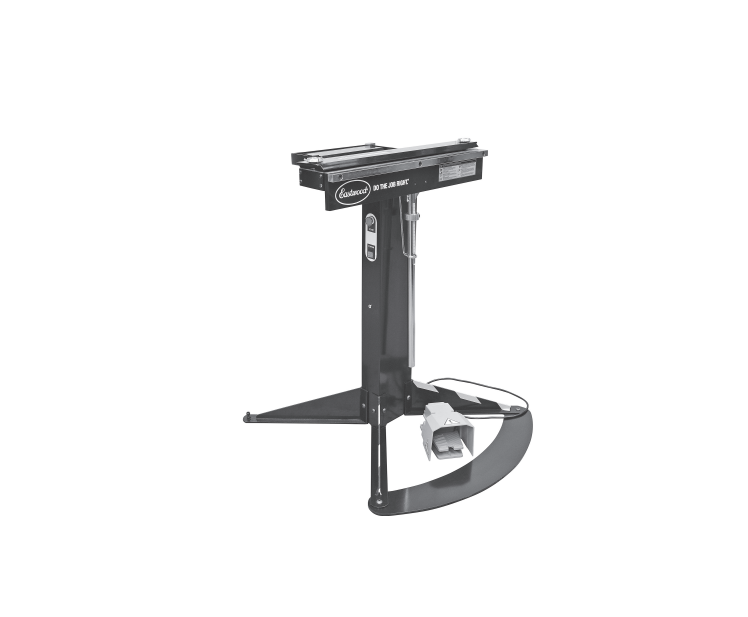

EASTWOOD 68512 24 Inch Electro Brake
Safety Instructions
- Keep the work area clean and well-lit. Cluttered or dark areas invite accidents.
- Do not operate power tools in explosive atmospheres, such as in the presence of flammable
liquids, gases, or dust. Power tools create sparks, which may ignite the dust or fumes. - Keep children and bystanders away while operating a power tool. Distractions can cause you to lose control.
- Power tool plugs must match the outlet. Never modify the plug in any way. Do not use any
adapter plugs with earthed (grounded) power tools. Unmodified plugs and matching outlets will reduce the risk of electric shock. - Avoid body contact with earthed or grounded surfaces such as pipes, radiators, ranges, and refrigerators. There is an increased risk of electric shock if your body is earthed or grounded.
- Do not expose power tools to rain or wet conditions. Water entering a power tool will increase the risk of electric shock.
- Do not abuse the cord. Never use the cord for carrying, pulling, or unplugging the power tool. Keep the cord away from heat, oil, sharp edges, or moving parts. Damaged or entangled cords
increase the risk of electric shock. - When operating a power tool outdoors, use an extension cord suitable for outdoor use. Use of a cord suitable for outdoor use reduces the risk of electric shock.
Assembly
- Install a Leg, Front (with striped tape) [D] at each side of the Support Column with Angle Indicator, Foot Pedal, Power Cord [C]. Fasten the Legs tight with the included M10x16 Rounded Socket Head Screw [K] hardware and 6mm Hex Key [J] (FIG 2).
- Repeat these steps for each Leg, Rear [E] at the opposite side of the Support Column (FIG 2).

- If anchoring the Front Legs to the floor, you may skip this step and stow the Foot Plate [G] for possible future use. The two threaded holes in the Foot Plate will align with the holes in the Legs, and you can fasten the Foot Plate with the included M10x16 Rounded Socket Head Screw [K] hardware (FIG 3).

- Flip the Bending Beam of the 24” Electro-Brake Assembly [A] 180° to the vertical position for better access to the bottom side and to expose the Handle mounting holes.
- Align the rear of the Electro-Brake Assembly with the lip on the Support Column (FIG 5) and lower it to lightly rest against the lip. Avoid pinching the power connector or wires.


- Adjust the Stop Collar on the Handle w/ Scale, Stop Collar [F] inward against the mounting tab. Then lower the Handle through the Angle Indicator with the inset Angle Gauge facing outward (FIG 7).

- Install the Tray [B] to the rear of the Electro-Brake with two M8x12 Socket Head Screw [L]. You may install the Backstop Clamp with Wing Screw [H] to the Tray if desired (FIG. 9).

SET-UP
CLAMPING BARS
The Eastwood Electro-Brake has several different Clamping Bar configurations to accommodate many projects from simple angle bending to rolling, crimping, and box forming.
24” x 2” Solid Clamp Bar [P]
- It may be used for simple angle bends.
- The narrow, 2” profile is used in creating secondary and reverse bends.
- Useful for use in making “U” or channel shapes 2” or more in width.
- Can be stood on a straight edge for narrower “U” or channel shapes.
- It may be used for simple angle bends.
- The Adjusting Knobs on the outer ends of the Clamp Bar feature eccentrics based on locating balls on the underside of the Clamp Bar that are nested into depressions on the top of the Base Deck (FIGS 10 & 11).
- Normally used with the angled edge outward to provide up to a 120° bend.
- May be reversed on the Base Deck with the straight edge facing outward and combined with a section of solid round bar stock (not included) to provide a rolled bend.
- Used identically as described in the 24” x 4” Solid Adjustable Clamp Bar, except that the 15, 2” deep x 3/8” wide slots cut into the leading edge are designed to be used in conjunction with the collection of 6 different-length Short Bars. [Q], [R], [S], [T], [U] & [V].
Short Clamp Bars [Q], [R], [S], [T], [U] & [V]
-
- May be used alone for inside box and tray work or in combination with the 24” x 4” Slotted Adjustable Clamp Bar [O].

- May be used alone for inside box and tray work or in combination with the 24” x 4” Slotted Adjustable Clamp Bar [O].
BENDING ANGLE GAUGE
- Using the included 6mm Hex Key, loosen the clamping screw of the Stop Collar (FIG. 15).
- This will cause the plate on the Gauge to limit the travel of the Handle, controlling the final bend angle of the workpiece.
TRAY BACKSTOP CLAMP
A maximum of 12.5” is possible. To Set:
- Loosen the Wing Screw of the Backstop Clamps (FIG. 16).

Control Panel
- Power Switch: Switches on power to the unit. Illuminates GREEN when ON.
- Foot Pedal: Serves the same function as the Green Push Buttons.
CONNECTING THE 24” ELECTRO-BRAKE TO A POWER SOURCE
The Eastwood 24” Electro-Brake requires a dedicated 120 VAC, 15-AMP, circuit breaker-protected outlet. If unsure about your electrical setup, contact a licensed electrician.
Operation
- This imparts a light clamping force to hold the workpiece in place.
- Grip the Handle and rotate it upward to begin the bending process FIG.G 19). If using the Foot Plate, step on it to counteract your applied force at the Handle, which will want to tip the Electro-Brake.
- Moving the Handle backward more than 15° automatically releases all clamping pressure.
- Check the results of the bend.
NORMAL, STRAIGHT BENDS
- Turn the Bender Power Switch to the ON ( I ) position.
- Set the Clamp Bar onto the Base Deck with the steel Detent Balls on the outer
ends of the underside, nested into the locating recesses in the Base Deck. - Adjust bend radii for workpiece thickness by rotating the Eccentric Adjuster Knobs at the ends of the Clamping Bar.
- Rotate the Bending Beam up to the 90° position and check that it is parallel to the leading edge of the Clamp Bar.
- Add the dimension of the material thickness to the allowable bend radius for the material. The final figure will be the distance from the leading edge of the Clamping Bar to the face of the Bending Beam @ 90°.
- Readjust the EEccentrics needed.
- Insert the workpiece between the Clamping Bar and the Base Deck.
- Press and hold the Green Start Button or the Foot Pedal to apply a light, pre-clamping pressure.
- Slowly pull up on the Handle. This will automatically engage full clamping pressure.
- Continue to the full planned bend.
- Moving the Handle backward beyond 15° will release all clamping pressure.
- Remove workpiece.
CREATING A HEMMED/CRIMPED EDGE ON A PANEL
- Operate Bender as described in NORMAL, STRAIGHT BENDS, except continue bend to 135°-140°.
- Remove the Clamp Bar and move the workpiece back from the edge of the Base Deck approximately. An additional 0.38” [10mm] depending on metal thickness.
- Without the Clamp Bar in place, rotate the Clamp Bar back up to 180° to flatten the angled bend into a crimp.
FORMING A RADIUSED/ROLLED EDGE ON A PANEL 
- Reverse the orientation of the Clamp Bar so that the vertical edge is facing outward, toward the Bending Beam.
- Place the steel bar or pipe on the Base Deck with the outer circumference flush with the front edge of the Base Deck and against the vertical edge of the Clamp Bar.
- This will allow a 90° radius. To curve the material more than 90°, move the workpiece inward so that the curved material is between the bar or pipe and the vertical edge of the Clamp Bar.
CREATING BOXES (UTILIZING SHORT CLAMP BARS) 
- Operate Bender normally for the 1st two opposite ends of the box.
- Determine the width of the Short Clamp Bars for the bends needed to make up the secondary width of the planned box.
- Place the partially formed box workpiece on the Base Deck.
- Set the Short Clamps over the inside of the box workpiece.
- Operate Bender normally with the Short Clamp Bars for the box sides.
FORMING TRAYS (UTILIZING THE SLOTTED CLAMP BAR) (FIG 25) As details such as tabs, f, lap,s, and flanges are added EASTWOOD 68512 24 Inch Electro Brake to box sides, clearance provided by the slots in the Slotted Clamp Bar is needed.
- Operate Bender as described in NORMAL, STRAIGHT BENDS for the initial bends of the tray sides.
Maintainance
- Use a liberal amount of a good-quality heavy-bodied chassis grease on the slide surfaces of the two hinges.
- Apply a thin motor or suitable lubricating oil to the pivoting portion of the hinges.
- Always keep the magnetic Base Deck of the EASTWOOD 68512 24 Inch Electro Brake Bender clean and free of any dirt accumulation or metal chips.
- Keep the surfaces of the Clamping Bars free of dirt and metal chips.
- Always keep the Eastwood Electro-Brake in a dry location and store it with a suitable cover in place.
- Keep all bare metal areas, including the Base Dec, lightly oiled to prevent rust formation when not in use.
Specifications
- Power Requirements: 120±10% VAC, 1Ph, 50/60 Hz, 8A
- Maximum Material Width: 24” [610mm]
- Maximum Material Thickness: 16 gauge mild steel, aluminum, 20 gauge stainless steel
- Overall Assembled Dimensions (W x D x H): 18.5” x 27.2” x 35.4” [740 x 690 x 900mm]
- Assembled Weight: 159 lbs. [72 kg]
Troubleshooting
| PROBLEM | CAUSE | CORRECTION |
| Does Not
Operate When Switch is Turned ON |
No power to the o Electro-Brake | Check the 120 VAC power connection. |
| Check for a tripped circuit breaker. The Electro-Brake operates on a 15 Amp Minimum circuit. | ||
| Magnetic
Clamping Power is Weak |
Excessive voltage drop due to undersized and/or too-long electrical supply wiring. | Have electrical supply wiring checked by a licensed electrician. |
| Continued use will generate heat in the coils, which weakens the magnetic field | Allow the unit to cool to room temperature before resuming work. | |
| The material to be formed is too thick or too hard | Limit material thickness to 0.63” [1.6mm] for mild steel. | |
| Excessive
Effort Required to Lift Handles While Bending |
The workpiece is too thick or too hard | Limit material thickness to 0.63” [1.6mm] for mild steel. |
Customer Support
- Website: https://help.eastwood.com/
- Ph: 1 (800) 343-9353
- Timings: Monday – Friday, 9:00 AM to 6:00 PM.
Additional Items
R&D MUST-HAVE ACCESSORIES