



GEPRC SMART 16 HD Caddx Polar Drone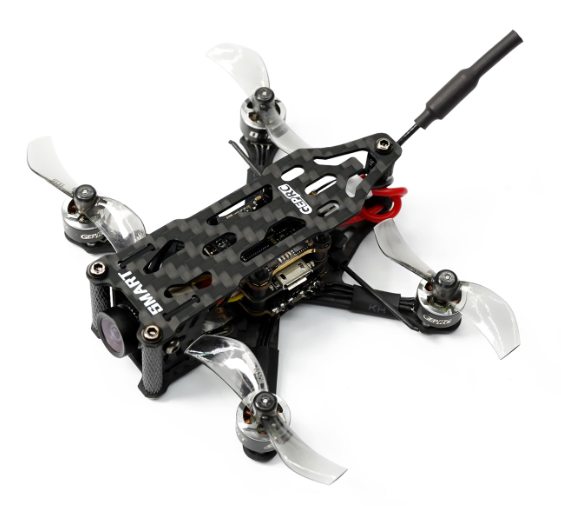
Safety Instructions
Introducing the new 1.6-inch GEPRC SMART16 mini-quadcopter, currently available in 5 versions: PNP, AC900, and TBS Nano, ELRS 915, and ELRS 2.4G SMART 16 continues the consistent lightweight design concept of the Phantom series. The
- Smm carbon fiber arm, with a 1mm top plate,e allows it to be lightweight and tough at the same time. We used 11000Kv 0803 brushless motors paired with 1610 props, so you can easily freestyle in your favorite field or a bando. The quadcopter comes with a 3D printed battery holder and will be powered by two 1S 380mAh batteries, making it weigh as little as 53.0g, and providing you with 4 minutes of flight time. We pursue lighter weight, better flying experience, and more functionality for all our products!
Features6-Inch
- h tiny size + light weight, just 36.0g.
- With a 2S 380mAh battery with plenty of power output.
- Equipped with 200mW 5.8G VTX, with 6 frequency bands and 8 frequency point selection.
- Caddx Ant camera with a high-quality image. Clear and clean!
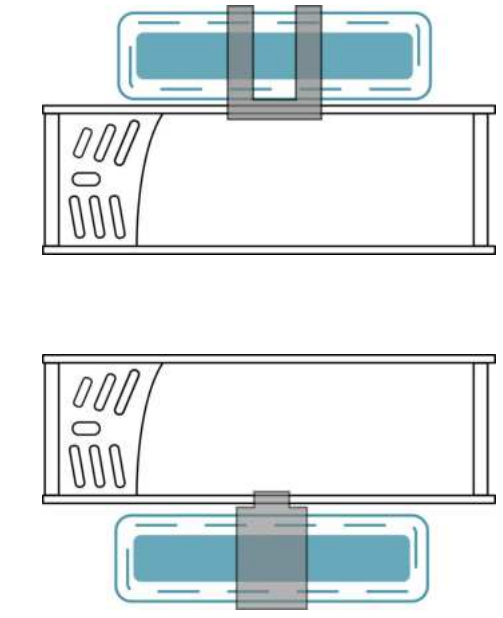
- Independent battery compartment design, can be stuck on top or bottom, making it easy and convenient to switch batteries.
- The latest 0803 motor is matched with 1610-2 propeller proving maximum power and efficiency.
- Suitable for both freestyle and racing.
- Includes a full set of high-quality 3D printed parts for a superior flying experience.
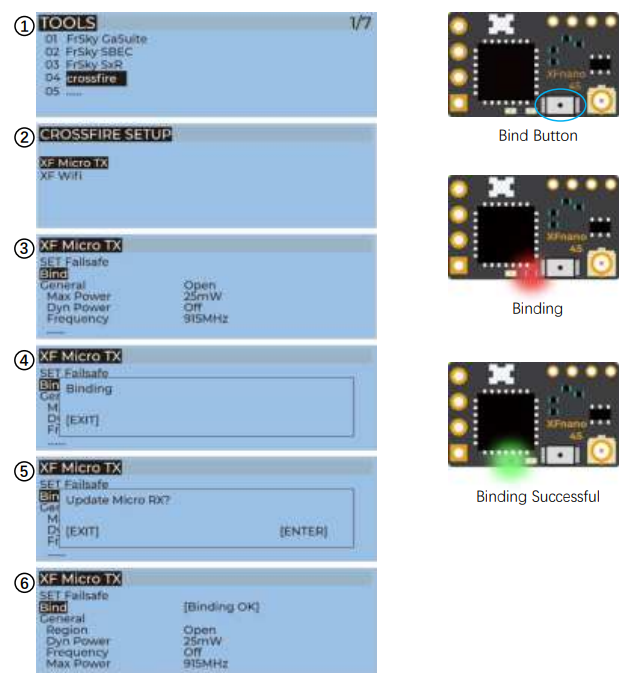
Bind TBS NanoRX
- For Taranis X9D/X9D Plus/X9E and Taranis QX7, turn on the transmitter, go to the TOOLS – CROSSFIRE SETUP – XF Micro TX, and select Bind.
- Wait for the update to complete. The green light will be on, indicating that the binding was successful.
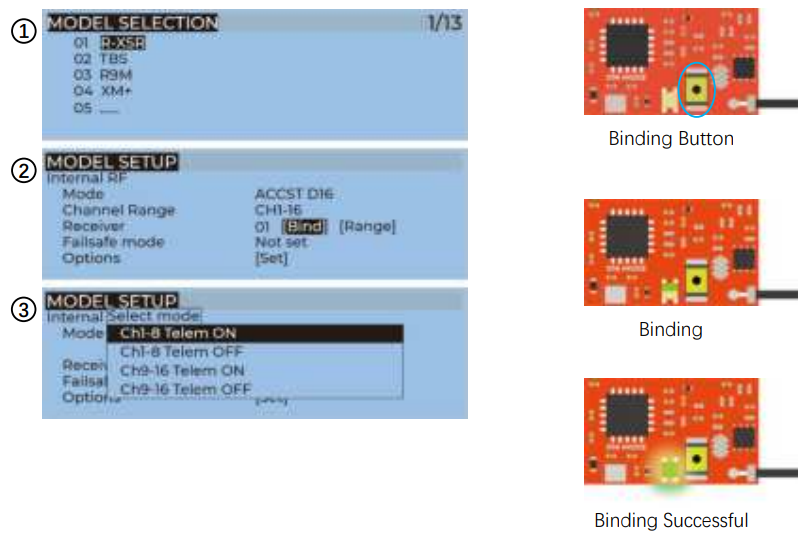
Bind AC900 Receiver
Before binding, update the firmware of the built-in module of the remote control to v1.1.3
(The built-in module firmware version of the remote controller needs to match the
receiver’s firmware version; the receiver cannot be bound.
- Turn on the receiver while holding the bind button on the receiver, release the button, and wait for the green light flash.
- For Taranis X9D/X9D Plus/X9E and Taranis QX7, turn on the transmitter, go to the MENU – MODEL SETUP – PAGE 2, choose Internal RF, and select BIND.
- When the green light is on, it indicates that the binding is successful. Turn off the receiver, and then turn on the receiver. The green light on the receiver must be on, indicating that the link is normal.
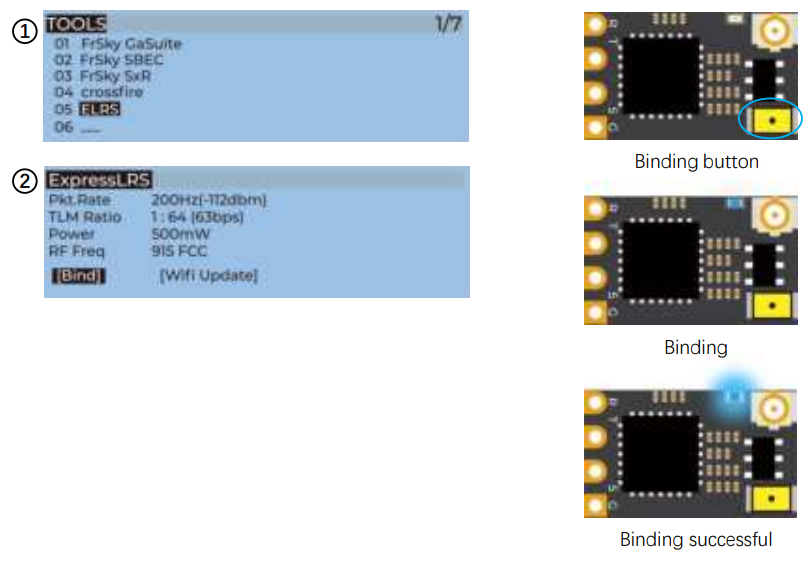
 Bind ELRS Receiver
The binding methods for GEPRC ELRS 868mhz, ELRS 915MHz and ELRS 2.4G receivers are
The same.
- Turn the receiver on and off three times (with an interval of 1 second), and you’ll be able to see continuous blue light double flashes on the receiver, indicating that the receiver has entered the binding mode.
- For the X9D / X9D Plus / X9E and Taranis QX7 remote controller, turn on the remote controller, long-press the menu key to enter tools – ELRS, and select [Bind].
- Wait until the blue light on the receiver changes from continuous double flashing to constant on, indicating that the binding is successful. Turn the receiver off and turn it on again. The blue light must always be on, indicating that the connection between the receiver and the remote control is established.
Install Betaflight
Although your quadcopter comes from the factory nearly completely ready to fly, you still need to install Betaflight to facilitate your subsequent use of Betaflight for debugging. Installation package download link: https://github.com/betaflight/betaflight-configurator/releases. Open the web page, scroll to the bottom, and select the appropriate installation package to download. File extensions for different OS. .exe – Windows system, .dmg – MacOS system, .rpm / .deb – Linux system, .apk – Android system.
Install Drivers:
If you are on Windows, you must install the drivers manually.
CP210x Drivers:
https://www.silabs.com/products/development-tools/software/usb-to-uart-bridge-vcpdrivers
STM USB VCP Drivers
http://www.st.com/en/development-tools/stsw-stm32102.html
Zadig:
OpenTX Transmitter
The transmitter of the OpenTX system needs to check the AUX channel. For Taranis X9D/X9D Plus/X9E and Taranis QX7, turn on the transmitter, go to the MENU – MIXES, and view the current AUX channel settings.
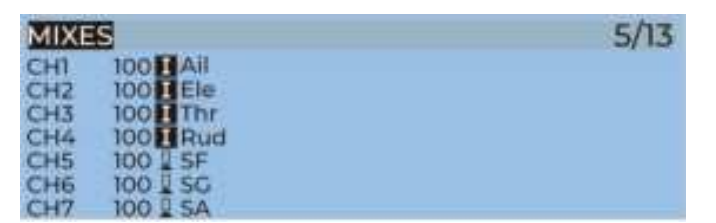
- CH1-CH4 corresponds to four channels of the rocker
- CH5(SF)AUX1(ARM)
- CH6(SG)AUX2(MODES)
- CH7(SA)AUX3(BEEPER)
- CH8(Vacancy)AUX4(Vacancy)
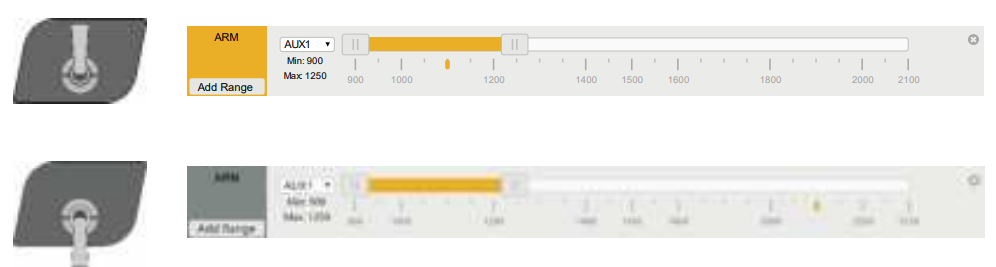
Use the transmitter wheel to move the cursor to select the AUX channel, and then press and hold the wheel key to edit the channel.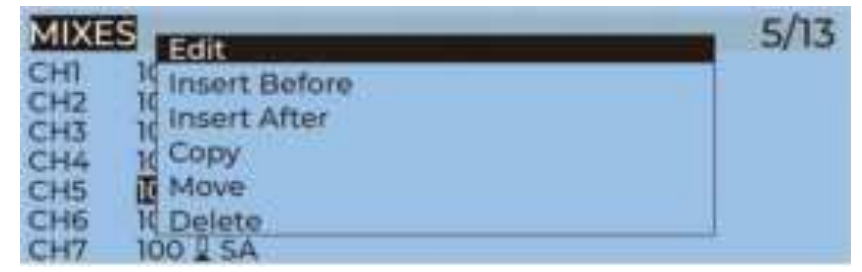
You can name the aux channel, or set the toggle switches you want, exit,t, and save it.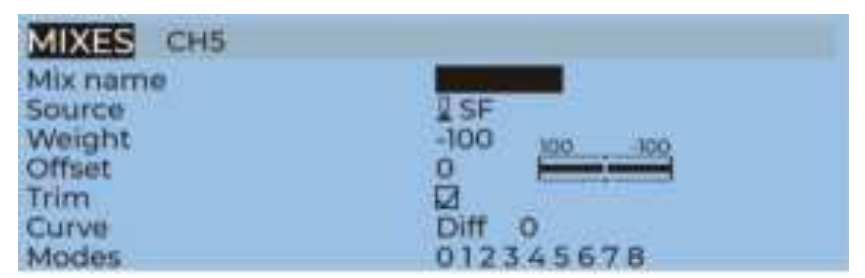
IRC Tramp (Analog
Turn on the transmitter, TH to R middle, YA to W left, PITC to H up, then enter the OSD menu. 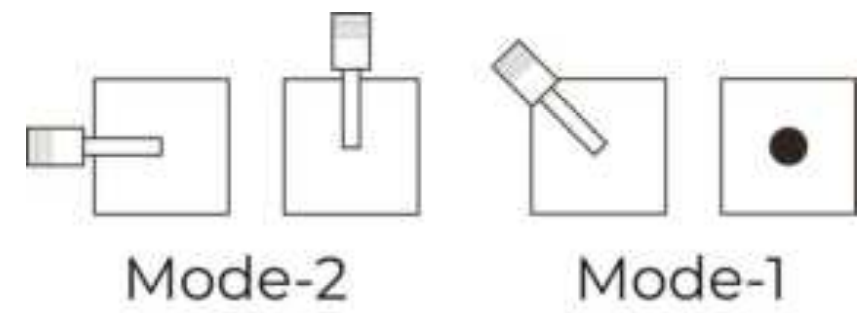
The PITCH moves the cursor up and down, and the ELE moves right to enter the next item. Now, save and exit.
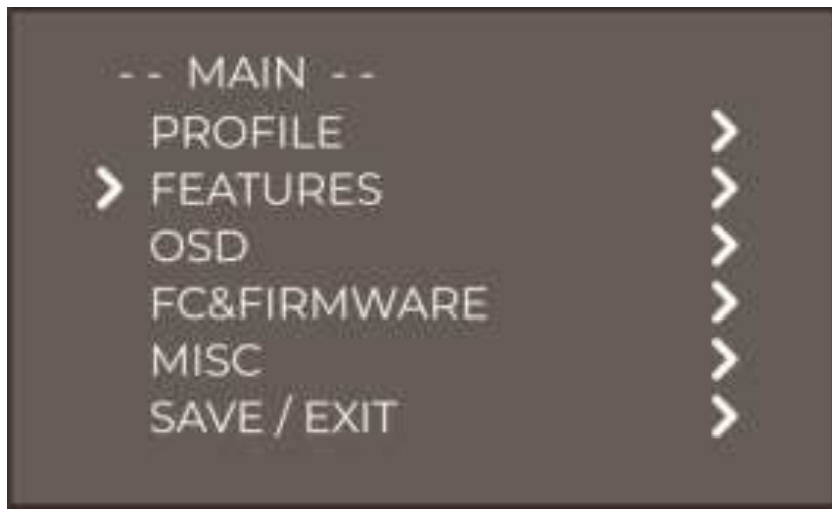
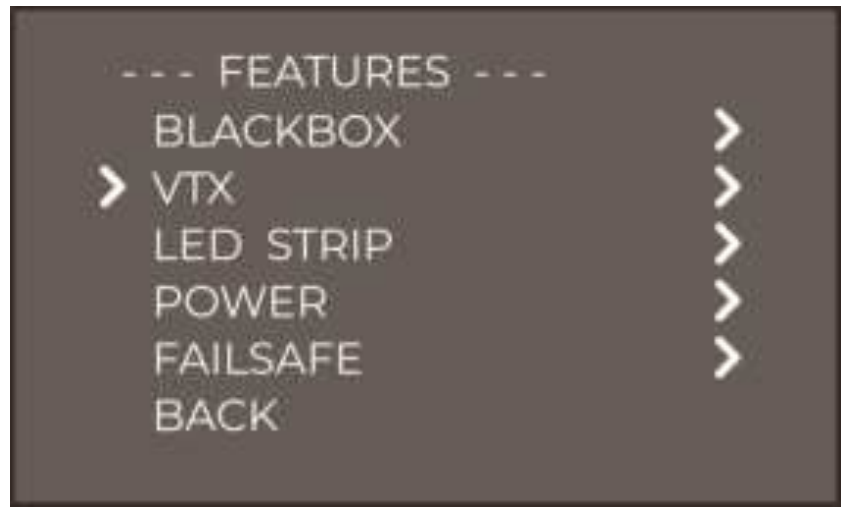
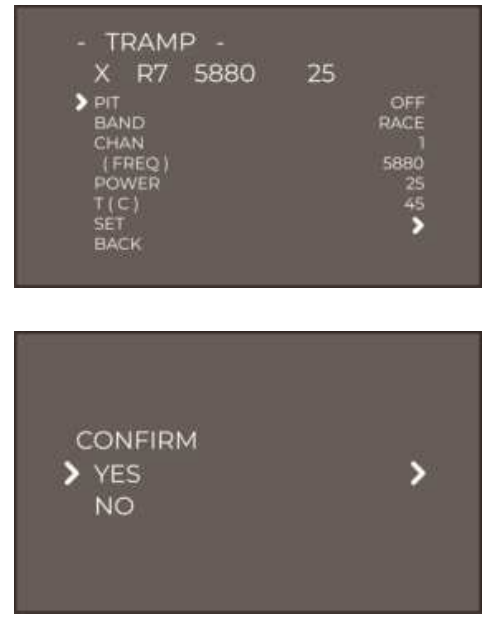
Frequency table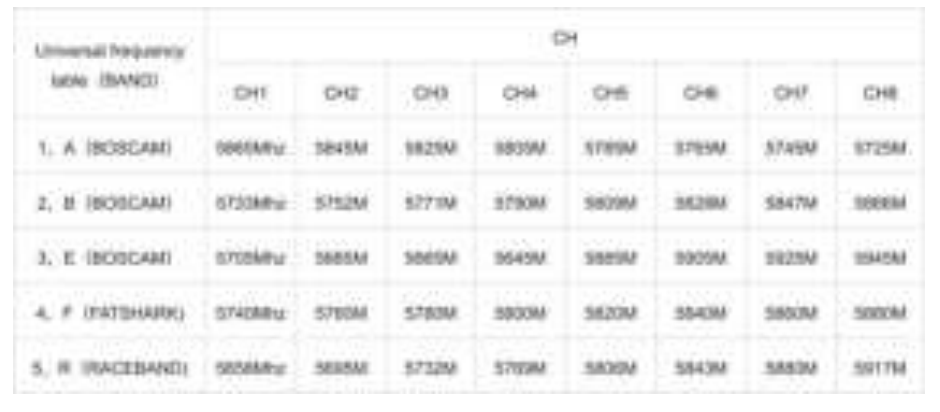
Install Propellers
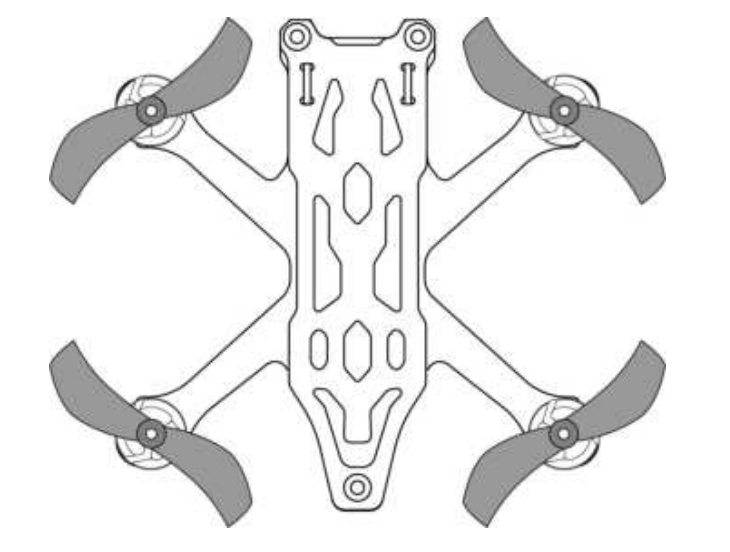
Although the propellers of SMART16 had already been installed in the factory, we strongly advise that the direction of the propellers is checked before taking off.
 Install Battery
SMART16 uses 3D printed battery holders that can allow you to mount the batteries on top and below
Specification
- Model: SMART16 Quadcopter
- FC: STABLE F411 FC
- ESC: STABLE BLheli_S 12A 4IN1 ESC
- VTX: STABLE 5.8G 200mW VTX
- Camera: Caddx Ant
- Antenna: IPEX 5.8G 70mm Antenna
- Motor: SPEEDX2 0803-11000KV
- Receiver: PNP / Frsky R-XSR / TBS NanoRX / ELRS 915MHz / ELRS 2.4G
Pre-flight check:
In many cases, the cause of a crash is a lack of a pre-flight check. For the sake of everyone’s safety, we suggest that you conduct a thorough check before every flight. The steps are as follows:
- Turn on the transmitter and select the correct mode. Please confirm that the arming switch on the transmitter is in the “disarmed” position and the throttle is all the way down.
- Please perform a physical inspection of the quadcopter for any visible damage. If there is damage, please fix it first.
- Please confirm the propeller is in the right direction,n and the propeller nut is locked tight; there is a risk of a crash.
- Check LiPo battery voltage. A fully-charged LiPo should be about 4.2 volts per cell, or about 12.6 volts for a 3S, or 16.8 volts for a 4S;
- Please confirm the battery is securely attached to the aircraft by the strap. And secure the balance to eliminate the possibility of it being struck by the props;
- Verify that you have clean, strong video in your FPV goggles or screen. If you see interference or you see another pilot’s feed, resolve this issue before flying.
- Arm the quadcopter. Listen for the props, make sure they aren’t cutting into anything and spinning freely;
Include
- 1 x SMART16 Quadcopter
- 2 x 1610-2 propellers (pairs)
- 2 x Battery strap M12x120mm
- 2 x Battery Silicone Pads
- 1 x Upper battery holder
- 1 x Screwdriver
Warranty Policy
- If the quadcopter is damaged or is having unknown issues, please contact GEPRC. We’ll do our best to get this taken care of as quickly as possible.
- Any impact damage, product liquid damage, high temperature damage, or other artificial damage, not attributable to the quality of the product, is not covered by warranty.
PS
- All components had been strictly inspected and tested before shipping.
- If you have any problems, please cooperate with our engineers to figure out solutions. (Email: support@geprc.com.)
Customer Support
- Email:support@geprc.com.