



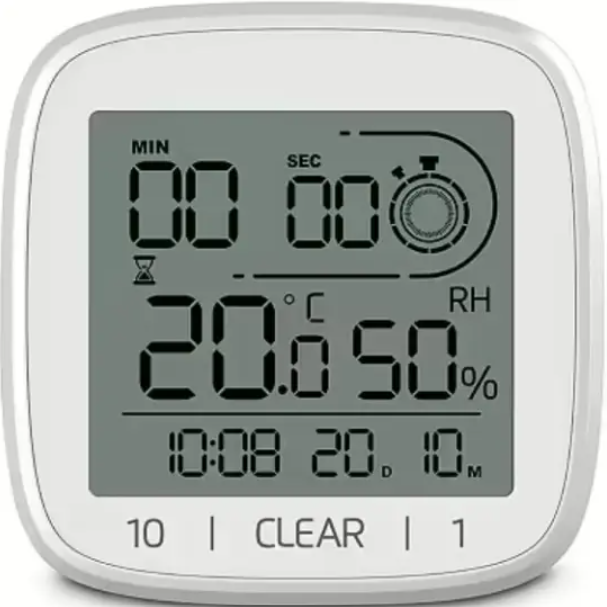
Hama 00185893 Digital Bathroom Clock
Safety Instructions
- Do not use the Hama 00185893 Digital Bathroom Clock in areas where electronic products are not permitted.
- Do not drop the product and do not expose it to any major shocks.
- Do not modify the product in any way. Doing so voids the warrantyKeepep the packaging material out of the reach of children due to the risk of suffocation.
- Dispose of packaging material immediately in accordance with the locally applicable regulations.
- The Hama 00185893 Digital Bathroom Clock is intended for private, non-commercial use only.
- Use the product only for the intended purpose.
- Do not use the product in the immediate vicinity of heaters, other heat sources, or in direct sunlight.
- Do not operate the product outside the power limits given in the specifications.
- Do not open the device or continue to operate it if it becomes damaged.
- Do not attempt to service or repair the product yourself. Leave the service work to qualified experts.
- As with all electrical products, this device should be kept out of the reach of children.
- Only use the article under moderate climatic conditions.
- Do not expose the product to any other moisture than that typical of a bathroom.
- Never expose the product to direct contact with water.
Controls and Displays
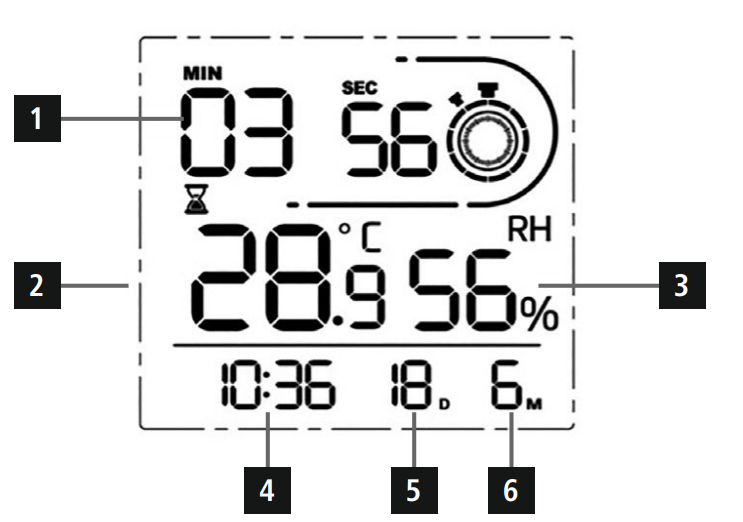
- Timer
- Room temperature
- Ambient humidity
- Time
- Day
- Month
Back: SET button (Confirm set value, 12/24h) Up button (Increase set value, C°/F°) Down button (Decrease set value)
Quick Guide
- This quick-reference guide for the Hama 00185893 Digital Bathroom Clock contains the most important basic information, including safety instructions and the steps necessary to operate the device.
- To help protect the environment and conserve valuable raw materials, Hama does not issue a printed manual and instead makes this available exclusively as a PDF download.
- The full text of the manual is available at the following internet address: www.hama.com -> 00185893 -> Download.
- Save the manual on your computer for reference and print it out if possible.
Package contents
- Bathroom clock
- 2 x AAA batteries
- These operating instructions
Setup
- Turn the cover on the back anticlockwise and remove it.
- Open the battery compartment and insert 2 AAA batteries, observing the correct polarity. Then close the battery compartment.
- After manually setting the date/time, replace the cover by turning it clockwise.
Operation
Manual setting of the date/time
- Press and hold the SET button to go to setting mode. Set the following information in sequence: Year, Month, Day, Hours, Minutes.
- To select the individual values, press the UP button or the DOWN button and confirm your selection by pressing the SET button.
- Press the SET button once to switch between 12 h and 24 h mode.
Installation
- There are 3 options for positioning the Hama 00185893 Digital Bathroom Clock: using suction cups, the hanging eyelet, or the base.
- The suction cups can be used on all glazed surfaces, such as mirrors, glass, or tiles.
- Dampen the suction cups before attaching the Hama 00185893 Digital Bathroom Clock for a better grip.
- Ensure that the surface to which you want to attach the suction cups is free of dust and grease.
- Since the suction cups can loosen after a while, occasionally push the suction cups firmly back into place to ensure that the clock remains secure.
- Place the Hama 00185893 Digital Bathroom Clock in an area where it will not be damaged if it should fall.
- Using the hanging eyelet on the back, you can hang the bathroom clock at a suitable location on a nail or screw.
- You can also place the bathroom clock on a surface. To do this, push the supplied base into the hanging eyelet.
Care and Maintenance
- Only clean this product using a lint-free, slightly damp cloth, and do not use any harsh cleaners.
- Ensure that no water is able to enter the product.
Warranty
Hama GmbH & Co KG assumes no liability and provides no warranty for damage resulting from improper installation/ mounting, improper use of the Hama 00222239 JAMAIKA Weather Station product, or from failure to observe the operating instructions and/or safety notes.
Declaration of Conformity
Hama GmbH & Co KG hereby declares that the Hama 00222239 JAMAIKA Weather Station radio equipment type [00222239] complies with Directive 2014/53/EU.
Customer Service
- Website: https://de.hama.com
- Ph: 49 9091 502-0
FAQs
Q: What is the purpose of the Hama 00185893 Digital Bathroom Clock?
In restrooms or other damp spaces, this clock is intended to show the time, date, and temperature. Because it is water-resistant, it can be used near sinks or in places like showers. If you’re interested in other Hama digital devices, such as weather stations, see the Hama 00222219 KO Samui Weather Station Instruction Manual for more setup and operational guidance.
Q: Does the clock require batteries or mains power?
Batteries (often AAA or AA; see to the handbook) power the Hama 00185893. It is completely portable and waterproof because it doesn’t require a mains connection.
Q: Can the clock display both 12-hour and 24-hour formats?
Yes, you may use the settings buttons on the rear to change between 12-hour (AM/PM) and 24-hour (military time) formats.
Q: Can I display the indoor temperature?
Yes, a temperature sensor is part of the clock. The options menu allows you to convert between Celsius (°C) and Fahrenheit (°F) values.
Q: Is the clock waterproof?
Although the clock can withstand splashes and humidity, it shouldn’t be submerged in water. Keep it away from flowing water.
Q: Can I mount the clock on the wall?
Yes, it may be put on a level surface or wall-mounted with screws or adhesive pads. To prevent falling, make sure it is secure.
Q: How long do the batteries last?
Battery life is usually between six and twelve months, depending on usage. Battery life may be shortened by regular use of the alarm or lights.
Q: Does the clock have an alarm function?
Indeed, the Hama 00185893 has a basic alarm feature. The Mode/Set buttons allow you to set the alarm time and turn it on or off.
2 Comments
Pingback: Hama 00222219 KO Samui Weather Station | Full Setup Guide
Pingback: Hama 00004676 Bluetooth® Remote Shutter Manual | Setup Guide