



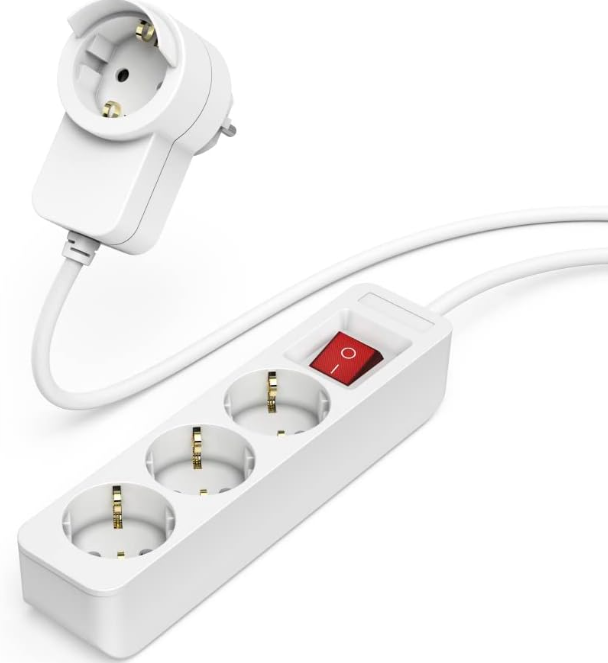
Hama 00223193 Power Strip 3+1 Pocket
Safety Instructions
The Hama 00223193 Power Strip 3+1 Pocket should always be used according to these safety guidelines to ensure proper operation and prevent damage.
- Use the product only for the intended purpose.
- Do not operate the product outside the power limits specified in the technical data.
- Protect the product from dirt, moisture, and overheating, and use it in dry environments only.
- Do not use the product in a damp environment and avoid splashing water.
- Do not continue to operate the product if it is visibly damaged.
- Do not bend or crush the cable.
- Do not drop the product and do not expose it to any major shocks.
- Always pull directly on the plug when disconnecting the cable, never on the cable itself.
- As with all electrical products, this device should be kept out of the reach of children.
- Dispose of packaging material immediately in accordance with the locally applicable regulations.
- Do not modify the product in any way. Doing so voids the warranty.
- The product is intended for private, noncommercial use only.
- The product is intended only for use inside buildings.
- Do not use the product in the immediate vicinity of heaters, other heat sources, or in direct sunlight.
- Only use the article under moderate climatic conditions.
- Do not use the product in areas where electronic products are not permitted.
- Route all cables so that there is no risk of tripping.
- Never connect multiple units of this product in series.
- The product must only be operated on a supply network as described on the type plate.
- Do not open the device or continue to operate it if it becomes damaged.
- Do not use the product if the AC adapter, the adapter cable, or the mains cable is damaged.
- Do not attempt to service or repair the product yourself. Leave the service work to qualified experts.
Operating Instruction
Thank you for choosing the Hama 00223193 Power Strip 3+1 Pocket. Take your time and read the following instructions and information completely. Please keep these instructions in a safe place for future reference.
Package Contents
- Power strip
- These operating instructions
For users looking to organize their home entertainment setup, the Hama 00220870 TV Floor Stand Bracket can complement the Hama 00223193 Power Strip 3+1 Pocket for a neat and safe arrangement.
USB Operation
- Ensure that the total output of all the connected devices does not exceed 65 W.
- Note the instructions in your device’s operating manual.
- Connect your device to a USB charging port using a suitable USB cable.
- Connect the charger to a properly installed and easily accessible mains socket.
- Then disconnect the charger from the line connection.
Care and Maintenance
- Only clean this product with a slightly damp, lint-free cloth, and do not use aggressive cleaning agents.
- Ensure that no water is able to enter the product.
Warranty Disclaimer
Hama GmbH & Co KG assumes no liability and provides no warranty for damage resulting from improper installation/mounting, improper use of the product, or from failure to observe the operating instructions and/or safety notes.
Technical Data
| Mains connection | 250 V ~ / 16 A | |
| Connected load | max. 3680 W | |
| Specifications according to Regulation (EU) 2019/1782 | ||
| Brand name, commercial register number, address | Hama, HRA12159, Dresdner Str. 9, 86653 Monheim, Germany | |
| Model identifier | 00223193 / 00223194 | |
| Input voltage | 230V | |
| Input AC frequency | 50Hz | |
| Output voltage/output current/power output | Typ-C1: 5,0-20,0V DC 3,0A-3,25A 15,0-65,0W Typ-C2: 5,0-20,0V DC 3,0A-3,25A 15,0-65,0W USB A: 5,0V-12,0 V / 1,5A-3,0A / 15,0W-18,0W Typ-C1 + Typ-C2: Typ-C1 5,0-20,0V DC 2,25-3,0A 15,0W-45W Typ-C2 5,0-20V DC 1,0A-3,0A 15,0W-20,0W Typ-C1 + USB A: Typ-C1 5,0-20,0V DC 2,25-3,0A 15,0W-45W USB A 5,0-12,0V, 1,5A-3,0A, 5,0-18,0W TYP-C2 + USB A: 5,0V DC 3,0A 15,0W total Typ-C1 + Typ-C2 + USB A Typ-C1 5,0-20,0V DC 2,25-3,0A 15,0W-45W TYP-C2 + USB A 5,0V DC 3,0A 15,0W total Total Output max. 65,0W | |
| Average efficiency during operation | 86,0% | |
| Efficiency at low load (10%) | 75,7% | |
| Power consumption at zero load | 0,30W | |
Customer Service
- Website: https://de.hama.com
- Ph: 49 9091 502-0
FAQs
Q: What is the main purpose of the Hama 00223193 Power Strip?
You can securely stretch a single wall outlet into three standard outlets and one USB port with this little power strip, allowing you to power and charge many devices at once.
Q: Can I charge my smartphone or tablet using the USB port?
Indeed. For the majority of smartphones, tablets, and other USB-powered devices, the dedicated USB port offers enough current. To ensure compatibility, always verify the charging requirements for your smartphone.
Q: Can I use the power strip with high-power appliances?
It works well with common gadgets, including laptops, chargers, and small appliances. Unless the maximum load rating permits it, avoid utilising high-wattage appliances like air conditioners, heaters, and microwaves.
Q: Is the power strip safe to use in multiple countries?
Before using, make sure the plug type and voltage compatibility are correct.
Q: Can I mount the power strip on a wall or desk?
Indeed. For easy access, the compact design frequently has mounting options or screw slits to secure the strip to a wall or beneath a desk.
To further enhance your home or office environment, the Hama 00222239 Jamaika Weather Station pairs well with the Hama 00223193 Power Strip 3+1 Pocket to ensure all devices remain powered and monitored safely.
1 Comment
Pingback: Hama 00221085 DAB/DAB+ Radio Indoor Antenna | Setup Guide