

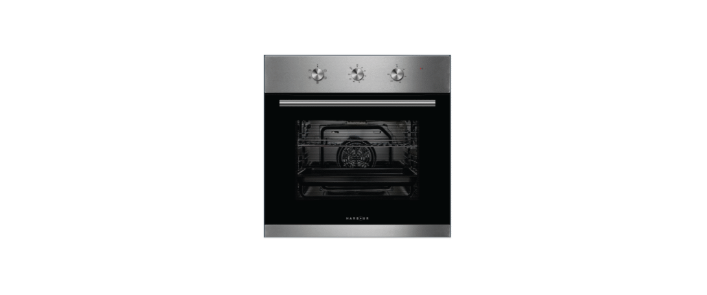

HARBOUR HBROB605 60cm 80L Electric Oven
Safety Instructions
- Do not allow children to go near the oven when it is operating, especially when the grill is on.
- Children should be supervised to ensure that they do not play with the appliance.
- If the supply cord is damaged, it must be replaced by the manufacturer.
- Do not use harsh abrasive cleaners or sharp metal scrapers to clean the oven door glass.
- Excess spillage must be removed before cleaning. A steam cleaner is not to be used.
- The appliances are not intended to be operated using an external timer.
- The oven must not be installed behind a decorative door to avoid overheating.
- It is not intended for commercial, industrial, al or outdoor use.
- It is not intended for use in a recreational vehicle.
- Other uses are not recommended and may cause fire, electric shock, or personal injury.
- This appliance is intended for indoor household use only.
- Do not use this appliance for anything other than its intended purpose.
- Damage due to improper use or repairs made by unqualified personnel will void your warranty.
- The use of attachments is not recommended by the appliance manufacturer and distributor, as they may be hazardous.
Overview

Control Panel

Functions
| SYMBOL | FUNCTION DESCRIPTION |
| Oven Lamp: Enables the user to observe the progress of cooking without opening the door. The oven lamp will light for all cooking functions. | |
| Defrost: The circulation of air at room temperature enables quicker thawing of frozen food (without the use of any heating elements). It is a gentle but quick way to speed up the defrosting time and thawing of ready-made dishes, cream-filled produce, etc. | |
| Grill: This cooking method is for everyday grilling, utilising only the inner grill element, which directs heat downwards onto the food. | |
| Grill fan: The grill heating element and the fan operate, making it suitable for grilling a large amount of meat. | |
| Convection: Heat from the rear heating element is circulated in the cavity by the fan. It is a fast and economical cooking function. This function also helps food cook faster, whilst also reducing hot and cool spots and helping dishes on every shelf cook more evenly. |
Installation
Wire Shelves
For the grill, dishes, a cake pan with items for roasting and grilling

Side Racks
These shelf support rails on the right and left sides of the oven can be removed. Dishes and trays can be put on the oven floor, using functions such as Grill or Double grill with fan.

Baking tray
For cooking large quantities of food such as cakes, pastries, frozen food, etc, or for collecting fat/spillage and meat juices

Fitting
Fit the oven into the space provided in the kitchen unit; it may be fitted underneath a worktop or into an upright cupboard. Fix the oven in position by screwing it into place, using the two fixing holes in the frame. To locate the fixing holes, open the oven door and look inside. To allow adequate ventilation, the measurements and distances were adhered to when fixing the oven.
This is a legal safety requirement. All guards must be firmly fixed in place so that it is impossible to remove them without using special tools. Remove the back of the kitchen unit to ensure an adequate current of air circulates through the oven. The hob must have a rear gap of at least 45mm.

Securing
- Fit the oven into the cabinet recess.
- Open the oven door.
- Secure the oven to the kitchen cabinet with the two distance holders “A”,
- Which fit the holes in the oven frame, and fit the two screws “B”.

Ventilation
When cooking is finished, in a pause state or in a waiting state, and if the oven’s centre temperature is over 75 degrees, the cooling fan will continue working for 15 minutes. Or when the oven’s centre temperature becomes lower than 7 degrees, the cooling fan will stop in advance.
Operation
Before First Use
Read: Before using the oven for the first time, read this manual thoroughly, even if you are familiar with this type of appliance.
Initial use: After the appliance has been properly installed and before first use, you should burn off any dust, oil, or other remnants that may have been left inside the cavity from the manufacturing process or transportation. Please run the new empty oven with the conventional cooking function at a250ºCC for at least 90 minutes.
Timer
- If you want to set a timer, refer to the next section, ‘USING YOUR OVEN WITH A TIMER’; otherwise, rotate the timer knob counterclockwise to the symbol to operate the oven without a timer.
- This will stop the oven from automatically powering off while in the upward position.
- Then turn the temperature knob and the function knob to your desired settings.
- Once you have finished cooking, turn all knobs back to their original position, facing upward, to turn
the oven off. - Use the timer control knob to set the oven to power off after your set number of minutes.
- Follow these steps to operate the oven in timer mode.
- Rotate the timer knob clockwise to set your desired number of minutes, between 15 and 120 minutes.
- Then turn the temperature knob and the function knob to your desired settings.
- Once the timer is up, the oven will make a sound to indicate that cooking is complete, and the oven
will automatically power off.
Maintenance and Cleaning
For the sake of a good appearance and reliability, keep the unit clean. The modern design of the unit facilitates maintenance to a minimum. The parts of the unit that come into contact with food have to be cleaned regularly.
- Before any maintenance and cleaning, disconnect the power.
- Set all controls in the OFF position.
- Wait until the inside of the unit is not hot but only slightly warm—cleaning is easier than when warm.
- Clean the surface of the unit with a damp cloth, soft brush, or fine sponge, and then wipe dry.
- In case of heavy soiling, use hot water with a non-abrasive cleaning product.
- Never leave acidic substances (lemon juice, vinegar) on stainless steel parts.
- Do not use a high-pressure cleaner for cleaning the unit.
Bulb Replacement
For replacement, follow the process below:
- Disconnect power from the mains outlet or switch off the circuit breaker of the unit’s mains outlet.
- Unscrew the glass lamp cover by turning it counterclockwise.
- S crew the glass lamp cover back in place.
Removing the Door
The removable door allows for full access to the entire interior of the oven for easier and quicker maintenance. Follow these instructions carefully if you wish to remove the over door.
- To remove the door, open it to the maximum angle. Then pull the buckle at the door hinge backwards.

- Close the door at an angle of approximately 30°. Hold the door with one hand on each side.
- Lift up and slowly pull the door out from the oven.

- Open the door rotation bracket assembly.

- Clean the surface of the unit with a damp cloth, soft brush, or fine sponge, and then wipe dry. In case of heavy soiling, use hot water with a non-abrasive cleaning product. For cleaning the glass of
Specifications
| Model: | HBROB605 |
| Gross Volume: | 80L |
| Product Dimensions (W × D × H): | 595 × 575 × 595mm |
| Weight (Net/Gross): | 30.2kg/33.2kg |
| Rated Voltage | 220-240V~ |
| Rated Frequency | 50Hz-60Hz |
| Rated Power | 2.1kW |
| No. of Functions | 5 |
| Other Features: | Minute Minder Timer |
| Triple Glazed Door | |
| Fixed Knob Controls | |
| Stainless Steel handle | |
| Removable Chrome Side Racks | |
| 1 × Chrome wire shelf | |
| 1 × Baking tray with chrome rack insert |
Troubleshooting
| Issue | Possible Cause | Resolution |
| The oven is not turning on. | Break in power supply. | Check that the oven is plugged in and the power is on. Check the household fuse box for any blown fuses and replace as necessarAlso Also, ensure that a safety switch hasn’t tripped. |
| The oven light is not working. | The light globe is loose or has blown. | When the oven has cooled and is switched off, remove the globe cover nd ensure that the globe is tight. If blown, refer to the Cleaning and Maintenance section under Bulb Replacement. |
| The oven is burning the top of my dish whilst the underside is underdone. | Not enough heat from the bottom of the oven. | Try using the Conventional cooking functions. Try lowering the temperature. Try using a lower shelf position. |
| The oven is burning the underside of my dish, whilst the top is underdone | Excessive heat from the bottom of the oven. | Try using the Conventional cooking functions. Try lowering the temperature. Try using a higher shelf position. |
| The oven is burning the outside of my dish, whilst the inside is underdone | The temperatures seem too high. | Lower the temperature and increase the cooking time |
| The outside of my dish is too dry, even though it looks cooked. | The temperature is set too low. | Increase the temperature and decrease the cooking duration. |
Disposal
Do not dispose of this product as unsorted municipal waste. Collection of such waste separately for special treatment is necessary. For more detailed information about treatment, recovery, and recycling of this product, please contact your local city office, your household waste disposal service, or the shop where you purchased the product.
Declaration of Compliance
If you have any doubts at all, do not use it: contact a professionally qualified person. Keep packing materials such as plastic
bags, polystyrene, or nails out of the reach of children because these are dangerous to children.
Repair and Refurbished
We recommend you save this data elsewhere prior to sending the product for repair. You should also be aware that rather than repairing goods, we may replace them with refurbished goods of the same type or use refurbished parts in the repair process.
Customer Service
- Tel: 1300 11 43 57
- Address: Residentia Group 165 Barkly Avenue Burnley VIC 3121 Australia
- Website: support@residentiagroup.com.au
- Hours of operation: Mon–Fri 9:00 AM – 5:00 PM