



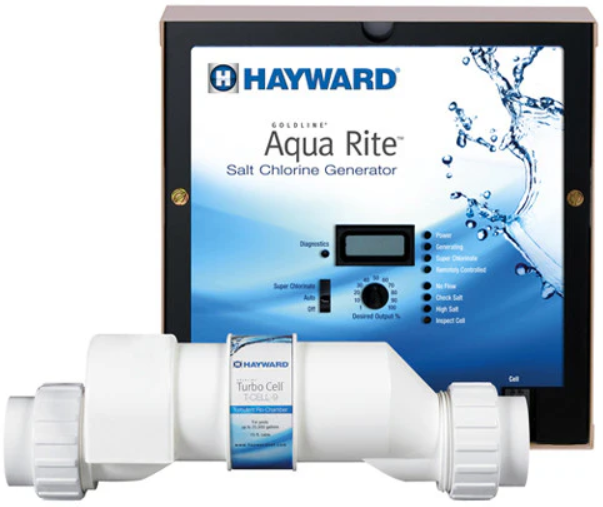
Hayward AQR15CUL Electronic Chlorine Generator
Safety Instructions
When using this electrical equipment, basic safety precautions should always be followed, including the following:
- Disconnect all AC power during installation.
- To reduce the risk of injury, do not permit children to use this product unless they are closely supervised at all times.
- A green colored terminal marked “Earth Ground” is located inside the wiring compartment.
- Risk of Electric Shock. Connect only to a grounding-type receptacle protected by a ground-fault circuit-interrupter (GFCI).
- Contact a qualified electrician if you cannot verify that the receptacle is protected by a GFCI.
- Do not bury the cord. Locate the cord to minimize abuse from lawn mowers, hedge trimmers, and other equipment.
- To reduce the risk of electric shock, replace the damaged cord immediately.
- To reduce the risk of electric shock, do not use an extension cord to connect the unit to the electric supply; provide a properly located outlet.
- One bonding lug for US models (two for Canadian models) is provided on the external surface.
- To reduce the risk of electric shock, connect the local common bonding grid in the area of the swimming pool, spa, or hot tub to these terminals with an insulated or bare copper conductor not smaller than 8 AWG US / 6 AWG Canada.
- All field-installed metal components, such as rails, ladders, drains, or other similar hardware within 3 meters of the pool, spa, or hot tub shall be bonded to the equipment grounding bus with copper conductors not smaller than 8 AWG US / 6 AWG Canada.
Operation
The AquaRite® is an automatic chlorine generation system for pool or spa sanitation. The operation requires a low concentration of salt (sodium chloride) in the pool water. These levels are low enough that they normally will not be tasted. The AquaRite automatically sanitizes your pool by converting the salt into free chlorine, which kills bacteria and algae in the pool.
Chlorine will revert to sodium chloride after killing bacteria. These reactions will continuously recycle, virtually eliminating the need to add sanitizing chemicals to your pool. The only time you may need to add more salt to the pool is when water is replenished due to backwashing, draining, or splashing (not evaporation).
The AquaRite is offered in three models and is designed to handle the purification needs of most residential swimming pools up to 40,000 gallons (150,000 liters), or the needs of most commercial pools up to 25,000 gallons (95,000 liters). Check local codes for other restrictions. The actual amount of chlorination required to properly sanitize a pool varies due to bather load, rainfall, temperature, and the pool’s cleanliness.
Select the proper model for your pool (installation and mounting requirements are the same for all models):
- AQR15CUL, AQR15XLCUL – for pools up to 40,000 gallons
- AQR9CUL, AQR9XLCUL – for pools up to 25,000 gallons
- AQR3CUL, AQR3XLCUL – for pools up to 15,000 gallons
Water Chemistry
The table below summarizes the levels that are recommended by The Association of Pool and Spa Professionals (APSP). The only special requirements for the AquaRite are the salt level and stabilizer. It is important to maintain these levels in order to prevent corrosion or scaling and to ensure maximum enjoyment of the pool.
Test your water periodically. Your Authorized AquaRite Dealer or most pool stores can provide you with the chemicals and procedures to adjust the water chemistry. Be sure to tell the pool store that you are using an AquaRite chlorine generator.
CHEMICAL IDEAL LEVELS
| Salt | 2700 to 3400 ppm | ||||
| Free Chlorine | 1.0 to 3.0 ppm | ||||
| pH | 7.2 to 7.6 | ||||
| Cyanuric Acid (Stabilizer) | 20 to 30 ppm (if necessary) | ||||
| Total A lkal inity
| 80 to 120 ppm
| ||||
| Ca | lc | iu m | Hardness | 125 to 250 ppm | |
| Metals | 0 ppm | ||||
| Saturation Index | –.2 to .2 (0 best) | ||||
Saturation index
The saturation index (Si) relates to the calcium and alkalinity in the water and is an indicator of the pool water “balance”. Your water is properly balanced if the Si is 0 ±.2. If the Si is below -0.2, the water is corrosive, and plaster pool walls will be dissolved into the water. If the Si is above +0.2, scaling and staining will occur. Use the chart below to determine the saturation index.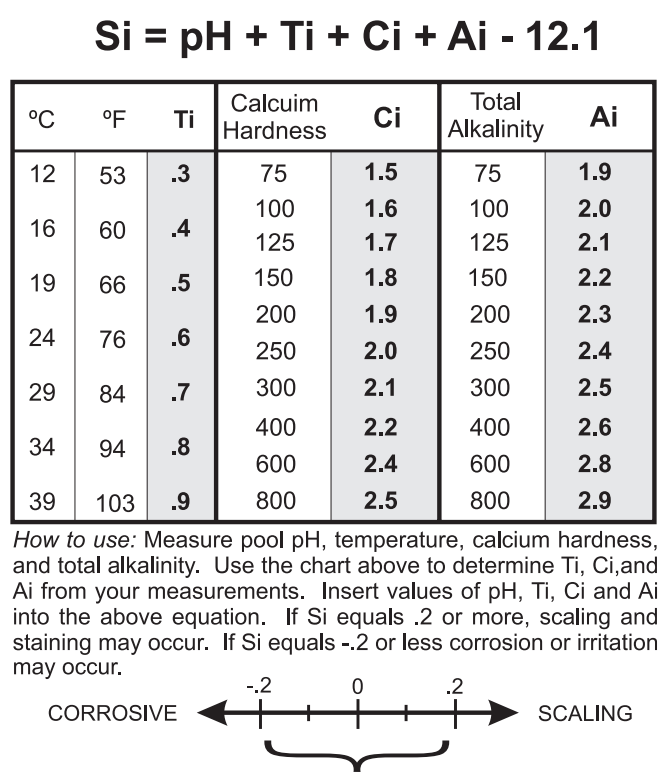
Salt Level
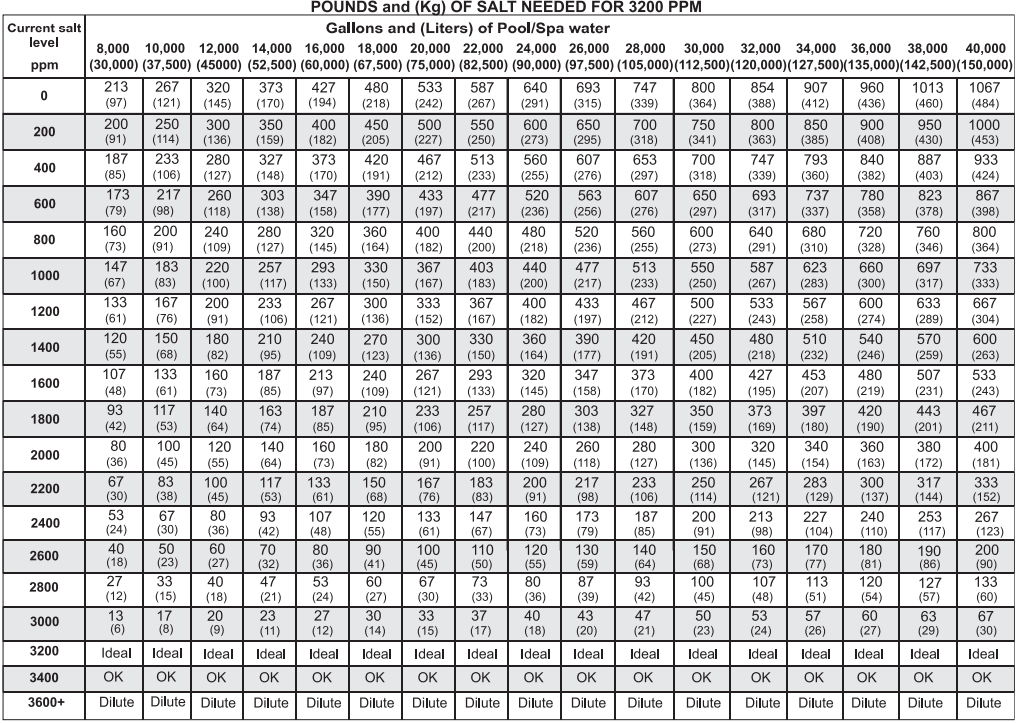
Use the chart on page 5 to determine how much salt in pounds (kg) needs to be added to reach the recommended levels. Be aware that there may already be salt in your pool from prolonged use of chlorine. Test your pool, then add the correct amount. Use the equations below (measurements are in feet/gallons and meters/liters) if the pool size is unknown.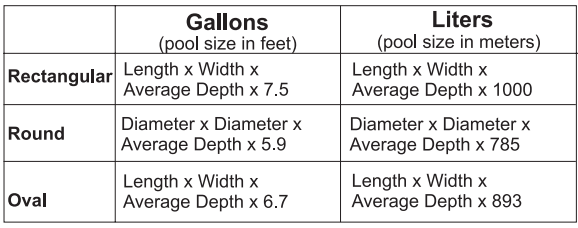
The ideal salt level is between 2700-3400 ppm (parts per million), with 3200 ppm being optimal. If the level is low, determine the number of gallons in the pool and add salt according to the chart on page 5. A low salt level will reduce the efficiency of the AquaRite and result in low chlorine production.
A high salt level can cause the AquaRite to shut down and may begin to give a salty taste to your pool (generally, the salt will begin to be tasted at a level of about 3500-4000 ppm). The salt in your pool/spa is constantly recycled, and the loss of salt throughout the swimming season should be small.
This loss is due primarily to the addition of water because of splashing, backwashing, or draining (because of rain). Salt is not lost due to evaporation.
Type of Salt to Use
It is important to use only sodium chloride (NaCl) salt that is greater than 99% pure. This is common food quality or water softener salt and is usually available in 40-80 lb. bags labeled “Coarse Solar Salt”. It is also acceptable to use water conditioning salt pellets; however, it will take longer for them to dissolve. Do not use rock salt, salt with yellow prussiate of soda, salt with anti-caking additives, or iodized salt.
How to Add or Remove Salt
For new plaster pools, wait 10-14 days before adding salt to allow the plaster to cure. Turn the circulating pump on and add salt directly into the pool. Brush the salt around to speed up the dissolving process–do not allow salt to pile up on the bottom of the pool. Run the filter pump for 24 hours with the suction coming from the main drain (use pool vac if there is no main drain) to allow the salt to evenly disperse throughout the pool. The salt display may take 24 hours to respond to the change in salt concentration.
The only way to lower the salt concentration is to partially drain the pool and refill it with fresh water. For outdoor pools, always check the stabilizer (cyanuric acid) when checking salt. These levels will most likely decline together. Use the chart on page 6 to determine how much stabilizer must be added to raise the level to 30 ppm.

Controls Main Switch
AUTO: For normal operation, the Main Switch should be left in the AUTO position. In this position, the AquaRite will produce chlorine according to the “Desired Output %” adjustment setting for the entire filtering/pumping cycle.
SUPER CHLORINATE: When you have an abnormally high bather load, a large amount of rain, a cloudy water condition, or any other condition that needs a large amount of purification to be introduced, put the Main Switch in the SUPER CHLORINATE position. This electronically “super chlorinates” (shocks) the water for 24 hours (filter pump must be on during this time) or until the power has been turned off, whichever comes first. At the end of the super chlorinate time, be sure to put the switch back into the AUTO position.
OFF: The OFF position prevents the AquaRite from energizing the electrolytic cell. In this position, there is no chlorine generation. NOTE: To service any of the pool equipment or the AquaRite, turn the power off at the circuit breaker.
Indicator LED’s
- POWER When illuminated, the AquaRite has input power.
- GENERATING This LED is on steadily during normal operation. When flashing, the pool water is too hot or cold to operate.
- SUPER CHLORINATE Illuminates during super-chlorination. See description above.
- REMOTELY CONTROLLED When illuminated, indicates that a remote pool automation control (Hayward Pro Logic, Pentair Intellitouch, Polaris Eos, etc.) is controlling the AquaRite–the main switch and “Desired Output %” adjustment are inactive. When flashing, the Pro Logic, Intellitouch, or Eos is in
- SERVICE OR TIME-OUT mode and the Main Switch and “Desired Output %” adjustment are active.
- NO FLOW When illuminated, the flow switch has detected no water flowin,g and the AquaRite has stopped generating chlorine. A flashing LED indicates a 15-60 second time delay period.
- CHECK SALT When flashing, the salt level is low (below 2700 ppm) and AquaRite is generating at low efficiency. When illuminated steadily, the salt level is too low, and AquaRite has shut down. Before adding large quantities of salt, it is advisable to have your salt level professionally checked.
- HIGH SALT When illuminated, the salt level is too high, and AquaRite has shut down.
- INSPECT CELL A flashing indicator signifies that either the cell efficiency is reduced or that it is time for a regularly scheduled cell inspection. In either case, inspect the cell and clean if necessary. When illuminated steadily, cell efficiency is greatly reduced, and the AquaRite has stopped producing chlorine. Inspect, clean, or replace if necessary.
To Set Turbo Cell Type
Before the operation, the AquaRite must be configured for the chlorinator cell that will be used. Your model AquaRite has been packaged with a corresponding Turbo cell. Refer to the following information and steps below to set the Turbo cell type.
- “t-3” = for all AQR3CUL and AQR3XLCUL models or if using a T-CELL-3, GLX-CELL-3-W
- “t-9 = for all AQR9CUL and AQR9XLCUL models or if using a T-CELL-9, GLX-CELL-9-W
- “t-15” = for all AQR15CUL and AQR15XLCUL models or if using a T-CELL-15, GLX-CELL-15-W
- “t-5” = if using a GLX-CELL-5, GLX-CELL-5-W
- Slide the Main Switch from “Off” to the “Auto” position.
- Push the Diagnostic button repeatedly until “t-3”, “t-5”, “t-9”, or “t-15” appears on the display (“t-15” is the factory default). If the desired cell type is displayed, skip to step 4.
- To change to a different cell type, slide the Main Switch from “Auto” to “Super Chlorinate” and back to “Auto”. Repeat this process until the desired cell type is displayed.
- Push the Diagnostic button to exit.
Desired Output %” adjustment knob
The “Desired Output %” adjustment knob is located in the lower center of the AquaRite control panel. This setting is used to control the amount of chlorine the AquaRite generates. Raise this setting to increase the chlorine level and lower it to decrease the chlorine level. Note: The “Desired Output %” adjustment will not function when the AquaRite is being controlled by a remote pool automation control.
Salt Display
Refer to the Water Chemistry section for recommended salt levels as well as how to add/remove salt. The Salt Display shows the average salt level of the pool water. The factory default display is in English units (ppm). If Metric units (grams per liter) are preferred, follow the procedure under Temperature Display. When the Aqua Rite is displaying grams per liter, the readout will show a decimal point. (ex. 3.2 g/l = 3200ppm).
Temperature Display
The Temperature Display shows the current temperature of the pool water. The factory default display is in ºF. Both the Temperature Display and the Salt Display can be programmed to display in Metric units. To display temperature in ºC and salt level in g/l, perform the following steps:
- Slide the Main Switch from “Off” to the “Auto” position.
- Push the Diagnostic button repeatedly until “ºF” appears on the display.
- Slide the Main Switch from “Auto” to “Super Chlorinate” and back to “Auto”.
- Push the Diagnostic button to exit.
Instant Salinity
The Instant Salinity display is the measured salt level of the pool water at that moment. If salt has recently been added, the Instant Salinity may show the change, while the Salt Display (average salt level) may take some time before the changes can be seen. Under these circumstances, you may want to “update” the Salt Display to the new Instant Salinity value. This action will clear the Salt Display and substitute the Instant Salinity value. To do this, follow the steps below:
- Slide the Main Switch from “Off” to the “Auto” position.
- Push the Diagnostic button repeatedly until “-xxxx ppm” appears on the display.
- Slide the Main Switch from “Auto” to “Super Chlorinate” and back to “Auto”.
- Push the Diagnostic button to exit.
Spring Start-up
DO NOT turn the AquaRite on until the pool water chemistry has been brought to the proper levels. This information can be found on page 3.
Installation
Installation must be performed in accordance with Local and NEC codes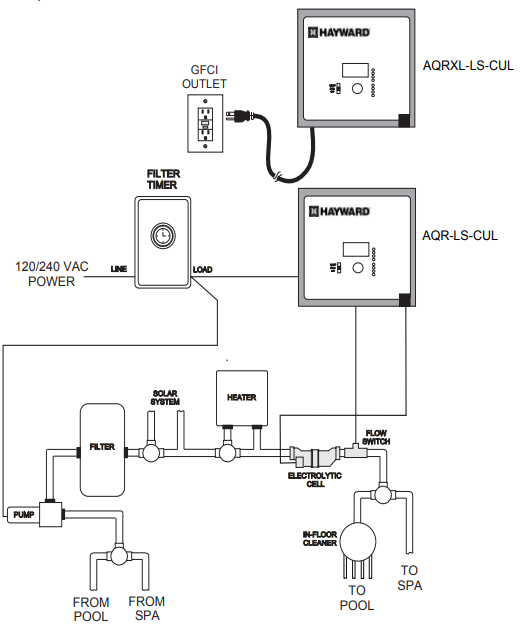
Preparing Pool/Spa Water
Refer to page 3 for recommended chemical levels. The pool’s chemistry must be balanced BEFORE activating the AquaRite. NOTE: If the pool does not have new water, add 1 quart (1 liter) of metal remover and 1 quart (1 liter) of non-copper-based algaecide to the pool, per manufacturer’s instructions. This ensures a quick, trouble-free transfer to the AquaRite system.
Mounting the AquaRite Control
The AquaRite is contained in a rain-tight enclosure that is suitable for outdoor mounting. The control must be mounted a minimum of 5 ft. (2 meters) horizontal distance (or more, if local codes require) from the pool/spa.
The control is designed to mount vertically on a flat surface with the knockouts facing downward. Because the enclosure also acts as a heat sink (disperses heat from inside the box), it is important not to block the four sides of the control. Do not mount AquaRite inside a panel or a tight, enclosed area.
Plumbing
Ensure that the AquaRite installation does not constitute a cross connection with the local potable water supply. Consult local plumbing codes. The AquaRite is packaged with a Turbo cell, flow switch, and cell unions. Refer to page 2 for information about available AquaRite models.
The flow switch and cell should be plumbed in the return line to the pool/spa. The preferred installation is after (downstream) all the pool equipment (filter, heater, solar, etc.). The electrolytic cell and flow switch tee fitting are designed to be plumbed into 2″ (51mm) PVC pipe. Adapters (not included) can be used for systems with 1½” (38 mm) plumbing. For proper plumbing, refer to the overview diagram on page 11 and the diagram below.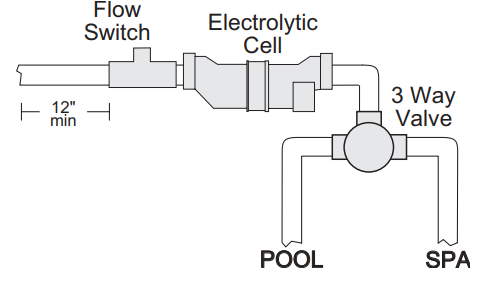
Flow Switch: There must be at least a 12″ (25cm) straight pipe run before (upstream) the flow switch. If the switch is plumbed after the cell, the cell can be counted as the 12″ (25cm) of straight pipe. To ensure proper operation, verify that the arrow on the flow switch (located on top of the gray hex) points in the direction of water flow.
Electrolytic Cell: Install using the unions provided. Tighten unions BY HAND for a watertight seal. For pool/spa combination systems with spillover, use configurations #2 or #3 above to allow chlorination of both the pool and spa during spillover, but prevent overchlorination when operating the spa only.
Wiring
Power must be shut off at the circuit breaker before performing any wiring. Be sure to follow Local and NEC electrical codes. To provide safe operation, the AquaRite must be properly grounded and bonded.
Input Power for standalone operation
AQR15CUL, AQR9CUL, AQR3CUL – Refer to the wiring label on the AquaRite as well as the diagram below to determine correct wiring connections. The AquaRite is shipped from the factory with the configuration jumpers in 2the 40VAC position. If using 120VAC, move the jumpers as shown below.
For Canadian models, the AquaRite shall be connected to a circuit protected by a class A ground fault interrupter. Be sure to connect the ground wire to the green ground screw terminal located on the bottom of the enclosure.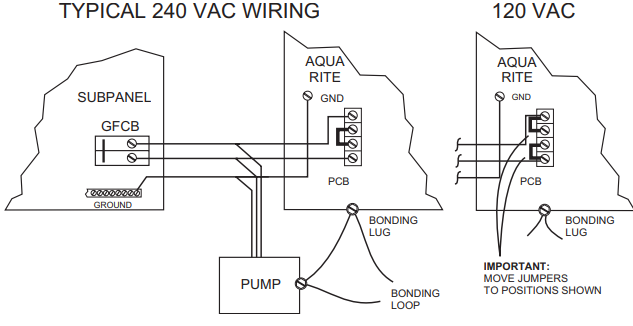
AQR15XLCUL, AQR9CXLCUL, AQR3XLCUL – These models are designed to use 120 VAC only. The 120 VAC line cord must be plugged into a GFCI receptacle or a receptacle protected by a Class A ground fault interruptor. See diagram below.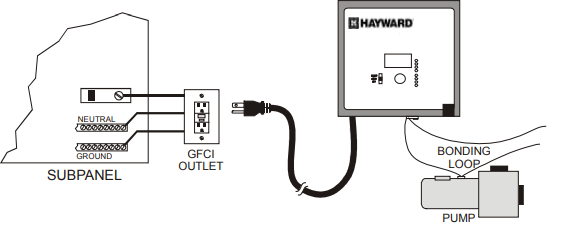
Bonding: Lugs used for bonding are attached to the bottom of the Aqua Rite enclosure. Connect to the pool bonding system using a minimum 6AWG copper wire.
Electrolytic Cell and Flow Switch
The electrolytic cell and flow switch cables are terminated with connectors that plug into the AquaRi for easy attachment and removal. The door of the AquaRite must be open to access the cell cable connector. The flow switch plugs into a connector (similar to a telephone jack) located outside, on the bottom of the enclosure. Refer to the diagram below for the location of these connections.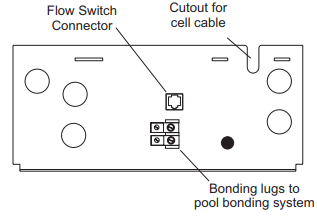
Optional Hayward, Pentair a,, nd Polaris controls: The Hayward, Pentair, and Polaris controls use a 4-wire connection to communicate with the AquaRite and can be wired up to 500′ apart. Any outdoor-rated 4-conductor cable can be used. Refer to each manufacturer’s instructions and the wiring diagrams below for proper wiring connection to the AquaRite.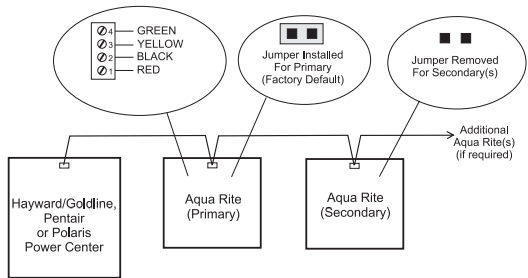
Hayward – Attach wires to the proper screw terminals as shown below
Pentair – Attach wires to opposite-numbered screw terminals as shown below. Note that the colors marked on the Pentair PCB do not match the AquaRite.
Polaris – Attach wires to the proper screw terminals as shown below. Note that the screw terminal “1” is marked on the Polaris PCB.
Maintaining the AquaRite System
To maintain maximum performance, it is recommended that you open and visually inspect the cell every 3 months or after cleaning your filter. The AquaRite will remind you to do this by flashing the “Inspect Cell” LED after approximately 500 hours of operation. After you inspect the cell (and clean, if necessary), press the small “diagnostic” button next to the display for 3 seconds to stop the flashing “Inspect Cell” LED and start the timer for the next 500 hours.
The AquaRite electrolytic cell has a self-cleaning feature incorporated into the electronic control’s logic. In most cases, this self-cleaning action will keep the cell working at optimum efficiency. In areas where water is hard (high mineral content) and in pools where the water chemistry has been allowed to get “out of balance”, the cell may require periodic cleaning. The “Inspect Cell” LED will indicate if cell efficiency is decreased and servicing is necessary. If the “Inspect Cell” LED remains on after a thorough cleaning, the cell may be worn and require replacement.
Servicing and Cleaning the AquaRite cell
Turn off the power to the AquaRite before removing the electrolytic cell. Once removed, look inside the cell and inspect for scale formation (light colored, crust, or flaky deposits) on the plates and for any debris that has passed through the filter and caught on the plates. If no deposits are visible, reinstall.
If this is not corrected, you may have to periodically clean the cell. The simplest way to avoid this is to bring the pool chemistry to the recommended levels as specified.
Mild Acid Washing: Use only in severe cases where flushing and scraping will not remove the majority of deposits. To acid wash, turn off the power to the AquaRite. Remove the cell from the piping. In a clean plastic container, mix a 4:1 solution of water to muriatic acid (one gallon of water to one quart of muriatic acid).
Winterizing
The AquaRite electrolytic cell and flow detection switch will be damaged by freezing water just as your pool plumbing would. In areas of the country that experience severe or extended periods of freezing temperatures.
Be sure to drain all water from the pump, filter, and supply and return lines before any freezing conditions occur. The electronic control is capable of withstanding any winter weather and should not be removed.
Troubleshooting
Visit www.hayward.com for helpful information on operation, maintenance, and troubleshooting your AquaRite Electronic Chlorine Generator.
Diagnostic Displays
Sequential pushes of the small “diagnostic” button next to the LCD will cause the AquaRite to display the following information:
- Pool temperature (xx degrees Fahrenheit or Celsius)
- Cell voltage (xx.x volts)
- Cell current (x.xx amps)
- Desired Output % (“0P” — “100P” depending on knob position or input from remote pool automation controller)
- Instant salinity ( -xxxx ppm or -x.xx grams/Liter)
- Product name sent to the pool automation control display (“AL-0” which signifies “AquaRite”)
- Software revision level (r1.xx)
- Chlorinator cell type (t-3, t-5, t-9, t-15)
On the 9th push of the button, the display will revert to the default salt display. Also, if the button is not pushed for 30 seconds, the display will revert to the standard Hayward AQR15CUL Electronic Chlorine Generator salt display.
Common Problems and Solutions
“Power” LED not on
Check to make sure either 120VAC or 240VAC input power is connected to the proper screw terminals at the AquaRite control. Verify input voltage with a voltmeter. If there is input power, the fuse may have blown. The AquaRite is protected by a 20-amp mini ATO fuse located on the circuit board above the cell connector.
“Generating” LED flashing
The temperature of the pool water is too high or too low to operate. You can override this by switching the main switch to SUPER CHLORINATE. The AquaRite will run at maximum output for the remainder of the current pump cycle or 24 hours, whichever comes first.
“No Flow” LED illuminated.
The AquaRite has sensed an anoxic condition and has stopped generating chlorine. Check that the flow switch is plugged into the connector on the bottom of the Hayward AQR15CUL Electronic Chlorine Generator control unit and that the wire is not cut or damaged. Make sure you have at least 12″ of straight pipe before the flow switch. If there is adequate flow and the LED is still on, check that the arrows on the flow switch (on top of the hex) are pointing in the direction of flow.
“Check Salt” LED illuminated or flashing.
Be sure that the correct model Turbo Cell has been selected (page 8). Check salt level in pool/spa. If the salt level is low, add salt according to the chart on page 5. Before adding large quantities of salt, it is advisable to have your salt level professionally checked.
“High Salt” LED illuminated.
Be sure that the correct model Turbo Cell has been selected (page 8). Check salt level in pool/spa. If the salt level is too high, lower the salt level by draining some Hayward AQR15CUL Electronic Chlorine Generator of the pool water out of the pool and replacing it with fresh water. Continue until the salt concentration is at recommended levels.
“Inspect Cell” LED flashing.
Be sure that the correct model Turbo Cell has been selected (page 8). Inspect and clean the cell according to the directions on page 10. When done, press the “diagnostic” button for 3 seconds to stop the “Inspect Cell” LED flashing.
“Inspect Cell” LED illuminated.
Be sure that the correct model Turbo Cell has been selected (page 8). Remove and inspect the cell for scale. If the cell is scaled, follow the directions on page 10 for cell cleaning. If the pool has the proper amount of salt and the “Inspect Cell” LED is still illuminated, the cell may be worn and need replacement.
Possible causes of little or no free chlorine residual
- AquaRite switch in the OFF position.
- The Desired Output % adjustment setting is too low.
- Low stabilizer (Cyanuric Acid).
- Filter pump time too short (8 hours for average-size pools, more for large pools)
- Salt level too low (below 2400 ppm, check Salt LED on).
- Salt level too high (High Salt LED on).
- Very warm pools increase chlorine demand–increase Output %, or filter run time.
- Cold water (below 50ºF) causes AquaRite to stop generating (Generating LED flashing).
- Excessive scaling on the cell.
- High level of Nitrogen in pool water.
- “Yellow Out” or similar treatment has been recently used. Some yellow algae treatments will use chlorine at a very high rate and deplete the residual free chlorine.
Manually shock the pool if indicated in the directions on Hayward AQR15CUL Electronic Chlorine Generator the algae treatment. It still may be a matter of days before the pool returns to “normal,” and chlorine tests will show the desired 1-3ppm free chlorine reading.
“-Pcb-” displayed and all 4 red/yellow LEDs are illuminated.
A possible Printed Circuit Board fault has been detected. Call for service.
Electrolytic Chlorine Generator
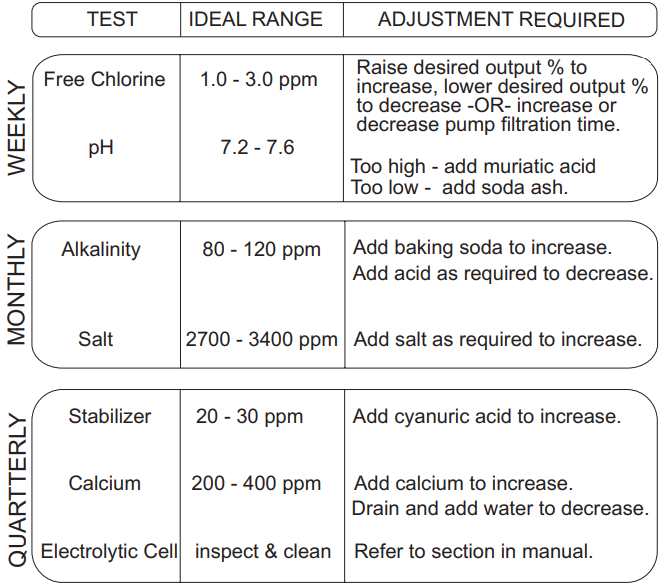
Basic Pool Maintenance Requirements
Limited Warranty (effective 03/01/12)
Hayward warrants its Pro Logic, OnCommand, and E-Command Hayward AQR15CUL Electronic Chlorine Generator pool automation products as well as its AquaRite, AquaRite Pro, Aqua Plus, and SwimPure chlorination products to be free of defects in materials and workmanship, under normal use and service, for a period of three (3) years. Hayward also warrants its Aqua Trol chlorination products to be free of defects in materials and workmanship, under normal use and service for a period of one (1) year. These warranties are applicable from the initial date of purchase on private residential swimming pools in the US and
Canada. Installations of the product for use on commercial pools in the US and Canada are covered for a period of one (1) year for defects in materials and Hayward AQR15CUL Electronic Chlorine Generator workmanship. Hayward warrants all accessories and replacement parts for the above-identified pool automation and chlorination products for a period of one (1) year. Accessories also include remotes, actuators, base Hayward AQR15CUL Electronic Chlorine Generator stations, temperature sensors, flow switches, and chemistry probes. Each of these warranties is not transferable and applies only to the original owner.
Hayward shall not be responsible for cartage, removal, repair, or installation labor or any other such costs incurred in obtaining warranty replacements or repair. Proof of purchase is required for warranty service. If written proof of purchase is not provided, the manufacturing date code will be the sole determinant of the date of installation of the product. To obtain warranty service or repair, please contact the place of purchase or the nearest Hayward authorized warranty service center. For more information on authorized service centers, please contact the Hayward Technical Service Support Center (61 Whitecap Road, North Kingstown, RI, 02852).
Exclusions
- Material supplied or workmanship performed by others in the process of installation.
- Damage resulting from improper installation, including installation on pools larger than the product rating.
- Problems resulting from failure to install, operate, or Hayward AQR15CUL Electronic Chlorine Generator maintain the product(s) in accordance with the
recommendations contained in the manual (s). - Problems resulting from failure to maintain pool water chemistry in accordance with the recommendations in the manual, problems resulting from Hayward AQR15CUL Electronic Chlorine Generator tampering, accident, abuse, negligence, unauthorized repairs or alterations, fire, flood, lightning, freezing, external water, degradation of natural stone used in or immediately adjacent to a pool or spa, war, or acts of God.
- Use of a non-genuine Hayward replacement salt Hayward AQR15CUL Electronic Chlorine Generator chlorination cell on any Hayward automation or chlorination product will void the warranty for that product.
The express limited warranty above constitutes the entire Hayward AQR15CUL Electronic Chlorine Generator warranty of Hayward Pool Products with respect to its products and is in lieu of all other warranties expressed or implied, including warranties of merchantability or fitness for a particular purpose. In no event shall Hayward Pool products be responsible for any consequential, special, or incidental damages of any nature.
Some states do not allow a limitation on how long an implied warranty lasts, or the exclusion of incidental or consequential damages, so the above limitation may not apply to you. This warranty gives you specific legal rights, and you may also have other rights, which vary from state to state.
Customer Service
- Ph: 1-800-657-2287
- Website: www.haywardcommercialpool.com
FAQs
What is the Hayward AQR15CUL used for?
The AQR15CUL is an electronic salt chlorine generator that helps sanitise your swimming pool water with little manual labour by automatically converting salt into chlorine.
What size pool is the AQR15CUL suitable for?
This variant is intended for pools with a maximum volume of 40,000 gallons (151,000 litres). You could need more than one unit or a commercial system if your pool is bigger.
How does the salt-to-chlorine conversion process work?
The generator sanitises the water by electrolysing dissolved pool salt (NaCl) to produce pure chlorine. The cycle then continues as the chlorine turns back into salt.
What type of salt should I use?
Use only high-purity sodium chloride (salt) that is labelled as food or pool grade that is 99% pure or above. Steer clear of salt that contains additives or anti-caking agents.
How much salt should I add to the pool?
The AQR15CUL requires 3,200 parts per million (ppm) of salt. For precise measurements, consult the salt level table in your handbook according to the size of your pool.
How do I know if the salt level is correct?
A digital monitor or LED indication that indicates salt levels is part of the control panel. Digital testers or salt test strips can also be used for manual testing.
Does the system automatically adjust chlorine levels?
You can manually adjust the output setting (0–100%) to determine how much chlorine the machine produces. Depending on the setting you select, it keeps a steady output even if it doesn’t alter itself.
Can I install this unit myself?
Although it is technically feasible for skilled users, professional installation is strongly advised to guarantee adherence to warranty conditions, plumbing specifications, and electrical codes.