

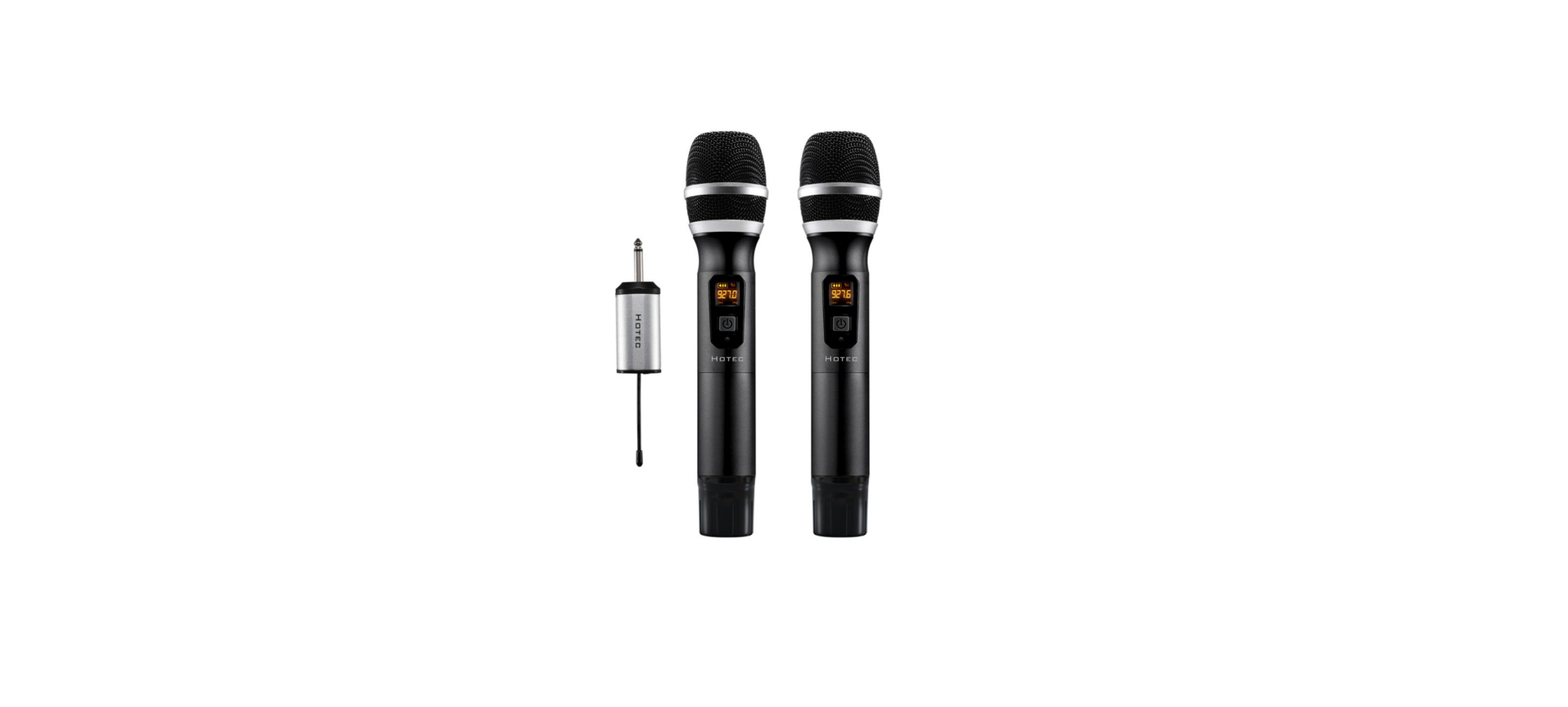

HOTEC H-U26 Wireless Microphone
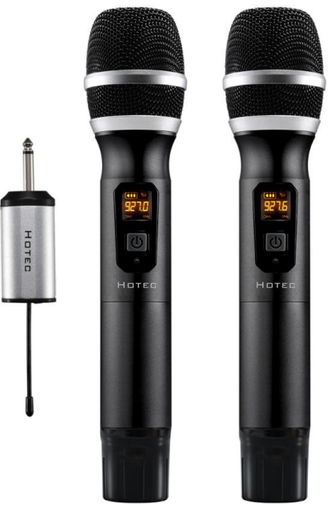
Introduction
The Hotec UHF wireless microphone works at 902-928MHz, a total of 64 frequencies for H-U26, 32 for each channel. The handheld microphone system with a rechargeable battery is perfect for vocal transmission over a PA, mixer, active speaker, and amplifier. The handheld microphone for H-U26 is powered by AA batteries, and the Receiver is powered by a rechargeable battery.
System Content
- H-U26 Hand held microphone x 2
- H-U26 Mini rechargeable Receiver x 1
- Charging cable x 1
- AA battery x 4 (for microphone)
- Microphone foam x 2
- Anti-rolling ring x 2
- TS to TRRS cable x 1
- TS to TRS cable x 1
Preparation Before Use
- Charge mini Receiver
Make sure the Receiver is fully charged before use. Use any standard micro USB cable to charge it. - Install batteries for the microphone.
Open the battery compartment of the handheld microphone and install the AA batteries.
Rechargeable Mini Receiver
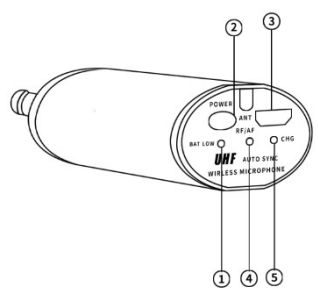
- Battery low indicator
The battery is low if this indicator becomes Red. Charge the Mini Receiver when the battery is low. When it is fully charged or has sufficient power, the battery low indicator is green. - Power button
Press this button to turn the product on/off. - USB charging port
Charge the Mini Receiver using the micro USB cable, input is 5V1A or 5V2A. - AF/RF indicator
When channel A is connected, it is solid Green; when Channel B is connected, it is solid Blue; when both channel A and channel B are connected, it is green-blue (orange). - Charging Status indicator
This will be Red during charging. When the battery is fully charged, it turns green. Unplug the charger when the battery is fully charged.
| Battery low indicator | Red | The battery is low | |
| Blue | Charged | ||
| Charging status indicator | Red | In charging | |
| Green | Fully charged | ||
| AF/RF
indicator |
H-U26 | Green | Only CHA is connected with the Receiver |
| Blue | Only CHB is connected with the Receiver | ||
| Green/Blue | Both CHA and CHB are connected to the receiver | ||
Handheld Microphone
- ON/FF
Short-press this button to power on/off the handheld microphone - Battery level indicator
This indicator tells you how much battery is left. Change the battery when the battery level is low. - Frequency point
This shows what frequency the handheld mic works. Make sure each mic is working on a different frequency. - Frequency change button
You can find this button when you open the battery compartment. Press this button short to change the frequency in case there is interference. Each press adds 0.4MHz.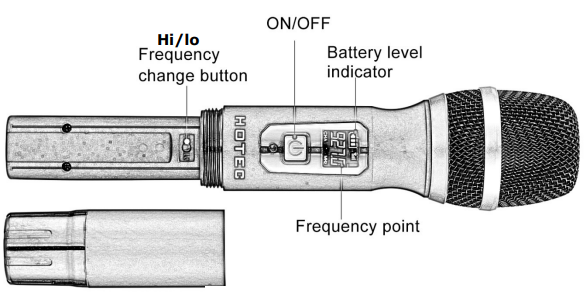
Connection Diagram
Use this H-U26 to amplify your voice in live performances
Make sure your speaker, mixer, or PA/amplifier has a 1/4” microphone input and a microphone volume control. Handheld Microphone.
- Plug the mini Receiver into the 1/4” microphone input of your audio device, like a speaker, mixer, or amplifier.
- Turn the microphone volume to minimum before plugging in the mini Receiver to avoid feedback or harsh loopback.
- Power on the microphone and Receiver. When you see the RF/AF indicator in the right color, you are ready to use it. If not, follow the troubleshooting steps to pair the Receiver and microphone manually.
- Change the microphone volume on your audio device.
- If there is any interference, short-press the hi-lo button to change the frequency.
Use this H-U26 to record audio with your Phones
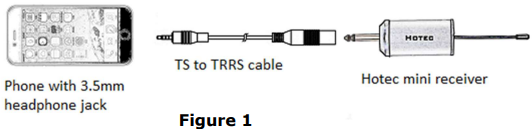
- Connect the TS to the TRRS cable to the mini Receiver.
- Connect the TS to the TRRS cable to the headphone jack of your phone.
- Power on the handheld microphone and Receiver. When you see the RF indicator in the right color, you are ready to use it. See Figure 1.
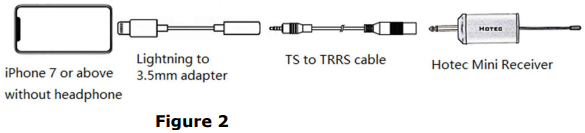
Use this H-U26 to record audio with the camera
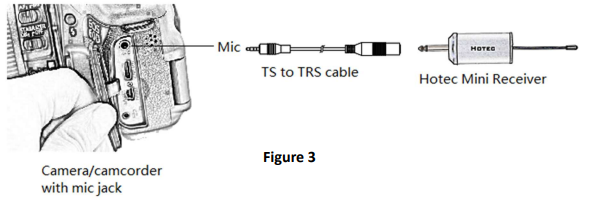
- Please make sure your camera has a mic input.
- Connect the TS to TRS adapter to the mini Receiver.
- Connect the TS to TRS adapter to the mic input of the camera.
- Turn on the mini Receiver and handheld microphone.
- You are ready to use it when you see the correct RF/AF indicator color.
Specification
System
- Modulation Mode: Digital Frequency Modulation
- Frequency Range: UHF 500~980MHz
- Preset Frequencies: 32 for CHA & CHB respectively
- Frequency Response: 75Hz~18kHz ± 3dBMax.
- Deviation Range: ±50kHz (with level limiting)
- T.H.D: < 1.0% @ 1kHz
- S/N: >98dB
- Working Range: Up to 100 feet
- RF Carrier Stability: ±0.005% (-10℃-50℃)
Receiver
- Dimension: 110*40*23 Power Supply: 650 mA
- Power Consumption: 120 mA
- Battery Life: 4 hrs after fully charged
- Recharging Time: About 2hoursr (5V/1A)
Handheld Microphone
- Carrier Frequency Power: 30mw
- Battery Type: 2 x AA Size
- Working Time: Up to 6-8 hrs (subject to the AAbattery capacity)
- Dimension: 250 x 55 Weight: 0.7 lb
Troubleshooting
| Issue | Cause | Solution |
| The mic does not sync with the Receiver | The mic lost pairing with the Receiver | Pair the mic and Receiver manually, following the steps below. Turn on the handheld. Turn on the Receiver when the LCD of the handheld microphone flashes; you will see the RF indicator flash briefly. |
| Mic volume is low | This wireless mic system does not support a portable Bluetooth speaker | Please make sure the speaker has a mic input and a mic volume control. Recommend using speakers over 15W or other audio devices such as audio mixers, amplifiers, and speakers like ION Bluetooth speakers or singing machines, or Hotec PAspeakers. |
| Can this be used with Android/iOS smartphones or DSLR cameras for recording? | Yes, please make sure to use the correct TS to TRRS cable or TS to TRS cable. | |
| Can I sync the microphone for HU26 with the Receiver of H-U06 since my Receiver for H-U26 is broken? | No. Please contact the seller for a replacement if the product is within warranty. | |
| Issue | Cause | Solution |
| Can I use two sets together? Are they interfering with each other? | Yes, you can use two sets working together. Make sure the mics are working at different frequencies to avoid interference. | |
| My mic cuts in and out. What is wrong? | There might be other UHF devices around that cause interference. | If you have several sets of Hotec wireless microphones or other brands that utilize UHF technology, please make sure the one you are using is working at different frequencies from other UHF devices. |
| My product does not work with the iPhone. | This product works perfectly with the iPhone. Try to plug and unplug a few times if possible. |
Customer Service
- Website: http://www.hotec.com
- Ph: 086-13544178467
FAQs
Q: Can I use the H-U26 while charging?
Indeed. It is possible to use the microphone while it is charging, although doing so continuously could shorten the battery’s life.
Q: Can I use the microphone for live streaming or video recording?
Indeed. Use USB or AUX to connect the receiver to your camera, computer, or smartphone. Make sure that the microphone is paired with the appropriate channel and frequency.
Q: Can the microphone be mounted on a stand?
Indeed. Make use of a typical microphone stand or clip. Verify that the microphone is firmly fixed and that the antenna, if it has one, is free of obstructions.
Q: Does the H-U26 have a mute function?
There is a mute button on certain models. To mute, press once; to unmute, press once more. Verify the mute status by looking at the LED indicator.
Q: What should I do if the microphone is accidentally dropped?
Check for obvious damage. Check the output of sound and the reception of signals. If the microphone isn’t working properly, check the internal connections. To guarantee reliable performance, do not use it outside until it has been tested.
Q: Are firmware updates required for the H-U26?
Firmware updates are not necessary for the majority of H-U26 devices. Wireless pairing and volume controls are used to control every feature. Just keep the channel and battery charge settings correct.