

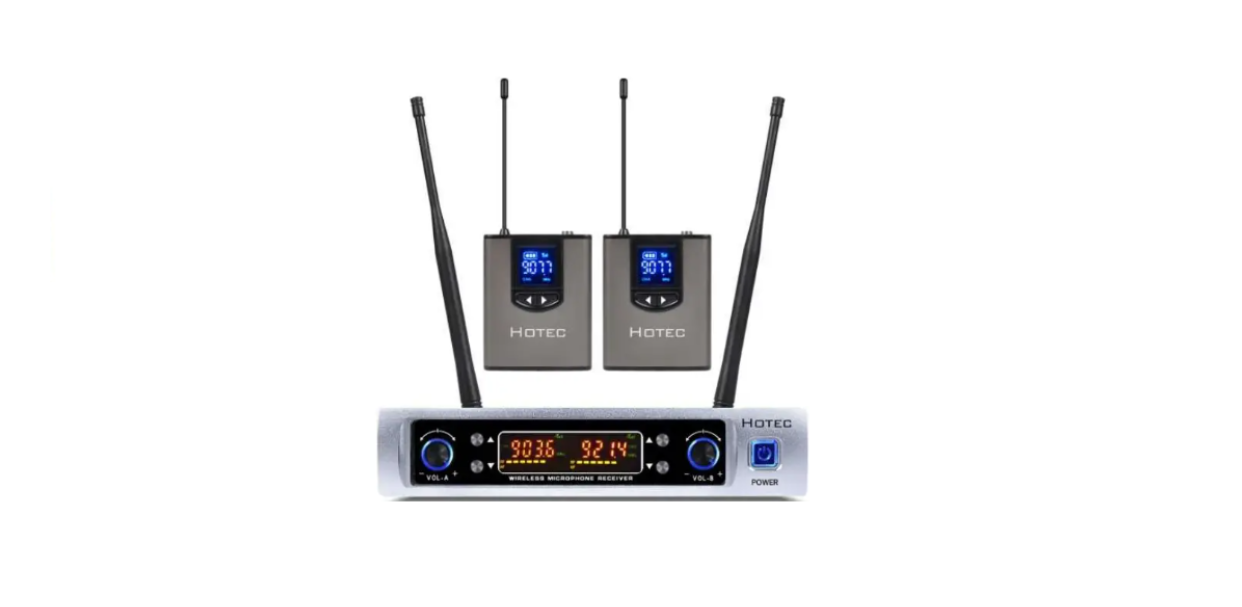

HOTEC K Series UHF Wireless Microphone

Quick Start
For Hotec K Series Wireless Microphones
K25

- Recever x 1
- Bodypack transmitter x 2
- Headset microphone x 2
- Power adapter x 1
- Mic cable (1/4” to 1/4”) x 1
- Lapel lavalier microphone x 2
- USB charging cable x 2
K26

- Receiver x 1
- Handheld microphone x 2
- Power adapter x 1
- Mic cable (1/4” to 1/4”) x 1
- AA battery x 4

Preparation Before Use
- Install the right and left antennas in the HOTEC K Series UHF Wireless Microphone Receiver.
- Plug the power cable into the DC jack of the Receiver. Connect the Receiver with your sound device, like a mixer, active speaker, or amplifier, using the audio cable.
- For K26, install 2 AA batteries in each handheld microphone. For K25, choose the lapel lavalier microphone or the headset microphone and plug it into the mic jack in the Bodypack transmitters.
- Make sure the Bodypack transmitter is charged and has sufficient power.
Operation Guide
This UHF wireless microphone system has 64 frequencies for selection. This system supports multiple sets to be used simultaneously.
K26
Single system operation instructions
Here are the operation instructions if you have ONE set of K26.
- Turn on the Receiver and the handheld HOTEC K Series UHF Wireless Microphone after the above preparations are done; you are ready to go.
- In case you find any interference, press the Hi/Lo button in the battery compartment of the Handheld microphone to change the frequency until you find an appropriate one. The Receiver will get paired with the Handheld microphone automatically.
- Turn the volume knob on the Receiver to change the microphone volume. The left volume knob is for Channel A, and the right volume knob is for Channel B.
K26
Multi-system operation instructions
In case you are having more than one set working together, here are additional steps to follow to avoid interference with each other.
- Select an appropriate frequency from the Handheld microphone for each set, and press the upper/lower button of the receiver at the same time to lock the frequency. Then, the Receiver works with the microphone at this locked frequency.
- If you want to change the frequency again, press the upper/lower button of the receiver again to unlock, then repeat step a) above for a different frequency.
- Make sure each set is working at different frequencies.
K25
Single system operation instructions
Here are the operation instructions if you have ONE set of K25.
- Turn on the Receiver and the Bodypack transmitter after the above preparations are done; you are ready to go. In case you find any interference, press the Right/Left button of the Bodypack transmitter together to change the frequency until you find an appropriate one. The Receiver will get paired with the Bodypack transmitter automatically.
- Press the Right or Left Button of the Body pack transmitter to change the microphone volume. Right for volume up and left for Volume down. You can also turn the volume knob on the Receiver to change the microphone volume. The left volume knob is for Channel A, and the right volume knob is for Channel B.
K25
Multi-system operation instructions
In case you are having more than one set of K25 working together, here are additional steps to follow to avoid interference with each other.
- Select an appropriate frequency from the Bodypack transmitter for each set, and press the upper/lower button of the receiver at the same time to lock the frequency. Then, the Receiver works with the microphone at this locked frequency.
- If you want to change the frequency again, press the upper/lower button of the receiver again to unlock, then repeat step a) above for a different frequency.
- Make sure each set is working at different frequencies.
Specification
System Specification
| Modulation Mode | DQPFSK |
| Frequency Range | UHF 500-928MHz |
| Preset Frequencies | 64 (auto pairing) |
| Frequency Response | 75Hz~18kHz +/- 3Db |
| Max. Deviation Range | +/-50kHz (with level limiting) |
| T.H.D. | <1.0% @1kHz |
| S/N | >98Db |
| Working Range | Up to 165 Feet |
| RF Carrier Stability | +/- 0.005% (14℉-122℉) |
| Dimension | 9×6.3×1.8 inch |
| Frequency Range | UHF 500-928MHz |
| Preset Frequencies | 64 (auto pairing) |
| Working Range | Up to 165 Feet |
| Power Supply | DC 5V ~ 12V 500Ma |
Handheld Microphone Specification
| Carrier Frequency Power | 30Mw |
| Battery Type | 2 X AA Size |
| Working Time | Up to 6 Hours |
| Dimension | 10×2.2inch |
Bodypack Microphone (Metal)
| Carrier Frequency Power | 30Mw |
| Power Consumption | 80Ma |
| Power Capacity | 650Ma |
| Charging Time | About 2 hours (5V/1A) |
Troubleshooting
| Issue | Indicator Status | Solution |
| No sound or faint sound | Handheld Microphone or Bodypack transmitter, power light on, receiver LEDs on | Verify all sound system connections |
| Receiver LED off | Make sure the AC adapter is securely plugged into the electrical outlet. | |
| Handheld Microphone or Bodypack transmitter power light glowing or flashing red. | Replace the battery for the handheld microphone or charge the Bodypack transmitter. | |
| Handheld Microphone or Bodypack transmitter power light off | Turn on the Handheld Microphone or Bodypack transmitter | |
| Distortion or unwanted noise bursts | N/A | Remove nearly all sources of RF interference (CD players, computers, digital effects, in-ear monitor systems, etc.) |
| Distortion increases gradually, or the handheld microphone or Bodypack transmitter cannot be turned on. | Handheld microphone or Bodypack transmitter power light glowing or flashing re.d | Replace handheld batteries or charge the Bodypack transmitter |
| The operation range is too short | The signal is not good | Check if both antennas are installed correctly |
| The frequency on the receiver does not change when the frequency of the transmitter/handheld microphones changes. | There is a lock icon in the Receiver LCD screen above the frequency number. | Press the upper and lower buttons of the Receiver to remove the lock. |
Microphone Care
- Avoid dropping the microphone.
- Do not unscrew the microphone grill.
- Clean the Handheld microphone, receiver, or Bodypack transmitter with a dry cloth when necessary.
- If the Handheld microphone is not in use for a long time, take off the AA batteries.
- Unplug the AC adapter from the power socket when the Receiver is not in use.
- Keep the Handheld microphone, Receiver, or Bodypack transmitter dry and avoid exposure to extreme temperatures and humidity.
Customer service
- Website: http://www.hotec.com
- Ph: 086-13544178467