Close Menu
onyxguides.comonyxguides.com

    Subscribe to Updates

    Get the latest creative news from FooBar about art, design and business.

    What's Hot

    SwellPro FD1 Fisherman Fishing Drone User Manual

    April 21, 2026

    Aurzen EAZZE D1 MAX Smart Projector Instruction Manual

    April 21, 2026

    Bartscher 200207 Water Bain Marie Instruction Guide

    April 20, 2026
    Facebook X (Twitter) Instagram
    onyxguides.comonyxguides.com
    Facebook X (Twitter) Instagram Pinterest
    • Home
    • About us
    • Terms & Conditions
    • Privacy Policy
    • FAQs
    • Contact us
    onyxguides.comonyxguides.com
    Home » iOttie CHWRIO107GR iON Wireless Charging Stand User Guide
    iOttie

    iOttie CHWRIO107GR iON Wireless Charging Stand User Guide

    By Gabriel SmithOctober 28, 2025Updated:October 28, 2025No Comments5 Mins Read
    Facebook Twitter Pinterest LinkedIn Tumblr WhatsApp Telegram Email
    iOttie-CHWRIO107GR-iON-Wireless-Charging-Stand-featured
    Share
    Facebook Twitter LinkedIn Pinterest Email

    iottie-logo

    iOttie CHWRIO107GR iON Wireless Charging Stand

    iOttie-CHWRIO107GR-iON-Wireless-Charging-Stand-Product

    Getting Started

    • Please make sure your device is Qi Wireless compatible. Compatible devices include iPhone X, 8 Plus, 8, Samsung Galaxy S9, S9+, Note 8, S8, S8+, S7, S7 Edge, S6, S6 Edge, and any other Qi-enabled devices.
    • Not all smartphones can receive a wireless fast charge; however, they will receive a standard wireless charge. Check your phone’s charging features for fast charge capabilities.
    • Please only use the included cable and power adapter. Third-party components may impact wireless charging performance.
    • If using a third-party charger, please only use a Qualcomm Quick Charge 3.0 or equivalent adapter. Plugging the Charging Pad into the computer will not| provide adequate power to support wireless fast charging. Please only plug directly into a Power Adapter.

    At a Glance

    iOttie-CHWRIO107GR-iON-Wireless-Charging-Stand-fig-1

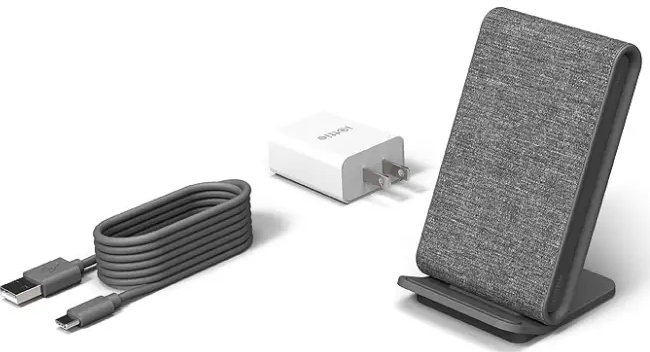
    What’s in the Box?

    iOttie-CHWRIO107GR-iON-Wireless-Charging-Stand-fig-2

    Key Features

    Dual Qi Wireless Charging

    • Wirelessly charge two devices simultaneously with the charging stand or pad.

    Charging Qi Wireless Accessory Devices

    • Also, an accessory charger for wireless charging earbuds, and any Qi-enabled wireless device or accessory.

    iOttie-CHWRIO107GR-iON-Wireless-Charging-Stand-fig-4

    Charging Speeds
    • Engineered to deliver charging speeds of up to 15W for Android and 7.5W for iPhone.
    • Dual Qi-Coil charging stand for wireless fast charging smartphones, plus a flat rubberized Qi wireless charging zone for smartphones and Qi-enabled accessories.

    Ideal Viewing & Charging Convenience

    • Draft messages, browse the web, and manage music in portrait mode. Or charge your phone horizontally in landscape mode to watch videos, edit photos, and more.

    Included DC Cable & Adapter

    • Plug the Charging Cable into the DC port on the back of the iON Duo.
    • Plug the Power Adapter into a wall outlet.
    • Both Charging Indicators will turn on and then fade to inform you that the iON Duo has received power.
    • Please only use the included cable and power adapter.
    • Using third-party components may impact wireless charging performance.

    Qi Alignment Guide

    • Use the guide below to receive an efficient wireless fast charge

    Qi Coil Location

    • The Qi coil is generally found in the center of most smartphone models.

    Smartphone Alignment (Stand)

    • The charging stand has portrait and landscape charging modes.

    Portrait Charging

    • | Line up the center of the smartphone vertically to the charging surface and rest the device on the Anti-Slip Foot until a charging connection is found.iOttie-CHWRIO107GR-iON-Wireless-Charging-Stand-fig-6

    Landscape Charging

    • | Line up the center of the smartphone horizontally to the charging surface and rest the device on the Anti-Slip Foot until a charging connection is found.
    • Rest your smartphone on the charging surface parallel to the Charging Stand.

    Using the Anti-Slip Foot (Stand)

    • The Anti-Slip Foot comes built-in on the stand portion of the iON Duo.iOttie-CHWRIO107GR-iON-Wireless-Charging-Stand-fig-7
    Pixel Buds Alignment (Pad)
    • Place Pixel Buds on the designated charging pad.
    • The cap opening should be placed perpendicular to the laser-etched line on the pad.
    • The Plus sign on the pad is where the center of the Qi coil is on both your Pixel Buds and the charging pad.

    iOttie-CHWRIO107GR-iON-Wireless-Charging-Stand-fig-8

    • Rest your smartphone or Qi-wireless accessory device on the charging surface parallel to the Charging Pad.

    Fading White Light

    • When powered on, the light will appear briefly and then fade.

    Blinking Red Light

    • A blinking red light will appear if the device is incompatible or the Qi coil is blocked.

    Solid White Light

    • White light will remain if the device is charging wirelessly.

    Specifications

    iON Wireless Duo

    Wall Charger

    Troubleshooting

    Your device’s screen will show that it is charging. If your device is not charging, please check the corresponding Charging Indicator on the front of the device.

    Declaration of Conformity (FCC)

    This equipment generates, uses, and can radiate radio frequency energy and, if not installed and usedbyh the instructions, may cause harmful interference to radio communications. However, there is no guarantee that interference will not occur in a particular iOttie CHWRIO107GR iON Wireless Charging Stand installation.

    • Reorient or relocate the receiving antenna.
    • Increase the separation between the equipment and the receiver.
    • Consult the dealer or an experienced radio/TV technician for help. CAUTION: Changes or modifications not expressly approved by the party responsible for compliance could void the user’s authority to operate the product.

    This equipment complies with FCC radiation exposure limits set forth for an uncontrolled environment.

    Customer Service

    • Website: cs@iottie.com
    • Tel: (201) 580-2688

    FAQs

    What devices are compatible with the iOttie iON Wireless Charging Stand?

    The majority of iPhones (8 and later), Samsung Galaxy phones, Google Pixels, and other smartphones that support wireless charging are among the Qi-enabled gadgets that the CHWRIO107GR is compatible with.

    Does this stand support fast charging?

    Yes, when paired with a QC 2.0/3.0 converter (not included), the iON Wireless Stand can provide fast wireless charging of up to 10W for Android devices and 7.5W for iPhones.

    Can I charge my phone with the case on?

    Yes, as long as the case is free of magnetic or metal fasteners, the stand may charge through cases up to 3 mm thick.

    Is the charging pad adjustable or fixed?

    Although the base of the stand is set in place for stability, its twin coil design enables both vertical and horizontal charging configurations.

    Can I use this charger for AirPods or other wireless earbuds?

    Yes, you can use the stand to charge your wireless charging case or earphones if they support Qi charging. For optimal effects, position them in the middle of the charging space.

    Does the charger turn off automatically when the device is fully charged?

    Indeed, the iON Wireless Stand has integrated smart charging capabilities to guard against overcharging and preserve the battery life of your device.

    What kind of cable does the stand use?

    The kit includes a USB-C cable for the iOttie iON Stand. For best results, you will need to bring your own Quick Charge wall adaptor.

    Is the stand safe for overnight use?

    The stand is safe to use overnight or while you’re gone because it has features like temperature control, surge protection, and overcharge protection.

    iOttie CHWRIO107GR iON Wireless Charging Stand installation guide iOttie CHWRIO107GR iON Wireless Charging Stand maintenance guide iOttie CHWRIO107GR iON Wireless Charging Stand manual iOttie CHWRIO107GR iON Wireless Charging Stand operation manual iOttie CHWRIO107GR iON Wireless Charging Stand user manual OnyxGuides Manual User Manual
    Share. Facebook Twitter Pinterest LinkedIn Tumblr Email
    Gabriel Smith

    Related Posts

    Sony ILCE-6700 Interchangeable Lens Digital Camera User Guide

    December 7, 2025

    Bose MA12 Panaray Modular Line Array Loudspeaker User Manual

    December 4, 2025

    Bowers & Wilkins Px8 Wireless Headphones User Manual

    December 4, 2025

    Sonos Arc Black Voice Control Ultra Soundbar User Manual

    December 4, 2025

    JANAM GT1 Self Mobile Entry Head Unit Instruction Manual

    December 4, 2025

    Ronix 1250 Carpet Vacuum Cleaner Instruction Manual

    December 4, 2025
    Add A Comment

    Comments are closed.

    Don't Miss
    Other

    SwellPro FD1 Fisherman Fishing Drone User Manual

    April 21, 2026

    SwellPro FD1 Fisherman Fishing Drone Safety instructions SwellPro Fisherman (FD1) is specifically designed by SwellPro…

    Aurzen EAZZE D1 MAX Smart Projector Instruction Manual

    April 21, 2026

    Bartscher 200207 Water Bain Marie Instruction Guide

    April 20, 2026

    SwellPro GC1-S Waterproof 1-Axis 4K Camera User Manual

    April 20, 2026
    Stay In Touch
    • Facebook
    • Twitter
    • Pinterest
    • Instagram
    • YouTube
    • Vimeo

    Subscribe to Updates

    Subscribe to Updates

    Follow us

    Facebook X-twitter Instagram Pinterest

    © 2025 All rights reserved Onyx Guide.